


For some people, a smartphone is a necessary tool to automate daily tasks. In addition to being a practical communication device, the phone may also be an important source of other real-time information and the most convenient way of entertainment. At the same time, it is a convenient tool for recording everything around you in real time. Considering the above factors, smartphones have long become a necessity to accompany you when traveling abroad. So what things must you confirm on your Android phone before going abroad?
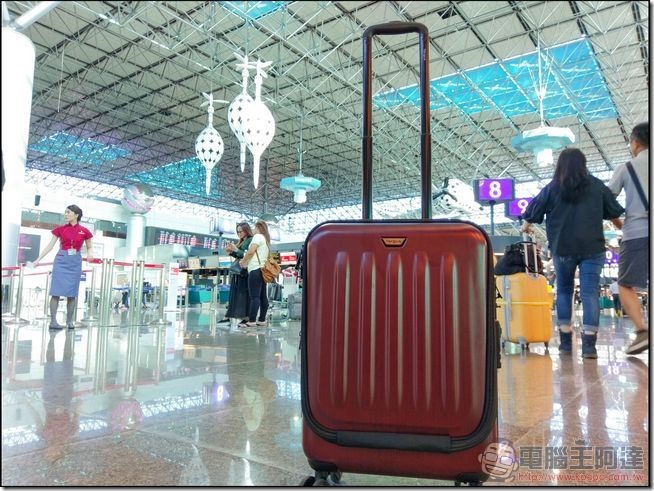
Check these 5 things on your Android phone before traveling abroad
If you’re an Android phone user, depending on where you’re traveling to, you may want to make sure certain settings on your mobile device are enabled or disabled, whichever is applicable. Additionally, if you want to document your journey with photos and videos, you also need to free up as much space on your device as possible. Below we’ve put together some practical tips for you to check out your Android phone before your upcoming trip, some of which may be important if you’re planning a long trip or heading out of the country.
Key Point 1: Your gadget is actually ready for travel
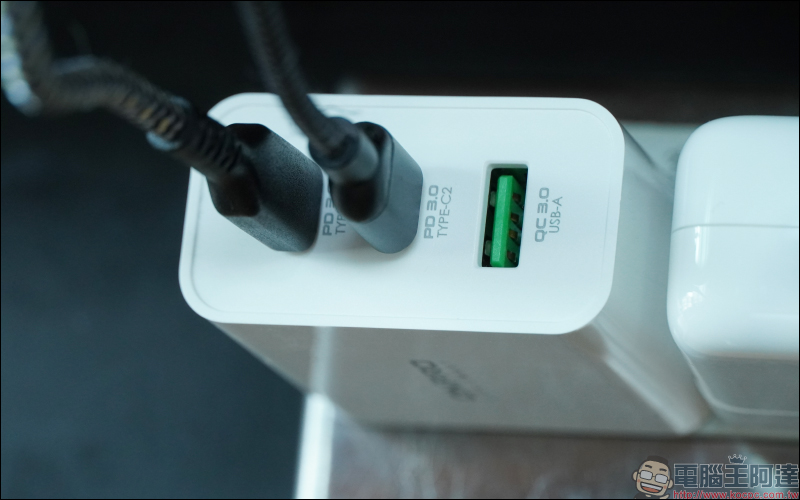
Regardless of what’s going on inside your phone, first you need to make sure your Android phone is functioning properly. Have all necessary accessories ready, such as a charging adapter and charging cable that are compatible with the electrical outlet at your destination. In addition, you may need to bring an extra power bank and car charger (a must for road trips); if you are doing outdoor activities, you will also need a phone case with a lanyard and a waterproof case to prevent your phone from getting wet during any water activities.
For security reasons, you must also consider what you would do if you lost your phone. Please enable the lock screen option on your Android phone to ensure that others cannot easily hack your phone. If your Android phone offers support, you may also want to consider including your email or social media account in the signature so that good Samaritans can contact you to return the phone.
Point 2: The content you want to access offline has been downloaded correctly.
To be prepared, it’s safe to assume that you won’t always have an Internet connection. Preload content on your phone with basic apps and ensure easy access even without Wi-Fi. For example, if you have a paid subscription to an audio-visual streaming service, you will have the additional privilege of downloading content first for offline playback, such as Netflix, Disney+, Spotify, etc. If you expect to have a long gap during the trip and need to kill time, you can download a few movies, albums, music playlists, podcasts, etc. so that you can enjoy these entertainment contents without any worries at any time.


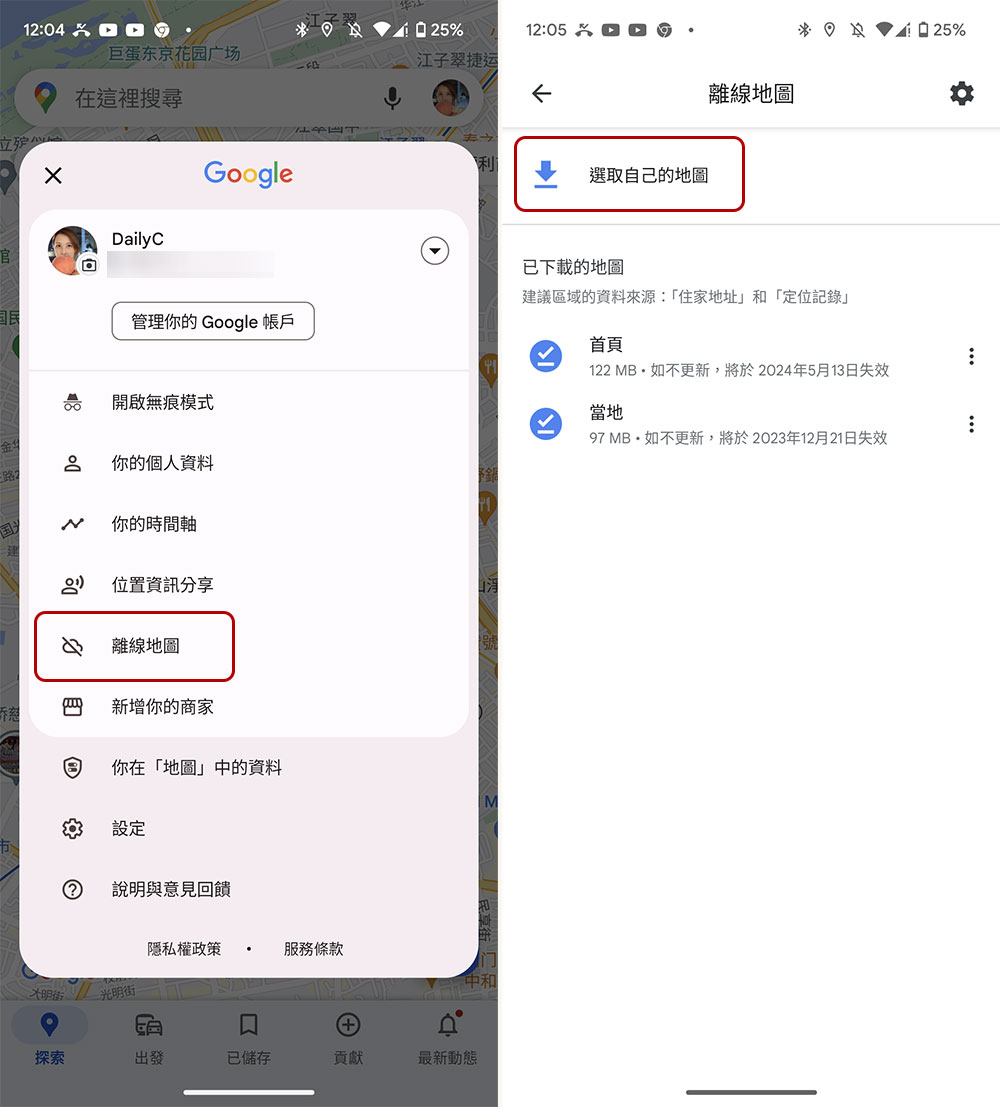
What’s more, you want to make sure you don’t get lost whether you have an internet connection or not. Before traveling, open Google Maps on your phone, log in, click your profile picture, and follow the steps below to download your offline map (if Google Maps isn’t available where you’re going, check out other available apps):
- Select “Offline Maps” from the menu, then “Choose your own map.”
- Then, on the screen, pinch the area you want to completely include in the selection box, and click “Download” when you are ready.
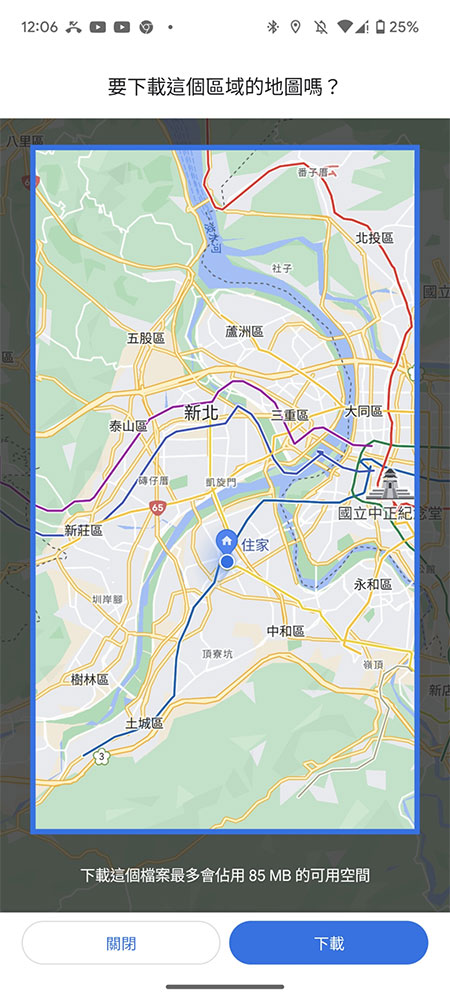
- If you want to go to many places, you can repeat the previous step to save offline maps of multiple areas.
Finally, for convenience, organize all necessary contact information into the same document in your favorite note-taking app, such as Google Keep. Be sure to include the phone number and address of a local contact person or hotel, the airline’s customer support contact information, and the phone numbers and addresses of Taiwan offices and embassies in the countries you may be visiting.
Point 3: Update, back up, remove and close irrelevant apps
In order to prepare for the upcoming trip, it is natural to keep your mobile phone in the best condition. Please remember to update your mobile phone operating system and make sure it is running properly. Next, in addition to checking whether essential apps have updates, you should also uninstall unnecessary apps to free up more space. Also consider backing up existing photos, videos, and other important files to Google Photos, Drive, or your computer to prevent your phone from being damaged or lost during travel.
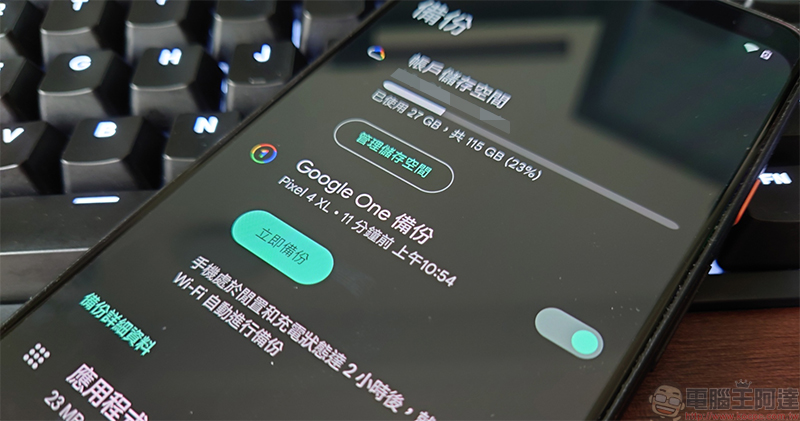
Finally, if you have set up two-factor authentication (2FA) for important services, such as social platforms, messaging software, bank and debit card accounts, etc., in order to avoid the trouble caused by losing your phone, please consider temporarily switching to other verification methods, such as changing the verification method from receiving verification codes on your phone to email confirmation.
Point 4: Install all necessary apps and tools
If you are going to a new place, it is recommended that you install the accompanying Android app to make navigation and communication easier. When traveling abroad, install a language app like Google Translate to view local signs and conversations, and it’s best to download an offline language pack for the local language to ensure it can be used when the Internet is unavailable. If you plan to use public transportation in your local area, consider installing an app like Citymapper in advance, or find a local transportation app and install it.
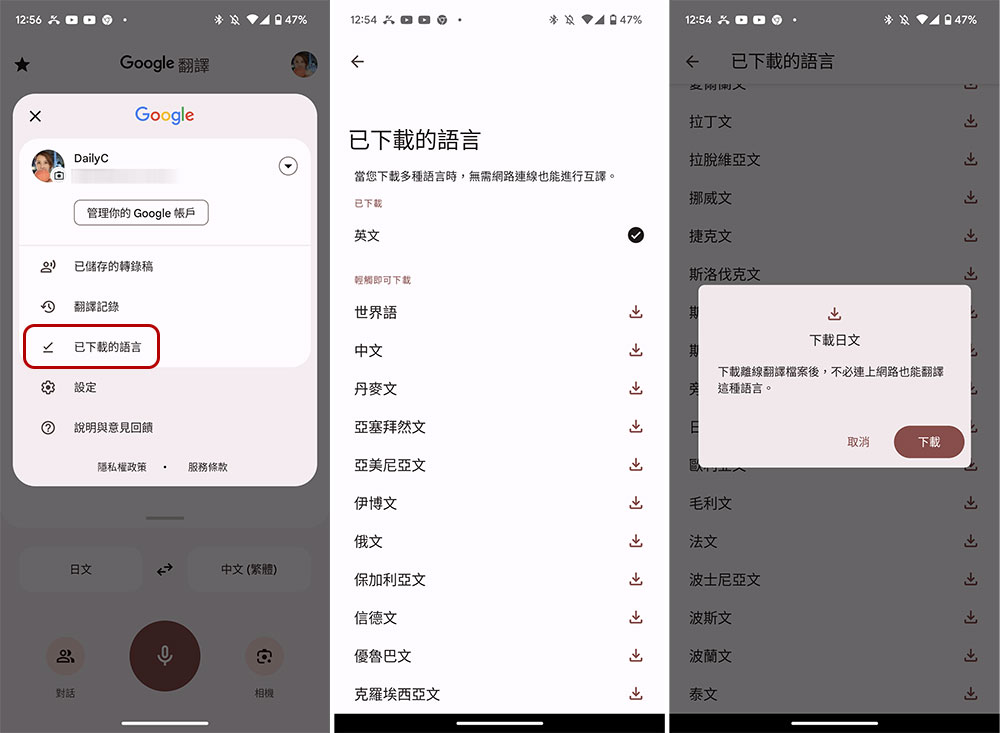
To make accommodations more accessible, download a housing app like Airbnb or VRBO (depending on which platform you’re booking from), or the official mobile app of the hotel or establishment you’re staying at. This will allow you to communicate more effectively with your host or housekeeping. It also allows you to view booking details easily.
Point 5: Check the data usage settings on your device
If your mobile phone’s SIM card cannot roam, don’t forget to buy a network card in Taiwan first, or check online to see if the local telecommunications company offers prepaid network cards, and then record where they can be purchased and the plan you want. Nowadays, people generally choose roaming with their original number when traveling abroad, which is much more convenient than buying a network card in the past. Before traveling abroad, be sure to contact your mobile service provider to learn about the company’s international roaming plan, and choose the program that suits you to activate, so that you can automatically obtain services from the service provider’s local service provider when you arrive at your destination. If you want to turn on the roaming function on your mobile phone when you arrive at the local area, you can follow the steps below:
- Open the Settings app and go to Network & Internet.
- Click on the “SIM” card.
- Turn on “Roaming”.
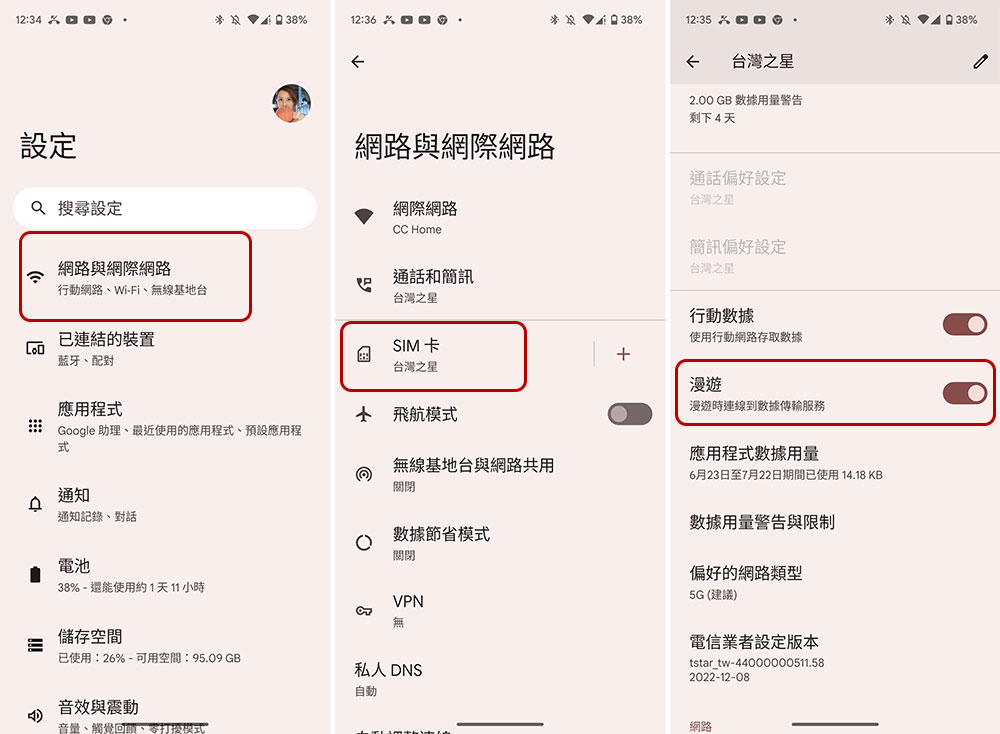
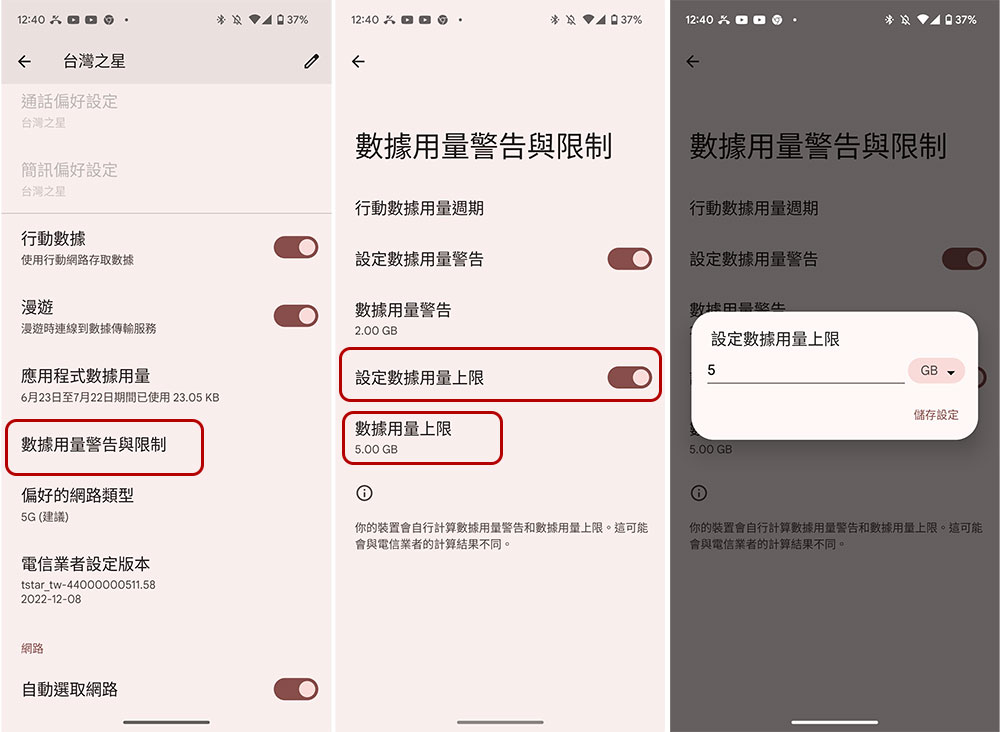
To ensure that mobile network usage does not explode, please consider following the steps below to set a data limit so that the mobile network is automatically turned off when the set range is reached:
- Open the Settings app and go to Network & Internet.
- Click on the “SIM” card.
- Click “Data Usage and Limits”.
- Turn on “Set data cap”.
- Then click “Data usage limit” in the next item and enter the upper limit value yourself.
You might also want to check all of your most used apps, especially streaming platforms like Netflix or Spotify, to see if they come with a data saver mode, enabling this feature can help further reduce mobile data usage. Alternatively, some apps may have settings that allow the service to be used only when the device is connected to Wi-Fi, so if available, turn it on while abroad and remember to turn it off when you get home.
Source: KOCPC Chinese