


We have previously introduced that NVIDIA GeForce RTX graphics card users can use it as long as they upgrade to the latest Game Ready 531.18 driver version. NVIDIA’s latest RTX Video Super Resolution feature(Currently only available for RTX 30 series and RTX 40 series), so many players may want to upgrade quickly to experience this new feature. If you haven’t yet, please wait. Now NVIDIA has confirmed that version 531.18 has a bug that will cause the CPU usage to exceed 10% for no reason.
If you haven’t upgraded to the latest NVIDIA driver yet, please wait! Officially admitted that there is now a bug problem with CPU usage exceeding 10%
According to foreign media VideoCardz, many players on the Internet have recently reported that after updating to the Game Ready 531.18 driver version, a very strange phenomenon occurred. After ending the game currently being played, the CPU usage will soar for no reason, and it seems to be at least 10% more, and may reach as high as 15%.
For players with not bad CPU processors, this problem may not be so easy to notice, but if you are using an entry-level model and are also performing other work tasks, you should hear the sound of the fan spinning loudly. However, if you want to know whether you are affected by this bug, the best way is to check the job manager, enter the “Handler” menu, find NVIDIA Container and see the usage rate.
if you're noticing high CPU usage from Nvidia's latest drivers (531.18) you're not alone. Seems to be a bug with the latest drivers where Nvidia container uses 10%+ CPU after logon or after closing games. Rolling back to previous drivers will fix
— Tom Warren (@tomwarren) March 6, 2023
This bug has been confirmed by NVIDIA and has been added to the known issues to remind users. Therefore, it is recommended that those who have not upgraded yet can wait, because usually a new Game Ready repair driver will be released not long after the official confirmation:
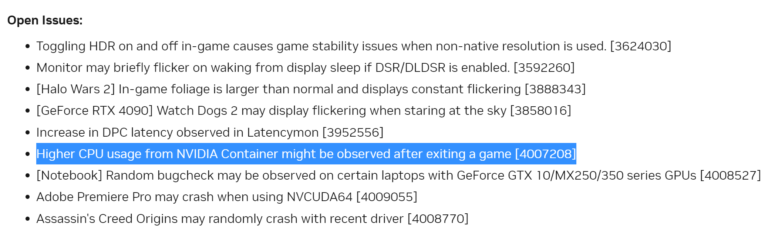
NVIDIA senior product manager Sean Pelletier has promised on Twitter that a new repair driver will be released tomorrow:
FYI – we'll be posting a hotfix driver tomorrow with a fix
— Sean Pelletier (@PellyNV) March 6, 2023
For currently affected players, if you want to fix this bug, the method is relatively simple, and there are many options, such as reverting to the old 528.49 WHQL driver, force closing the NVIDIA Container driver, or restarting the computer.
As for what caused it, it is still unclear. However, some foreign users suggested that they can delete a special DLL. It may be caused by this DLL, but I don’t think it is necessary, because it is not a big problem and there are temporary solutions. Deleting the DLL may cause GPU instability:
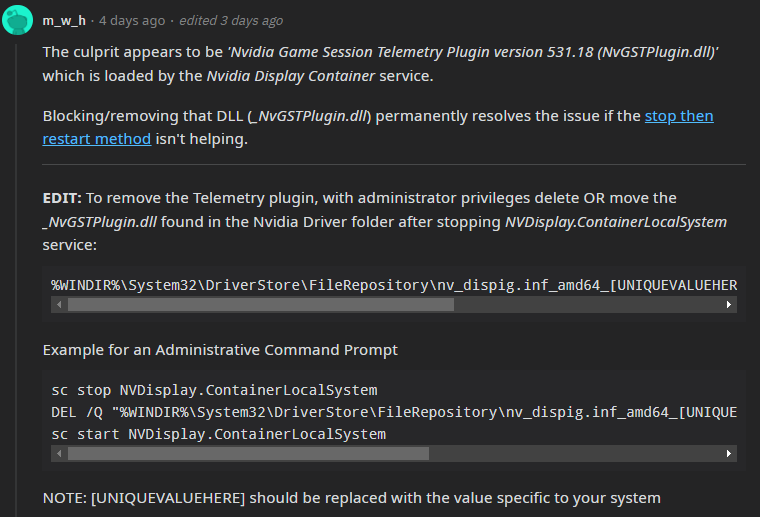
The NVIDIA Game Ready 531.18 driver mainly adds a new technology: “RTX Video Super Resolution”.For related usage introduction, you can click here to read my previous teaching articles.. In addition, the following Bugs have been fixed:
- [Steam Version] Forza Horizon 4 may crash after 15-30 minutes of playing
- Call of Duty Modern Warfare 2 has occasional stability issues
- Enable Dead Space Resizable Bar profile
- Adobe After Effects/Media Encoder – ProRes RAW file issues
Source: KOCPC Chinese