


Generative AI applications are flourishing across the industry, and LINE is keeping pace with the official launch of its new service, “LINE AI,” which lets users freely experience three core features—AI chat, image analysis, and image generation—directly within the familiar LINE app. There’s no need to download another app or register; simply access the LINE AI page while logged into LINE to get started.
Whether you need everyday information lookup, photo content analysis, or wildly imaginative creative drawing, LINE AI responds instantly and offers support—a smart companion that blends practicality and fun. Although this AI service was first announced by LINE’s Japanese office, it is already available in Taiwan based on real-world testing. If you want to experience the power and convenience of AI for yourself, now is the perfect time.
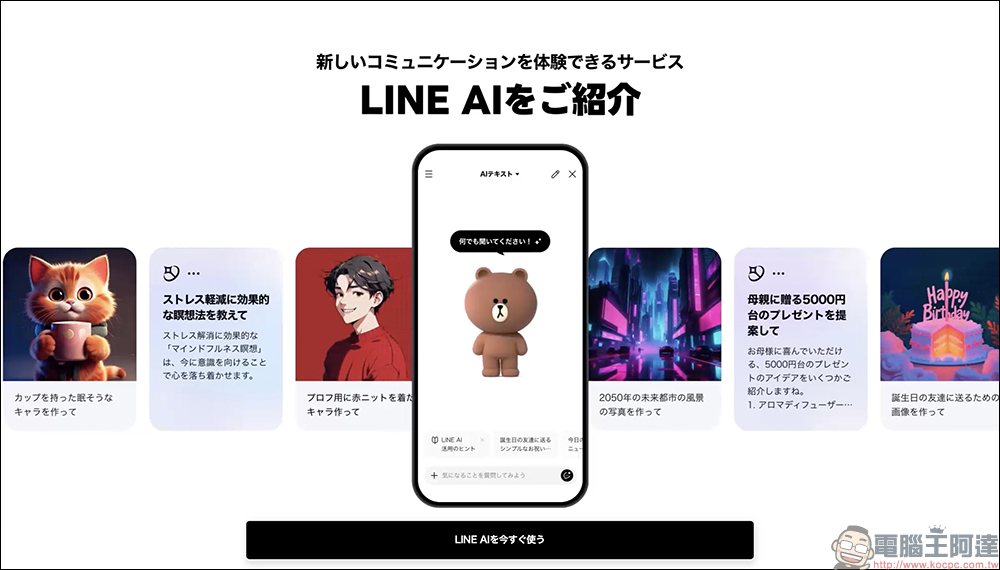
LINE’s free AI service is now available! No additional app download needed — text chat, image analysis, and AI drawing all in one.
Earlier, LINE officially announced the launch of a new AI chatbot—”LINE AI”—that lets users ask questions, analyze images, and even have AI create drawings, all directly in LINE just like chatting with a friend. This new service is completely free, with no need to download an extra app or switch to another platform. As long as you have LINE, you can use it. It’s simple to operate and runs smoothly, making it a great fit for AI beginners or users who are already used to chatting on LINE.
LINE AI combines three major features: “AI text chat,” “image analysis,” and “AI drawing.” Whether you want to check the weather, find travel information, ask AI to interpret an image, or create an imagined illustration, everything can be done with a single tap. It’s not just fun but also highly practical, marking an important step for LINE into the field of generative AI.

How do I start using LINE AI?
The LINE steps are very simple, just open it with your phone. LINE AI Introduction PageThen click the “LINE AIを今すぐ使う” (or “Try LINE AI now”) button to go to the LINE AI page.
In the future, users will also be able to choose to open the LINE app and follow the path below: “Home” > “Services” > “LINE AI”. However, this option is not yet visible in the LINE app in Taiwan.
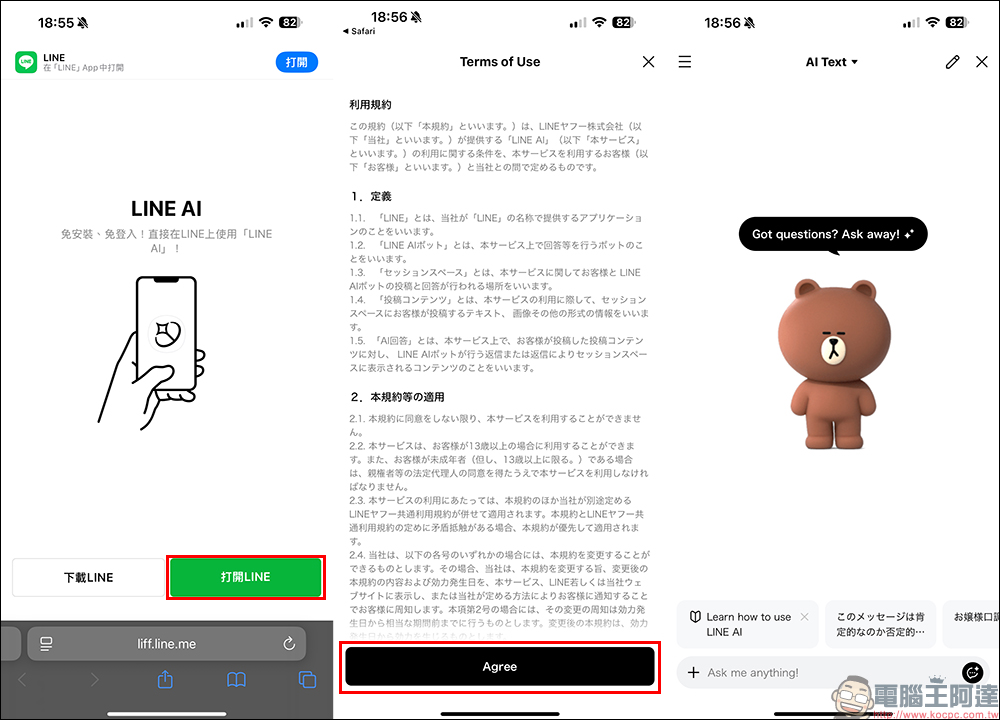
On first use, you’ll see the Terms of Service and usage instructions. After agreeing, you can start using it right away. You can freely type in questions, upload photos, or enter what you want the AI to draw—the entire interaction happens right in the familiar LINE chat window, with zero learning curve.
Introduction to Three Free AI Features | Handle Information, Images, and Creation with LINE
Currently, LINE AI supports three features: “AI text conversation (text Q&A)”, “image analysis”, and “AI image generation”. All of them are free to use—as long as you have LINE, you can start playing with them.

AI text chat | as easy as asking a friend a question
Simply type natural-language questions like “Recommend some must-eat foods in Fukuoka” or “Provide a Korean-style beef seaweed soup recipe,” and LINE AI will respond instantly with practical, well-organized answers. You can even ask everyday questions in a casual tone and sometimes get surprisingly delightful responses.

This feature requires no learning of complex commands or formats—it works just like sending a message on LINE, with zero learning curve and quick to get the hang of. Whether it’s daily life matters, work inspiration, information gathering, or casual chat and Q&A, the AI can provide you with real-time assistance.
Image Analysis Feature|Send a photo, and AI will interpret what’s inside
Have you ever had a friend send you a photo and you wanted to know what brand it was? In that case, you can use LINE AI’s “Image Analysis” feature. Just send the image to LINE AI, and it will analyze the content of the image, such as whether a product appears, what brand it is, and what it’s used for. It can also translate foreign text in the image, and might even tell you related information about the product. This is super useful for people who like online shopping and researching product information. You can also use it to identify buildings, plants, animals, or other complex image content.
This feature is actually kind of similar to the old Google Lens, but this time it’s built directly into LINE, making it more convenient and user-friendly.

AI Drawing Feature | “Scenes From Your Imagination,” LINE AI Brings Them to Life!
This might be the most eye-catching feature—”AI Drawing,” also known as the “AI image generation” service. Simply switch LINE AI from “AI Text” to “AI Canvas,” then you can enter a description, such as “draw a Corgi in a suit” or “a cute cosmic background with a purple unicorn,” and LINE AI will automatically generate an image that matches your description.
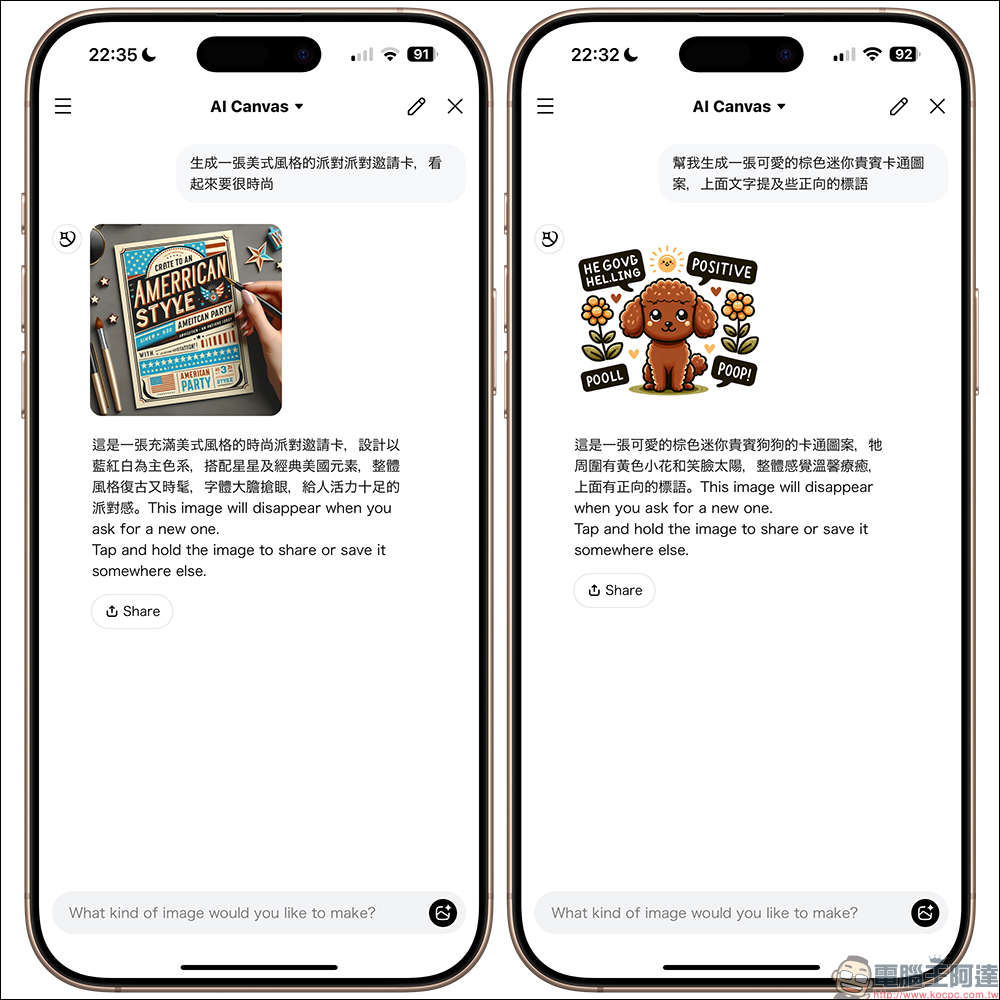
This feature works well for creative sketches, character ideation, community memes, or even just testing ideas for fun — the generated images can also be downloaded or shared. For illustration enthusiasts or creative professionals, it’s a really interesting source of inspiration.

Notes and Usage Tips
- This feature is currently in its trial phase. AI responses may vary based on usage and are still being optimized.
- The number of times you can use it per day may be limited. If you use it too much, you may see a message asking you to try again later.
- For image and text input, please avoid content involving personal privacy, infringement, violence, or sensitive information.
- AI-generated content is for reference only. If it is to be used for commercial purposes, please note the copyright and legal implications.
Conclusion
In summary, the biggest highlight of LINE AI, this new service, is that it’s completely free and requires no additional app downloads. As long as you already use LINE, you can seamlessly enter the world of generative AI. Whether it’s everyday chat interactions, quickly looking up information, analyzing photo content, or having AI draw the images you imagine in your mind, LINE AI provides a simple, approachable entry point. It’s quite friendly for users new to AI, and it’s a new experience worth trying.
However, since LINE AI has only just officially launched, it’s still being refined gradually. During use, you’ll still notice some minor shortcomings—for example, image analysis accuracy still has room for improvement, and it can occasionally misinterpret photos. As for the image generation feature, while it can already produce cute illustrations with complete compositions, it still falls short of advanced tools like ChatGPT-4o or Midjourney in terms of detail, style variation, and realism, with overall performance coming across as relatively basic.
In other words, LINE AI is more like a “convenient, easy-to-use” AI assistant rather than a professional tool for advanced creators. But if you just want to experience the power of AI technology, or hope to add a bit more interactive fun to your daily life, then LINE AI is already sufficient for most needs. If it can continue to optimize its features and improve accuracy and expressiveness in the future, I believe this AI assistant, which fits so naturally into our daily communication habits, will become even more powerful and practical.
Why should you try LINE AI?
In this era of countless AI tools, LINE AI’s advantages are very obvious:
- No registration, no app download required
- Fully integrated into LINE, familiar to operate and quick to learn.
- Supports Traditional Chinese and natural language
- Provide practical and interesting text, image, and graphic features.
- Most importantly, it is currently “free” to use.
LINE AI (recommended for mobile use)
LINE AI introduction page (recommended to open on mobile)
Source: KOCPC Chinese