


If you don’t mind receiving red envelopes in red envelopes during the New Year, as long as the red envelope money can be stably deposited into your account, it is also recommended to use bank transfer to give and receive red envelopes! However, I always have trouble remembering my bank account and am afraid of making mistakes. Not everyone can use QR Code scanning, so try the simpler “mobile phone number transfer”! This time I will share with you the instructions on how to set up the mobile phone number transfer service. Transferring money is super easy!
Your mobile phone number is your bank account! Tutorial on setting up inter-bank transfer service with mobile phone number
I believe you all still remember the New Year banknote exchange map we compiled for you a few days ago, right? Although according to traditional customs, getting new banknotes during the New Year can bring happiness. But back to reality, when the younger generation wants to give red envelopes to their elders during the New Year, the other party may be worried that the child will have a hard time making money and is unwilling to accept the red envelopes. On New Year’s Eve, red envelopes are often stuffed back and forth, which also makes other relatives and friends around them a little embarrassed. So how do you give red envelopes to others in a skillful and non-emotional way? A good way to do this is via bank transfer!
However, as we all know, the account numbers of different banks and financial institutions are very long, and with multiple bank accounts, it is difficult for most people to remember their bank account numbers. In fact, many banks and financial institutions currently support the “mobile phone number transfer” service! After a simple setup process, you can use your mobile phone number as your bank account number and make transfers easily!
Which banks and financial institutions support “mobile phone number transfer”?
according toInformation from the website of Financial Information Co., Ltd., so far, financial institutions support mobile phone number transfer services as follows, in order:
- bank of taiwan
- land bank
- Cooperative Treasury Bank
- first bank
- South China Bank
- Changhua Bank
- Shanghai Commercial and Savings Bank
- Taipei Fubon Bank
- kaohsiung bank
- Mega International Commercial Bank
- Taiwan Enterprise Bank
- Taichung Bank
- Beijing Bank
- Yangxin Bank
- Hsinchu Yixin
- Taichung Second Letter
- Sanxin Commercial Bank
- Kaohsiung Sanxin
- Hualien Second Letter
- Agricultural Finance Information Co., Ltd.
- Chunghwa Post
- Commonwealth Bank
- far east international commercial bank
- Yuanta Bank
- Wing Fung Bank
- Yushan Bank
- Cajun Bank
- Taishin Bank
- Agriculture and Fisheries Association Southern District Information Center
Although not all financial institutions support mobile phone number transfers, in addition to the post office accounts that most people have, many banks are also participating. Most of the digital accounts of the above-mentioned banks also support mobile phone number transfer services, such as: Wing Feng Bank’s DAWHO large-account digital account.
How to bind a mobile phone number for transfer?
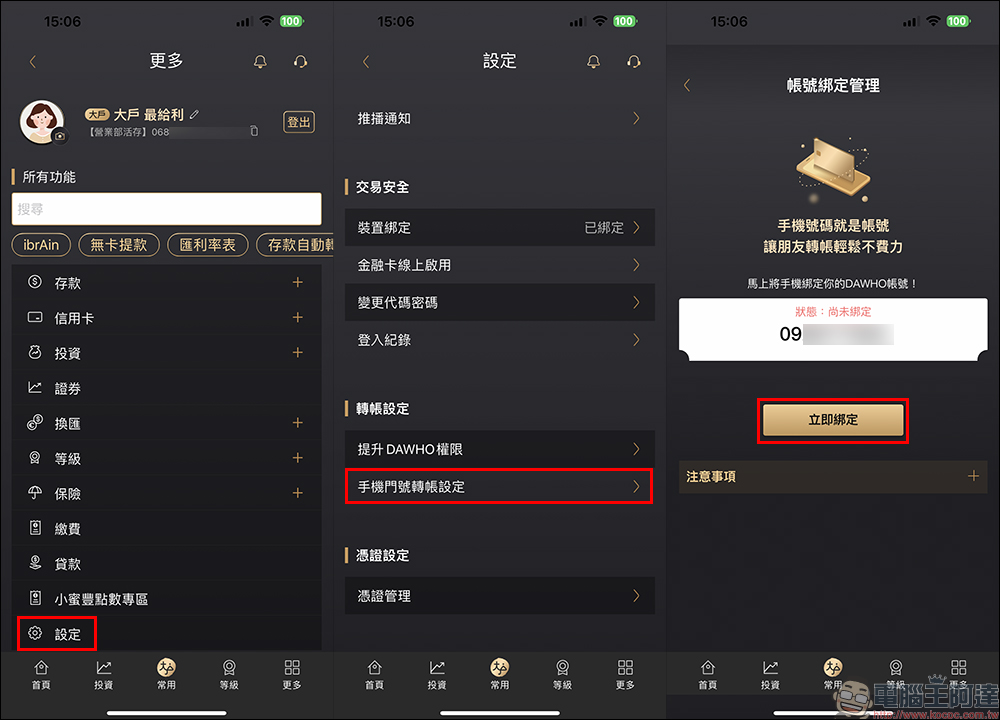
Assuming that you have a list of accounts that support mobile phone number transfer, let me quickly show you how to bind the mobile phone number transfer service! The following author first takes SinoPac Bank’s DAWHO large account digital account as an example. First log in to your bank account and find the “Settings” page, then find “Mobile Phone Number Transfer Settings” under the transfer settings category.
Since you have already logged into the bank account, the phone number that should be preset before binding will be the mobile phone number set by the user when opening the account. If you are sure that the phone number is correct, you can click “Bind Now” to proceed to the next step.
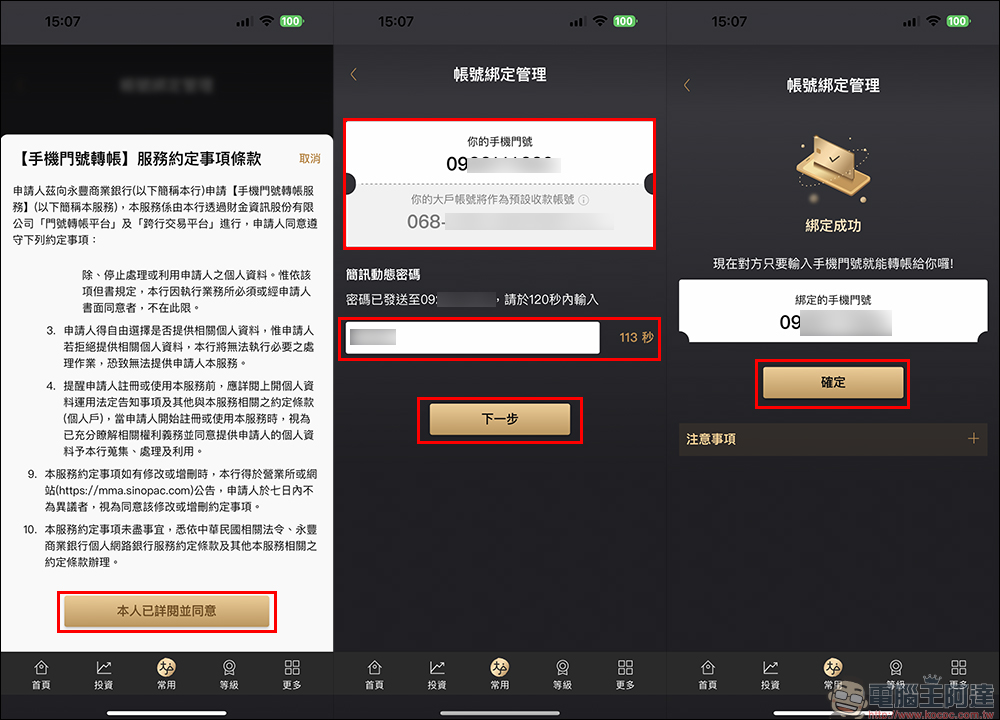
Next, read the terms and conditions of the service agreement for mobile phone account transfer. After confirmation, click “I have read and agree” to proceed to the next step. At this time, the system will send a SMS dynamic password. Enter the dynamic password and click “Next” until the screen displays that the binding is successful and you are done!
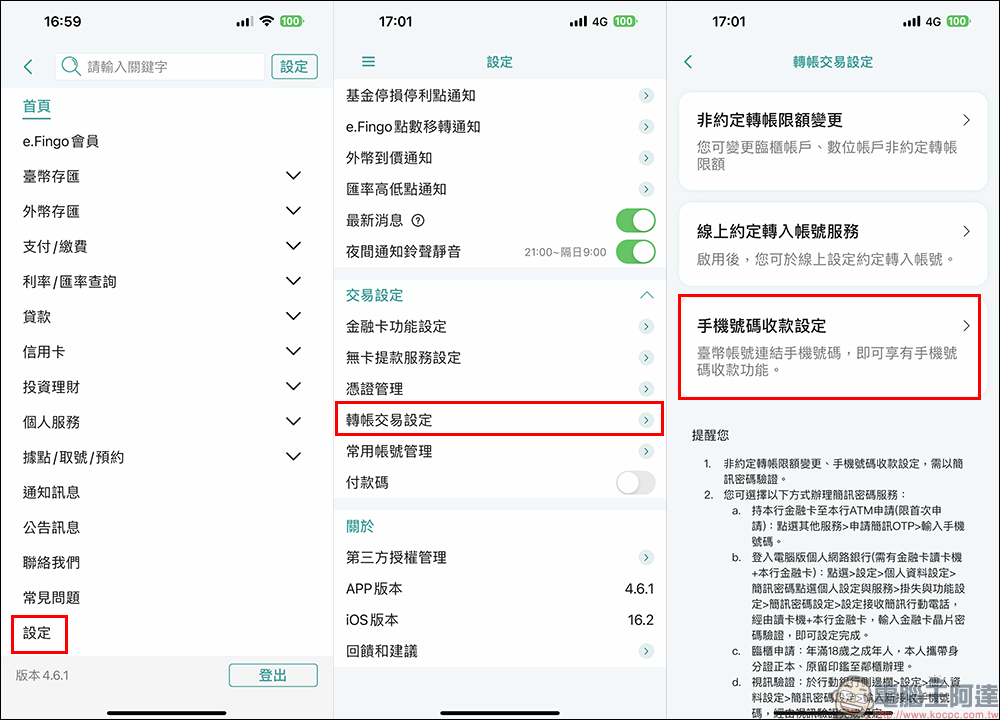
The author also shares the steps for binding Yushan Bank’s mobile phone number for transfer. After logging into the online banking account, click “Settings” in the function menu, click “Transfer Transaction Settings” under the transaction settings category to enter the next step, and then select “Mobile Number Collection Settings”:
The next steps in the Yushan Bank App are the same as other binding methods. First read and agree to the terms of service, enter the SMS dynamic password for verification, and the binding is completed if the verification is successful.
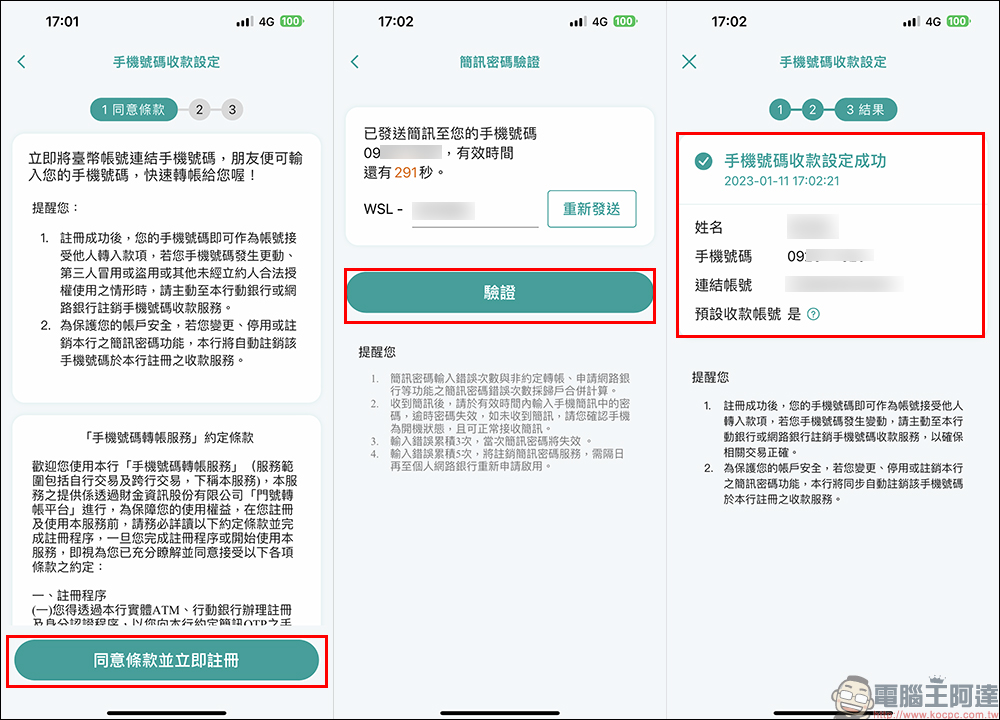
Since each bank and financial institution has different categories and names, the process is basically the same. You can try it after logging in to your online banking account and going to settings to find the relevant settings for transfer transactions.
How to transfer money to a mobile phone number?
After finally binding the mobile phone number to the bank account, the next “mobile phone number” is also the account number of the bank account! Mobile phone number transfers also support inter-bank transfers. However, the mobile phone number transfer service may require both banks or financial institutions to support mobile phone number transfers. However, in fact, only the payee’s account must be bound to a mobile phone number. For example: Ada uses a Yongfeng Bank account (it can be bound to a mobile phone number or not) to transfer money to Ah Hui’s Yushan Bank account (a mobile phone number needs to be bound for transfer).
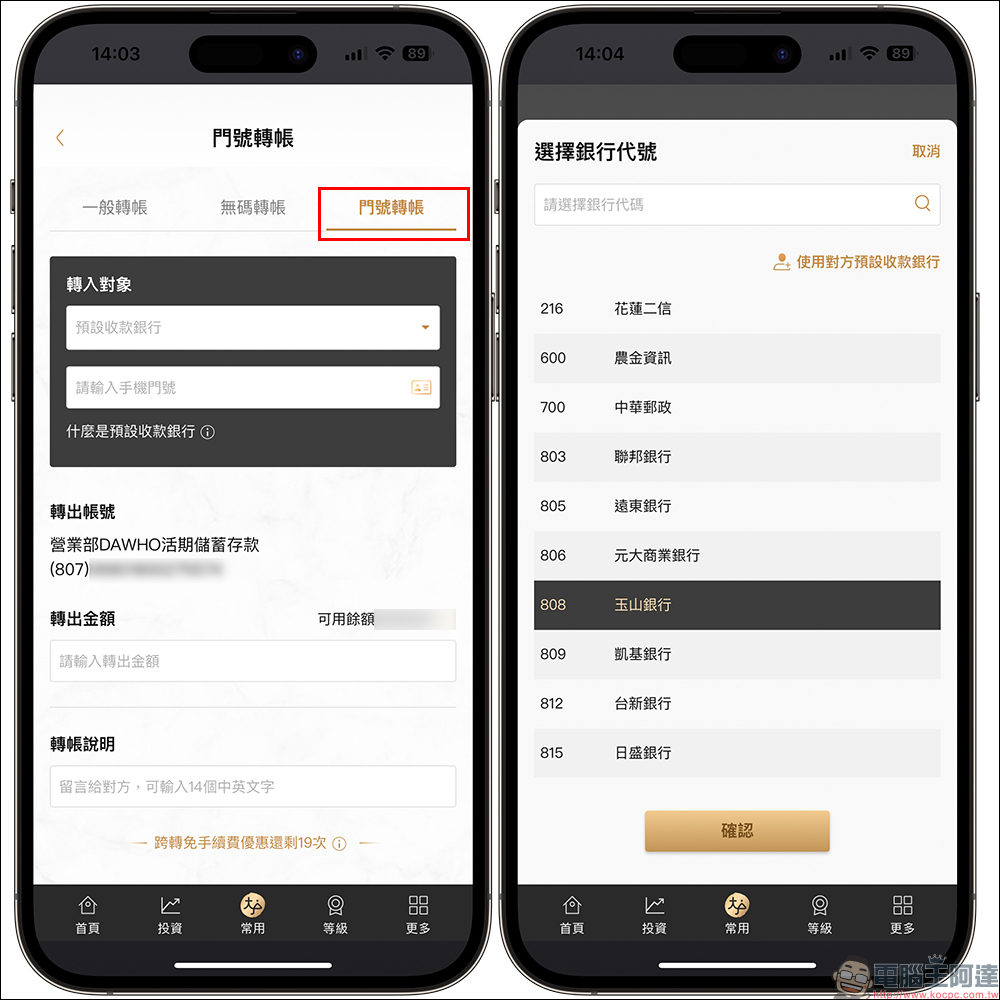
After understanding the concept of mobile phone number, let’s take a look at the actual transfer operation process! In fact, it’s almost the same as usual bank transfers, but without the need to manually enter lengthy bank account numbers or worry about copying and pasting the wrong account number. If you use a mobile phone number to transfer money, first select “Mobile Phone Number Transfer” in the transfer service, and then select the bank code of the transfer destination:
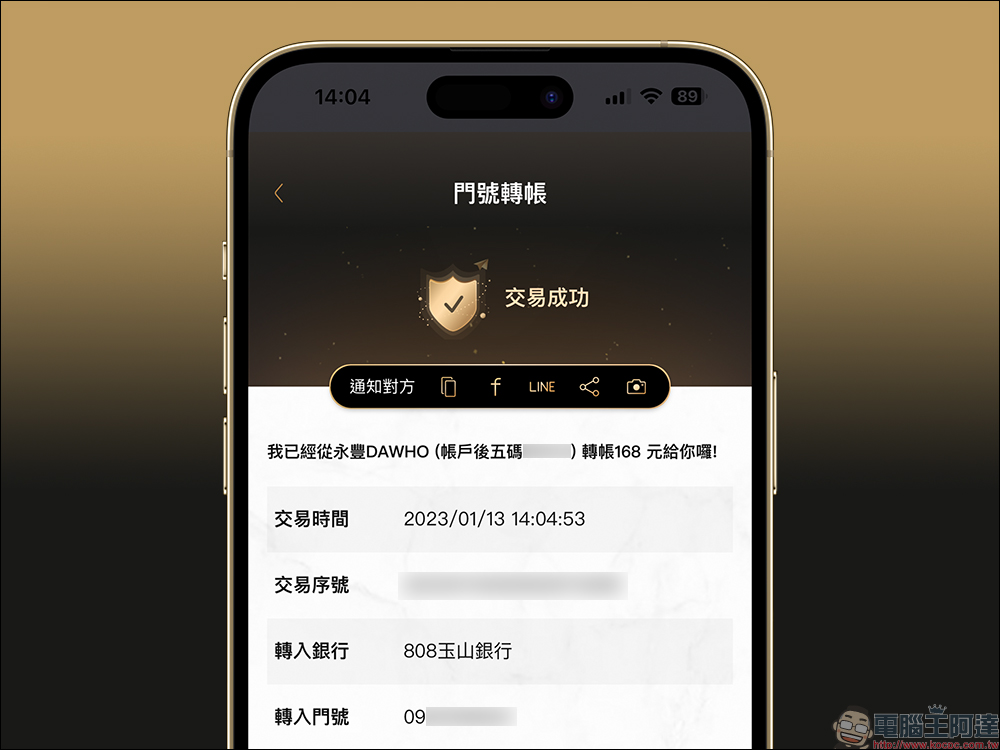
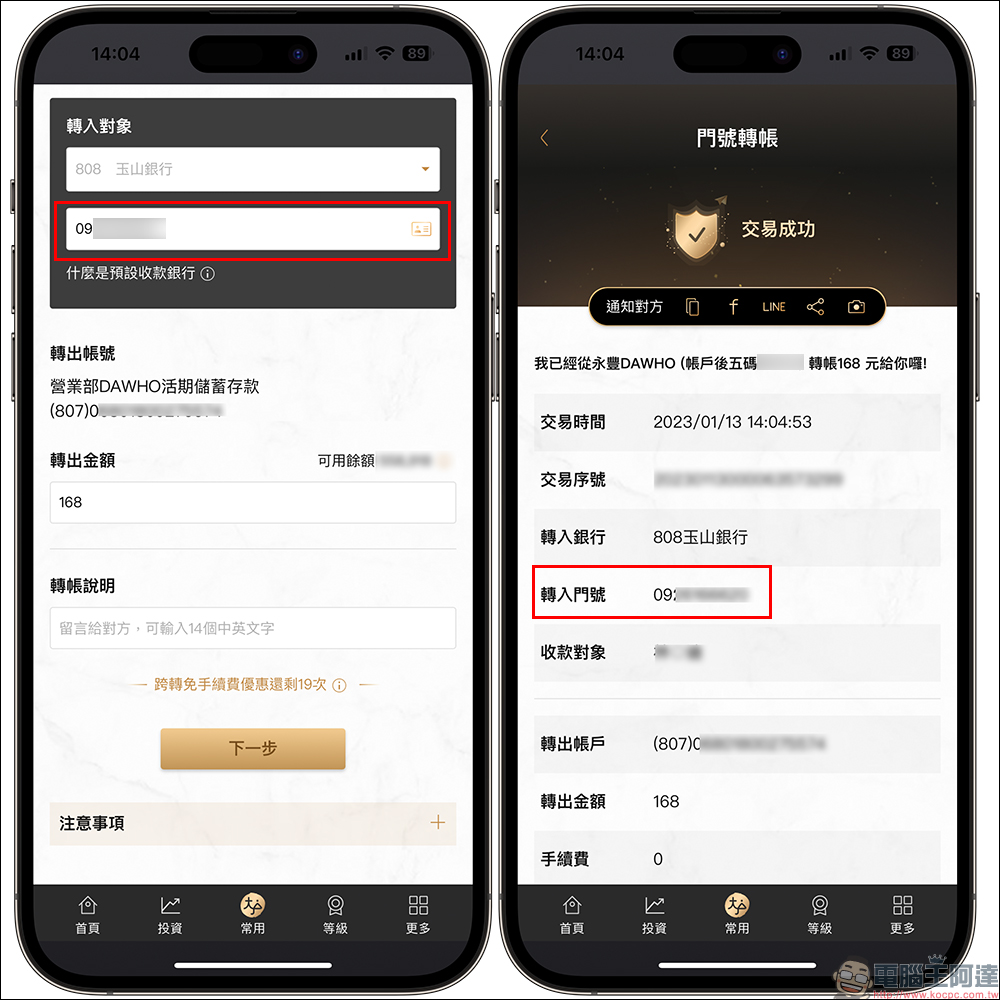
Next, just enter the phone number into the mobile phone number field of the transferee. However, you must first confirm that the bank account of the transferee has a mobile phone number bound to it! Next, you can enter the amount you want to transfer to the other party, and you can also leave a message to the other party in the transfer description field. For example, during the Chinese New Year, you can send some auspicious words of New Year’s greetings to the other party. After the transfer transaction is successful, the system will also display the transfer-related information, just like the usual screen after the transfer, but it will display “Transfer Account” instead of “Transfer Account”.
FAQ
Are there any handling fees for “Mobile Phone Number Transfer”?
- The handling fee for mobile phone number transfer is the same as that of online banking. Some banks will launch fee-free activities. For detailed information, you can refer to the official announcements of each bank.
Is there a transaction amount limit for “Mobile Phone Number Transfer”?
- In accordance with the transaction limit standards for general transfers, it is recommended that you contact your card-issuing bank for relevant matters.
summary
Learn how to set up “mobile phone number transfer”, and you can use this method to easily receive red envelopes during the upcoming Chinese New Year! There will be frequent transfer transactions in the future, and you no longer have to worry about too many bank account numbers and the risk of accidentally transferring the wrong amount. However, mobile phone number transfers can only be bound to one bank at a time, so it is recommended that you choose the bank account that receives payments most frequently for binding. If you bind a bank first, and then set up a mobile phone number transfer in a second bank, the account applied for later will be the default account, and the bound bank will be unbound at the same time.
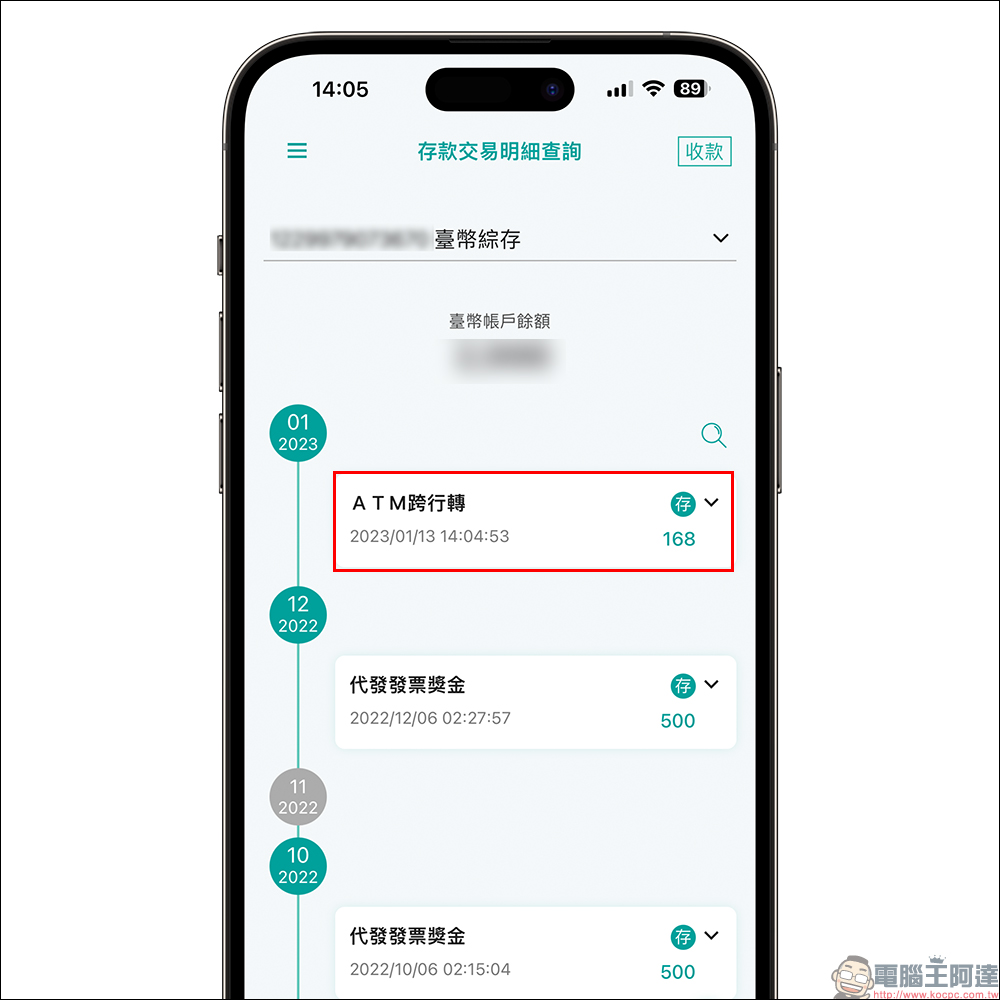
Who is suitable for mobile phone number transfer? What situations?
Finally, let’s summarize, for which groups is the “Mobile Phone Number Transfer” service introduced this time suitable, and in what situations may it come in handy? The mobile phone number transfer service function is most suitable for people who need to collect money, but do not want to log in to online banking and copy account numbers every time they collect money, such as:
- Between friends and relatives, give each other pocket money or expenses for daily expenses
- Online auctioneers collect payments, such as transactions on social platforms such as PTT
- Various other people who often need to collect money, but do not want the other party to ask for their bank account number every time
Further reading:
2023 New Banknote Exchange Branch/Post Office Lazy Pack, 454 designated new banknote maps in Taiwan
Source: KOCPC Chinese