


As AI technology becomes more deeply integrated into daily life, Google’s newly launched Gemini Live feature has officially taken a significant step forward. The camera and screen sharing capabilities, previously available only to paid subscribers, are now fully open to all Android users for free, greatly enhancing their practicality. This isn’t simply “screen sharing”—it allows the AI to see in real time what’s on your phone screen or the physical objects captured by your camera, and provide interactive answers and assistance based on that information. From translation, navigation, and step-by-step tutorials to life advice, Gemini Live can become the digital assistant that understands you best on your mobile device. Just open Gemini, and the AI becomes your “eyes” and “brain,” helping you process all kinds of information and needs anytime, anywhere.
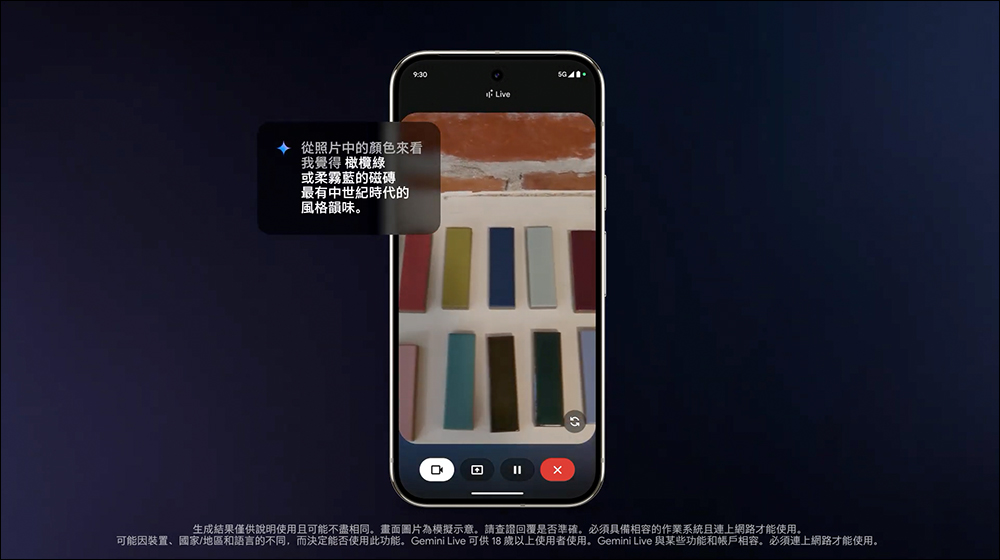
▲Image source:Google
Google Gemini Live is now free for all Android users.
Google is making another move, pushing AI applications to new heights! The Gemini Live video recording and screen sharing feature, previously limited to Gemini Advanced subscribers, is now completely free for all Android users. This upgrade means that once you open Gemini, you can have AI directly understand your phone screen or real-world scenes captured on camera, and get instant answers to your questions.
We’ve been hearing great feedback on Gemini Live with camera and screen share, so we decided to bring it to more people ✨
Starting today and over the coming weeks, we’re rolling it out to *all* @Android users with the Gemini app. Enjoy!
PS If you don’t have the app yet,… https://t.co/dTsxLZLxNI
— Google Gemini App (@GeminiApp) April 16, 2025
Whether you’re asking Gemini to help identify an app interface, website content, or even take a look at a physical object, translate signage, or walk you through operating steps, it all now feels more intuitive and practical. Combined with Project Astra’s enhanced visual recognition capabilities, Gemini Live’s use cases have become even richer. It not only supports full-screen operation but also lets you switch seamlessly between the front and rear cameras, making the entire experience smooth and simple. This article takes an in-depth look at this AI feature and how it’s completely changing the way we interact with our phones!
How to enable the screen sharing feature?
You can quickly start screen sharing through the Gemini interface — just bring up Gemini’s floating panel and tap the new “Share screen with Live” option to enable the feature right away. Once enabled, a counter icon will appear in your phone’s status bar, indicating that Gemini is “watching” your current screen.
For example, when you open an app or browse a specific website, just say to Gemini, “Help me see what this is” or “How do I use this?” and it can provide explanations and suggestions based on what’s on the screen.
When in use, you’ll feel a subtle vibration, indicating that Gemini is preparing to respond to your question. If you want to stop sharing, simply tap “Stop sharing” in the notification shade dropdown. The overall design is simple and intuitive, so you won’t have to worry about accidental taps or privacy leaks.
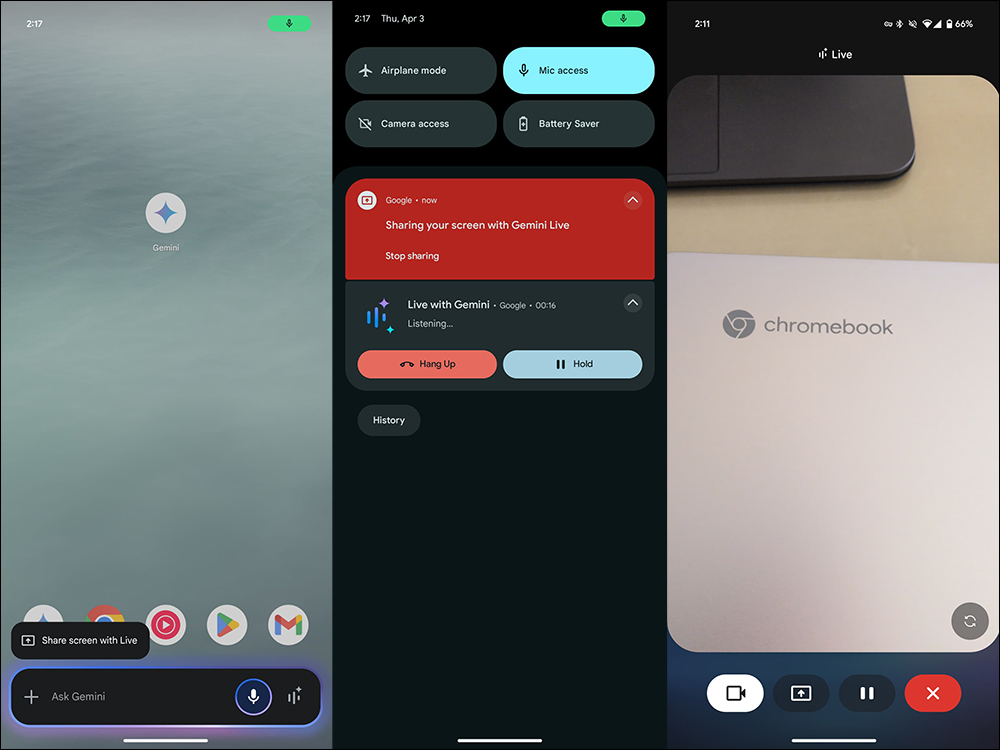
▲Image source:9to5Google
In addition to the screen, Gemini Live also supports using the phone’s camera. From full-screen Gemini Live mode, you can tap the new button on the left side of the screen to activate camera mode. Once in camera view, the phone screen shows a viewfinder like when taking a photo, with a button on the lower right to switch between the front and rear cameras. This way, you can let Gemini see actual images of objects, documents, meals, landmarks, and more, and get real-time suggestions or explanations.
Google also specifically reminds that for the best recognition results, it is recommended to keep the image moving steadily. Additionally, the phone’s screen must remain on for Gemini to correctly capture images for analysis.
Sharing your camera or screen in Gemini Live makes it even easier to:
✨ Brainstorm creative ideas
🔧 Get real-time troubleshooting support
🤓 Learn something new…and so much more: https://t.co/2Ea8e1zgoe pic.twitter.com/kSygpDSRkc
— Google Gemini App (@GeminiApp) April 7, 2025
Further Reading:
Still letting your Shorts thumbnails be picked at random? A must-see for YouTube creators—”this trick” doubles your traffic
Source: KOCPC Chinese