


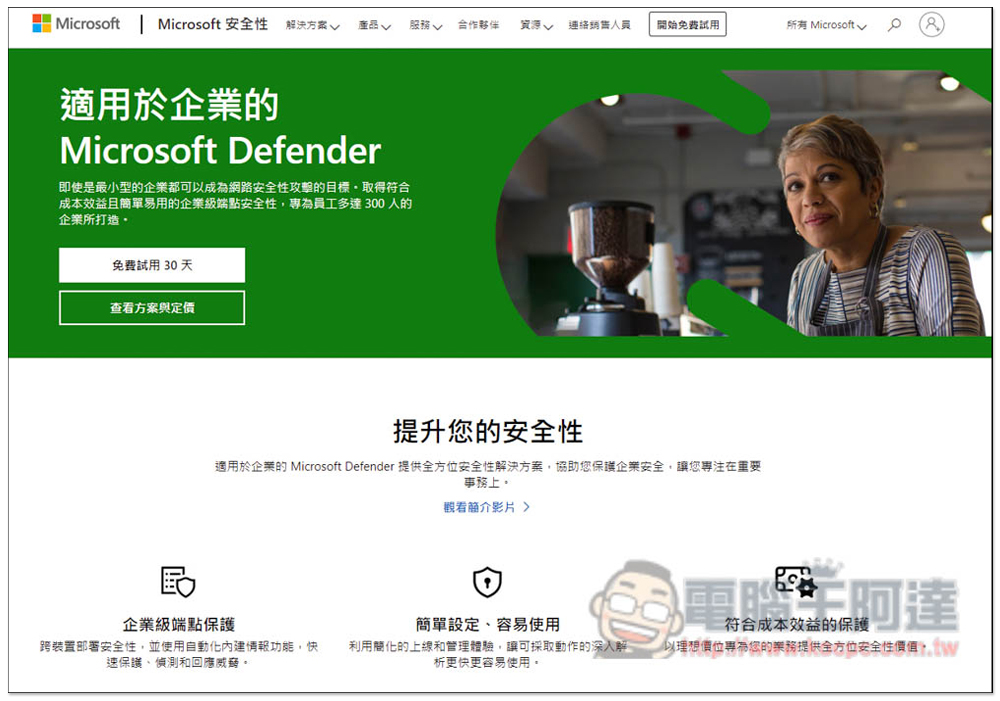
In recent years, there have been news of companies and enterprises being hacked, even well-known companies around the world. There are also research reports that show that ransomware attacks have grown by 300% in the past year. Therefore, information security has become very important nowadays. If a company’s equipment is accidentally hacked, a lot of money and time will be lost, which really cannot be ignored. Of course, Ada is also a small and medium-sized enterprise owner, and he also knows that not every enterprise has the budget to hire professional security IT personnel. This article will recommend a Microsoft Defender for Business enterprise cloud anti-virus and anti-hacking service that is cheap, simple to set up, and targeted at small and medium-sized enterprises with less than 300 people.
In addition to providing powerful anti-virus and anti-hacking functions, Microsoft Defender for Business also has “behavior detection”, which will detect the user behavior of each device at any time to determine whether the device has security concerns and minimize the risk, that is, for the purpose of prevention in advance. I will introduce it to you in detail below.
Apply for the Microsoft 365 Business Premium plan (now also giving away a big gift package)
Why do you need Microsoft Defender for Business?
Information security issues are something that every company must pay attention to. If it is hacked, not only the company information may be stolen, but also extorted, and a huge amount of money needs to be paid to unlock it. A similar incident occurred at Huayun in February this year, and the hackers demanded payment in Bitcoin before they were willing to unlock it. Recently, Cisco, a well-known company in the world, has also been reported to have been hacked. The ransomware group Yanluowang claimed to have obtained 2.8G of Cisco data.
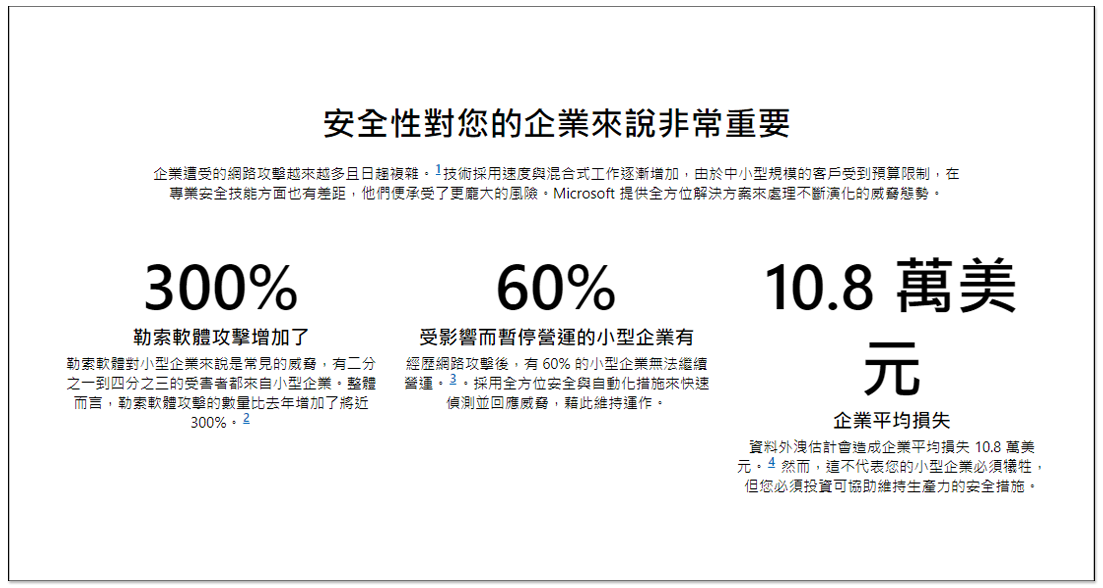
In addition to the loss of money and important data, the company also needs to spend a lot of time dealing with this matter, such as how to remedy it and find experts to solve it. At the same time, the work is temporarily suspended. If it happens to be the peak season at this time, it will be really miserable, so don’t ignore it.
These companies basically have security departments, but they were still hacked. This shows that if the company does not have security personnel, the risk must be higher. In addition, in recent years, many companies have also switched to remote work, which has made it more difficult for information security protection.
Microsoft Defender for Business Taiwan agent Lingyi also shared a good reference case with Ada. A small and medium-sized enterprise with about 80 people was affected by the epidemic. 5% of employees need to work from home. Due to job requirements, most employees need to browse various web pages to search for knowledge. The data handled by employees also requires a lot of customer privacy protection, and the company only has 2 MIS engineers, which is completely insufficient.
This company hopes that the endpoint protection strategy will be smarter and have decision-making functions to reduce the burden on managers, so it finally decided to import Microsoft Defender for Business. The initial discussion took about a month. After the decision was made to use it, it only took 2 weeks and one to assist the customer to complete the import, and the process hardly affected the daily operations of users.
Some people may think that Windows already has Defender anti-virus software. Is it okay to just use the built-in one?
The built-in Defender in Windows is different from Microsoft Defender for Business. Defender can only scan and protect existing virus databases. Therefore, if a new virus comes out and the virus database has not been updated, it may not be detected and it does not support the anti-hacking function.
In addition, the built-in Defender only protects a single Windows computer. Representatives said that it is difficult for company managers to know whether there are viruses and threats, and it is difficult to manage. Microsoft Defender for Business is different. It is a cloud anti-virus and anti-hacking service. It has a Wizard-drive cloud backend, where administrators can track the security status of each device, whether there are risks, receive notifications of known threats as soon as possible, and even use behavior reports, etc.
Microsoft Defender for Business also supports cross-platform protection, including Windows, Mac, iOS, Android, and Linux.
Easy to set up, no matter how many devices you have, no technical knowledge required
For companies without IT staff, you might be worried that setting up Microsoft Defender for Business will be difficult? After Ada understood it, he had no idea. After applying for and logging in to the administrator account, you can find the Script file in the cloud management background. You only need to download the file on the device to be protected, click twice to execute it, and the settings will be completed automatically. Then you can see the device in the cloud management background. Almost no technical knowledge is required:
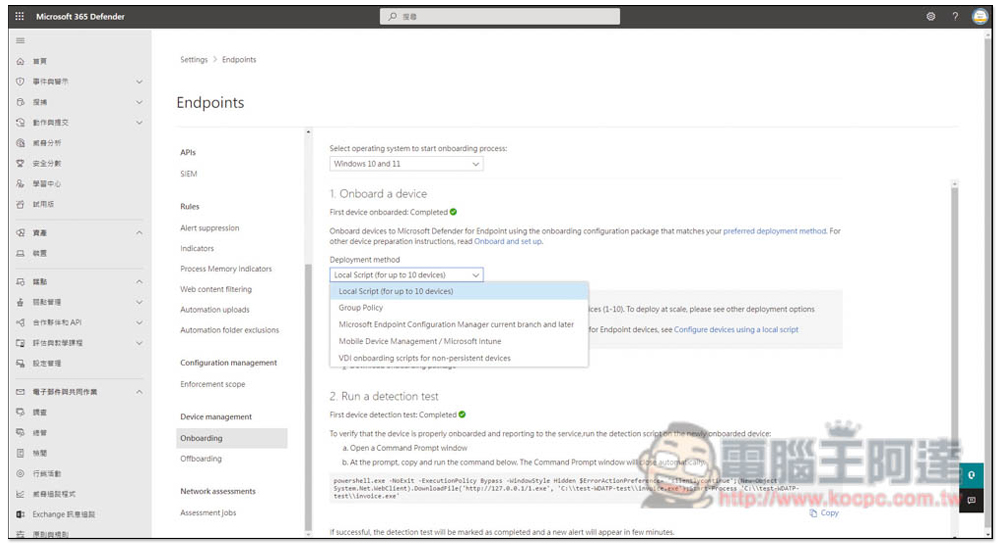
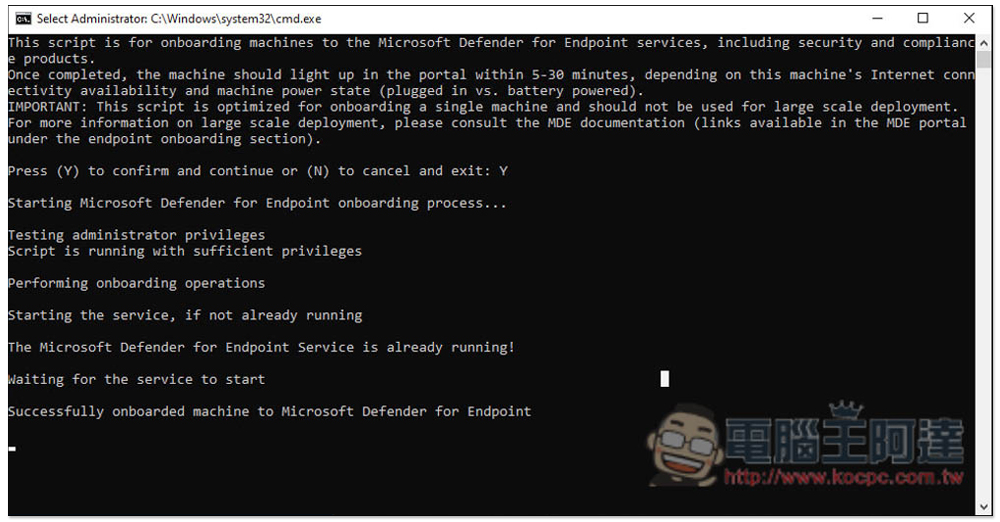
Of course, if you have any questions about setup or use, Taiwan agent Zero-One Technology has relevant support services and will also provide setup instructions at the beginning, so you don’t have to worry about running into problems.
In addition, according to Lingyi Technology, some customers have directly applied for purchase online without contacting them, and then set it up by themselves. This shows how simple it is.
Apply for the Microsoft 365 Business Premium plan (now also giving away a big gift package)
How does Microsoft Defender for Business bring the highest security protection to small and medium-sized businesses? What are the characteristics?
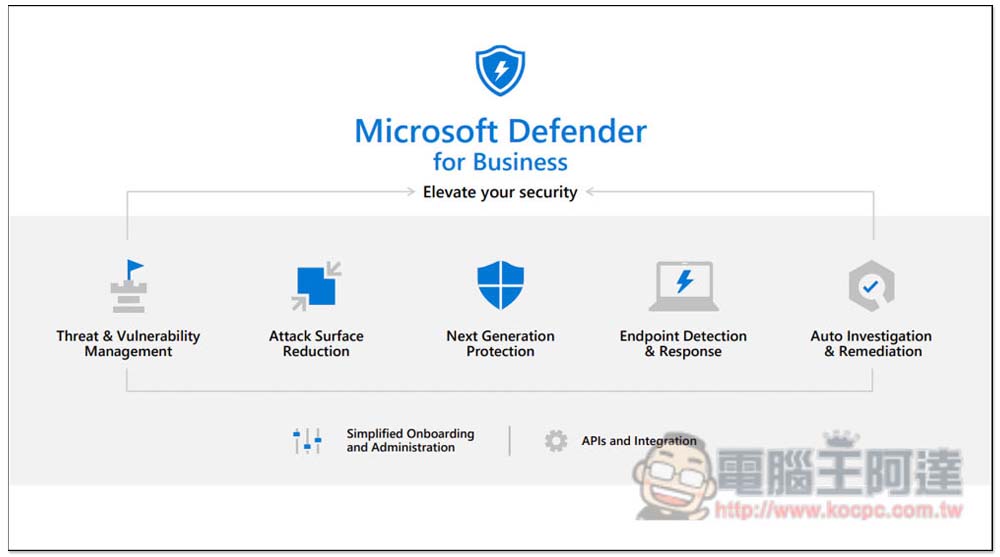
Anti-virus and anti-hacking completed in one stop
Unlike the Windows built-in Defender and other anti-virus software, Microsoft Defender for Business is an anti-virus and anti-hacker function. All functions such as tracking, settings, and reporting are completed directly in the Wizard-drive cloud backend without the need to install any software on the machine.
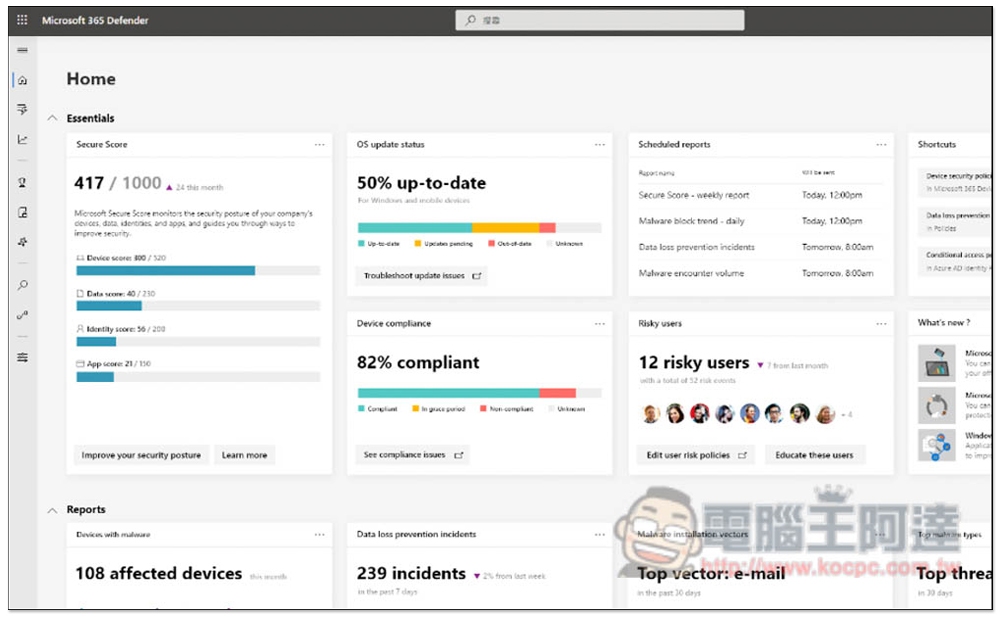
In addition, with the characteristics of the cloud, no matter where you are, as long as there is an Internet connection, you can always know the security status of the company’s devices and whether any new threats have emerged. This is very convenient for business managers who often need to travel or go abroad.
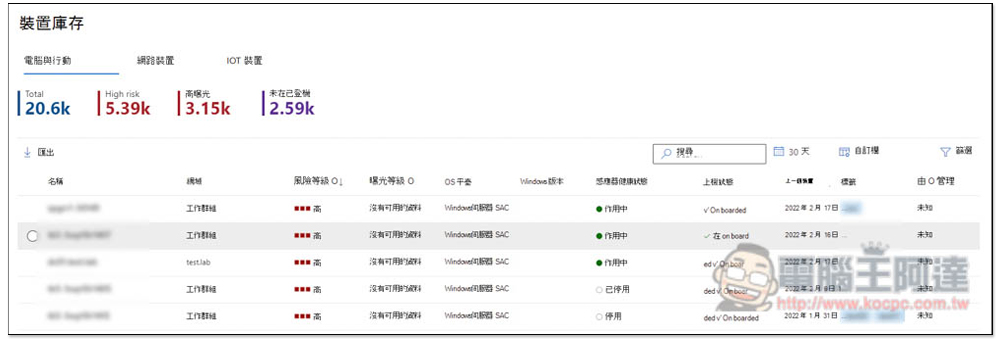
Like Ada, before the epidemic, they had to go abroad to work at least two or three times a year. In addition, Ada’s team works from home, so cloud management is really a plus.
The backend interface also provides an action-oriented dashboard, making it easy to understand which tasks are the most important and need to be resolved first:
Provide recommended security strategies to quickly set up the most suitable protection environment for the company
Ada also does not hire security IT personnel, so when choosing this kind of enterprise anti-virus and anti-hacking service, we also know that many people will worry about whether this kind of high-tech security service will be difficult. Don’t worry too much about this. In addition to the installation process of each device that has been introduced before, it is very easy and provides complete support services. After installation, the Wizard-drive cloud backend will also provide recommended security policies so that administrators can quickly complete the installation. Moreover, this is customized for your company, unlike other companies.
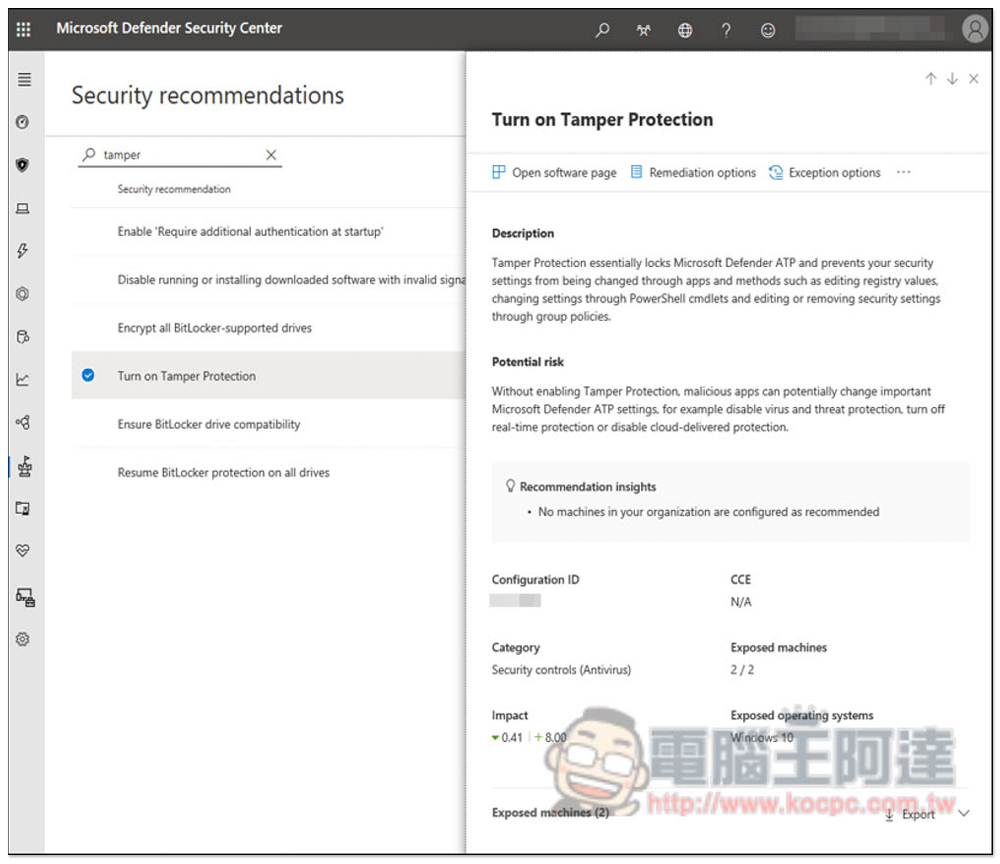
In other words, even if you have no idea about information security, it’s no problem. Let Microsoft Defender for Business help your company develop the most appropriate protection environment.
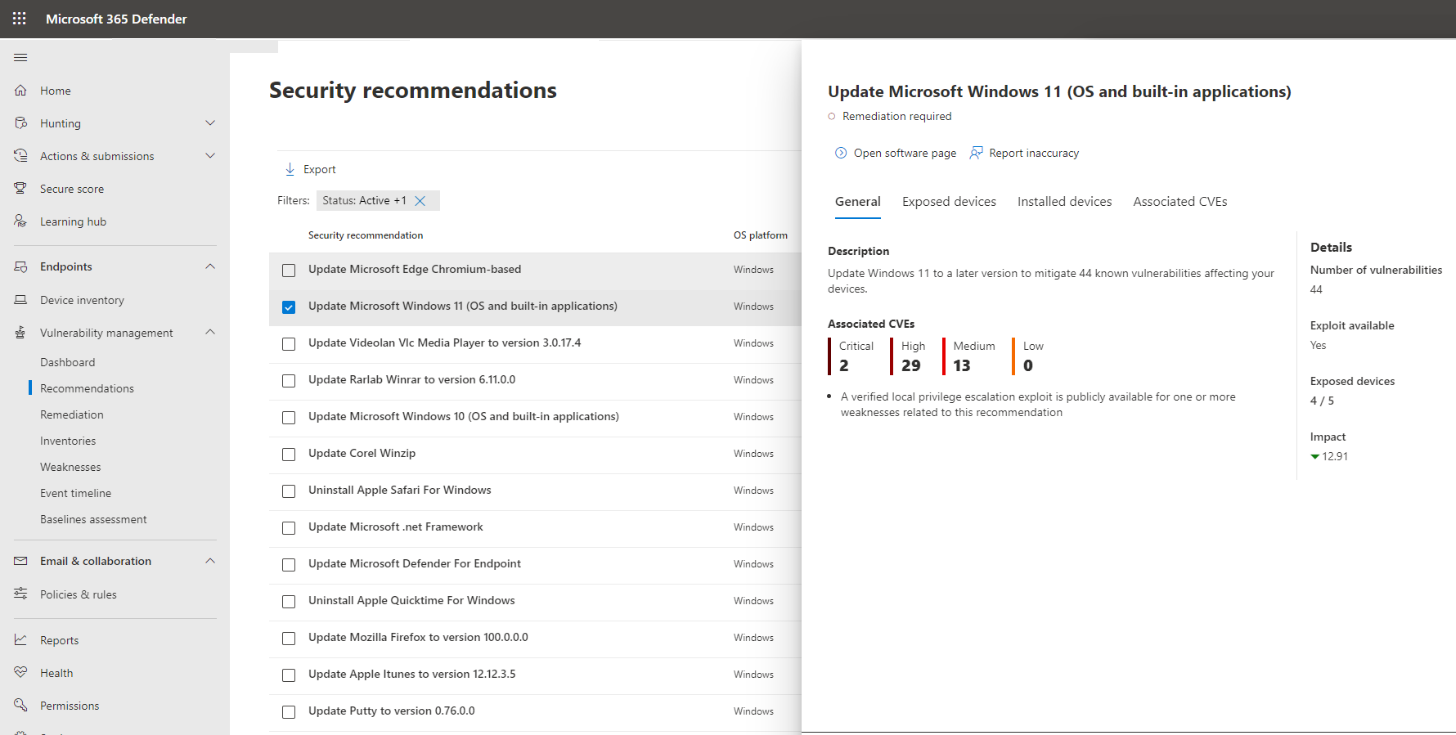
Real-time protection based on usage behavior, detecting whether there are abnormalities in each device
This is one of the biggest features of Microsoft Defender for Business and Ada’s favorite feature.
The so-called usage behavior means that the usage process of each company device will be detected at any time, such as: what folders are opened, what files are copied, and what things are browsed. When abnormal behavior is detected, it will be notified to the administrator.
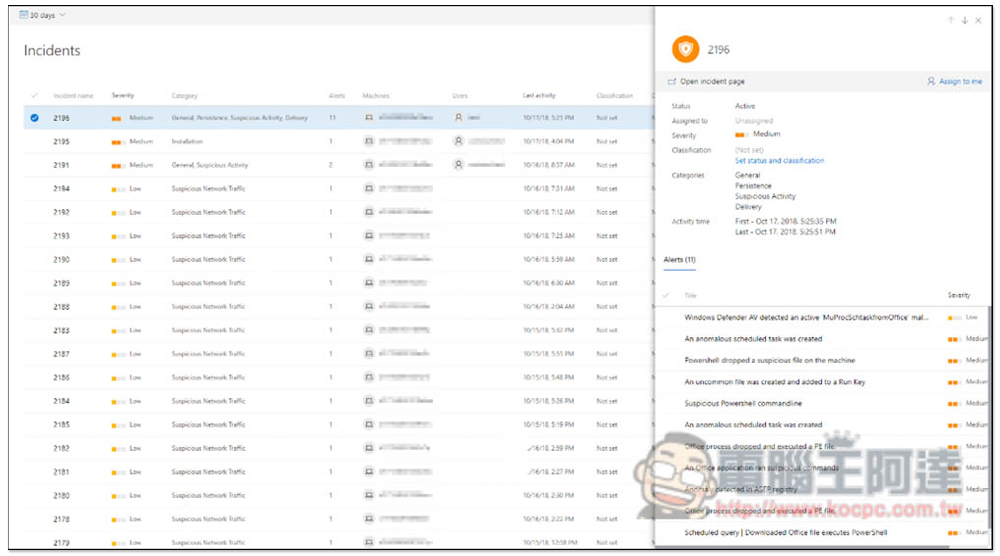
Regarding the behavior part, Microsoft has a database that stores some known abnormal behaviors. Once these are detected, managers will be notified immediately. For example, if an employee normally does not download strange things or copy certain folder files, but it suddenly happens one day, Microsoft Defender for Business will detect it and notify managers.
This function is really good. Compared with simple anti-virus and anti-hacking, it can prevent in advance and eliminate all possible potential risks.
In addition, in the abnormal behavior detection setting section, administrators can set “immediate block” or require consent before continuing:
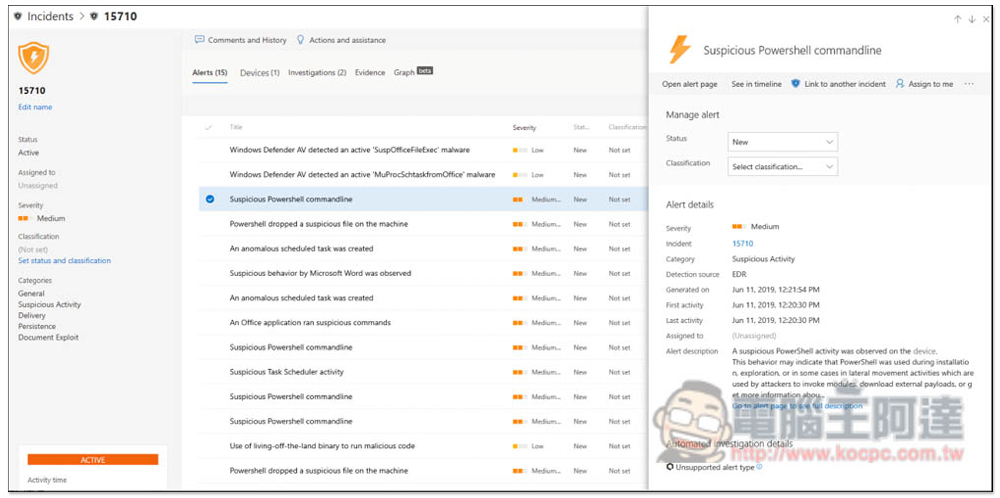
Of course, given that each company’s business is different, misjudgments are more likely to occur. If the “already determined” behavior is completely fine, you can add it to the whitelist so that it will not be blocked in the future. However, Ada also reminds you to remember to really make sure that there is no problem, otherwise it may become a security hole.
If the company has information security IT personnel, of course, it can also write its own behavior architecture to make the detection function more in line with the current situation of the company:
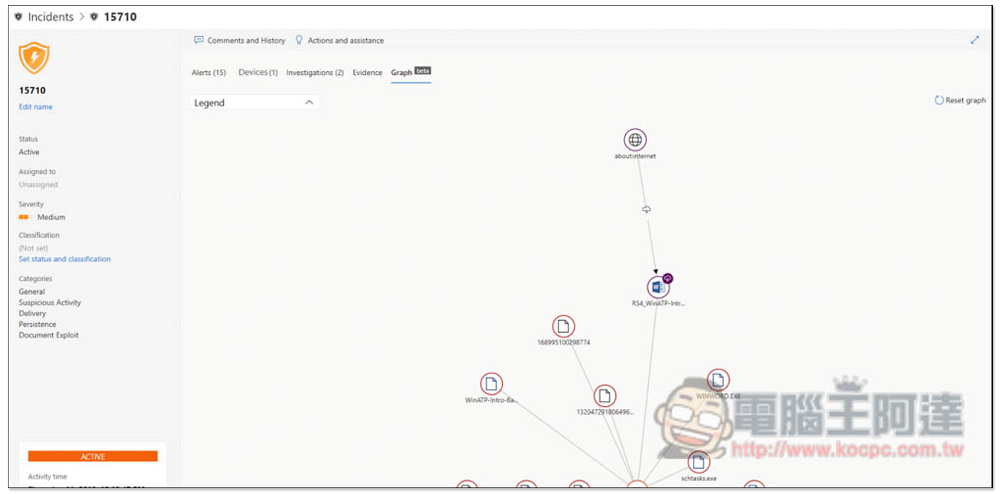
24/7 automated endpoint investigation and response, with built-in automatic vulnerability correction capabilities
Ada has been paying attention to information security issues for a long time, and occasionally chats with friends from small and medium-sized enterprises. New threats to network attacks will continue to emerge over time. Therefore, even if the security environment of the company’s equipment has been set up at this stage, it does not mean that there will be no problem in the future.
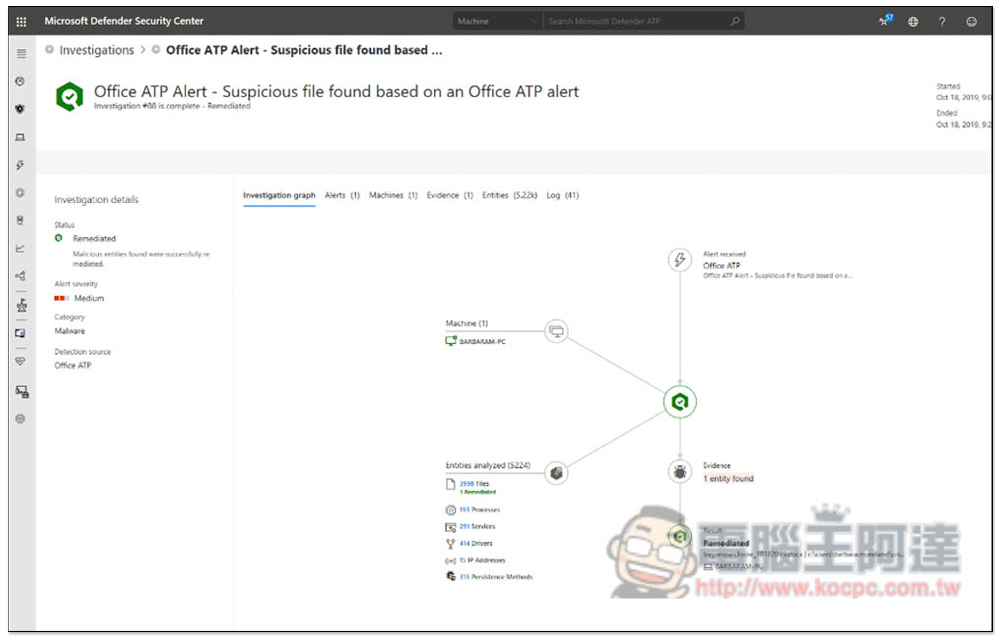
Microsoft Defender for Business takes advantage of the cloud to immediately update the database for new threats. In addition, endpoints adopt 24×7 automatic investigation and response. Once a new risk is discovered, an alert will be notified immediately, which means that the latest and most secure protection can be provided at any time.
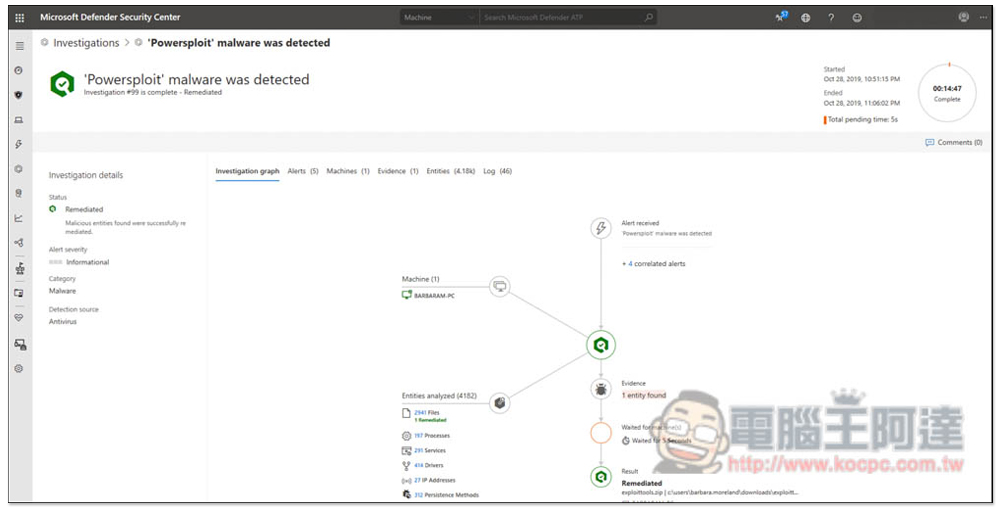
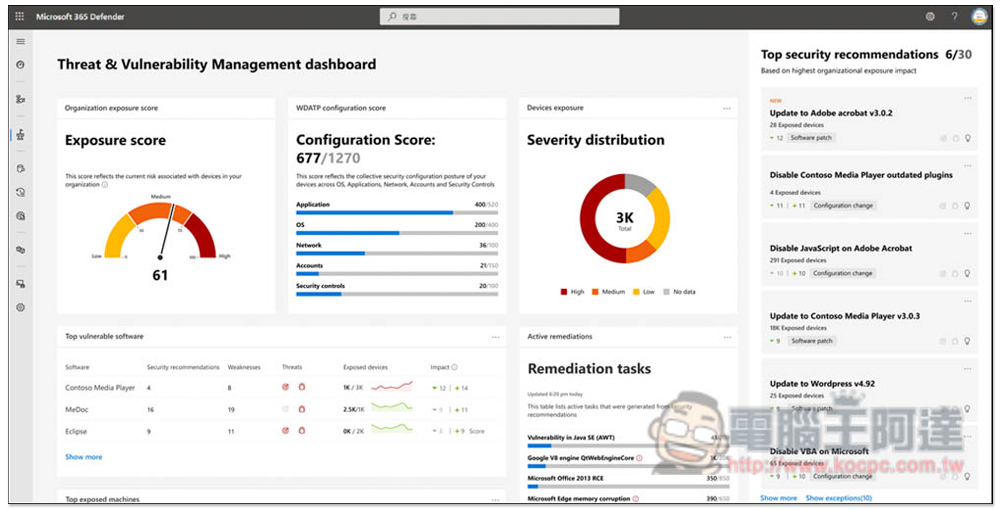
When a new vulnerability risk is detected, managers who are not familiar with information security may not know how to deal with it. The Wizard-drive cloud backend provides a very good “Threat and Vulnerability Management” function. The vulnerability priorities of all devices will be listed here. Administrators can quickly identify which ones need to be dealt with first, or which settings are wrong, and it is easy to manage the risks and vulnerabilities of each device.
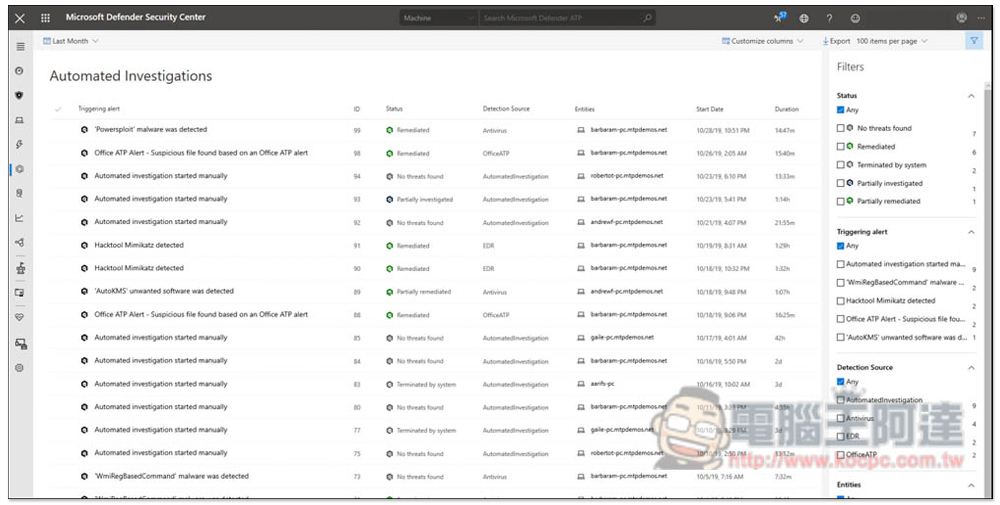
What Ada thinks is even better is that Microsoft Defender for Business also provides an “automatic vulnerability correction” function, which can repair these vulnerabilities with one click, which is very practical for companies without IT personnel.
price
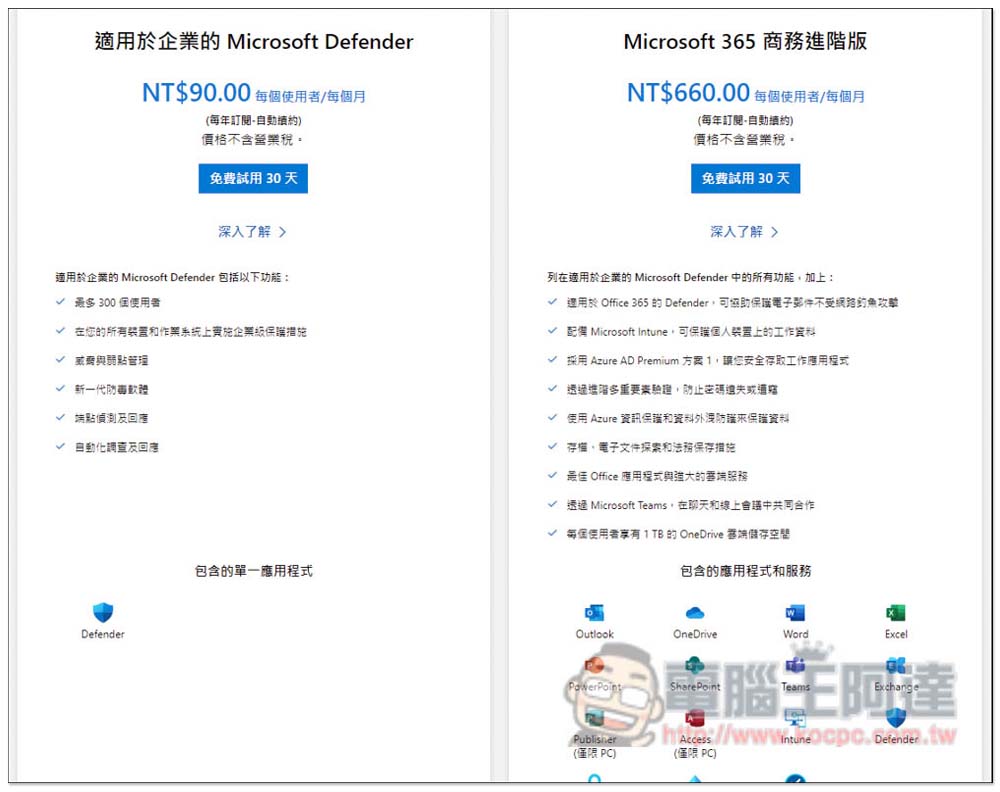
Microsoft Defender for Business has two plans: “Buy it separately” or “Microsoft 365 Business Premium Plan”.All offer a 30-day free trial。
Buying it separately only costs NT$90 per user per month, which is super cheap. The Microsoft 365 Business Premium plan is also good. It only costs NT$660 per user per month. It can also use all Office series, 1TB cloud space, enterprise-level email, Microsoft Teams conference collaboration platform, etc.
NowLingyi Technology is holding a gift package event for small and medium-sized enterprises, until 2022/10/30, you will receive a “Jabra Evolve2 30 MS Bluetooth headset” for purchases of 25U (inclusive) and above, and a “Jabra Speaker conference phone speaker” for purchases of 50U (inclusive) and above. Small and medium-sized business owners in need can grasp:
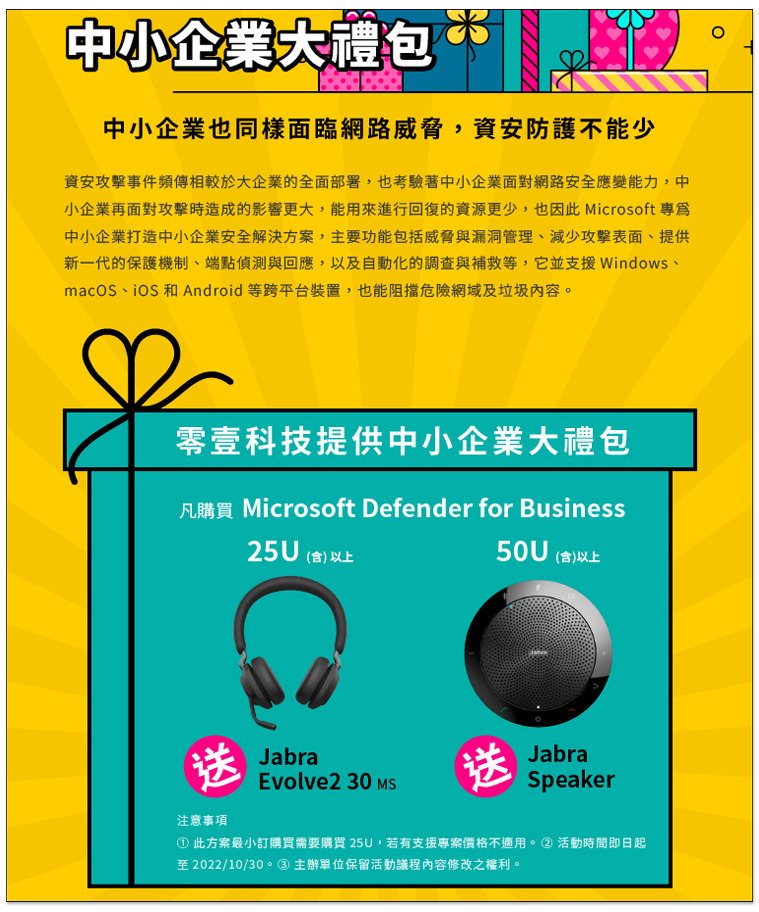
This kind of data security protection really cannot be spared. If you are accidentally hacked, customer data will be stolen, and company computers will be shut down. The amount of money lost at one time may be enough to subscribe to the Microsoft 365 Business Advanced plan for several years.
Microsoft official websitethis articleIt is highly recommended to read. This company only thought of strengthening its security department because it was attacked by ransomware. Fortunately, there was not much damage, otherwise it would have been really serious. The text states, “These threats may affect revenue, delay customer delivery, cause sensitive intellectual property rights such as product design to be stolen, and even lead to security incidents.”
In addition, it also points out a great advantage of Microsoft Defender for Business. For enterprises with branches in many places around the world, it is difficult to know the network status of each branch, and it is impossible to hire a security personnel. Microsoft Defender for Business is very easy to set up.
Summarize
In the past two years, there have been more and more news about companies being hacked and extorted. It is also obvious that cyber attacks continue, so information security cannot be ignored. And don’t say that because a company is small and not well-known, it will not be attacked. These hackers will not care about this. If a company has a certain number of people, it should be more careful, because it is difficult to understand everyone’s habits of using computers and devices. Ada highly recommends applying for the Microsoft Defender for Business enterprise cloud anti-virus and anti-hacking service, which is well worth considering.
Apply for the Microsoft 365 Business Premium plan (now also giving away a big gift package)
Source: KOCPC Chinese