


You may not realize it, but your computer knows more about you than you think. First, the web browser on your computer records and lists the websites you have visited, the files you have downloaded, and the passwords you have stored. The files saved on your computer include photos, videos, personal documents, and other sensitive information. Some people also like to store financial information such as ATM cards, credit card numbers and security codes on their computers for regular use. But what steps do you take to keep your computer safe, especially from spyware?

What is spyware? How to tell if it’s hiding on your computer? How to remove?
What is spyware?
The quickest and most straightforward definition of “spyware” is malicious software that monitors computer activity by accessing system resources such as storage space and memory. Once spyware gets a foothold on your computer, it will disguise itself as a legitimate application or software, gain access to system resources such as keyboard, mouse, and screen, and may even ask for permission to the camera and microphone. After being authorized, it can monitor almost all operations performed on the computer, including browsing the web, online transactions, video sources, etc. This is not the worst part.

Spyware hides on your computer more easily than other malware, so it can be difficult to tell if your computer is infected, but there are things you can do to check for and remove it from your computer.
Different types of spyware and the information they steal
From the above simple explanation you already know the definition of spyware and what it does. Spyware is also divided into different types, each type has a specific purpose and is designed to achieve this purpose. For example, trying to capture the keyboard input process“Keylogger”, it can steal your passwords, security credentials, bank accounts and other key private information. If there is a keylogger in your computer, all input through the keyboard will be at risk.

Some banking Trojans pretend to be real financial institutions or Windows 11 installerTo obtain your account-related information and send it to a remote location set by the hacker, the Trojan horse uses links in emails and files as a way of spreading, and contains fraudulent content to encourage users to click on the links. These fraudulent contents are nothing more than “threats and inducements”, using sensational words to warn users that they will be disadvantaged if they do not click, or that they will gain huge benefits after clicking.
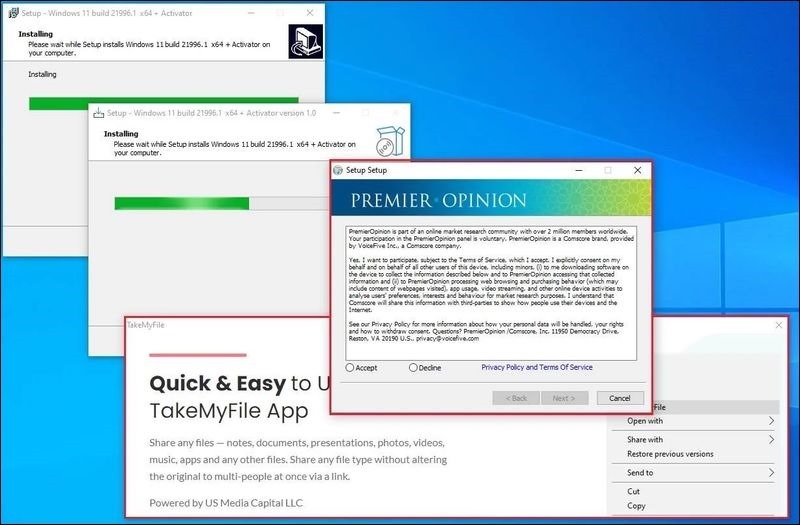
※Image source
There is also audio and video spyware, which can use the microphone and video camera on the computer to record video and audio clips, and then upload the files to the Internet or send them to remote hackers without the user’s permission. There is also mobile spyware that can track your location, calls you make from your mobile device, your contact list and other related information.
How to tell if there is spyware on your computer?
As mentioned above, spyware is very good at hiding on various platforms, so you probably won’t notice its presence in the initial stage, but if it starts to access your system files and resources, you may notice something that usually doesn’t happen:
- Computer performance slows down
- A strange shortcut randomly appears on the computer desktop
- Randomly open windows or browser tabs
- Mouse cursor moves randomly on monitor
- Enter random text
- Network camera automatically turns on
- The radio microphone automatically unmutes
- Network data usage increases for no apparent reason

How to detect and remove spyware from your computer?
Once you determine that your computer is infected, you must identify the spyware so that it can be removed.
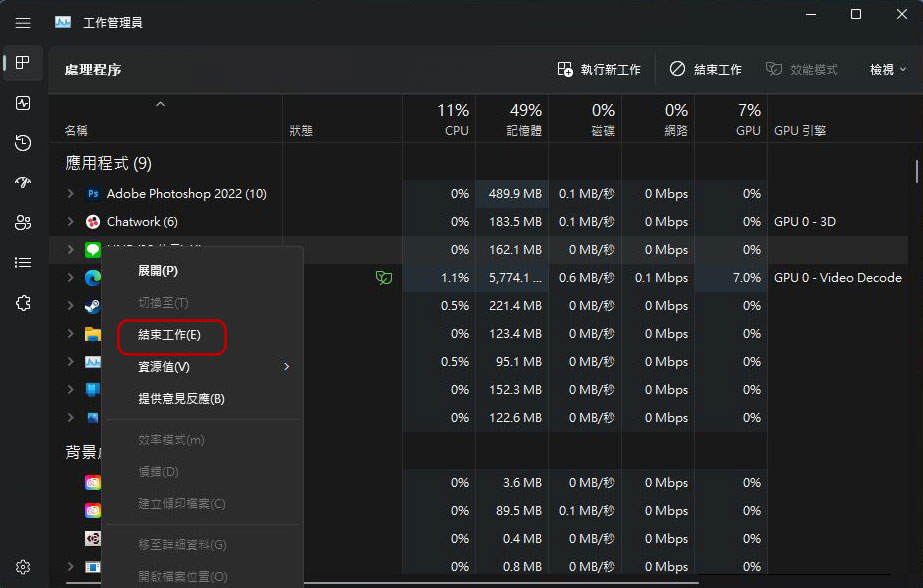
One of the easiest ways to detect spyware is to check the memory usage of each application running in the Work Administrator. You can press Ctrl + Alt + Del, click the task manager to open the window, and then check the memory usage of each running program in the “Processing Programs” tab. If you see a large one but don’t know what it is, copy its name and search in Google to see if it is marked as spyware. After confirmation, right-click on the suspicious software in the job manager window, select “End Job”, and then remove the application from the computer.
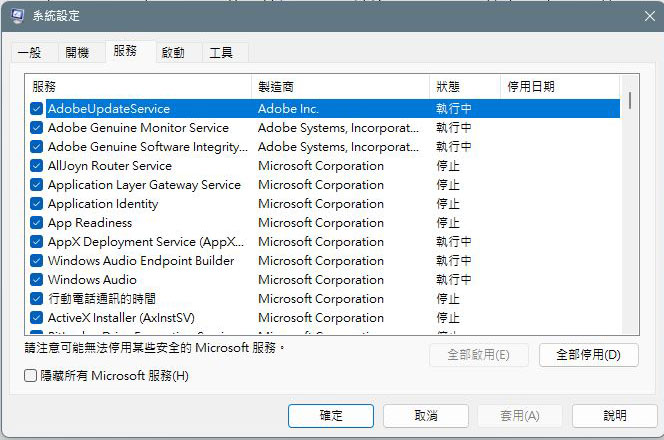
You can also use the “System Configuration” function. On a Windows computer, press the Win + R key combination to open “Run”, then enter “Msconfig” to open system settings. In the Services tab, you can see a list of all the applications and services that are loaded with Windows, as well as manufacturer details for each software. If there is a service you don’t recognize, follow the process described above and delete the app if other users declare it harmful.
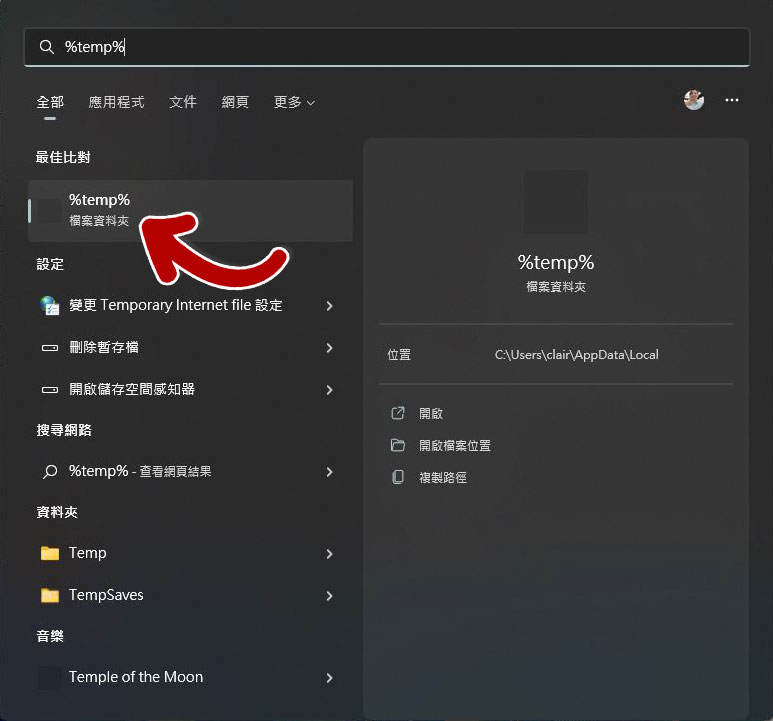
Cleaning out the TEMP folder is also a safe option. Usually, malware and spyware will reside in the TEMP folder on your computer. If you want to access the TEMP folder, press the Win + S key combination to call up the search, enter the keyword “%temp%”, click Open, select all files, and delete it permanently (Shift + Del).
In addition to what is mentioned above, if you feel uneasy and want an extra layer of protection, you can download and install anti-spyware software. However, I still recommend that you choose mainstream models with good reputations, including Norton 360, Bitdefender and McAfee Total Protection. Although these are mainly anti-virus software, they can also identify spyware from applications and delete them. After installing anti-spyware software on your computer, the system will conduct a thorough scan of all files, files, and applications to pick out harmful parts and delete them. In addition, you can schedule them regularly as needed. More importantly, you must ensure that these software are kept up to date so that the database can keep up with the ever-changing mutant viruses.
How to protect your computer from spyware?
Prevention is better than cure. In addition to detecting and removing spyware, you must also be aware of protection.
- Do not click on links or attachments from strangers or from unfamiliar sources.
- Avoid using public WiFi networks.
- Don’t download apps and games from untrusted third-party sources, as they may contain spyware or viruses.
- Installing a genuine operating system on your computer and protecting your computer with various security measures in the system can reduce the chance of being infected with spyware.
Source: KOCPC Chinese