


During the WWDC 2026 press conference, we have already made some arrangements, including Siri AI、New architecture for Apple Intelligence, but at that time Apple did not detail the new features and improvements of each new system. Many people will be curious, in addition to Siri AI and Apple Intelligence, are there any changes in iOS 27, iPadOS 27, and macOS 27?
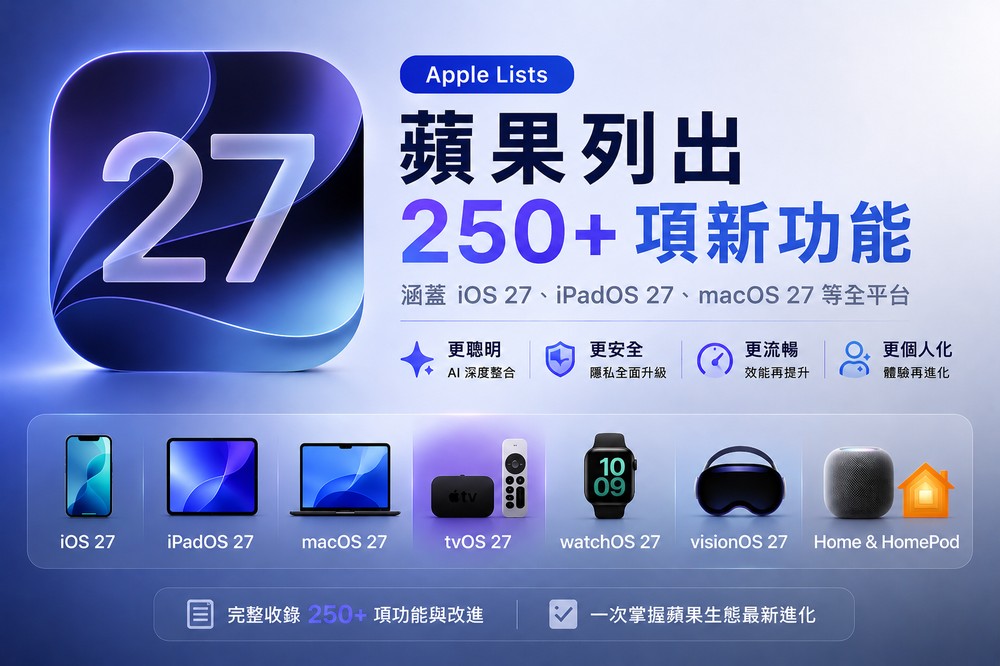
according toForeign media MacRumors reported, Apple listed iOS 27, iPadOS 27, macOS 27 Golden Gate, watchOS 27, tvOS 27, visionOS 27 and other systems in detail in a slide. The total number is more than 250 items. I will sort it out for you below.
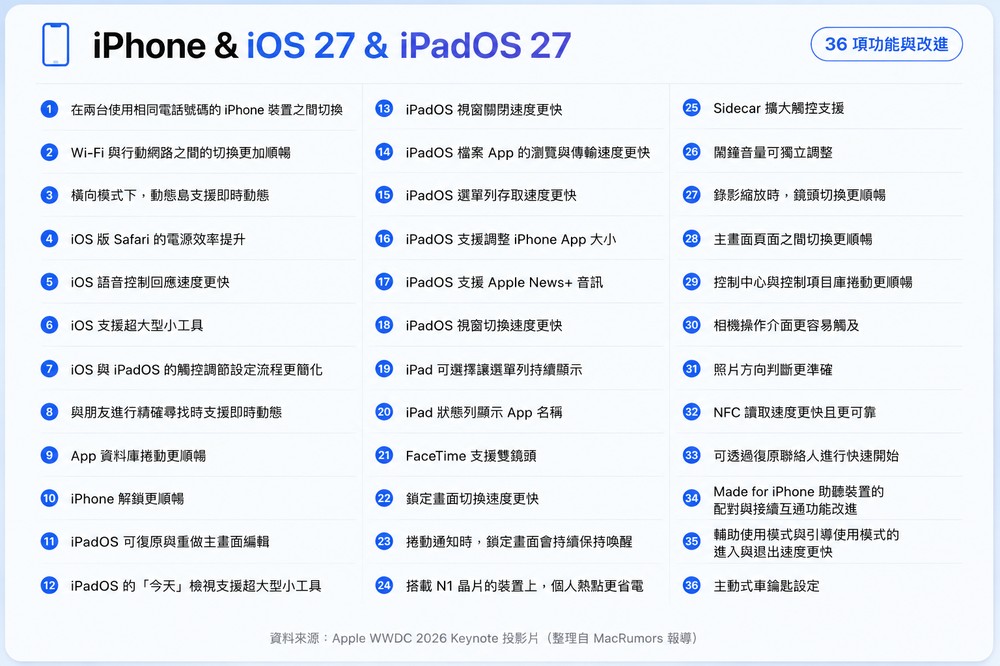
The focus of iOS 27 and iPadOS 27: Rather than a single new feature, it’s more about optimizing daily operations
Many updates in iOS 27 this time are related to optimizing daily use. For example, Apple lists the same phone number to switch between two iPhone devices, the transition between Wi-Fi and mobile networks is smoother, Safari saves more power on iOS, and Voice Control responds faster.
Dynamic Island also has some extended applications this time, such as displaying “real-time updates” in landscape mode, or using “real-time updates” with the “accurate search” function for friends. In addition, Apple also lists many operational improvements such as the lock screen, App library, Control Center, and home screen page switching.
The focus of iPadOS 27 is more towards multitasking and desktop operations. As mentioned in this list, the iPadOS window closing, window switching, file app browsing and transfer, and menu bar access speeds have all been improved, and you can also choose to keep the menu bar displayed.
For people who often process files, edit videos or organize files on iPad, this kind of detailed upgrade may be more meaningful than simply adding a new app.
In addition, iPadOS 27 also supports resizing the iPhone App window, adds super-large widgets to Today View, and adds restore and redo functions to the home screen editor.
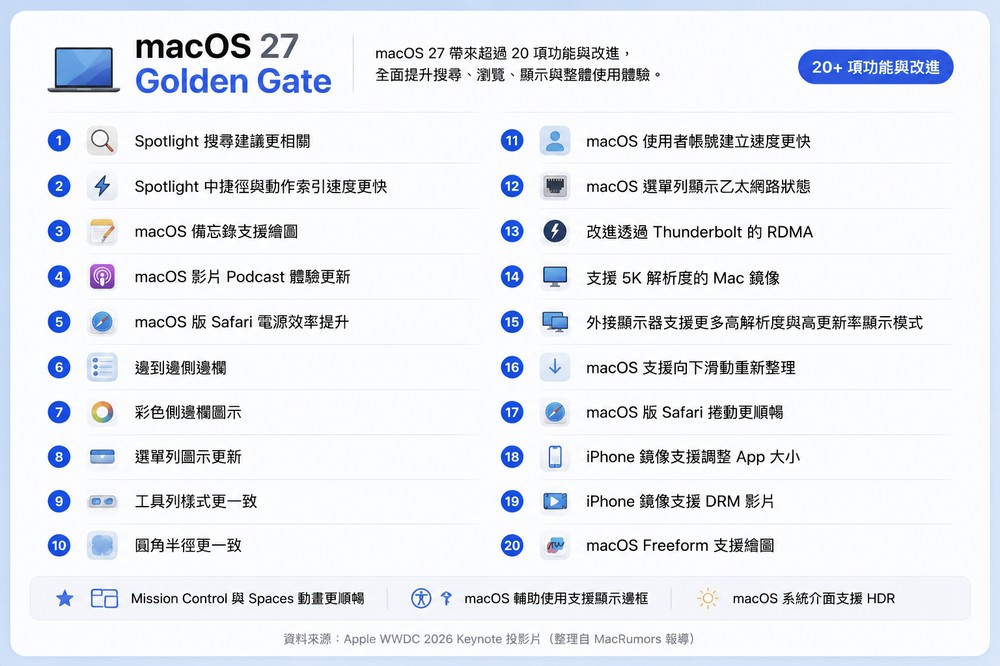
macOS 27 Golden Gate highlights: Spotlight, external monitors and interface consistency have been upgraded
macOS 27 is codenamed Golden Gate this time. Judging from the list compiled by MacRumors, the update direction is mainly focused on search, interface, external screens, and linkage with iPhone.
Among them, Spotlight is the more noteworthy part. Apple lists macOS 27 as bringing more relevant Spotlight search suggestions and speeding up the indexing of shortcuts and actions.
In terms of interface, macOS 27 will add a full-size sidebar, colorful sidebar icons, updated menu bar icons, unified toolbars, and a more consistent rounded corner design.
There are also many practical updates for linking external displays with devices. For example, Mac mirror output supports 5K resolution, and the external screen will have more high-resolution and high refresh rate modes. iPhone mirror output supports resizing of apps and DRM videos.
In addition, macOS 27 also adds “Notes” drawing, “Boundless Notes” drawing, smoother scrolling in Safari, smoother animations in Command Center and Desktop Space, and an HDR system interface.
Apple TV and tvOS 27 Highlights: AirPlay is faster and the interface is smoother
The number of updates for tvOS 27 is relatively small, but it is very useful in several directions. For example, AirPlay connection to Apple TV will be faster, the control center will respond faster, and animations and app startup will be smoother.
The Podcasts App has also been redesigned, and a smart download function will be added to Apple TV. AppleCare warranty information can be viewed directly in settings.

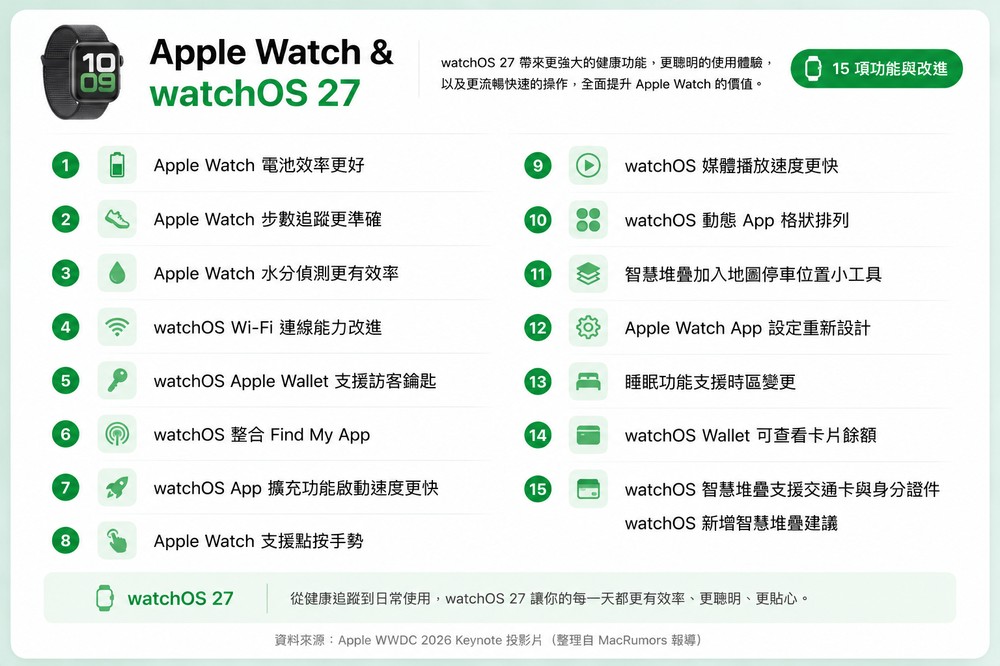
Apple Watch and watchOS 27 highlights: battery life, health tracking and smart stacking all improved
The focus of this update of watchOS 27 can be seen in three directions: battery life, health tracking, and smart suggestions.
The battery efficiency of Apple Watch will be better, step tracking will be more accurate, water detection will be more efficient, and Wi-Fi connection performance will also be improved.
In terms of wallet, watchOS 27 supports guest keys and can also check card balances. The “Find” app will be further integrated, and more suggestions will be added to the smart stack. Information such as parking locations, transportation cards, and IDs may all appear on the watch at the right time.
The operating interface has also changed, including new click gestures, dynamic App grid display, faster App extension startup, faster media playback, and the settings page in the Apple Watch App has also been redesigned. The sleep function adds support for time zone changes, which will be more practical for people who often go abroad or travel on business.
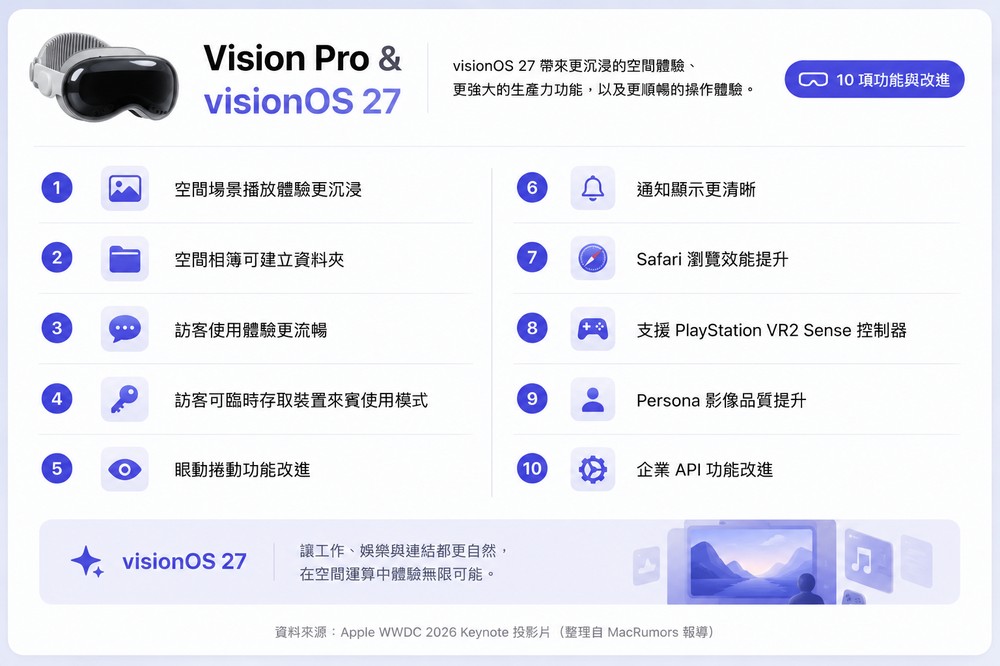
Vision Pro and visionOS 27 focus: more complete interaction with panoramic photos, curved windows and notifications
The update focus of visionOS 27 is obviously to enhance the space usage experience.
Apple said users can set their own panoramic photos as environments, and panoramic photos also support spatial scenes. There are also new changes in window operations, including a new curved window design, Safari supports multi-tab view, and the Mac virtual display also has dedicated gadgets.
Notification interactions have also become more direct. visionOS 27 supports viewing and responding to notifications by looking and clicking, and the control center has also been improved. The system level includes faster booting and faster Wi-Fi connection.
Other updates: Photos, Messages, Safari, Shortcuts, Language Support
CarPlay
- CarPlay currently playing screen supports audio dragging to fast forward/reverse
- CarPlay navigation directions and GPS accuracy improvements
- Wireless CarPlay reliability improvements
- CarPlay supports audio mini player
photo
- Shared albums can filter photos and videos
- Photo App can add keywords to photos and videos
- Improved photo album organization function in Photos App
- Photo App allows for customizable slideshows
- Photo App adds “Photographed by me” collection
- Photos app can save any slideshow as a video
- Photo shuffle to select specific pets
- Search photos and videos using more metadata
- Photo search returns better-looking photos of people and pets
- Option to prioritize syncing to iCloud Photos
- Storing photos from shared albums is easier
- Photo shuffle with the option to include your own photos
- Photo App collection pagination renders faster
- Photos app supports select view
- Photo App adds identity document collection
- Photos app loads new shots faster
- Video frames can be saved as photos
- Photos app supports Star Ring
- iCloud shared albums support full-resolution photos and videos
- Shared album permissions to add more participants
- Allow shared albums to expire
- Shared photo album supports recent activities
- Shared albums can be responded to with any emoticon
- Android and Windows can participate in iCloud shared photo albums
- Inviting others to a shared album is easier
message
- Message App joins Drawing App
- Messages app can find uninstalled media
- Messages that fail to be sent in the Messages app will be automatically retried.
- Messages app can continuously send photos, videos and texts
- The Messages app will integrate notifications from multiple Tapbacks
- Messages app displays thumbnails of uninstalled media
- Search message conversations by phone number or contact nickname
- Adding recent camera content to the Messages app is faster
- Improved synchronization of messages between different devices
Apple Music and Podcasts
- Apple Music streaming reliability improved
- Added new AutoMix transitions
- Apple Music album page update
- The music app’s now playing screen loads faster
- Apple Music artist page updates
- Podcast supports searching within the program
- AirPods support custom equalizer
- Apple Music playback starts faster
- Best results improvements in Mail
- Mail messages load faster
- Mail search index more reliable
- Mail list format improvements
- Mail unread badge accuracy improved
map
- Visited locations in the map are more accurate
- Map guide available in more areas
- Map Flyover function enhancement
- Offline map update improvements
- Map route planning supports natural language search
Health, Fitness & Journaling
- Sort by completed Fitness+ workouts
- Health App data updates faster
- Health App supports perimenopause and menopause
- Health App supports perimenopausal and menopausal symptom recording
- The upper limit for the number of attachments in the Log App has been increased
- After exercise, fitness app’s route map is more accurate
- Log items support iCloud synchronization status
- Improved distance accuracy during treadmill training
- Step sync for health and fitness apps
- Fitness training app starts training faster
- Log items support timestamps
- Fitness+ provides perimenopausal and menopausal related training
- The continuous log recording method is more intuitive
- iPhone and AirPods Pro 3 support GymKit
memorandum
- Memo supports chapter links
- Stylized notes from third-party calendar accounts
- Memo supports copying and pasting in Markdown format
- Notes support separators
shortcut
- Shortcut support Else if
- Shortcuts support group conversations
- Shortcut expands “Get content on screen” function
- Shortcuts to save data
- Shortcut editor redesign
- Shortcuts support screenshots and notification automation
Freeform
- Freeform whiteboard preview is faster
- Freeform right-to-left text editing is more reliable
- Freeform whiteboard performance is smoother
- Freeform dark mode adaptive canvas
- Freeform supports collaborative folders
Safari
- Safari start page content loads faster
- Safari web app performs faster
- Safari animations and graphics are smoother
- Safari JavaScript processes faster
- Safari start page resizes more smoothly
- Apple Wallet and Apple Pay
- Apple Pay makes card selection and payment management easier
- Wallet order tracking supports Australia and Canada
Find My
- Find My sharing options are more flexible
- Find My user interface improvements
family
- Home App supports 4K camera recording
- Home App allows simultaneous viewing of streams from compatible cameras
calendar
- Can modify multiple calendar events
- Calendar event details are simplified
- Calendar scrolling is smoother
Auxiliary use
- Reading and editing PDFs is easier with VoiceOver
- PlayStation Access controller support improvements
- Assistive usage mode setting process is simplified
- Systems, performance and more
- Liquid Glass Updates
- Customizable Liquid Glass
- Apps start faster
- Web page messages no longer interrupt system messages
- Save PDF faster
- AirDrop transfers faster
- AirDrop recipient search is faster
- Bluetooth power management improvements
- FaceTime quality improvements when the connection is poor
- Browse online files faster
- Supports sharing media from third-party apps
- Preview App supports more file formats
- Emergency alarm monitoring is more efficient
- Keep window position more consistent across external monitors
- Game controller settings improvements
- Battery Insight Information Improvements
- Game coverage interface navigation improvements
- Apple News performance improvements
- Camera settings show all options
- Access password assistance from the lock screen
- In low power mode, the camera consumes less power
- In low power mode, the camera starts up faster
- iCloud collaboration link preview is richer
- Can request access to items shared via iCloud
- Faster text recognition in photos and documents
- App icon update
- CPU scheduler optimization
- Fields can be automatically resized and reset
- Enabling full-screen view from the Photos gadget is faster
- Access shared content faster on iCloud.com
- News and Stocks article animations are smoother
- iCloud collaborative sharing links are easier to access
- Active windows are easier to identify
- Widgets update instantly when the app is open
- Fast return service is faster
- Weather App hourly and 10-day view updates
- Start uploading photos to iCloud faster
- Option-click for secondary sorting
- When sharing photos and links, provide recipient suggestions based on the content
- Emoji and sticker keyboard loads faster
- Widget library scrolling is smoother
- Apple Account Recovery Codes Easier to Access
language and region
- Added Canadian English and Philippine English interface languages
- Added Slovenian and Estonian keyboard layouts
- Supports automatic punctuation when typing using multilingual keyboards
- Chinese and Hindi support natural language time format
- Call recording transcripts support Traditional Chinese, Japanese and Brazilian Portuguese
- New multi-language keyboards, including Afrikaans, Basque, Bebein, Filipino English, Galician, Guarani, Luxembourgish, Xhosa and Zulu
- Added keyboards for multiple Native languages, including Blackfoot, Comanche, Cree, Kiowa, and Chutina
- Process multilingual handwritten text faster
- Split word input
- Smart language and keyboard setting suggestions
- Vietnamese VNI keyboard supports QuickPath and input suggestions
- Multilingual grammar check
- China supports alarm clocks adjusted according to holidays
- Provide punctuation suggestions when typing in Chinese
- Indian alternative calendar supports using current time zone when traveling
- Expanded language support for shopping lists in Reminders
- When inputting Simplified Chinese and Japanese, the conversion effect from phonetic characters such as pinyin and kana has been improved.
- Instant voicemail verbatim support in Singapore English and Japanese
- Visited Places in Maps feature available in more markets
- Scribble supports Hindi and Marathi when used with Apple Pencil
- Chinese and Japanese input suggestions refer to more on-screen context
- Reminder automatic classification function expands language support
- FaceTime real-time subtitles support Traditional Chinese
Source: KOCPC Chinese