


In the past, you may have heard Apple’s early marketing rhetoric, claiming that the iPhone has extremely high security and will not be infected with viruses. Apple has long since retracted this statement, but this “myth” is still circulated in the public, making users relax when browsing the web. So, will the virus infect my iPhone from Safari?
Can viruses infect my iPhone from Safari? Answer: “Yes!”
Although it is wrong to say that “iPhone cannot be infected with viruses”, in fact, iOS devices are generally more secure and the possibility of virus infection is relatively low. The reason why people get infected depends largely on how people use their iPhones. Whether you’re using Chrome, Microsoft Edge, or Apple’s own Safari browser, you should continue to practice good Internet browsing habits, because malicious or unsafe websites are the main cause of virus infection on your phone. Suspicious websites may prompt you to download certain components or files to your iPhone, or try to click on some suspicious advertisements. Although these advertisements look very tempting, please do not be fooled into clicking on them.

You should think back to the essence, the virus itself does not exist in Safari, but on the website you visit using the browser, so no matter which browser you use, as long as you develop good usage habits, you should not encounter any security problems (unless it is physically or targeted intrusion).
How do you know if your iPhone is infected with a virus?
If you’re wondering how to tell if your iPhone has a virus?Cyber Talk There are several warning signs mentioned above, which I think are quite useful for reference. You can compare them:
- Is your phone overheating?
When your device gets hot while running, it is likely a sign that a malicious application is overusing your CPU resources and memory, causing excessive operation and causing the body temperature to rise. - Is your iPhone using too much Internet data?
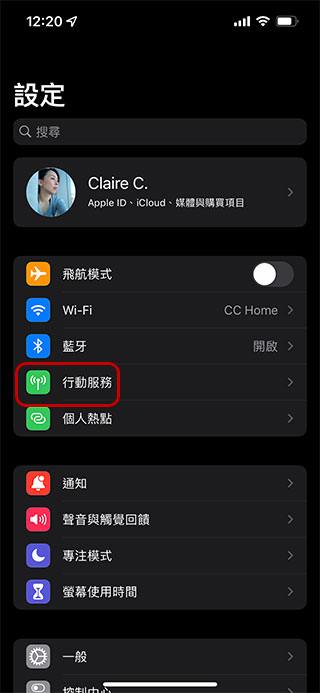
This is an important sign that your iPhone has been hacked. Applications such as Netflix often require large amounts of network traffic because high-definition video streaming is data-intensive. If you have not watched video streaming on your phone recently, nor have you FaceTimed anyone, but the data usage consumed every day is still very high, it means that your iPhone is likely to be infected. If you want to verify it, you can go to the iPhone’s “Settings >> Mobile Services” to view the data usage of each application.
- Are pop-up windows still appearing when the browser is not open?
If you are not using any browser, pop-ups should not be displayed on your phone. If they are, please pay attention to whether they are infected. - Are you seeing strange apps on your iPhone?
If you find an app on your phone that you don’t remember downloading and installing, it’s probably an important warning sign unless you forget it. - Does the app keep crashing while using it?
When there are malicious applications on your device, they tend to occupy computing resources, so other applications will appear abnormal when used, and may crash or crash. - Is the battery draining faster than usual?
As mentioned in the previous article, it is common for malware to occupy resources because it continues to transmit data or install more malware in the background, so your phone’s battery consumption will be much worse than normal. - Is your iPhone running slowly?
The overall experience is significantly slower. This is the last sign of virus infection. However, factors such as aging equipment and obsolete equipment must also be ruled out.
If the above problems occur on your phone, please restore the iPhone to its original factory settings to remove the virus, but if you still have problems, the best way is to contact Apple or take your iPhone to a repair center for help.
Source: KOCPC Chinese