


In fact, the Autoplay video automatic playback function is not a bad feature, but sometimes you just don’t want to waste data (even in a Wi-Fi environment, it may be a hotspot on your phone), so you should at least give users the option to turn it off. And with iOS and Facebook are also starting to offer the option to turn off automatic video playbackFinally, now Netflix can finally turn off the automatic playback of trailer videos on “All Devices”! Anyway, come and see our teaching.
Netflix can finally turn off automatic playback of trailers on “All Devices” (tutorial)
Although Netflix on twitterThere is still a little bit of arrogance, but all in all, they finally provide an option to turn off the “automatically play trailers while browsing” feature. according toOfficial description page(There is also an option to turn off automatic playback of the next episode, which you will also see in this article). They provided the following instructions:
You can use the autoplay feature to automatically play trailers while you browse Netflix
to preview the show or movie. To turn autoplay on or off:
1. Log into Netflix on a web browser
2. Select “Manage Users” in the menu
3. Select the user to update
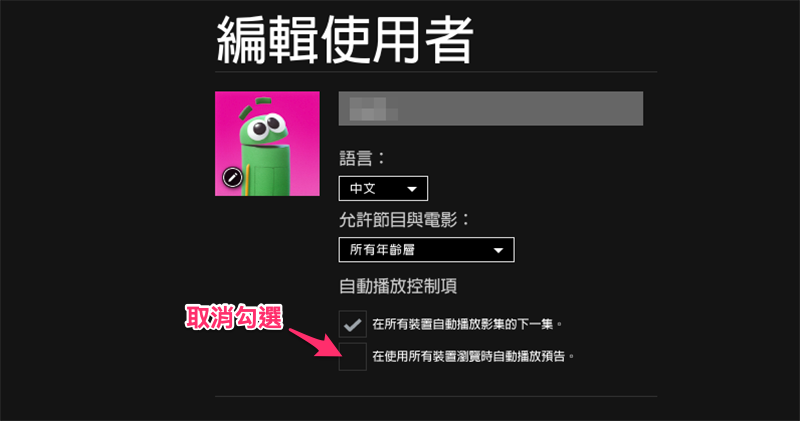
4. Check or uncheck the ‘Automatically play previews when browsing on all devices’ option
Seems a bit complicated? However, the only troublesome aspect of this option is that it may require logging in via the web version. However, since you can turn off this feature in “All Devices” at once, if you feel you hate this feature, then you can turn it off in “All Devices”.Web versionSign in to your Netflix account and select “Manage Users”:

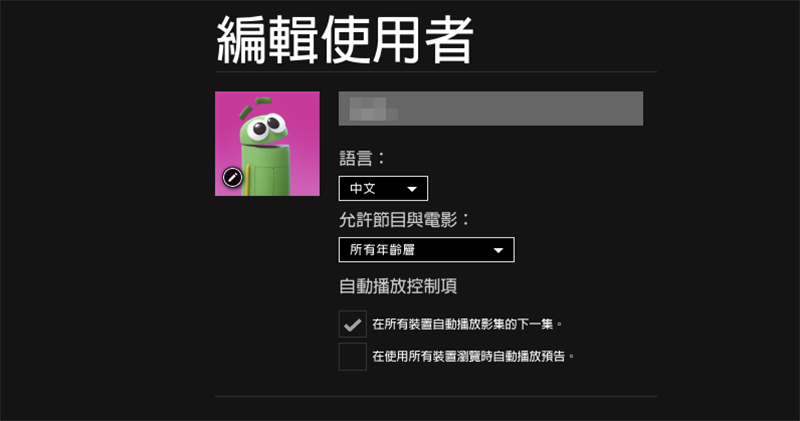
Or link directly to https://www.netflix.com/ManageProfiles (Click here to go directly to, if you are not worried, just copy the previous text) and you can log in to the page below. Click the user icon here to edit the user’s options:

Then it’s very simple, just cancel the options you don’t want (remember to save the options in the end). In this way, you can browse on all devices without seeing the trailer automatically playing! :
Further reading:
Source: KOCPC Chinese