


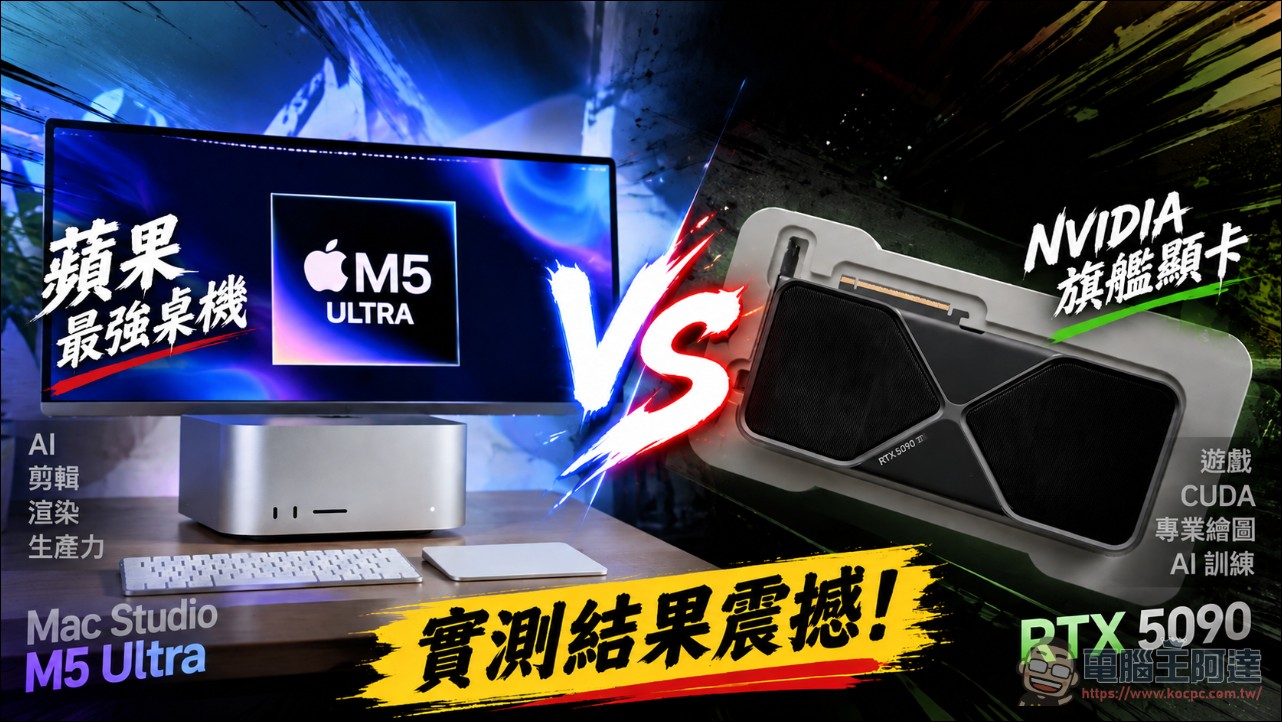
On August 25, Apple announced new Mac Studio models with the M5 Max and M5 Ultra, and the M5 Ultra version is Apple’s most powerful desktop machine to date. YouTube channel Hardware Canucks pitted it against the fastest PC in its editorial office in its latest hands-on test: an AMD Ryzen 9 9950X3D processor, 96GB DDR5 memory, and an NVIDIA GeForce RTX 5090. The tests covered CPU benchmarks, GPU rendering, local large language models, video editing, and gaming, and the results were a bit surprising.
First, the money. The video mentioned that an RTX 5090 alone originally cost around $5,000 (about NT$162,000), and with recent shortages, it was even scalped to nearly $9,000 (about NT$292,000). In comparison, a Mac Studio M5 Ultra with a 36-core CPU, 80-core GPU, and 96GB unified memory is priced under $7,000 (about NT$227,000), meaning the whole machine is cheaper than a single card.
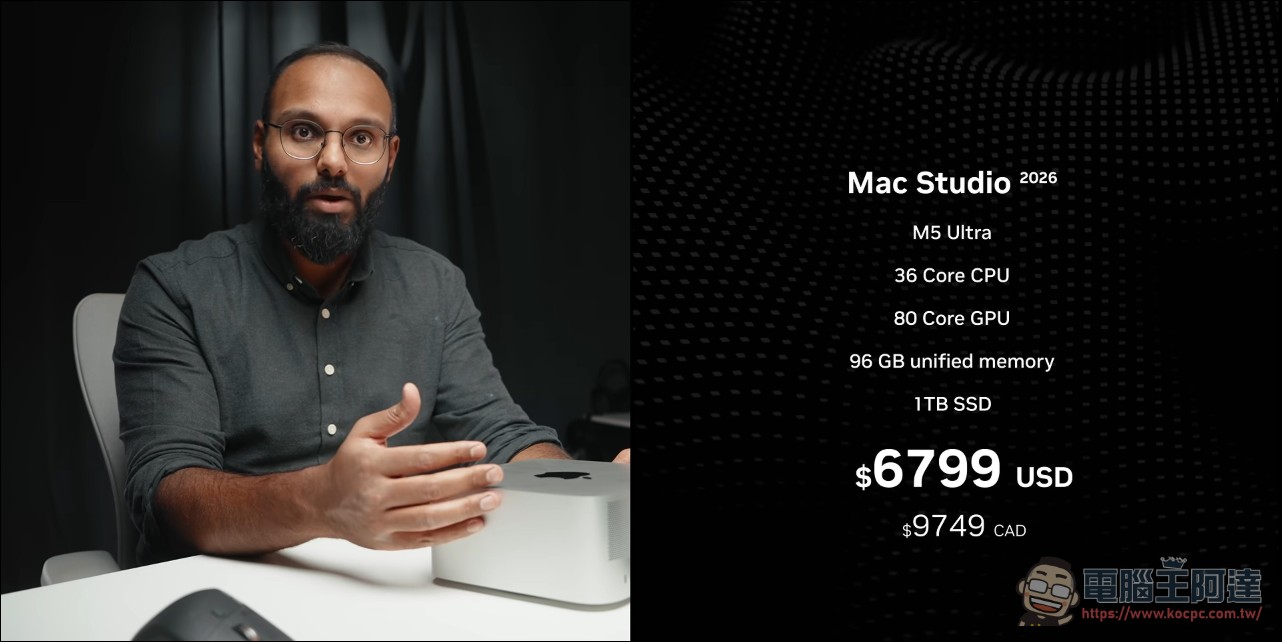
If the test machine he has were upgraded from 96GB to 256GB of memory, that option alone would add US$4,000 (about NT$130,000), and the total price would be nearly NT$390,000.

The host emphasized that at this price, the 5090 is no longer a product sold to gamers; its main selling point is 32GB of GDDR7 memory, and buyers are mostly teams training large language models, powering Agentic AI, or doing heavy GPU-accelerated production. And because both sides are astonishingly expensive, the question this showdown must answer is: Is the M5 Ultra actually an alternative for this kind of professional workload? Price is the premise of this comparison. Because of AI demand, the RTX 5090 has been marked up to nearly three times its suggested retail price, which in turn makes the Mac Studio, whose as-configured price often exceeds NT$300,000, look not so outrageous, and also determines that subsequent testing focuses on professional workloads rather than gaming.
CPU performance: multi-core nearly doubles, while power consumption is a quarter lower.
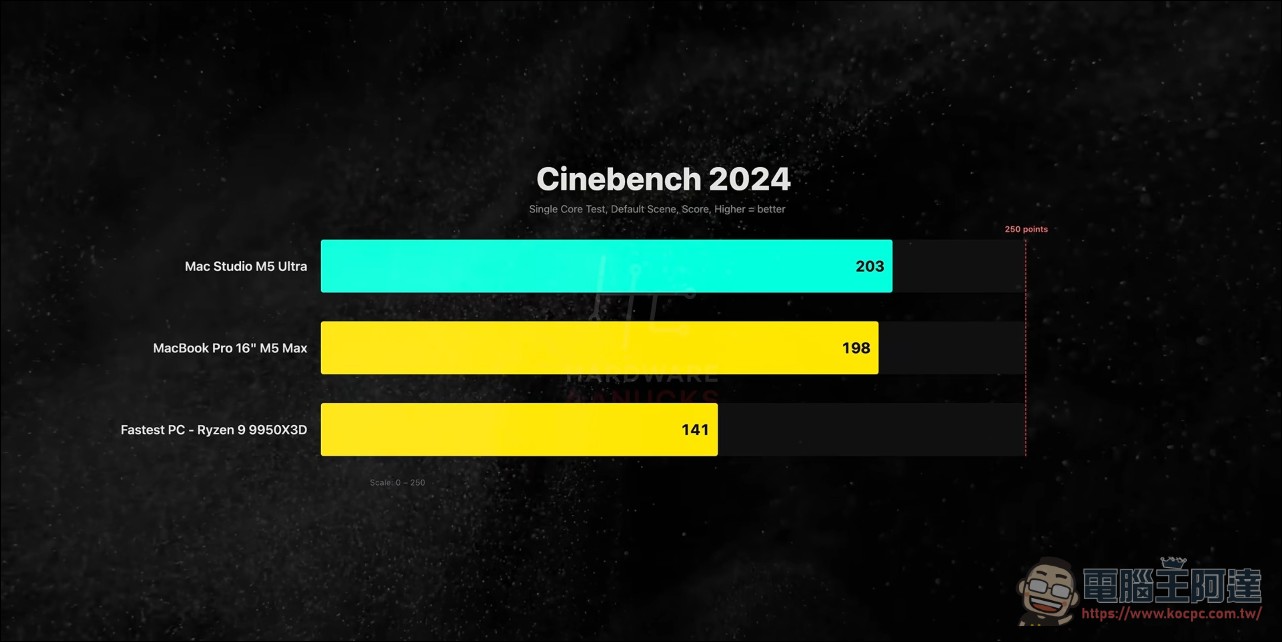
Processor showdown: start with single-core. The M5 Ultra’s single-core score edges out the M5 Max MacBook Pro (since they’re essentially the same-generation product), and beats the 9950X3D by a clear margin, responding extremely quickly to bursty tasks like opening projects and loading large files.
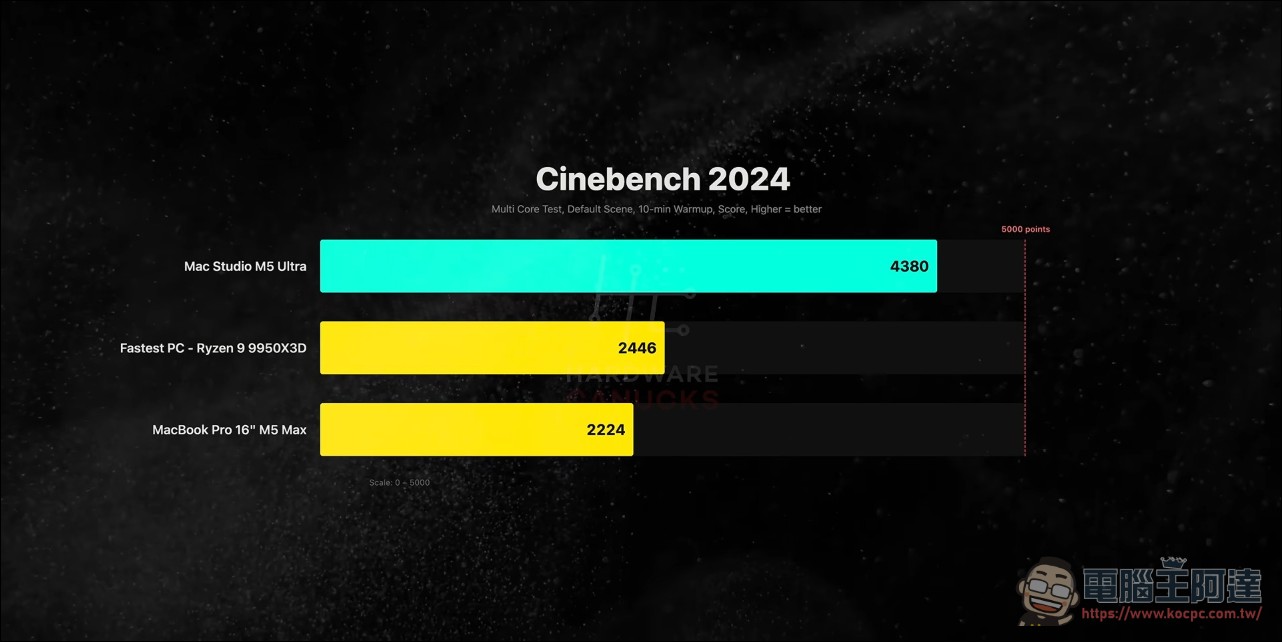
Multi-core is where the M5 Ultra truly excels: the 9950X3D’s 32 threads are no match for the 36-core M5 Ultra, with benchmark scores nearly twice as high, and Cinebench 2026 maintains the same lead. And this is a sustained 10-minute long-duration test result, not just a short burst.
What surprised him even more was the power consumption. Under full-core load, the M5 Ultra draws about 150W, while the 9950X3D draws about 200W—meaning it delivers nearly twice the performance using 25% less power; the machine is quiet at idle, and even under full load the fans don’t sound like a jet engine.
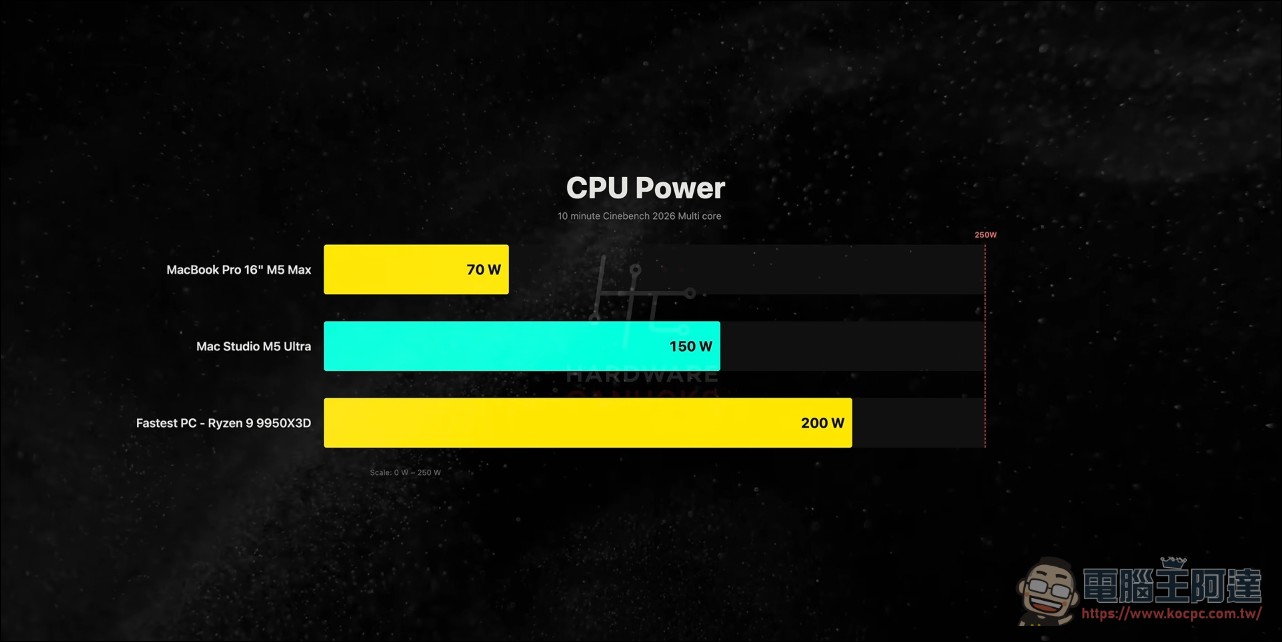
Real-world applications echo this as well: Blender rendering is over 70% faster than the 9950X3D and more than twice as fast as the M5 Max MacBook Pro; Houdini effects are 60% faster; HandBrake transcoding also maintains a comfortable lead.
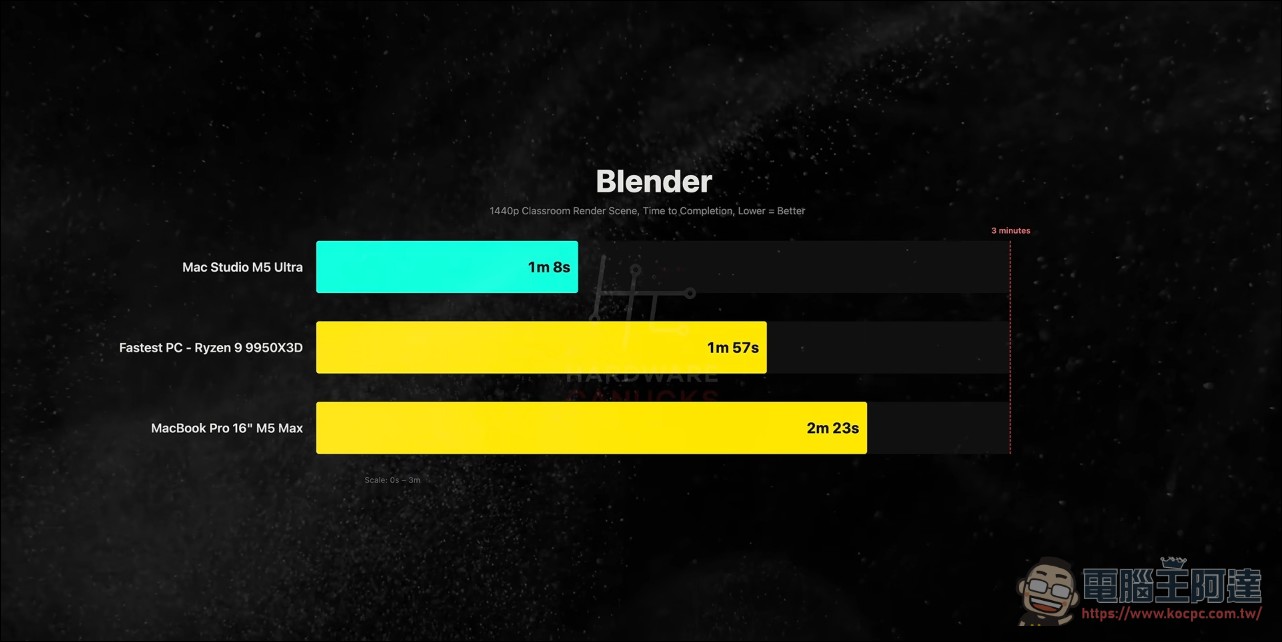
On CPU projects, the M5 Ultra almost completely dominates its rivals. The point isn’t just that it’s fast, but that it improves performance and power consumption at the same time. For studios doing long rendering and transcoding sessions, electricity bills and noise are both costs, and this is a structural advantage of Apple Silicon.
GPU rendering: beats CUDA, loses to OptiX
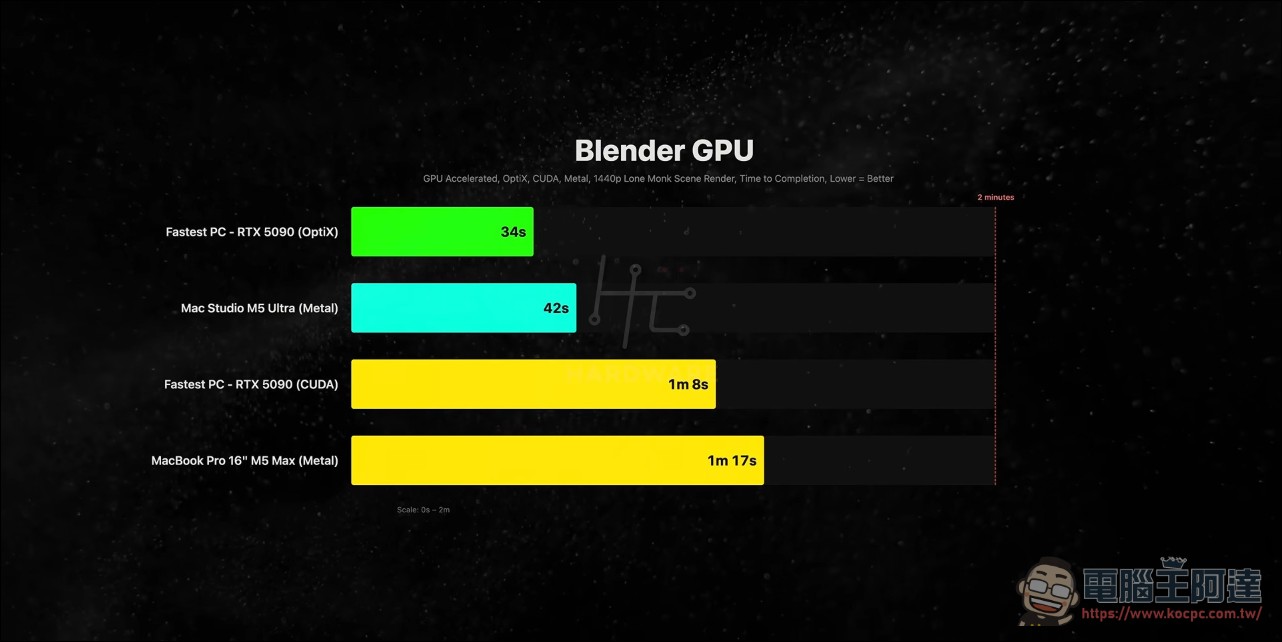
There’s an interesting twist in the GPU story. In Blender tests, the Mac Studio is about 40% faster than the RTX 5090, but the video points out that this comparison pits Apple’s Metal path against NVIDIA’s CUDA path; Blender’s OptiX ray-tracing acceleration has to be enabled separately on the PC side, and once it is, the 5090 overtakes the Mac Studio. The software stacks running on the two sides are completely different, and he lays out both sets of results to show that which one to buy depends on the toolchain you’ll actually use.
Local AI: The 5090 has the edge on small models, while Mac fights back on large models (⏱️ 06:35-11:02)
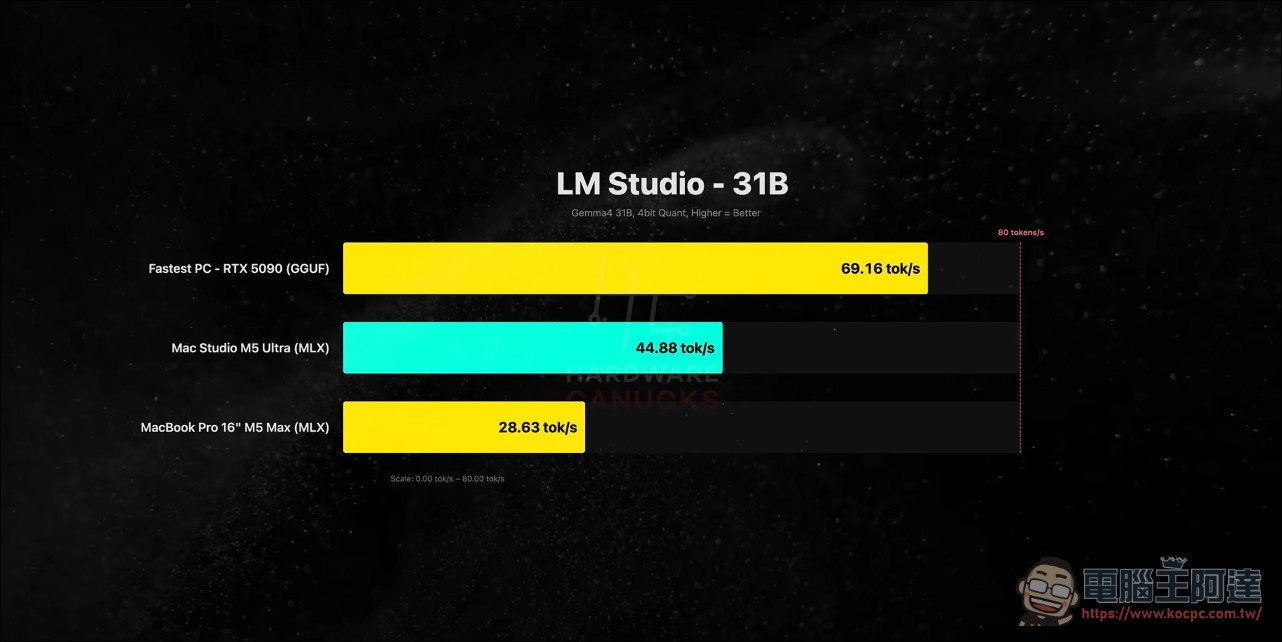
Local AI is the most promising battleground for the M5 Ultra. The host tested six models ranging from 12B to 70B parameters in LM Studio and first explained the methodology: on the Mac side, Gemma 4 12B, GPT-OSS 20B, and Gemma 4 31B run on Apple’s own MLX framework, with native acceleration advantages; for 27B and 70B, both sides use the GGUF format for comparison.
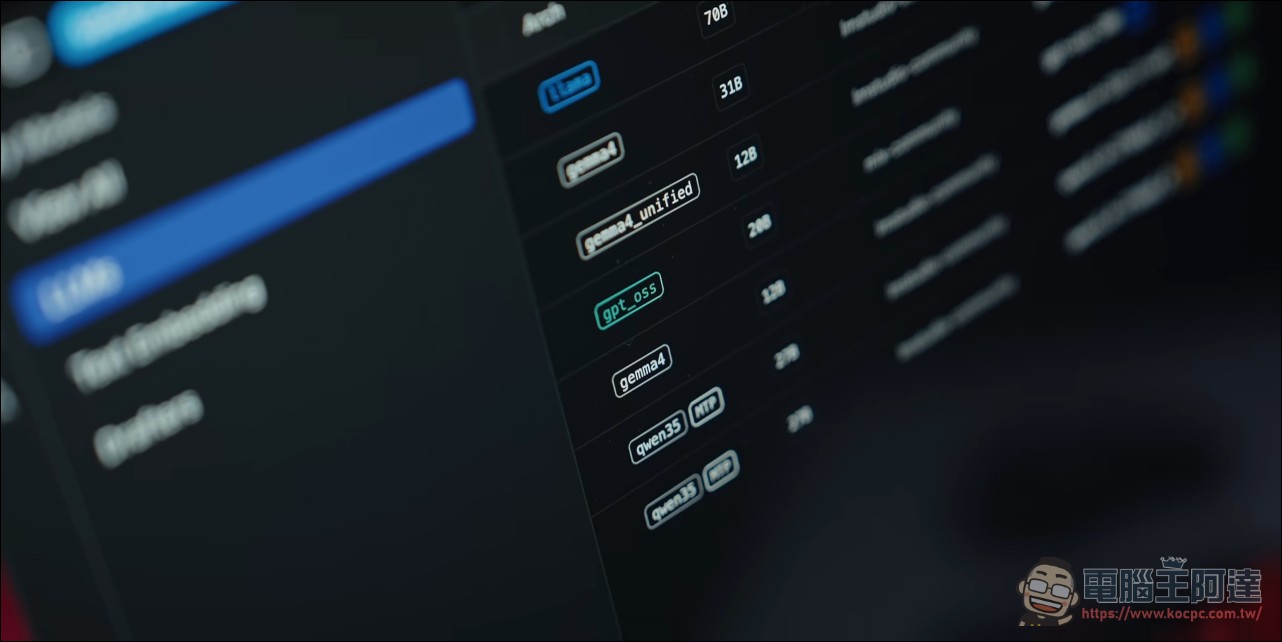
When the model fits within 32GB of VRAM, the 5090 has the upper hand:
- Gemma 4 12B(MLX): 5090 is about 45% faster
- GPT-OSS 20B(MLX): 5090 is almost over 75%
- Qwen 3.8 27B (GGUF, Q4 quantization)5090 is about 47% faster.
- Qwen 3.8 27B (GGUF, Q8 quantization)The gap narrowed to about 23%
- Gemma 4 31B(MLX,4-bit)5090 is about 54% faster
The gap for Q8 is smaller than for Q4 because higher-quality quantization is more memory bandwidth-intensive, which plays right into the strengths of the M5 Ultra’s unified memory architecture.
With the 70B DeepSeek R1 Llama distilled version, the situation flips entirely. The model doesn’t fit into the 5090’s 32GB of VRAM, so the overflow has to be transferred to system memory via PCIe, at speeds far below dedicated GPU memory. As a result, the M5 Ultra is more than 20x faster than the 5090, and even an M5 Max MacBook Pro wins. Power consumption is nearly the same on both sides (5090 around 275W, M5 Ultra around 300W), yet there’s a 20x speed difference. (Editor’s note: Simply put, for small local models, the RTX 5090 has the biggest advantage due to ecosystem and raw compute, but models exceeding the 32GB VRAM limit become completely unusable. However, with Strata recently, this situation has actually changed.)
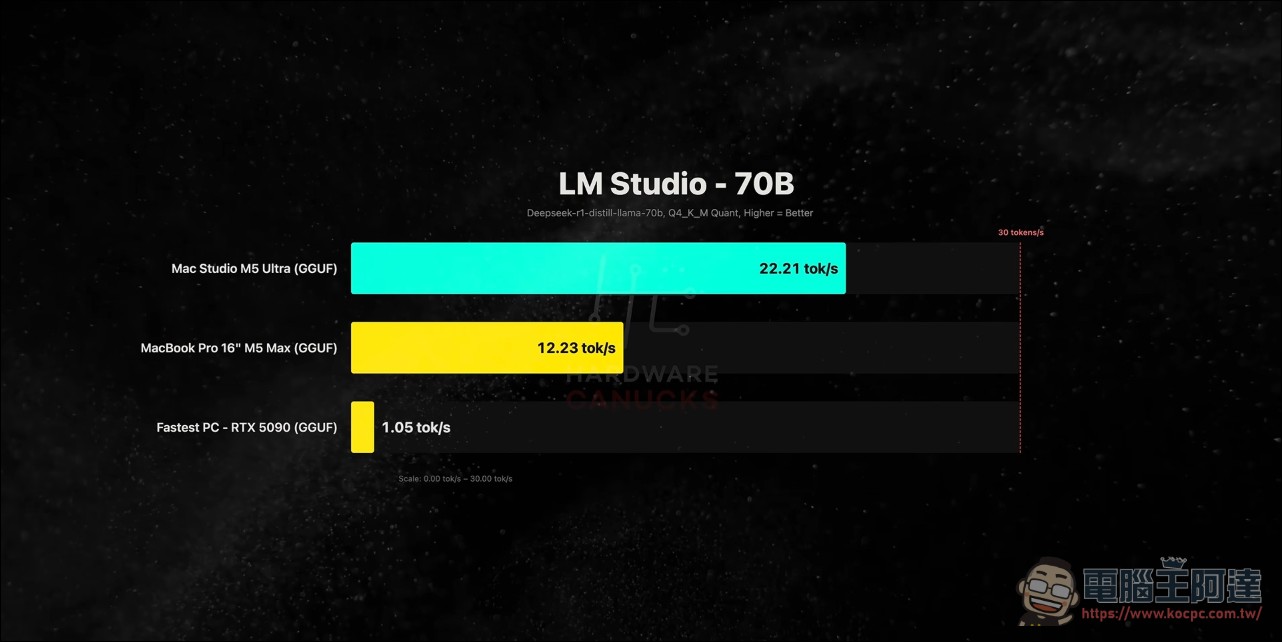
With small models, it comes down to GPU throughput, and NVIDIA still has the edge with its raw compute power and high-bandwidth GDDR7. Once models get large, the contest shifts to a war over memory capacity. Unified memory architecture proves its value here: 256GB of shared memory keeps models above 70B from shuttling back and forth over the PCIe bus, and it is also Mac Studio’s foothold in the local AI market—at a minimum, the M5 Ultra can run any model under 200B parameters.
Video editing: Adobe optimizations let laptops match flagship desktops (⏱️ 11:02-12:10)
The editing tests can be viewed in two parts. In DaVinci Resolve Studio, exporting a 10-minute 4K timeline to H.265, the M5 Ultra and the 5090 tie, with each relying on its own hardware encoding engine (Apple media engine vs. NvEnc). Switching to a 4K project in Adobe Premiere Pro, the M5 Ultra’s export time is less than half that of the rival PC (5090 plus 9950X3D); even more surprising, the M5 Max MacBook Pro he normally uses for editing has an export time almost the same as this flagship desktop.
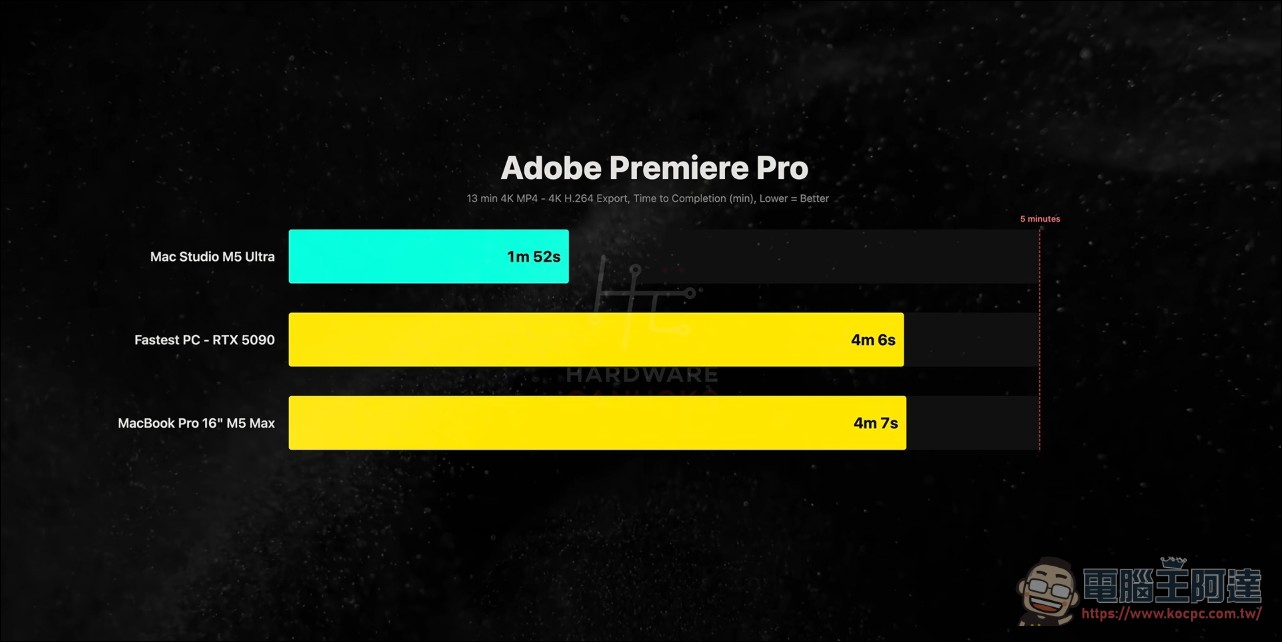
The Premiere results show the value of software optimization. The same hardware can differ by as much as twofold across different apps, and for creators who make a living with the Adobe suite, this test is more useful as a reference than overall benchmark scores.
Games: Playable, but don’t pay for games.
There was no suspense in the gaming section: the 5090 won by a wide margin in all three major titles—Cyberpunk 2077, Baldur’s Gate 3, and Total Warhammer. Even for Pragmata running through the CrossOver translation layer, the Mac fell behind considerably. The host noted that the first three games all have native Apple Silicon versions, and games like Pragmata that can only rely on a translation layer will lose another chunk of performance.
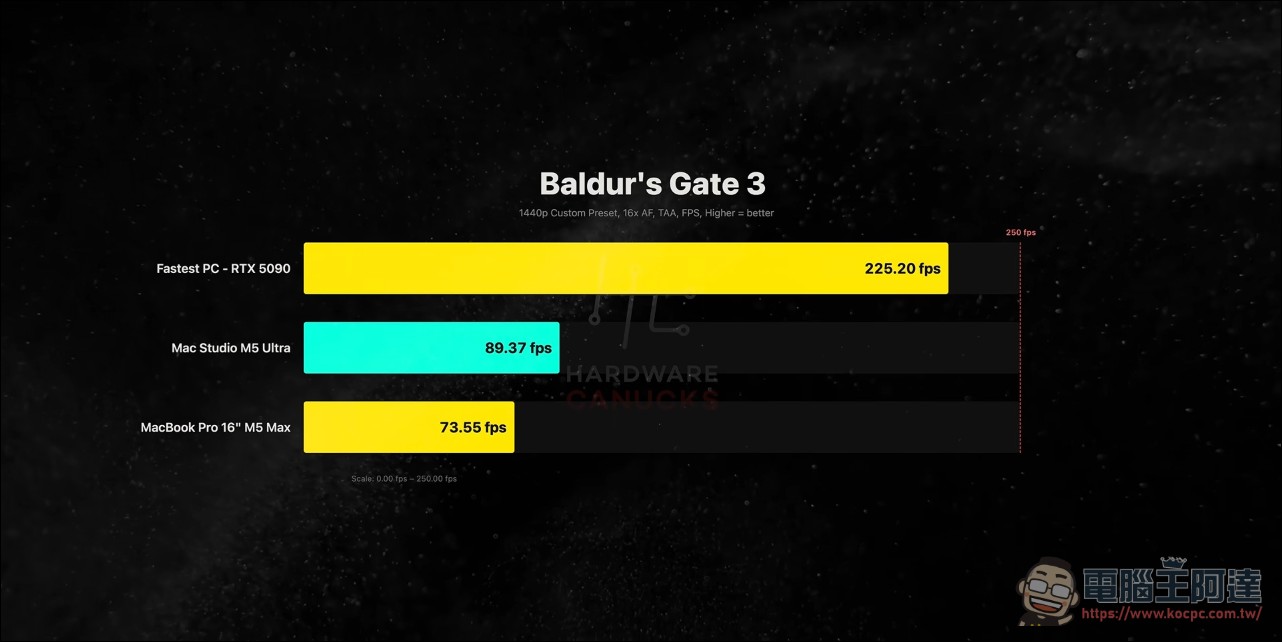
The host’s conclusion, though, was unexpectedly forgiving: today’s Mac can already play some games during breaks—five years ago, saying that would have gotten you laughed at. PC is still the first choice for gaming, provided you didn’t pay a premium for hardware just to chase performance.
This video is very detailed in its explanations and introductions of all aspects. I highly recommend everyone watch the original video; it has cc subtitles:
Buying red flags: stock shortages, price hikes, and no upgrade path.
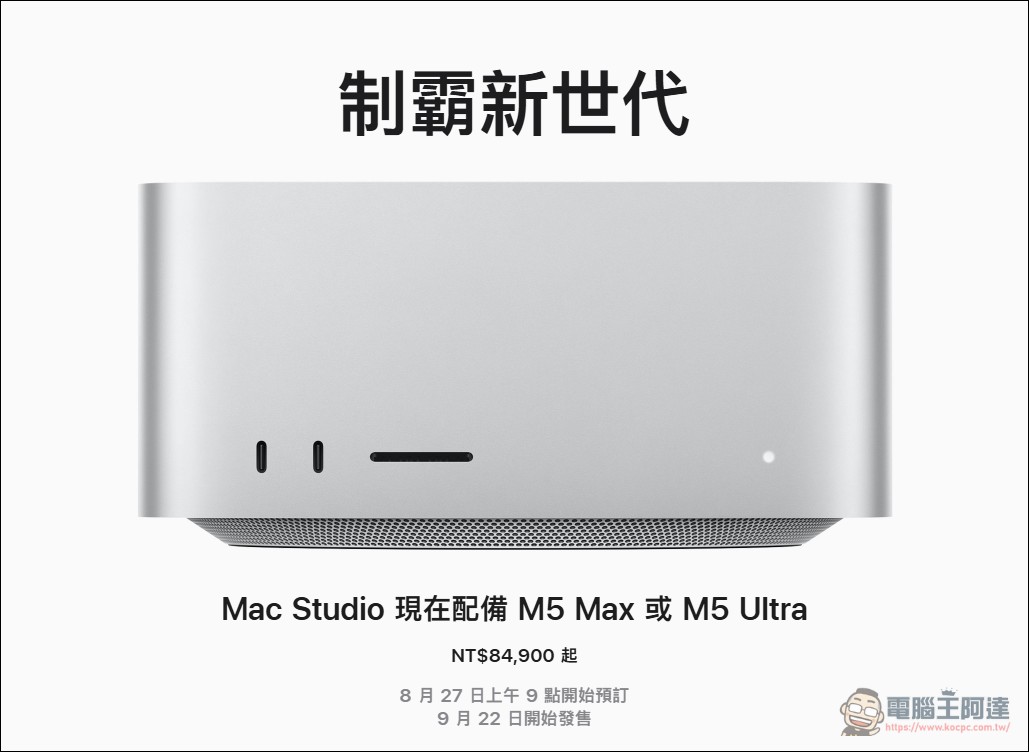
The Mac Studio looks almost identical to the previous generation, with the same footprint and I/O configuration: six Thunderbolt 5 ports, HDMI 2.1, 10Gb Ethernet, and it still retains full-size USB-A and an SDXC card reader, which is very practical for photographers and people still using older devices.
Before buying, though, there are a few caveats. First, both sides are expensive: the 5090 is being scalped for close to 3x its suggested retail price, and a Mac Studio with 256GB of memory is likewise costly. Second, this machine’s unified memory wasn’t pushed to its limit in most tests, and that headroom is exactly what local AI developers care about. Third, supply is tight: the M5 Ultra model currently has a 16-to-18-week wait, and Apple recently raised prices across its Mac lineup, so no one can say for sure what will happen in four months. Fourth, if you’re after pure CPU performance, the PC counterpart is Threadripper, but a complete build with a Threadripper Pro 9975WX (32 cores, 64 threads) paired with a 5090 costs over US$14,000 (about NT$455,000).
In terms of pricing, it starts at US$2,499 (about NT$81,000) for the M5 Max version, while the entry-level M5 Ultra is US$5,499 (about NT$179,000). This test unit, upgraded to a 36-core CPU, 256GB of memory, and a 4TB SSD, costs US$12,299 (about NT$399,000) and is also out of stock for 16 to 18 weeks. In Taiwan, the M5 Max version starts at NT$84,900, and the M5 Ultra version starts at NT$199,900.
Mac Studio with M5 Ultra
Conclusion: A workstation built for local AI
The host gives a pragmatic summary. If you’re an AI developer who wants to run larger frontier models locally, the Mac Studio is very competitive; for other workloads, the gap between the M5 Ultra and high-end PCs isn’t as big as you’d think, and in the end it comes down to what software you use and what work you do. He thinks his own workflow doesn’t need that much performance, but he can also see the machine’s value in professional fields, and hopes to look back at this comparison in five years. At the end of the video, he gives everyone thinking of upgrading one line: spend rationally.
The M5 Ultra’s decisive factor lies in its memory architecture, not in its score on any single benchmark. It delivers flagship-level performance in large models, editing, and CPU-intensive tasks, while gaming remains a clear weakness. For users with ample budget whose work is tightly tied to local AI or professional rendering, the value of this machine is clear; for average consumers, waiting for price cuts and supply to stabilize will be a more pragmatic choice.
Source: KOCPC Chinese