


After Apple’s most powerful desktop ever, the M5 Ultra Mac Studio, made its debut, many users online have been sharing real-world performance results from their own use cases. After testing the M5 Ultra Mac Studio for a week, the YouTube channel Max Tech reran benchmarks on all models, including the M1 Max, M2 Ultra Mac Studio, M5 Max MacBook Pro, and M6 Mac Mini, in its latest video. The conclusion was quite astonishing: this machine beat NVIDIA’s flagship graphics card RTX 5090 in a complex Blender 3D rendering scene, and the author even wrote in the title, “M5 Ultra kills NVIDIA.”

M5 Ultra models feature up to a 36-core CPU, an 80-core GPU, and up to 512GB of unified memory, and Apple officially positions them as “the ultimate desktop for on-device AI and extreme professional workflows.” In Taiwan, M5 Max-equipped models start at NT$84,900, while M5 Ultra models start at NT$199,900, with the 512GB memory version expected to launch in late October. The 80-core GPU, 96GB memory, and 1TB SSD version Max Tech bought costs US$6,800 (about NT$221,000), so let’s see what that money gets you.
99% of people don’t need it, but they still want to upgrade.
At the start of the video, Max Tech admitted that for 99% of people, this machine is “absurdly overpowered,” but the team still decided to upgrade it into their main editing machine, for three reasons. The focus of this test is to rerun the benchmarks for every model from scratch, rather than citing official numbers. The comparison models include the Mac Studio with M1 Max and M2 Ultra, the M5 Max MacBook Pro, and the latest M6 Mac Mini.

Processor and SSD: Scores Never Before Seen in Consumer PCs
In terms of SSD read speed, the M5 Ultra scored over 12,000 points, while the 1TB version’s write speed is slightly slower than that of the 2TB M5 Max, because Apple requires upgrading storage capacity when buying the top-tier chip. On the CPU side, Geekbench 7 scores about 3,700 points in single-core, and after a redesign, the multi-core test is closer to Cinebench’s workload profile, with the M5 Ultra breaking past the 50,000-point mark.

The subsequent 10-minute multi-core endurance test in Cinebench 2026 scored over 17,000 points, nearly twice that of the M5 Max. The host said this was a result never seen before in a consumer PC; only three chips in the world are faster, and all are workstation processors with two to three times as many cores, such as the Threadripper Pro 7995WX, which costs as much as US$10,000 (about NT$325,000).
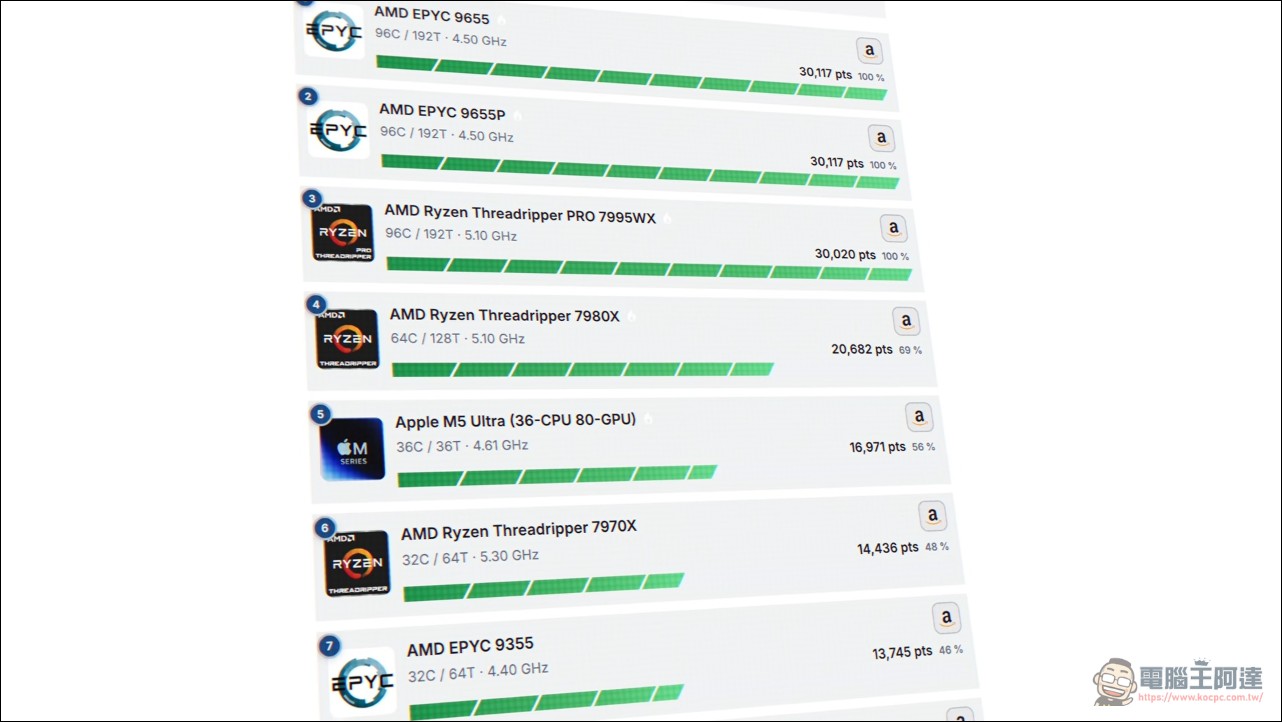
The revamped Geekbench 7 is more favorable to multi-core chips like Ultra, but Cinebench’s long-duration load test is closer to real rendering scenarios, and a score of 17,000 certainly raises the bar for desktop processors by a notch.
Graphics Card and Ray Tracing: 48% Faster Than M5 Max
In graphics performance, the Geekbench 7 GPU test scored around 350,000 points, an impressive gain over the M5 Max. In the 3DMark Steel Nomad Light test, the M5 Ultra was 48% faster than the M5 Max, while Solar Bay Extreme even exceeded 200 FPS. The older-generation M1 Max and M2 Ultra scored extremely low in this test because they lack dedicated ray-tracing hardware.
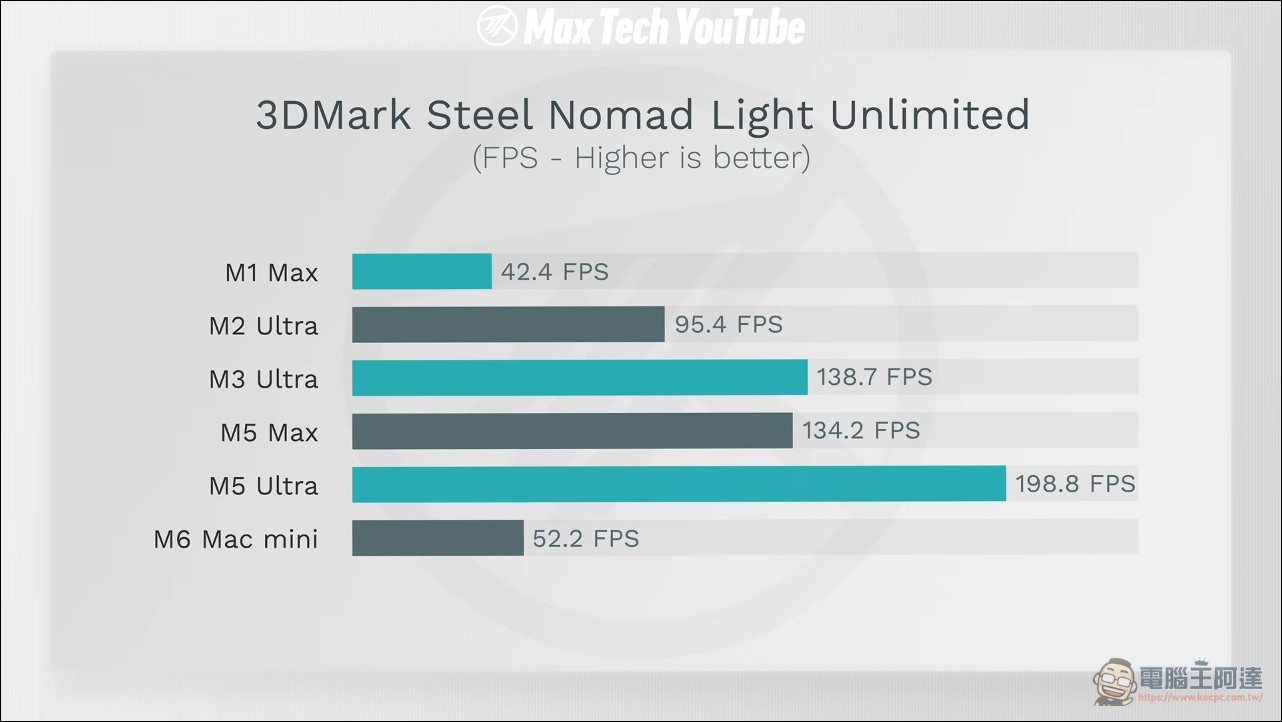
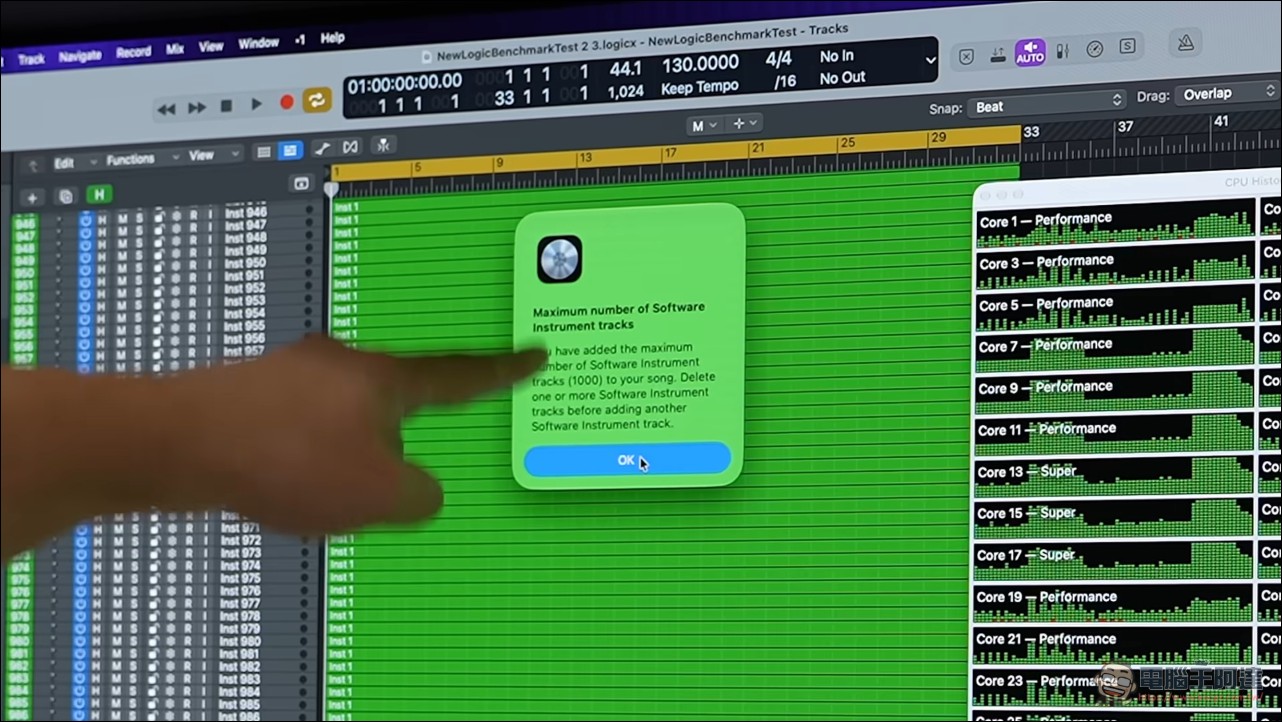
Code compilation tests (rewritten by community developer Alex Zkin to support macOS 27) turned in a time of 55 seconds, far ahead of all previous models. In music production, the Logic Pro test was maxed out immediately, hitting the software’s limit at over 1,000 tracks, prompting the host to joke, “You can’t add any more.”
After ray tracing hardware was added in the M5 generation, Apple’s GPUs finally addressed their weak spot in gaming and rendering workloads. The 48% generational increase shows that Ultra’s dual-chip package is highly effective for graphics scaling.
Blender Rendering Showdown RTX 5090: This Is the Main Reason to Buy It
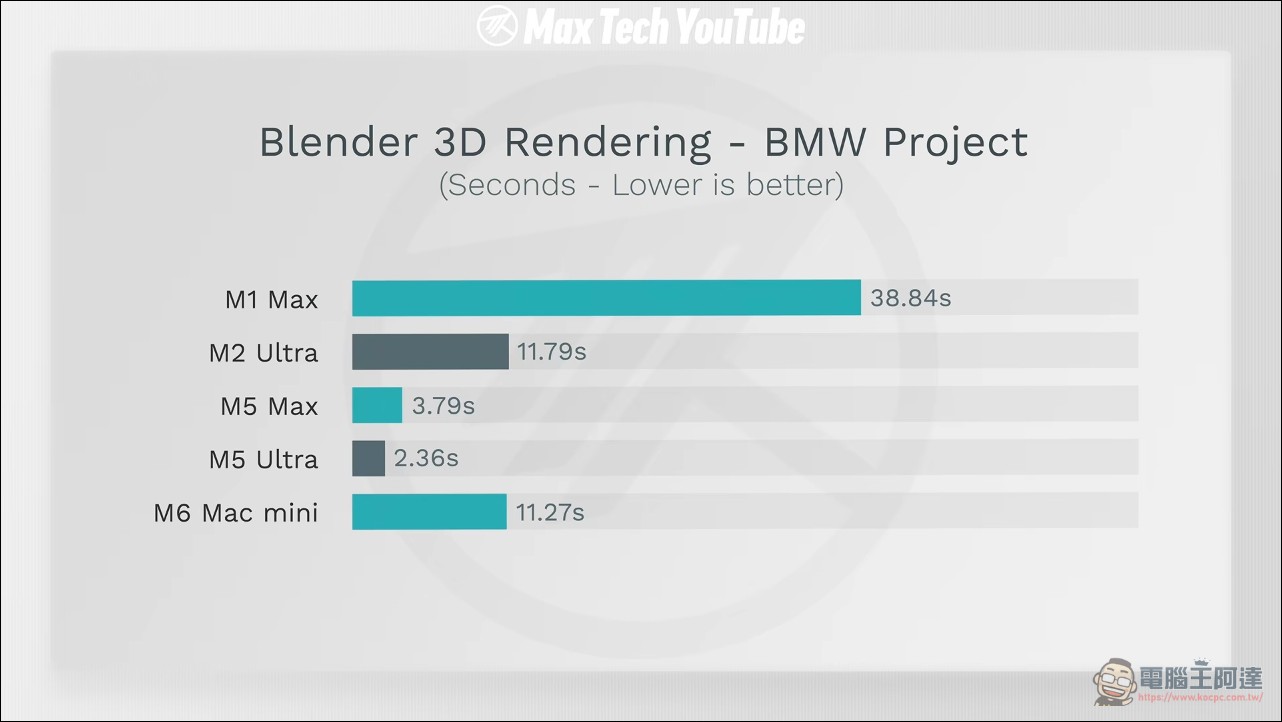
3D rendering is the category most people are watching. In the classic BMW scene, M5 Ultra took only 2.36 seconds, and the more complex Party Tug scene finished in 8 seconds, two and a half times faster than the previous-generation M3 Ultra (what actually surprised me even more is that the M6 Mac mini has already surpassed the M2 Ultra). In the more complex City and swamp projects, M5 Ultra is almost twice as fast as M5 Max, with the swamp scene running in 1 minute 46 seconds.
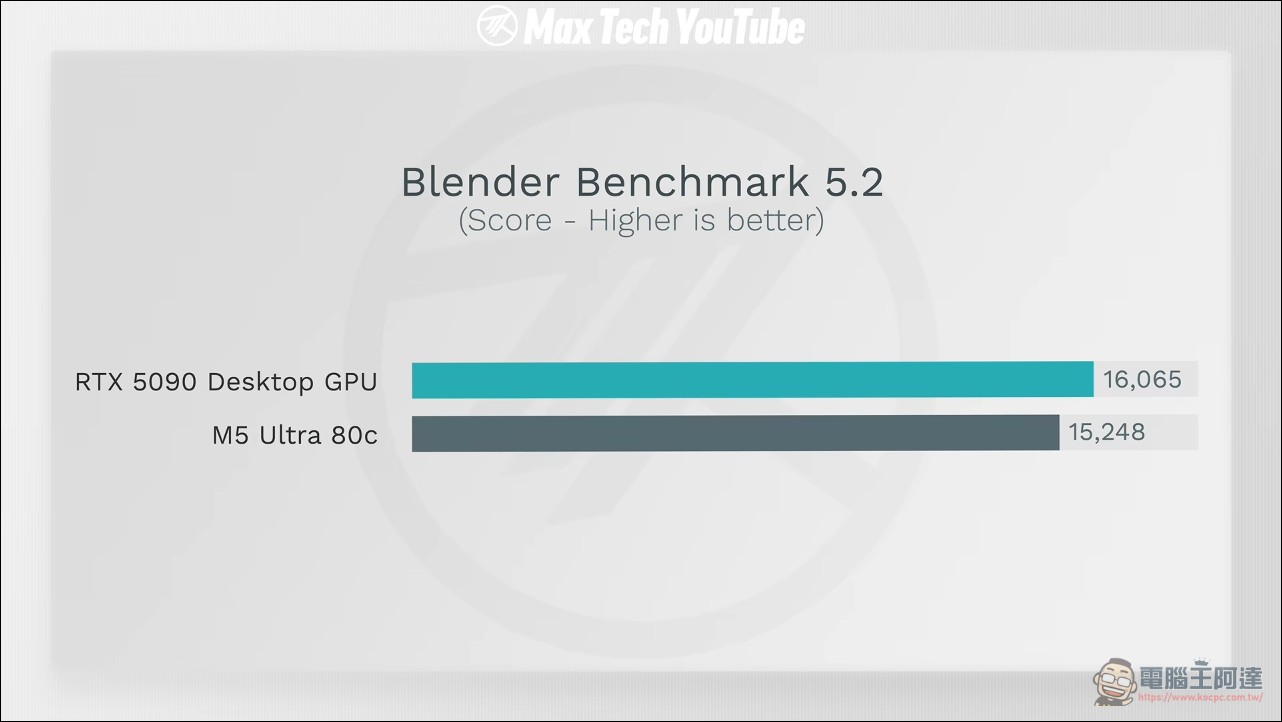
The matchup against the RTX 5090 is split into two stages. In the first stage, comparing against Blender’s official benchmark database, the 5090 scores about 16,655, while the M5 Ultra 80-core GPU scores 15,248, making the 5090 only 5.4% faster.
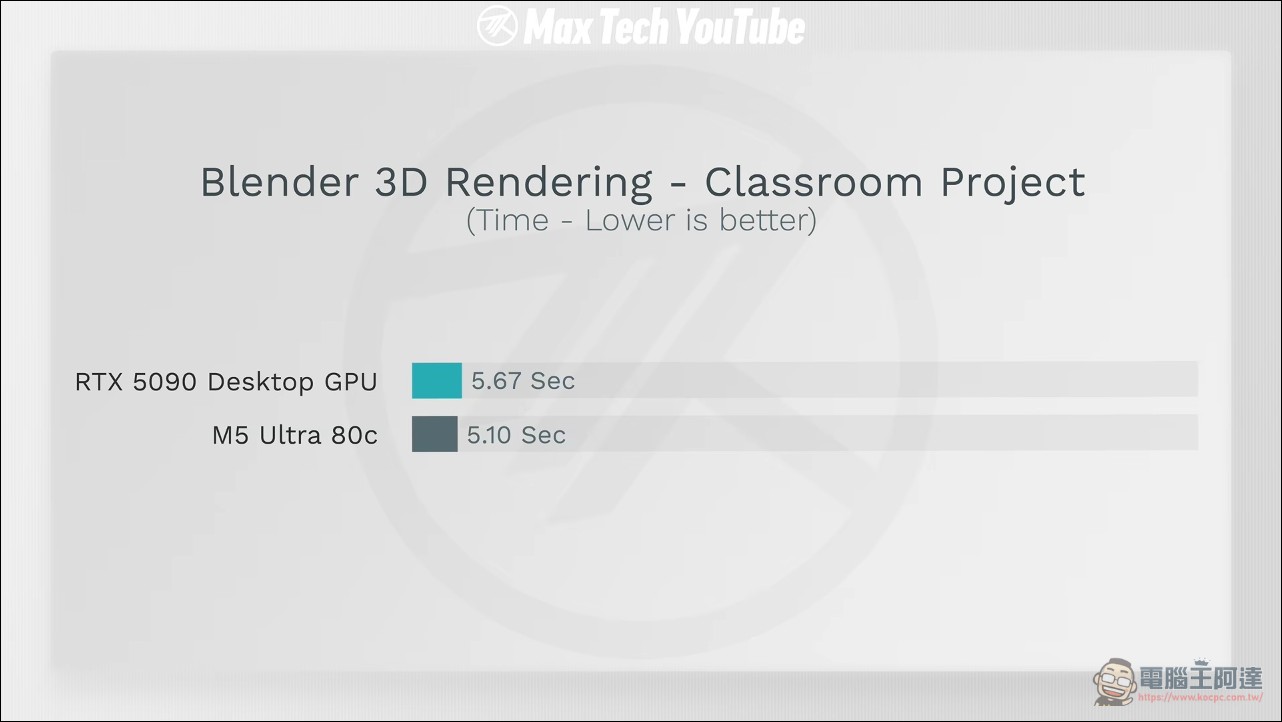
Second stage, direct head-to-head test: Max Tech found a video rendered on an MSI liquid-cooled RTX 5090 by the YouTube channel Contradiction Tech. The Classroom project took 5.67 seconds on the 5090, while the M5 Ultra finished in 5.1 seconds; in the more demanding Lone Monk scene, the 5090 needed 1 minute 26 seconds, while the M5 Ultra took only 35 seconds, a full two and a half times faster. The host speculates the reason lies in the 96GB unified memory versus the 5090’s 32GB VRAM, and the unified memory architecture lets the CPU and GPU share a data pool, so complex scenes don’t have to shuttle data back and forth between the two processors.
Other media outlets also corroborated this test result,Notebookcheck According to the Blender Open Data database, the 80-core M5 Ultra GPU scores about 15,350 points, trailing the 5090 by less than 5%, and the entire $6,800 Mac Studio is cheaper than a PC build with a single 5090 plus other components (about $9,000, or about NT$293,000).
Local AI testing: if the large model fits, that’s everything.
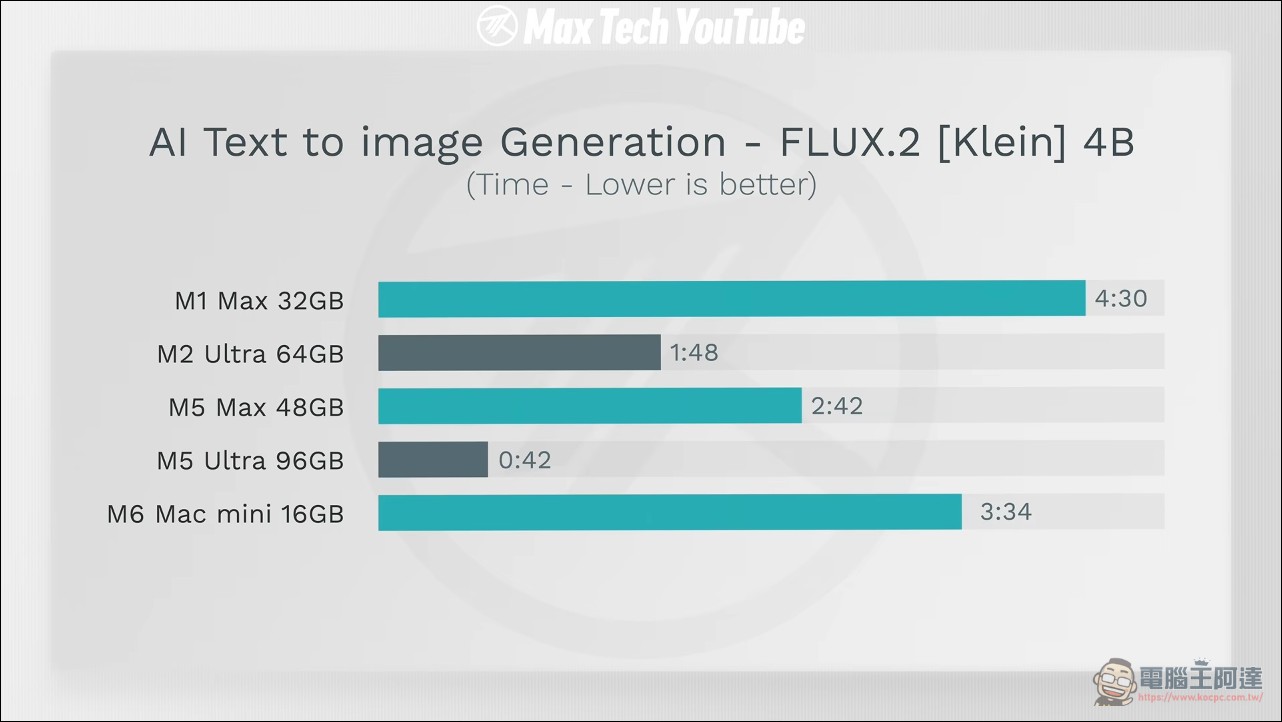
AI testing has two parts. First is image generation with the Draw Things offline app paired with the Flux.2 Klein 4-billion-parameter model. The M5 Ultra took only 42 seconds, while the M5 Max took 2 minutes and 42 seconds; the difference comes from the gap between 48GB and 96GB of memory.
Next, using Ollama to test language models: the Qwen 3.6 35B A3B model had a prefill speed of about 113 tokens per second and an output speed of 158 tokens per second; the larger Qwen 3.5 122B model still delivered output at 75 tokens per second, while the M2 Ultra and M5 Max in the comparison group simply couldn’t run it due to insufficient memory. If you need more, you can also pay extra for a 256GB memory version, at a cost of another $4,000 (about NT$130,000). The host emphasized that this is the world’s only mass-produced PC with this combination of CPU, GPU, and large-capacity unified memory. (Editor’s note: In this part, the author didn’t use an RTX-5090 for comparison; otherwise, the 35B A3B would likely have been crushed by NVIDIA, but the 122B wouldn’t run.)
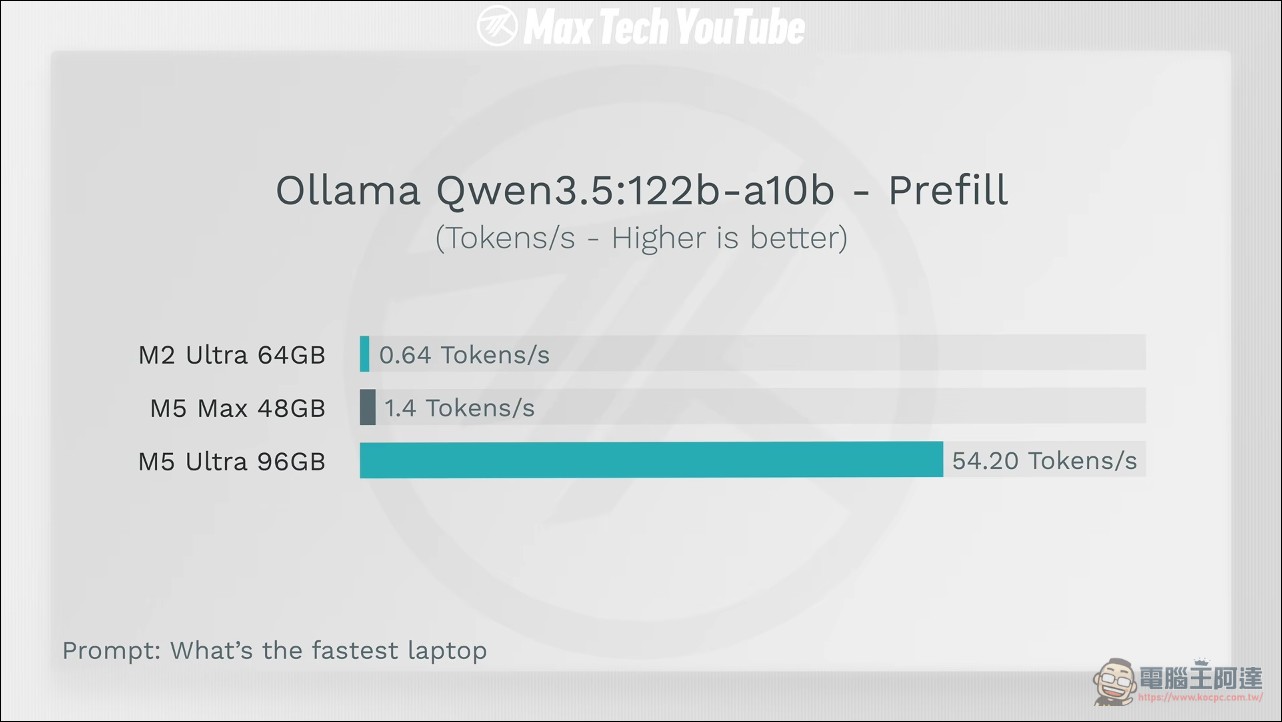
The bottleneck for local AI is memory capacity and bandwidth, not purely the number of compute cores. A 122B-class model being able to run on a desktop at usable speeds is a decisive difference for developers who want to put large models on their own machines, and it also highlights the significance of the 512GB version.
Creator Workflow: Lightroom and Final Cut Pro
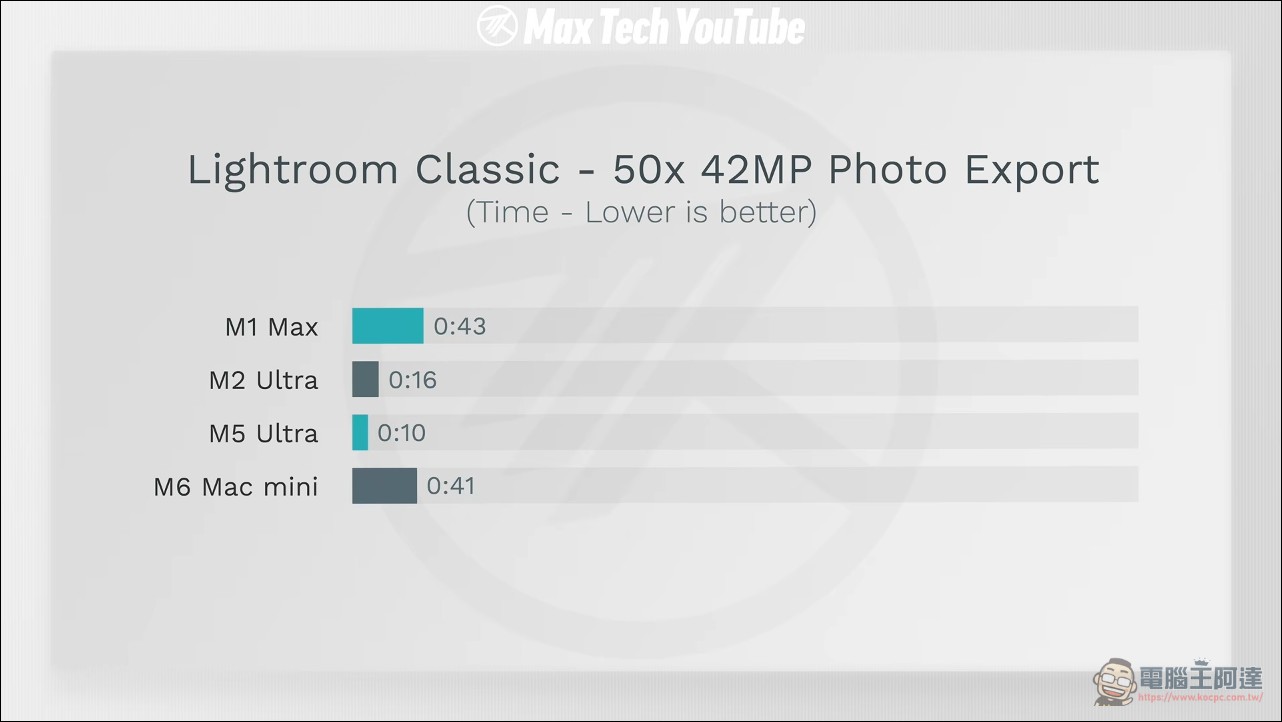
In photo editing tests, Lightroom Classic exported 50 42MP RAW files in just 10.5 seconds, and ten times the workload took 1 minute 37 seconds—both clearly faster than the comparison models. Video editing showed an interesting discrepancy: in a five-minute H.265 export test, the M5 Ultra was only slightly faster than the M3 Ultra, because the bottleneck was the hardware encoder speed, unrelated to GPU or memory; after switching to a one-minute 8K-to-8K export test to eliminate the encoder’s influence, the M5 Ultra finished in 31 seconds, more than twice as fast as the M2 Ultra and about 50% faster than the M5 Max MacBook Pro.
Three Reasons to Buy, and Max Tech’s Upgrade Plan
In the summary, Max Tech lists three reasons to buy an M5 Ultra Mac Studio: first, local AI work, for which there is currently no comparable alternative; second, Blender 3D and video rendering, where it matches the speed of an RTX 5090 while costing less, and also comes with the fastest CPU, a high-speed SSD, stable macOS, and expected good resale value; third, tax-saving needs for business users, as the $6,800 (about NT$221,000) expense can be claimed as a deduction on corporate tax returns.
As for the team’s own plans: Max Tech said it is still using an M1 Max Mac Studio with only 32GB of memory that has clearly slowed down, the M5 Ultra will replace colleague Ben’s M2 Ultra, and the host will take over Ben’s M2 Ultra. After actually using it for a few days, Ben said everything loads noticeably faster, and the 96GB of memory means editing and multitasking no longer stutter. At the end of the video, the host mentioned that he had originally hesitated about making this video because interest in high-priced hardware is declining, but considering that developers, engineers, and even Apple employees watch their tests, he decided to produce the full results. You can watch the video for the detailed full content; it’s packed with details and highly recommended:
Conclusion
Combining Max Tech’s full hands-on testing with third-party data, the M5 Ultra Mac Studio indeed stands at the pinnacle of consumer-grade PCs in three major categories: CPU multi-core, 3D rendering, and local AI. In particular, its result of beating the RTX 5090 in a complex Blender scene makes the claim that “Apple beats NVIDIA” hold true under “specific workloads” (Blender; for local AI applications such as LLMs or video generation, the RTX-5090 is actually still much better). For 3D, AI, and video creators, the value of this machine lies in the real difference brought by its large unified memory; for ordinary users, it remains an overkill, expensive desktop. Whether it is worth buying depends on whether your work truly requires such an expensive computer.
Source: KOCPC Chinese