


When browsing the internet these days, you’re often flooded with overwhelming amounts of information, making it feel like looking for a needle in a haystack to find useful content. To solve this problem, Microsoft has launched a new feature called Copilot Vision, which can understand the content of the web pages you’re viewing and provide potential solutions when you need them.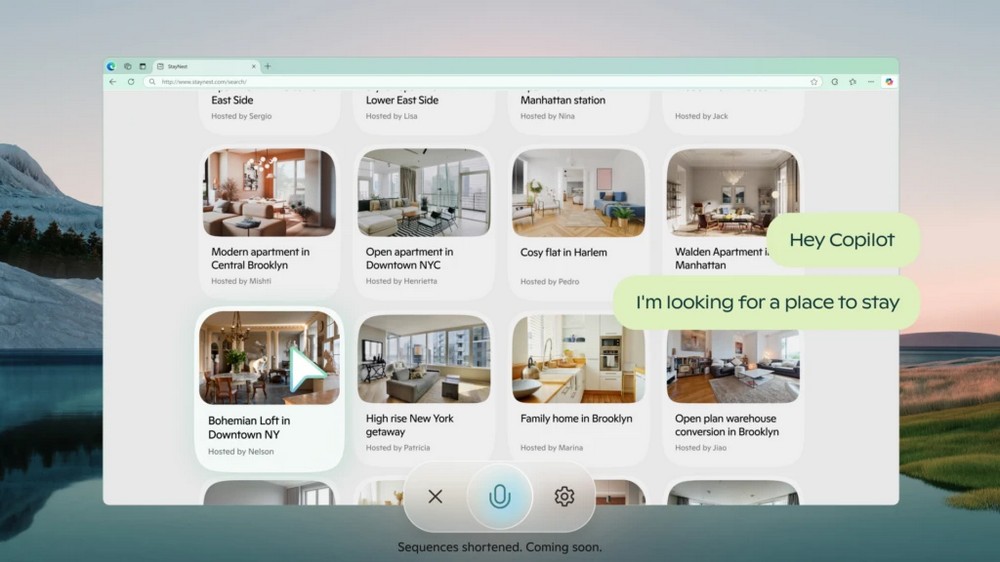
Microsoft Copilot’s New Feature Copilot Vision: Online Shopping and Museum Trip Planning Made Easy with One Click
Microsoft has added a new feature, “Copilot Vision,” to its AI assistant Copilot. Copilot Vision can understand the full context of your online activity. When you turn on Copilot Vision, Copilot can see the web page you’re currently browsing, read along with you, and discuss the problems you’re facing. That explanation might sound abstract, so check out the examples below to get a simpler idea of what Copilot Vision can actually do.
Copilot Vision can plan a one-day museum itinerary for you. When you’re browsing a museum’s official website, you can summon Copilot Vision to recommend suitable exhibitions. You just need to state your needs, and Copilot Vision can find the content that best matches them among all the exhibition descriptions. This way, you don’t have to spend a lot of time reading through every exhibition introduction one by one.
Besides helping you plan trips, Copilot Vision can also give you advice when you’re shopping online. For example, if you tell Copilot Vision you want to buy an ugly Christmas sweater, it will browse the webpage with you and recommend sweaters it thinks would suit you.
If you encounter difficulties while browsing the web, Copilot Vision can also act as an online teacher. For example, if you’re stuck playing GeoGuessr, a web game where you guess your location by observing the surrounding environment, Copilot Vision can use what it sees on screen to help you find the answer.
Copilot Vision is Microsoft Edge’s first exclusive AI experience, and it is only available in Edge. Copilot Vision appears at the bottom of the Edge browser. To use it, you open Copilot Vision, and it can immediately scan the webpage you’re currently browsing to analyze it and provide feedback. Regarding privacy, Microsoft says Copilot Vision is optional, and once you turn it off after use, all conversation content and context between you and Copilot will be deleted.
Copilot Vision is still in the experimental stage and is currently only available to a small number of Copilot Pro subscribers in the United States. For now, Copilot Vision can only interact with certain web pages, and the scope of eligible users and access to more websites will be gradually expanded in the future.
Source: KOCPC Chinese