


For people who are very difficult with math and calculations, spreadsheets (Sheets) may already be called the greatest invention in human history. What’s even better is that when Google provides a productivity package that includes documents, spreadsheets, and presentations directly in the cloud, basically anyone with a mobile or computer device can use these productivity tools.
However, in order to calculate correctly, the writing methods of some formulas have to be carefully confirmed in the past to avoid problems such as incorrect N/A in the end. Fortunately, Google Spreadsheet will also use the power of “wisdom” to allow people like the editor who have always had trouble calculating formulas to achieve higher work efficiency! Continue reading to speed up your productivity! Google spreadsheet import formula smart correction function, which data is supported, please see the text of the report here.
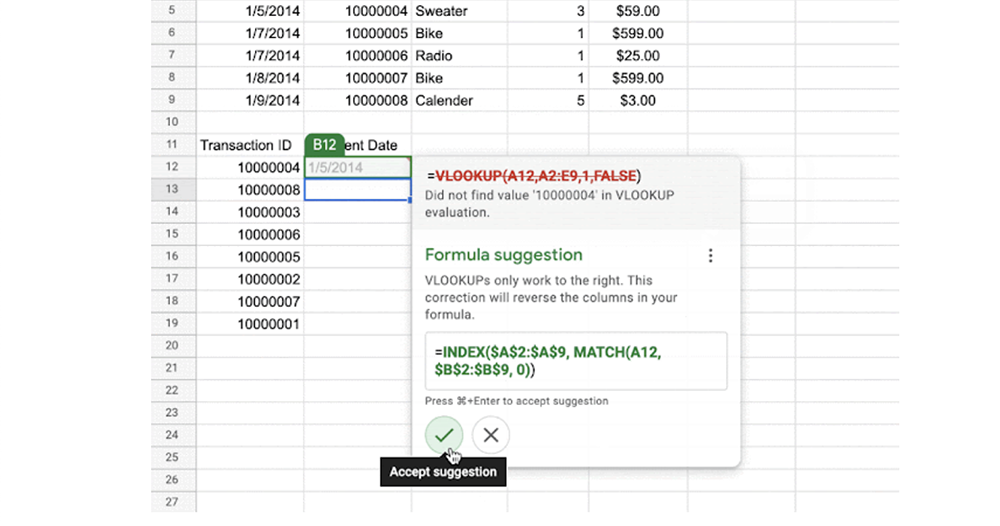
▲Image source: Google
Accelerate work efficiency! Google Spreadsheet imports formula smart correction function, see what data is supported here
As Google’s “Three Treasures of Productivity” continue to evolve, most users can enjoy better offline access and even new-generation theme support for dark mode. Recently, the Google Sheets spreadsheet function is based on the previously launched function of proactively suggesting formulas, and further extends the user experience to allow people to modify calculation formulas more intuitively.

Previously, through the suggested formula function, Google spreadsheets were able to provide relevant data analysis suggestions for specific types of cells. The new function this time allows you to enter formulas faster and with more confidence – when writing spreadsheets, the smart formula function with content-aware correction will automatically display a “Suggestion details” button as shown in the picture below when it is determined that there may be a problem with the calculation.
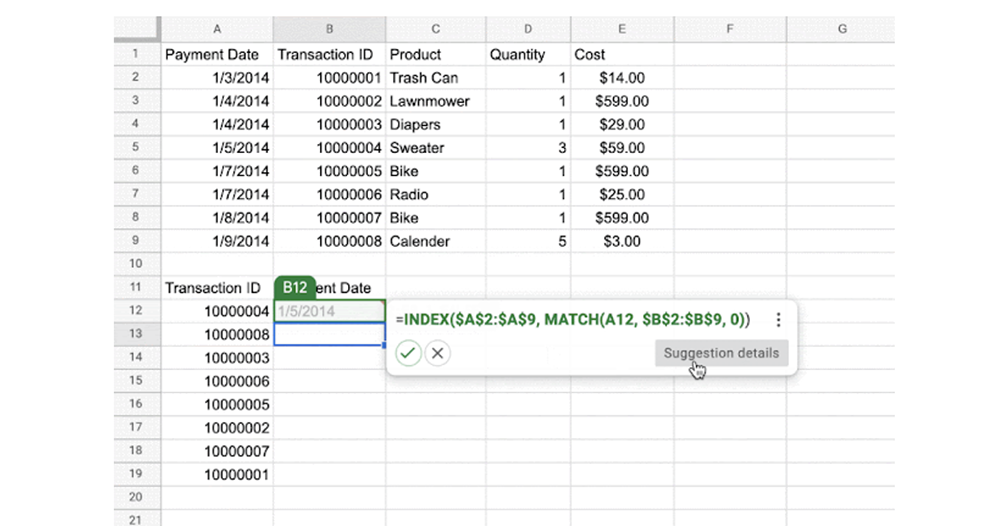
After clicking, the suggested correction formula window will pop up. On this screen, you can clearly confirm the difference between the upper and lower parts, and you can quickly apply or skip the suggested corrections by clicking the check mark or cross button. Compared with the automatic correction of ordinary words, this method makes it easier for you to know where the mistake is? It also avoids continuous reliance on this function, which is a pretty good interface.
The smart formula correction function of Google Sheets spreadsheets currently supports limited types of debugging. According to the official statement, it includes: VLOOKUP errors, missing value ranges in cells, and when applying formulas across cell lock ranges, you will be able to take advantage of such new features. According to official instructions, this feature will be available to users in about two weeks.
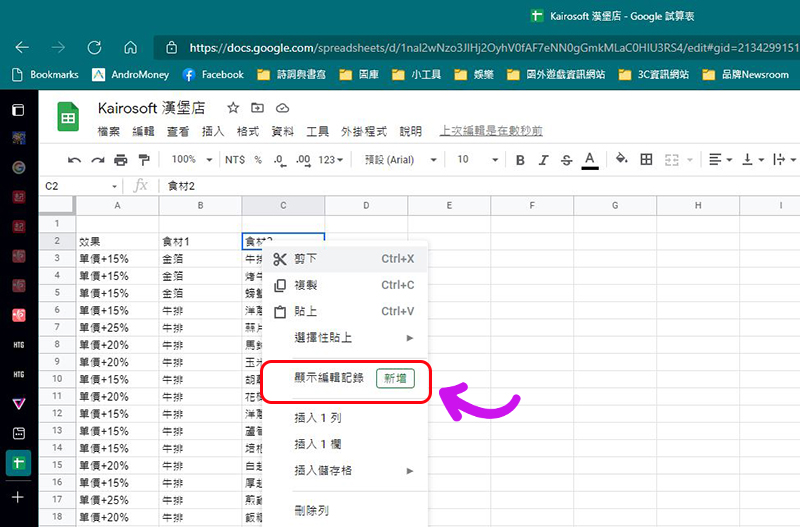
In addition to the smart correction function, we have previously introduced that Google has also introduced a co-editing history function for the spreadsheet function. There will be a record of changes to values in cells, changes to hyperlinks in cells, changes to formulas in cells, and who made changes to cells. The usage is the same as the function introduced this time. It can be started by right-clicking. Interested friends canRefer to our previous introduction。
Further reading:

Source: KOCPC Chinese