


Nowadays, work patterns have begun to change. Many companies have switched to remote working and even outsourced part of the work. After the change to remote work, remote software has become very important. Although there are many choices on the market, if it is for enterprise use, there are many aspects to consider, such as how to allow employees to safely connect to company computers while working from home, how IT personnel can quickly solve employees’ computer problems, etc. Splashtop Enterprise Enterprise Edition is definitely worth your reference.
Splashtop Enterprise is a remote software solution that takes into account all aspects of operation, functionality, management, IT solutions, and security. Even when working remotely, business managers can easily manage and monitor each remote connection to ensure data security.
More importantly, Splashtop also has a technical team in Taiwan. If you encounter any problems, you can get local support without worrying about communication problems. I will introduce it to you in detail below.
Click here to apply for a trial Splashtop Enterprise account
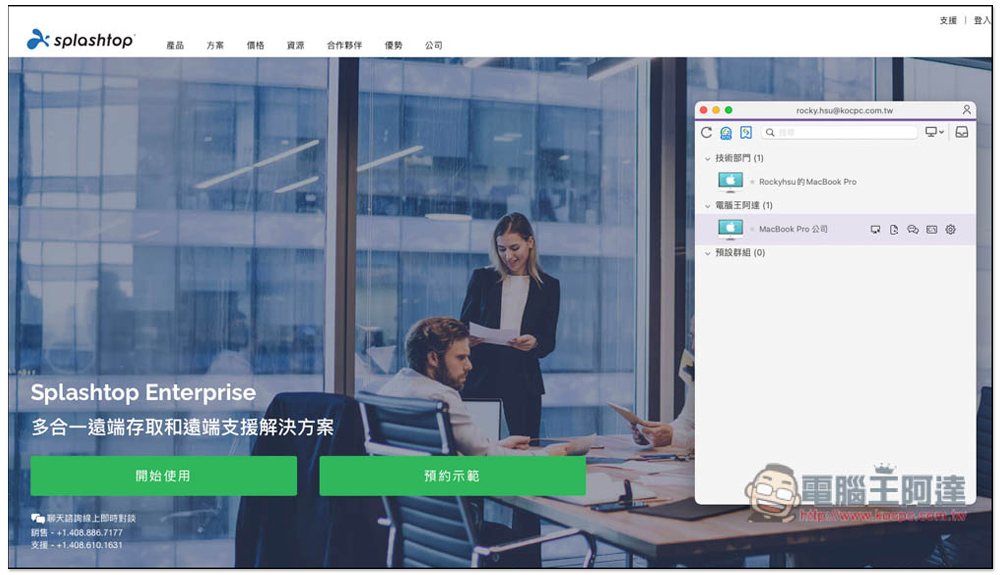
Why can’t I use free remote software?
Most free remote software is limited to personal use and cannot be used for commercial purposes. This is a very important reason.
Secondly, the free remote software does not provide any management functions, so enterprises and companies cannot control it. This poses a great threat to important computer data, and the transmission security is also relatively poor.
Basic introduction to Splashtop
We introduced Splashtop several years ago. At that time, we were quite impressed by this remote software. It was fast and easy to use, and the interface was easy to use. I originally thought it was a software developed by foreigners, but it was only after recent research that I discovered that the founders are all from Taiwan.
Headquartered in Silicon Valley, Splashtop was founded by four Taiwanese-born partners and currently has offices in major cities around the world, including Taipei.
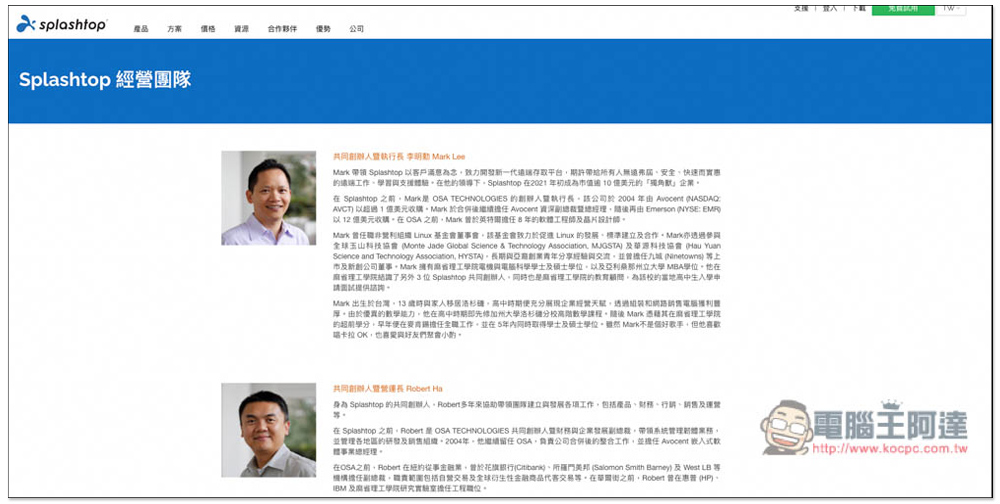
More importantly, both Taipei and Hangzhou have R&D and technical support teams. When companies encounter usage problems, they can get online technical and customer service support in Chinese at any time. This is something that many remote software cannot do. It is a big plus for Taiwanese companies, especially companies that have just transitioned to remote work. They will definitely encounter many situations when using remote software systems at the beginning, and they can seek help from Splashtop at any time.
So far, Splashtop has more than 300,000 users. TOYOTA, Marriott, Taiwan Life, Sony, NBC, NHK, Nintendo, LEVI’S, Microsoft, etc. are their customers. The NPS score is as high as 93 points. The business software evaluation agency G2 Crowd also has 4.8 stars, and it has received very high ratings abroad.
Here is a reference data for everyone. The following are the NPS scores obtained by other well-known remote software:
- TeamViewer -> 69
- AndyDesk -> 72
- RemotePC -> 83
- LonMeln Pro -> 66
9 major features of Splashtop Enterprise and why you should choose it?
1. Powerful and easy-to-use Management Platform web version management platform, all remote connection records can be checked
After switching to remote work, employees working from home often connect to company computers remotely to transfer data or perform tasks that can only be performed using company computers. For business managers, they will definitely think about how to ensure the security of company data.
Regarding this point, Splashtop Enterprise has a powerful web-based management platform, and all connection records, data transfers, and even chat conversations will be recorded. In addition, managers can also set the time points and permissions for each employee to connect, which will be introduced in detail later.
Many people think that the functions of the enterprise version should be complicated, but Splashtop Enterprise’s web management platform can be said to be the simplest one I have ever used. Even people who have never been exposed to the enterprise version will have no problem. The interface design is simple, and the arrangement of each function option is quite intuitive and reasonable, such as “If you want to check any connection history information, go to the “Record Menu””, “To manage members, devices, groups, etc., go to the “Management Menu””. It didn’t take me much time to get started:
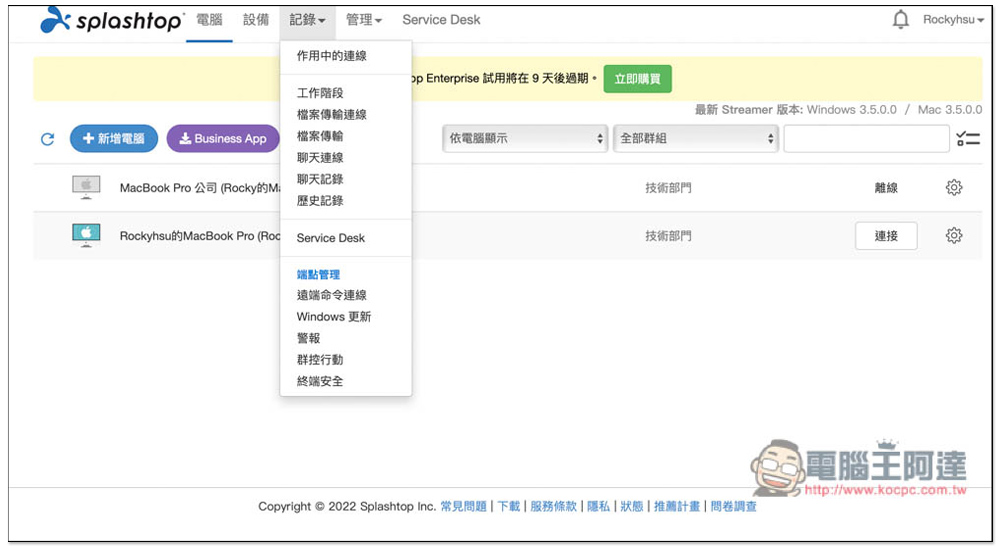
The connection history of each person’s remote connection to the company computer (work session), past file transfers, text chats, etc. will be automatically recorded. Representatives said that managers can easily monitor and manage to see whether everyone has completed assigned tasks on time, or what has been done remotely. If there is file transfer or chat in this connection, a prompt will appear on the right:
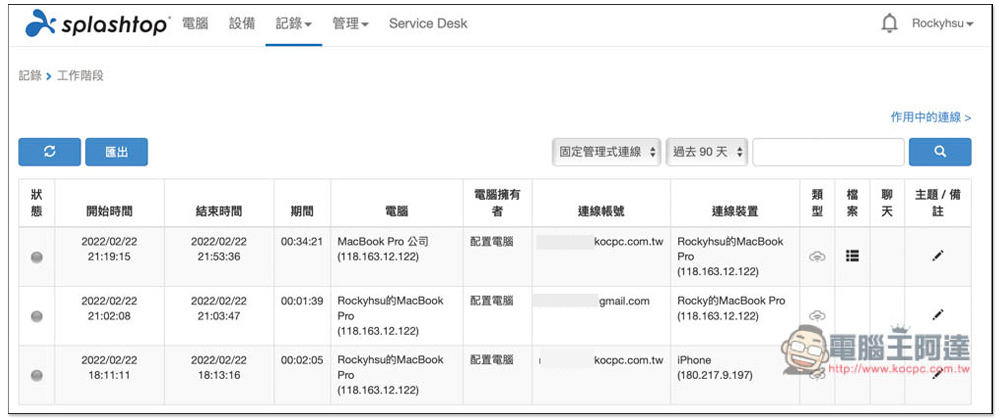
It will also tell you what file is uploaded (file name):
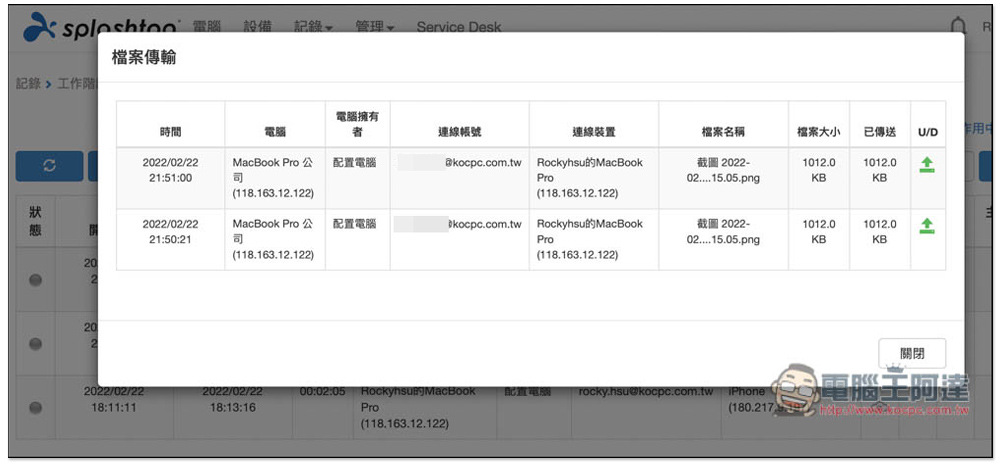
This record is also very useful for companies that cooperate with outside companies. For example, you may ask outside technicians to maintain company computers and need remote assistance with software and systems. Even if you are busy and cannot monitor in real time, you can use these records to check whether there are any unusual behaviors.
2. Easily invite employees to join the team and integrate SSO functions
Administrators of Splashtop Enterprise can directly send invitation letters to company members and partners through the user management function. When they click the link in the letter, they will directly join the team after creating an account. This is quite convenient:
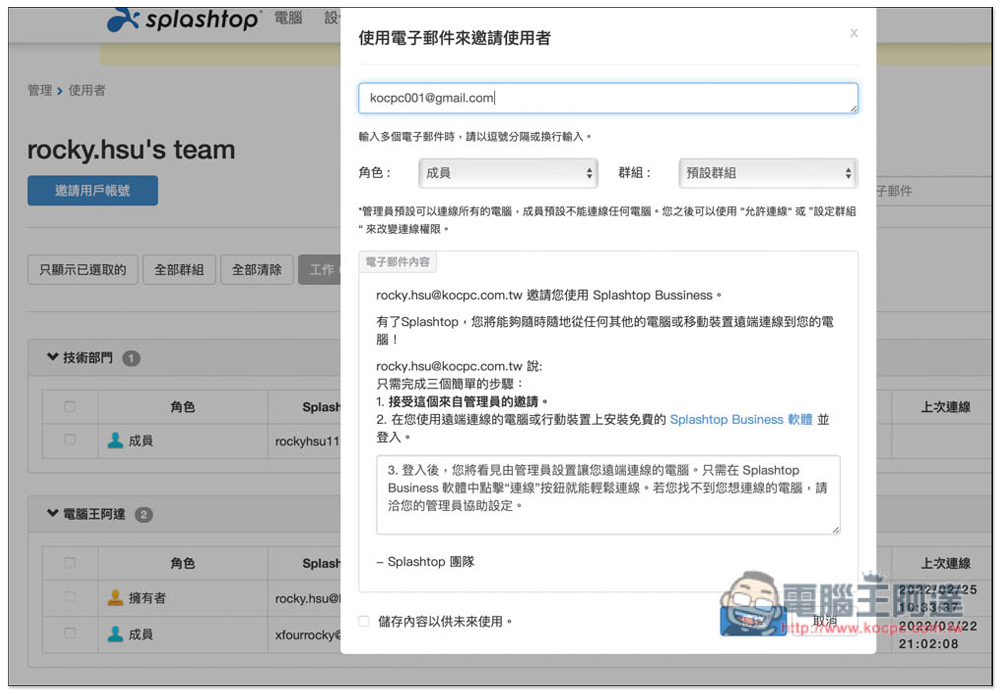
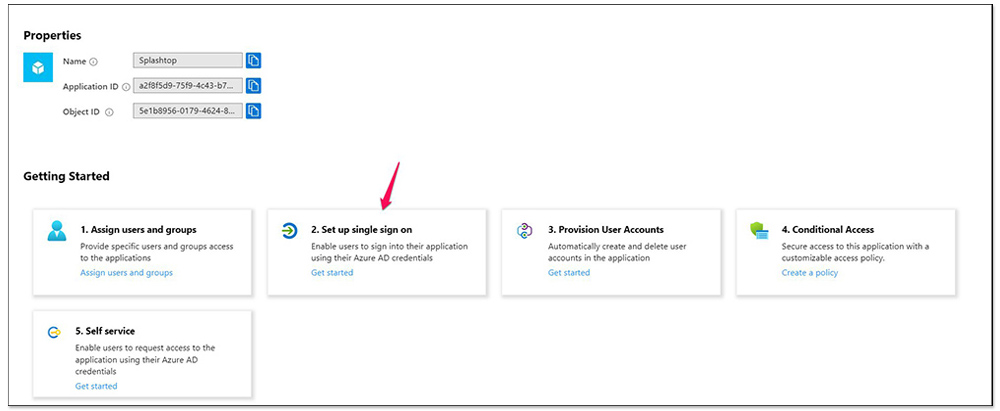
There is also an SSO function that integrates corporate accounts. Employees do not need to create separate accounts and can directly use Splashtop. For more detailed setup instructions, pleaseClick me to read:
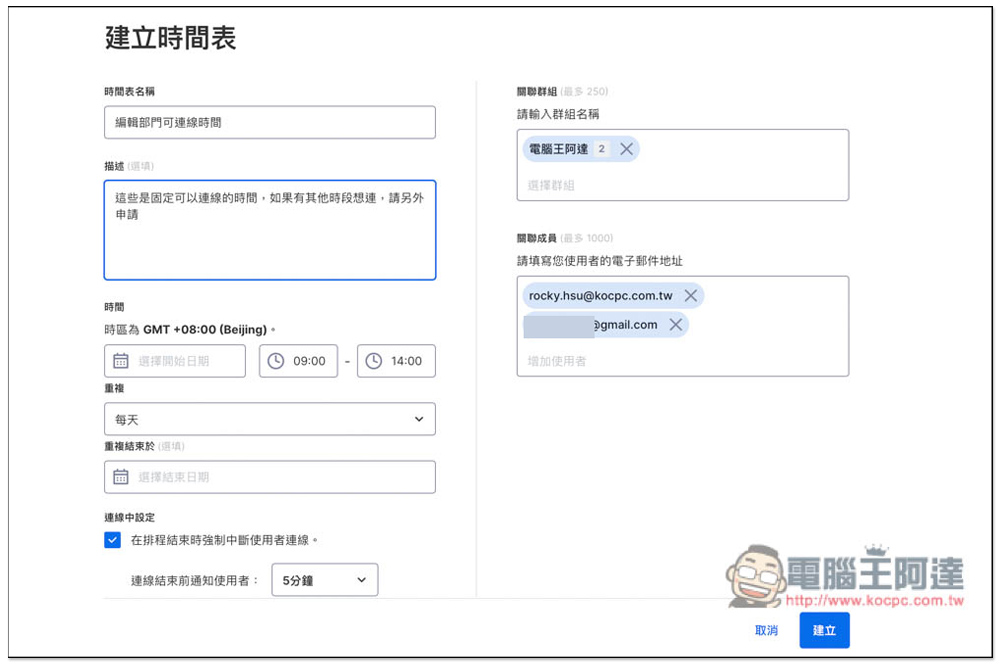
3. Set up a scheduled connection so that each person can only remotely connect to the company computer within a specified time.
In addition to connection history information, Splashtop Enterprise administrators can also set the time when each member can remotely connect to the company computer. I think this is very important for remote work. Administrators can control connection activities and security in a more organized manner. The following situations can be solved by using this function:
- There is no need to worry about members connecting to a certain computer during the same time period. For example: member A can only access the morning session and member B the afternoon session. If you have other special needs, please apply separately.
- No remote connection to the computer is allowed during non-working hours to ensure the security of company data.
- If there is work outsourcing, such as computer technical support, you can restrict the other party to only connect during specified periods.
4. Exclusive fine control function that can specify the connection permissions of each member
Splashtop Enterprise also has a very unique “fine control” function, which is not available in most remote software. Each member can set what can be done remotely, including: quick support connection, file transfer, remote printing, copy and paste, and the need for two-factor authentication. For members who only need file transfer, they can only turn on this function and turn off the others, so that the administrator does not have to worry about doing something they should not do.
Enter the user page of the management menu to find the fine control functions:
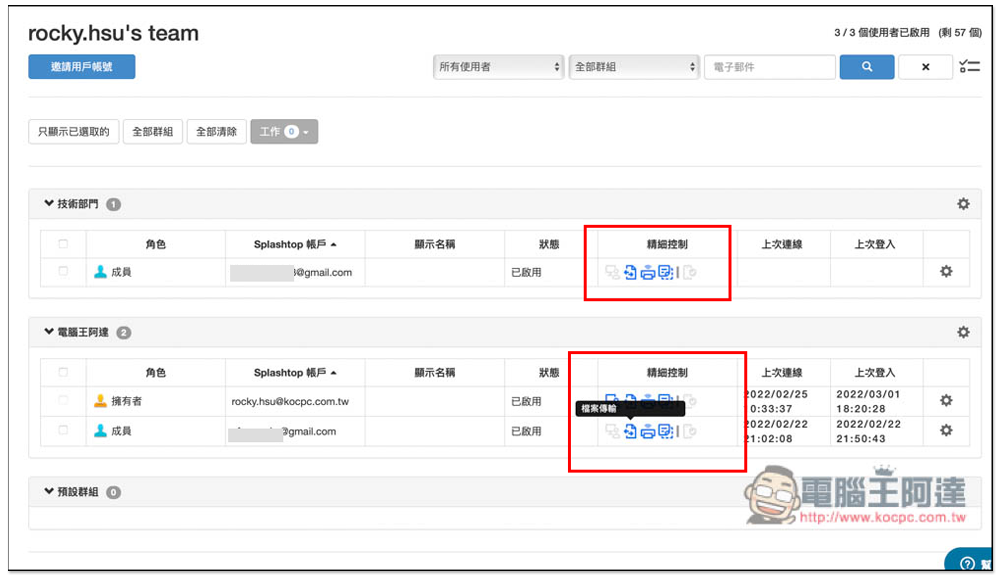
Nowadays, many companies will outsource work to individual workers. Sometimes they may need to connect to the company computer to check some information. After all, they are not official employees of the company. You may worry about data security issues if you let them connect remotely. In this case, you can turn off all permissions to ensure that they cannot perform file transfer, copy and paste, etc.
5. Set the computer that each member can connect to remotely
Some companies may have multiple computers, and each member needs to connect to a different computer remotely. Splashtop Enterprise also provides a very convenient group management function. Administrators can easily specify which computers each group can connect to. For example, editors can only connect to computers in the editing department, so there is no need to worry about confusion or the leakage of important data:
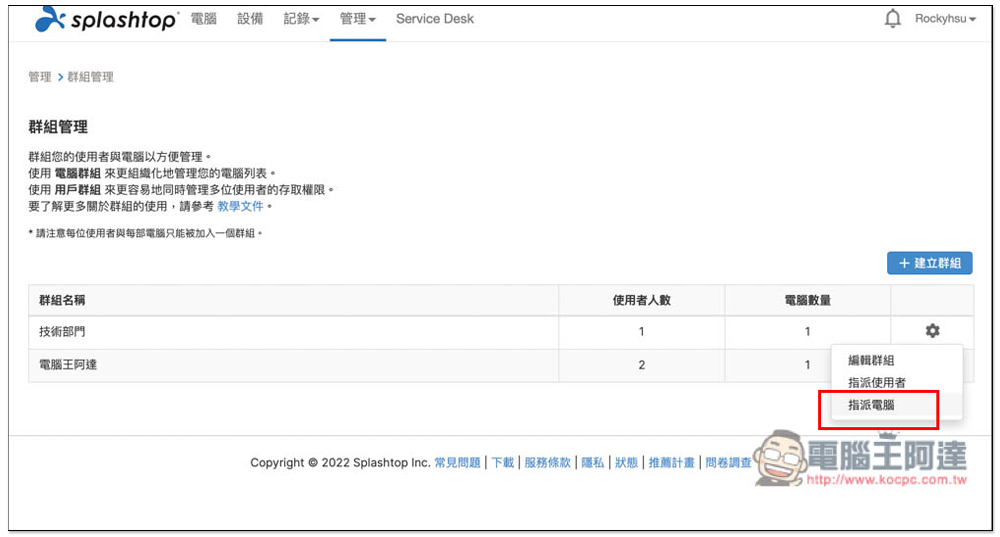
6. Service Desk allows IT staff to quickly receive temporary technical support and transfer orders to others with one click.
When working remotely, the biggest fear is that a member’s computer will suddenly have problems. Unlike in the company, where you can quickly find IT personnel for maintenance. For this reason, Splashtop Enterprise provides a very good Service Desk function. Managers and IT personnel can create maintenance orders here, and after passing the link to each other, they can quickly connect remotely.
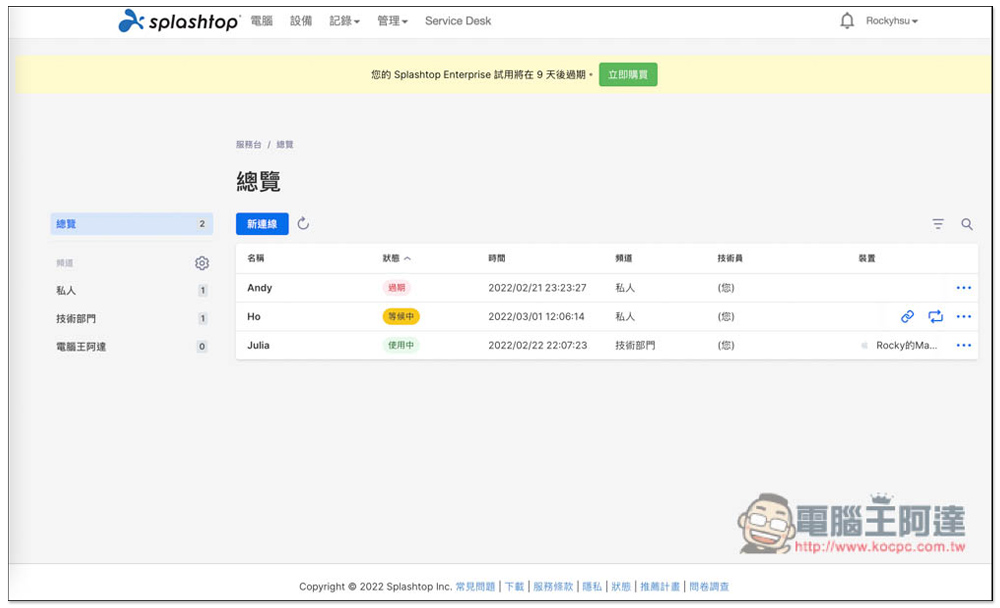
If the problem cannot be solved, or other IT personnel are required to assist, the built-in order transfer function can be used to transfer the maintenance order to other personnel, and the recipient does not need to send a link to the other party, and can directly connect remotely, which is very convenient:
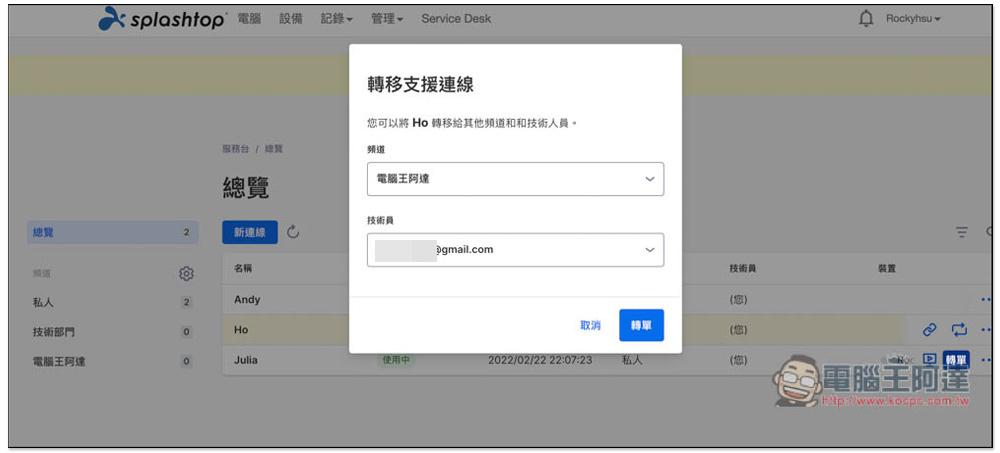
Service Desk is a plus for some companies that provide software services and technical maintenance. Even if they are not in the company, IT staff working remotely can handle each case efficiently, saving a lot of time in communication. What’s even better is the next SOS function.
7. The SOS party can be controlled remotely without creating an account.
When helping customers or outsourced workers to solve computer problems, Splashotop provides a very convenient “SOS solution”. After the IT staff creates a repair order in the Service Desk, they will get an exclusive link. After sending it to the other party and downloading and opening it, the IT staff can connect quickly without entering anything (not even a code). They only need the other party’s consent to connect, and the other party does not need to install any software or apply for an account:
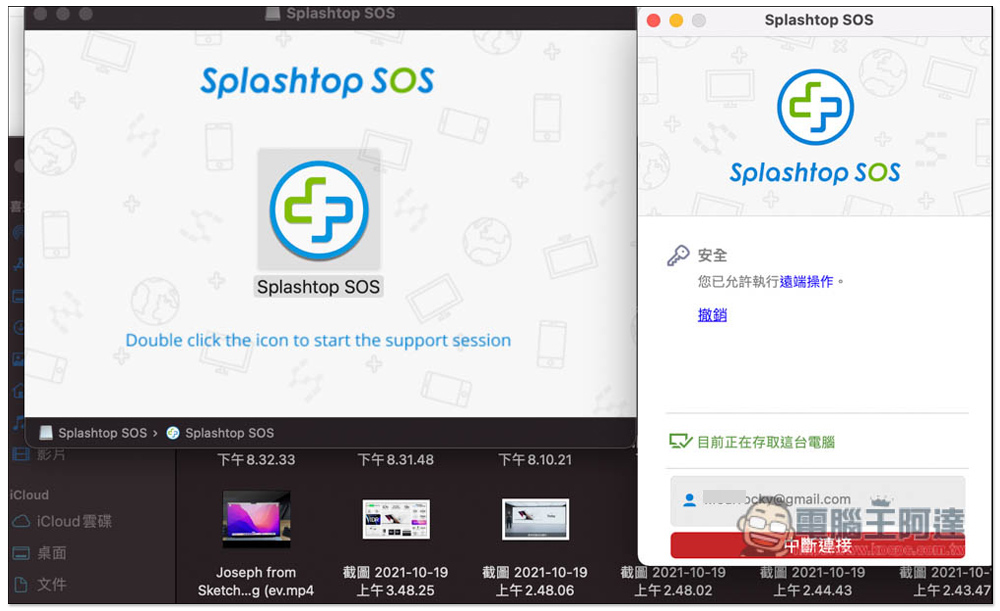
This can save a lot of time, especially if the other party is not familiar with computers. IT staff can easily establish a remote connection and perform repairs without having to explain too much.
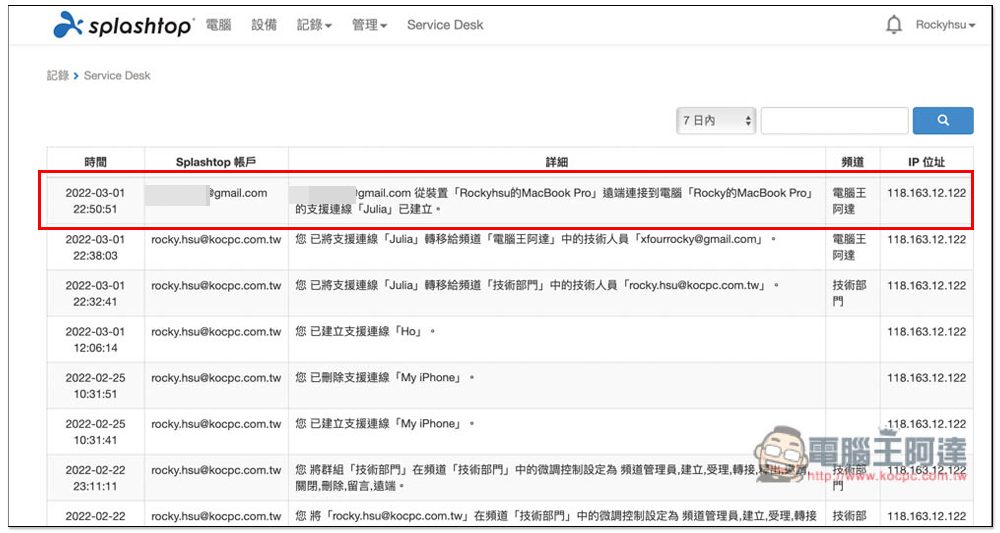
Managers can also use Service Desk records to observe whether IT personnel have handled:
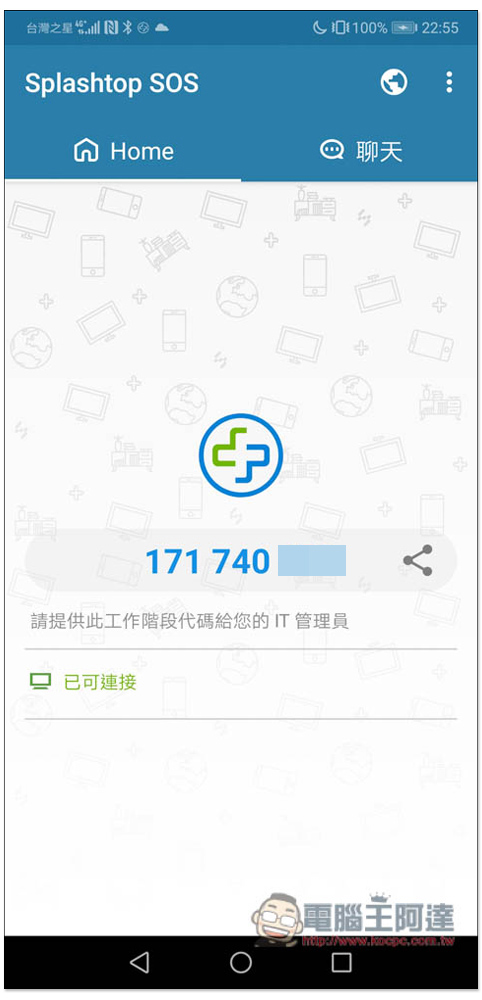
The mobile phone part is also supported. Enter the code displayed on the SOS App to connect:
8. File transfer security that can replace VPN
In order to allow external network employees or outsourcing vendors to connect to corporate intranet services, many companies use VPNs, but the setup is very cumbersome and the security is relatively low. For example, the network administrator needs to provide the internal IP Address to external network employees or vendors through VPN, which may lead to breaches in the internal network and infection with ransomware viruses.
In addition, VPN scalability is not good, and different intranets often need to set up different VPN services. Splashtop Enterprise takes the hassle out of the way and offers stronger security mechanisms.
Splashtop Enterprise not only does not need to provide the IP address of the intranet to external devices through VPN, but also has multi-level security verification, such as mandatory device authentication, two-step verification 2FA, additional security code or requiring additional Windows login confirmation to achieve a multi-level security verification mechanism.
Remotely connected devices must also be authenticated by the administrator or authenticated by users authorized by the administrator. Only devices that have passed device verification can connect, so hackers cannot just grab a laptop and try to connect or guess passwords. For higher security, you can also turn on two-step verification and bind TOTP App (such as Google Authenticator or Microsoft Authenticator). The user’s connection permissions are also completely controlled by the administrator.
The remote connection of Splashtop Enterprise provides the function of transferring files, and there are two modes, “remote connection” and “non-connection state”, which can transfer files. The most important point is that all remote connections are protected by TLS 1.2 and AES-256 encryption. Coupled with the security settings functions introduced earlier (such as device verification, two-stage verification, fine control, and connection time), the security is actually better than VPN, and the operation is easier.
File transfer interface during remote connection:
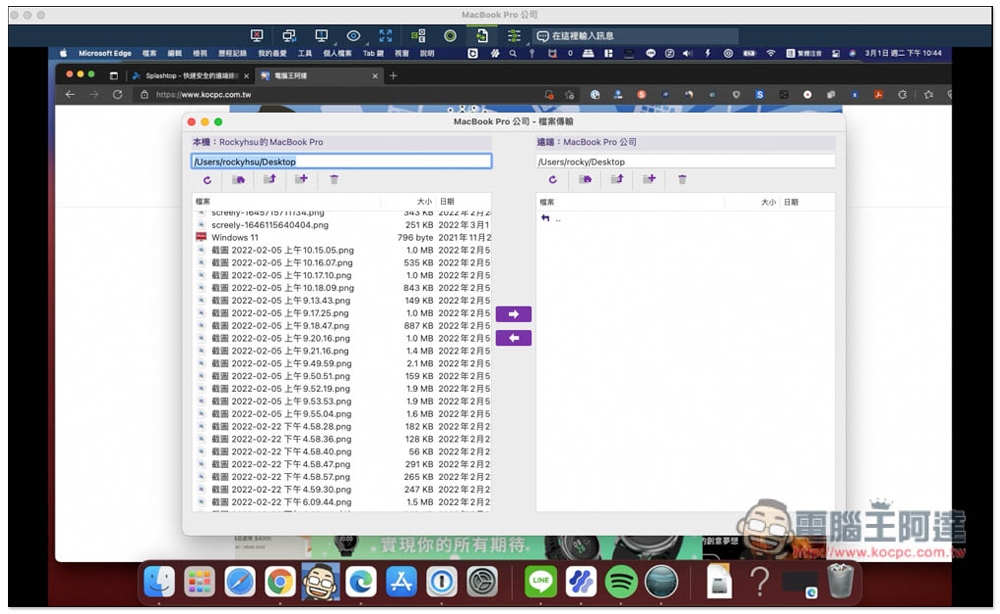
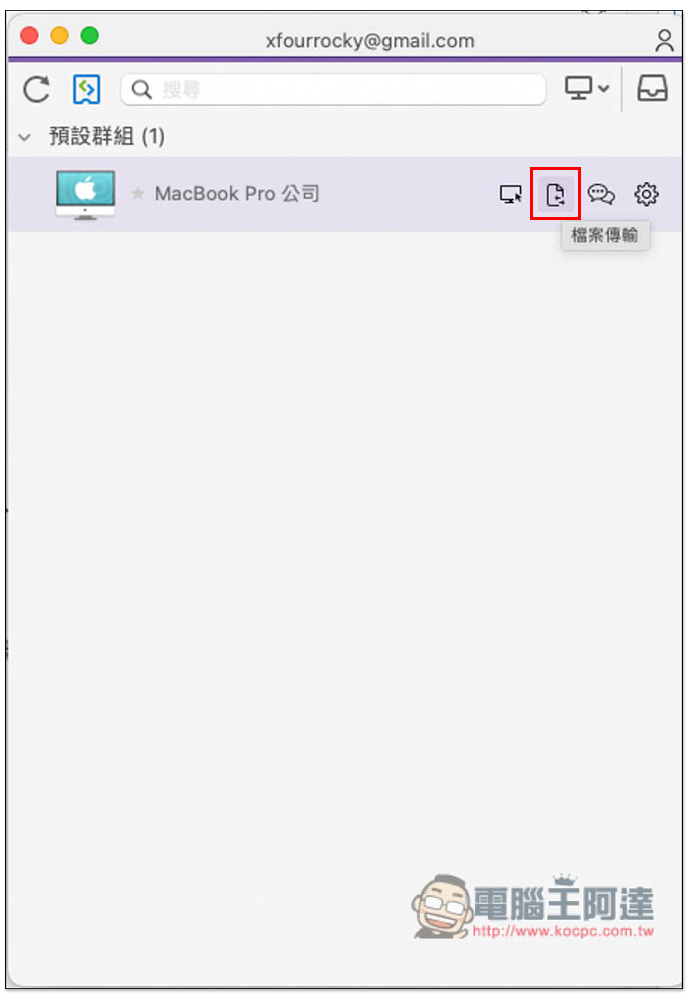
When not connected remotely, open Splashtop Business App and move the mouse to the computer to be transferred. The second icon on the right is the file transfer function:
9. Powerful new function Connector, which can use RDP/RDS protocol to connect and record the connection process
The new function of Connector is a link software that can jump into different network segments. Only port 443 of the Connector is connected to Splashtop’s cloud service. Other services on the intranet do not need to expose themselves to the outside world.
Deploy the Connector on Windows PCs/Servers in different network segments. You can jump into the intranet of different network segments and use the Connector to remotely access computers or servers in different network segments. For example, install the Connector on the CRM, ERP, file database, etc. servers at the corporate headquarters to allow employees in remote locations to work online. Or install a Connector on a springboard machine to provide the manufacturer with remote support for PCs/Servers on the intranet, and record the connection process. The previously mentioned security verification functions (such as device verification, two-stage verification) are also applicable to the Connector, providing high-security remote connections.
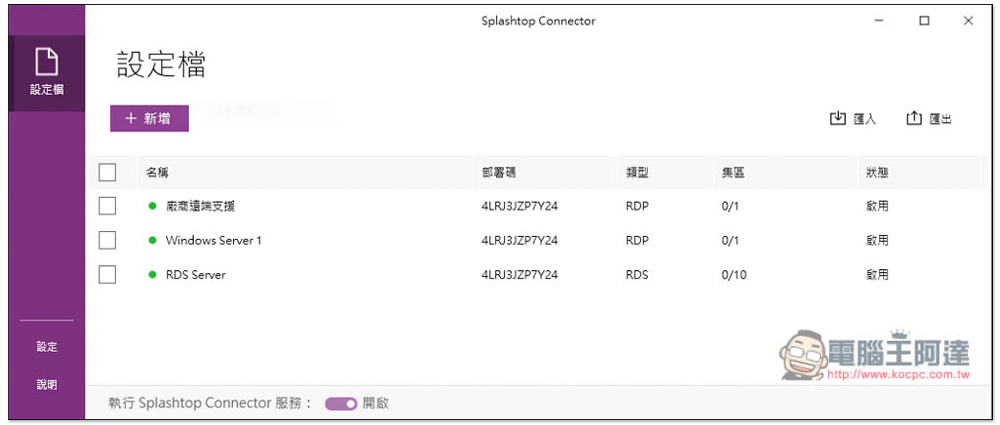
You can set up multiple profiles to connect to different computers or servers:
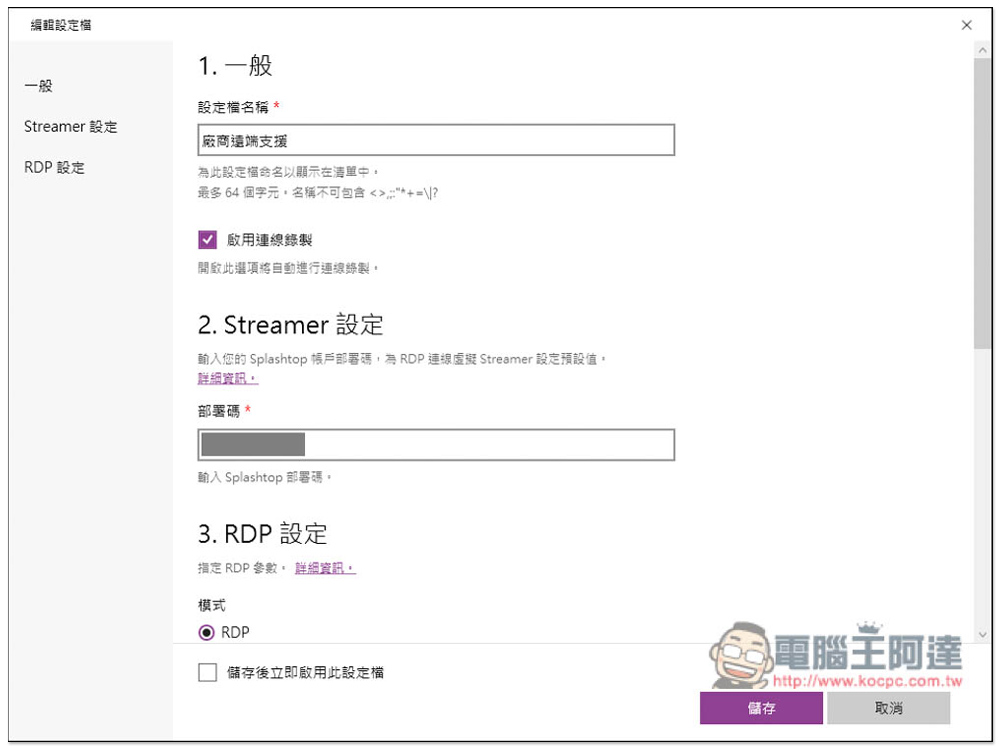
Check Enable Connection Recording to record the connection process:
Note:Splashtop Connector is a new add-on feature and requires the purchase of additional Connector licenses.
Splashtop Business remote connection interface quick preview
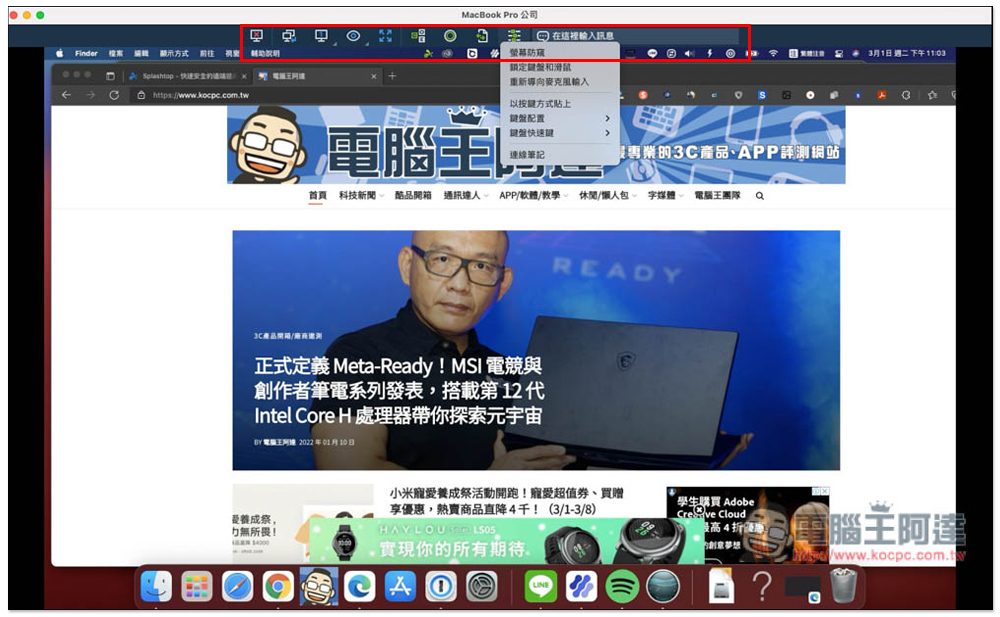
Splashtop Business is the app used by Splashtop Enterprise for remote connections. It is available in major operating systems, such as Windows, Mac, iOS, and Android. Just like the web management platform, the remote connection interface is also easy to use. The picture below is the Windows computer version. The menu is at the top. Basically, the required remote operation functions are available, such as locking the other party’s keyboard and mouse, screen switching, laser pen or handwriting, text chat, etc. It even provides a video recording function, which can record the current scene:
Splashtop Enterprise’s local technical support service advantages
As mentioned at the beginning of the article, Splashtop has local technical support services in Taiwan, which means you can communicate directly in Chinese without worrying about language issues. This is something that many remote software cannot match, and online consultation is available 24 hours a day. No matter when you encounter a problem, there are officials who can help you solve it remotely. In addition to online consultation, we also provide email and telephone communication, whichever method you prefer. Splashtop Enterprise customers will also receive a dedicated “account manager” who will assist with various matters and planning.
Click here to apply for a trial Splashtop Enterprise account

Another point worth mentioning is that Splashtop has a branch in Taiwan, with business departments, technical support departments, and R&D departments. Splashtop said that if enterprises find any important functions that are missing during use, they can report them back to them. After evaluation, they are likely to add them in the future. Currently, there are some functions that were recommended by other companies, such as Service Desk, fine control, and schedule management.
Summarize
For companies that plan to or have already converted to remote working, Splashtop Enterprise is really a good choice. It has comprehensive functions, complete connection records and permission settings that can be easily monitored remotely, and a Service Desk specially designed for IT personnel, making remote work as efficient and secure as in the company, and it is also easy to use. For those who are interested, Splashtop Enterprise also provides an account trial, you can click the link below to apply.
Click here to apply for a trial Splashtop Enterprise account
Source: KOCPC Chinese