


With the popularity of digital information and the increasing bandwidth, video and audio sharing is becoming more commonplace. However, the various formats are really disturbing. WinX DVD Ripper Platinum It is a powerful DVD video backup and conversion software. It has the advantages of simple operation and fast conversion. In addition to supporting many video formats, it can also be converted to various mobile devices. Whether it is disc copying or converting, it is not a problem. The most important thing is that it supports Chinese language, so you no longer have any language barriers. It is currently free for a limited time, so there is no need to wait.

用 Telegram 訂閱【挨踢路人甲】最新文章:https://t.me/itwshare
After entering the event page (the event website is at the end of the article), you can see that the WinX DVD Ripper Platinum DVD video backup and conversion software is free for a limited time.

Scroll down to Step 1. Click “GIVEWAY PAGE”.

Enter your email account and click [Get Giveaway Version].

The following picture will appear. Press [Get License Code] to see the downloaded compressed file.

Unzip the compressed file and you will see three files. There are serial numbers in the text files. Win-dvd-ripper-giveaway.exe is the installation execution file.

After opening the text file, write down the startup serial number.

Execute the installation file. In the Windows 10/11 environment, a window for using this account will appear during execution. This is because a security warning window of “User Account Control” will appear due to security issues. Mainly when the user performs some actions that will affect the system, a confirmation screen will often appear, so click [Yes] to continue (if you want to remove this warning, please refer to “How to turn off User Account Control (UAC) in Windows 11″article).

There is a Chinese interface, or Traditional Chinese.

Then the installation wizard’s welcome screen, installation path and other inquiry screens will appear. Just click [Next] with the mouse to complete all actions.

After the program is executed, a screen requesting a serial number will first appear. Enter the email and serial number, and click [Enable] to see a window indicating successful registration.

After successful startup, you will see the main window as shown below. After loading the file, you can crop and edit it, and specify the output format for conversion.

Put the DVD video into the disc drive, “WinX DVD Pipper Platinum” will automatically detect it (you can also click the [Disc] icon button), and press [OK] to prepare to convert the DVD video.

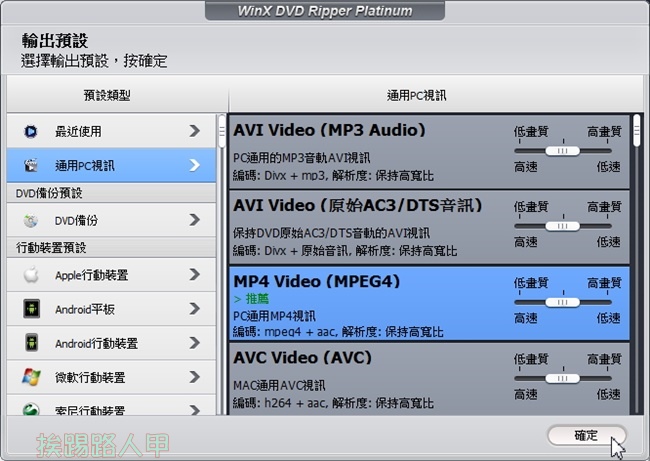
“WinX DVD Pipper Platinum” supports many transcoding formats, and the format support for mobile devices is also quite rich. The Chinese interface operation is clear at a glance.
After selecting the conversion format, you can also easily edit the video, as shown below by pressing the [Edit] icon.

On the editing screen, you can edit and embed subtitles, or edit videos. The preview window allows you to keep track of the editing status at any time.

Click the [RUN] icon on the lower right to start converting. The simple interface with Chinese display will make it easier and more enjoyable to back up DVDs or convert files.

[Activity webpage]: Please clickhere
Further reading:
Source: KOCPC Chinese