


It’s so annoying, not to mention that out-of-date drivers may affect performance. Although Windows 10/11 updates are quite criticized, you can refer to IObit Driver Booster 9 PRO, which is free for a limited time. In addition to one-click driver update, it also has driver backup and restoration. Now it is launching a trial version activation code for a limited time and free for half a year, so act quickly.

用 Telegram 訂閱【挨踢路人甲】最新文章:https://t.me/itwshare
A driver is a software program that allows your system to communicate with your computer’s hardware (such as graphics card, sound card). Drivers can be said to be the communication bridge of the system. Outdated drivers may cause various problems, especially those who play games. Therefore, updating drivers in a timely manner is also a topic. The first thing that comes to mind when playing games is to upgrade the drivers. If something goes wrong with the upgrade, you also hope to restore the previous version. Let’s take a look at the free one-year trial version of IObit Driver Booster 9 PRO, so that the drivers on your PC will not fall behind others.
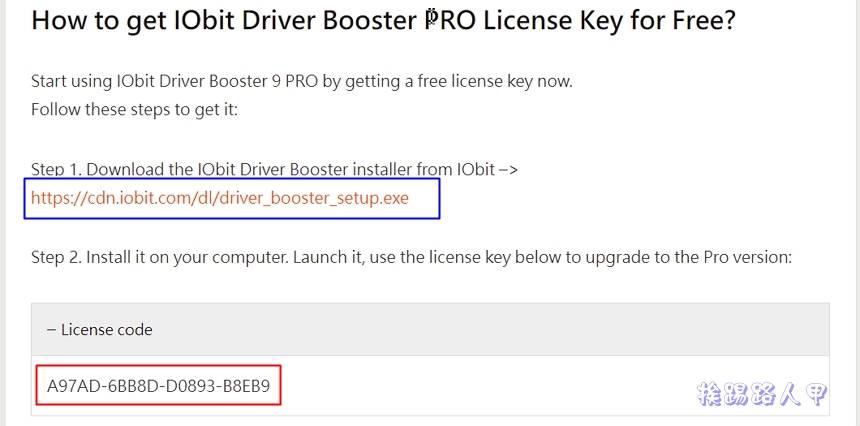
Go to the event webpage and see the screen of IObit Driver Booster 8 PRO being launched for free for one year (the event webpage URL is at the end of the article).

Scroll down to see the download link and activation serial number (scroll down to see the Spoiler).
In the Windows 10/11 environment, a window for using this account will appear during execution. This is because a security warning window of “User Account Control” will appear due to security issues. Mainly when the user performs some actions that will affect the system, a confirmation screen will often appear, so it is better to press [Yes] to continue (if you want to remove this warning, please refer to “How to turn off User Account Control (UAC) in Windows 11″article).

I am always very friendly when I see the Welcome to Driver Bootster installation program in Traditional Chinese. Please uncheck the green box before pressing [Install] so that you will not install additional tools.

Encountered recommended installationAdvanced SystemCarIf you don’t want to recommend installing some tools that are not available, you can skip them first.

The author has always disliked a lot of advertisements and newsletters in my mailbox, so I chose not to subscribe.

After the installation is complete, click [Scan] to see which drivers need to be updated.

Sure enough, I found a lot of device drivers that need to be updated, but let’s upgrade the Free version to the Pro version first! So click on the red box to close the window.

Enter the previous serial number and enable it.

The letters “Pro” have appeared in the upper middle of the window screen. Although it is not free for life, half a year of free use can allow you to fully understand the features and charm of the software.

IObit Driver Booster scans and finds that the driver has a version. You can update all the drivers to be updated with one click, or you can select a driver to update.

IObit Driver Booster’s driver backup and restoration is very practical. Windows 10/11 often encounters disasters after occasional updates, so it is a good idea to back up your computer’s drivers in advance and buy an insurance policy.

Backups can be done on a full selection or on a single driver.

Restoring after backup is a breeze.

Although Windows 10/11 will automatically update the system, it will also update third-party applications, and supports game acceleration and system optimization checks. It is recommended to install it and experience it. You will find that the lag situation seems to have improved!

[Software name]: IObit Driver Booster PRO
[Software version]: v 9.0
[Software language]: English / Chinese
[Operating system]: Windows XP/Vista/7/8/10/11
[Activity webpage]: Please clickhere
Further reading:
Source: KOCPC Chinese