

• About Us
King of Computer Media
  • Home
  • Tech News
  • AI News
  • Apps & Tutorials
  • Mobile & Telecom
  • Lifestyle
  • About Us
No Result
View All Result
  • Home
  • Tech News
  • AI News
  • Apps & Tutorials
  • Mobile & Telecom
  • Lifestyle
  • About Us
No Result
View All Result
King of Computer Media
No Result
View All Result

Home - iOS peripherals - Apple releases firmware update for AirPods Pro and AirPods 3

Apple releases firmware update for AirPods Pro and AirPods 3

Shengti by Shengti
November 17, 2021 - Updated on August 4, 2026
in iOS peripherals, iOS Software and Jailbreak Articles

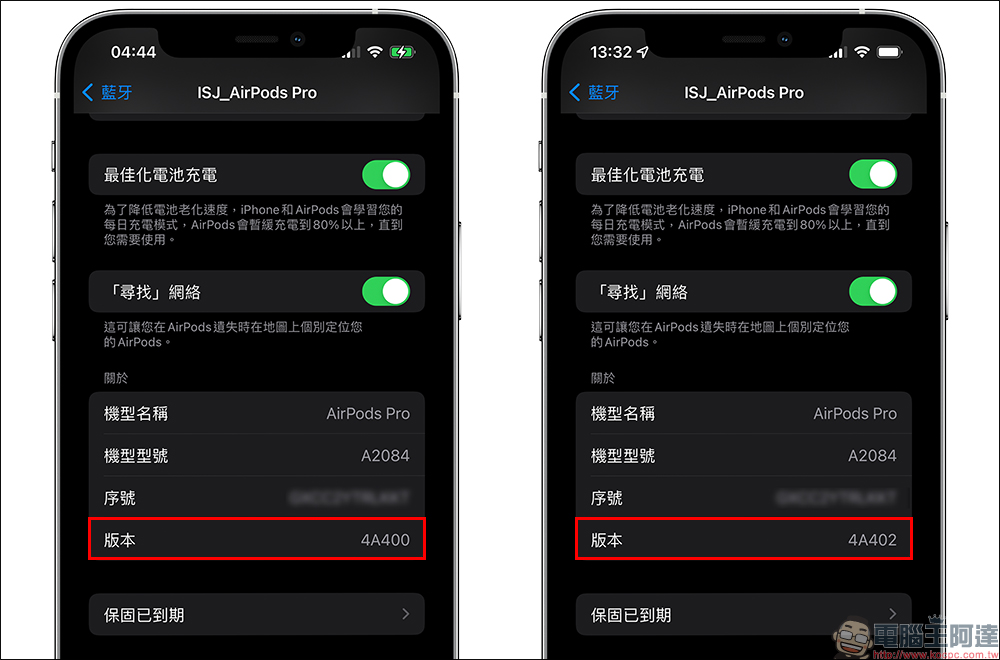
In October this year, Apple released the 4A400 firmware update for AirPods Pro and AirPods Max, which brought a useful “find” function. Earlier today (17th), Apple also pushed version 4A402 firmware update to AirPods Pro. In addition, Apple has also released version 4B61 firmware update for AirPods 3, even though Taiwanese consumers have not yet been able to purchase this new AirPods.

Apple releases firmware update for AirPods Pro and AirPods 3

Apple officially pushed the 4A402 firmware update for AirPods Pro earlier today (6) (previously the update was 4A400), and also released the 4B66 firmware update (previously the update was 4B60) for AirPods 3 that has not yet been sold in Taiwan.
Unfortunately, it is currently impossible to know what the firmware update of AirPods Pro and AirPods will fix, nor can it be determined whether it will bring any new features after the update.

How to update AirPods?

  1. Put the AirPods back into the AirPods charging case
  2. Complete the connection between AirPods and iPhone/iPad
  3. Connect the AirPods charging box to the power source (either Lightning wired charging or wireless charging)
  4. Place your iPhone/iPad connected to the Internet close to the AirPods and make sure it is connected
  5. Make sure the AirPods and charging case are fully charged and wait for a while for the update to complete automatically.
How to check AirPods firmware version?

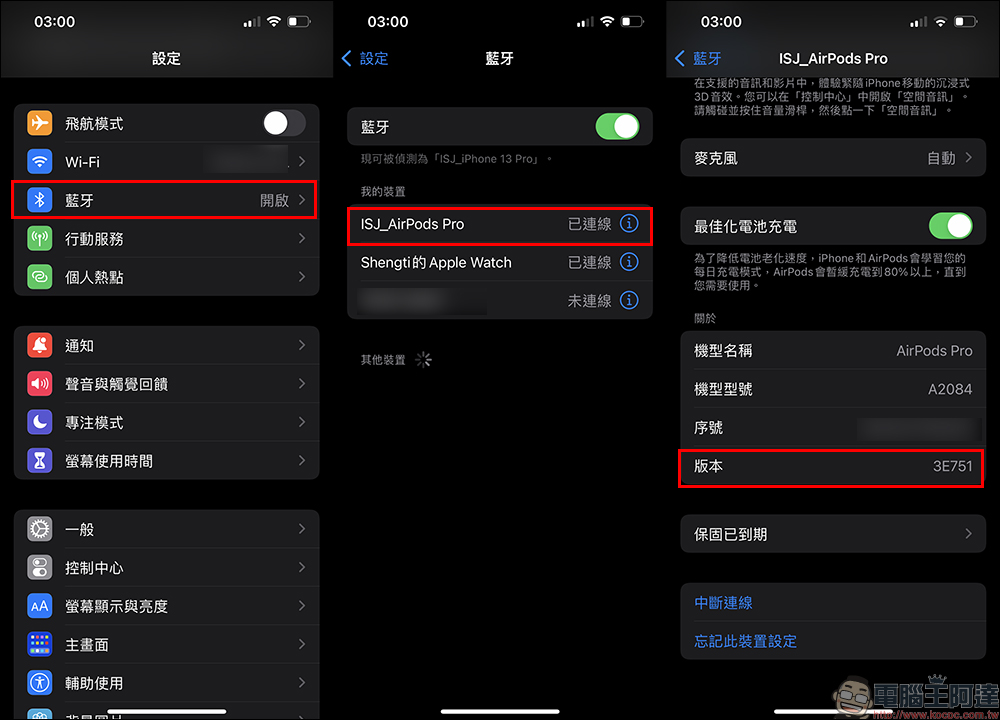
View from “Bluetooth”

First open “Settings” and select “Bluetooth” and then click the “i” next to the AirPods device to view more information. Then in the “Version” field under the “About” category at the bottom, you can see the current AirPods firmware version.
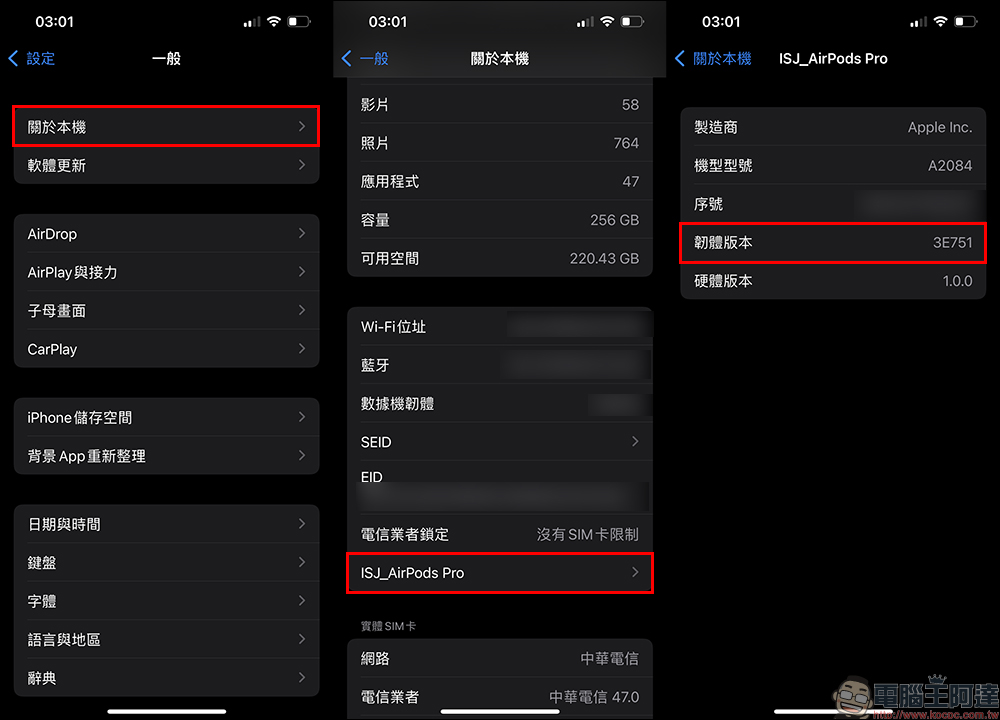
View from “About This Mac”

Another way is to first confirm that the AirPods are connected to the iPhone, then go to “Settings” and select “General” > “About this Mac”.
Further reading:
The world’s first iPhone equipped with USB-C was finally sold for about 2.388 million yuan, 86 times higher than the original price


The latest news about new products such as Xiaomi Mi 12 series: It is rumored that there will be a small version of the new flagship phone! Expected to be published from December

Source: KOCPC Chinese

Tags: AirPodsAirPods 3AirPods ProAirPods updatesApple

Recent Posts

  • The Xiaomi Pad 8S Pro has passed network access certification and will debut with the self-developed XRING O3 chip.
  • The entire Google Pixel 11 lineup has been leaked! Official promotional renders of the Pixel 11 Pro XL have also surfaced
  • Are Chinese phone battery capacities falsely labeled? A brief look at the “capacity locking” phenomenon in Chinese silicon-carbon batteries.
  • NCC is leaderless, recklessly sending out national-level alert messages!?
  • What does “QR” in QR Code mean?

Recent Comments

No comments to show.
  • About Us

We welcome partnership inquiries and product review opportunities from smartphone manufacturers, iPhone accessory brands, and app developers.koc kocpc.com.tw|Privacy Policy |Hosting & Maintenance: Fast Line Taiwan, A-Chang Digital Technology

No Result
View All Result
  • Home
  • Tech News
  • AI News
  • Apps & Tutorials
  • Mobile & Telecom
  • Lifestyle
  • About Us

We welcome partnership inquiries and product review opportunities from smartphone manufacturers, iPhone accessory brands, and app developers.koc kocpc.com.tw|Privacy Policy |Hosting & Maintenance: Fast Line Taiwan, A-Chang Digital Technology