


The official iOS 15 update has just been released recently, and it also includes many interface adjustments and new practical features. Foreign media also compiled the top 10 selected new features of iOS 15, including cross-device FaceTime calls, original text and other convenient applications. Let users who have just updated iOS 15 or are about to buy a new iPhone 13 get started faster!

▲Picture source:MacRumors
Foreign media compiled the top 10 new features of iOS 15, which are a must-read for users who have updated iOS 15!
After the recent official version update of iOS 15 was released, it brought many new features and interface optimizations. Foreign media MacRumors also compiled their top 10 selected new features of iOS 15 for everyone. Of course, there are more updates to iOS 15. In the future, we will continue to share various hidden new features of iOS 15 with you. Before that, let’s take a look at the following 10 new features compiled by foreign media!
1. Cross-device FaceTime (Join a FaceTime call from an Android or Windows device)
In the past, FaceTime was limited to iOS, iPadOS and macOS systems. However, since the launch of iOS 15, it has also officially opened a web version for Android and Windows systems to make cross-device FaceTime calls!

▲Image source: Apple
iOS users only need to open the FaceTime app, click “Create Link” and share the link to various platforms such as LINE to the other party. Whether the other party is an Android or Windows user, they can click on the link and enter their name to use FaceTime on the web page.
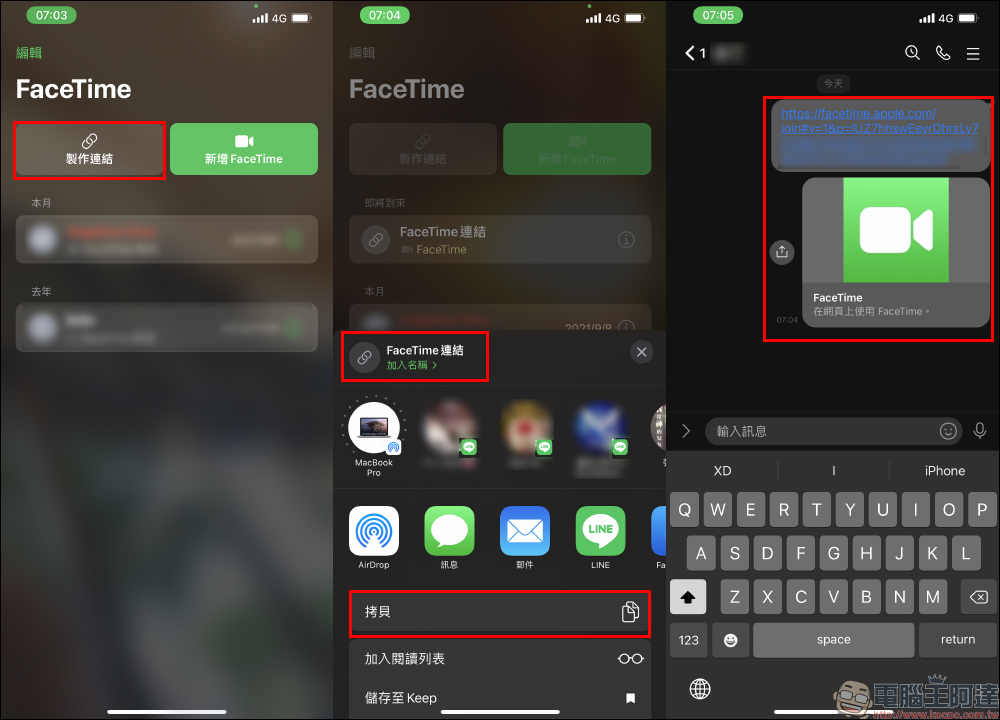
Taking Android phone users as an example, after clicking the link, they can enter a name to join the conversation.
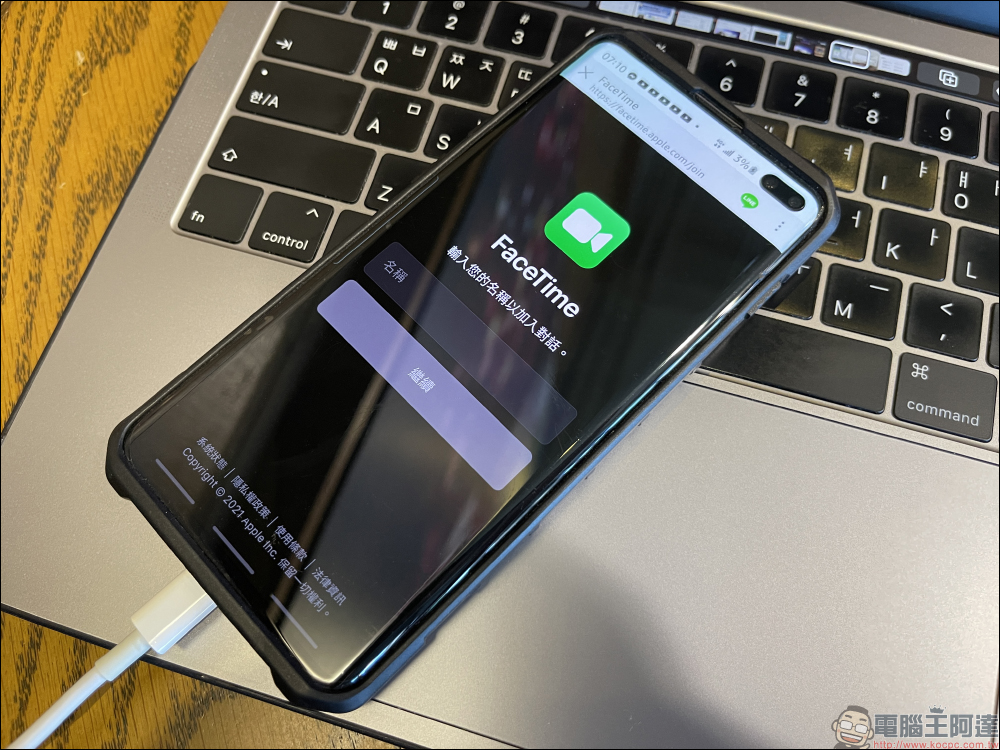
It’s important to note, though, that while Android and PC users can join a FaceTime call, they need an iPhone, iPad, or Mac to create the initial FaceTime link and approve participants.
2. Summary of notification
Depending on the number of applications installed by the user and notification permission settings, the user may receive hundreds of notifications every day. However, many notifications are not that urgent. In this case, the “Notification Summary” function can be turned on.

Through the “Notification Summary” function, users can set unimportant notifications to be sent at specific times (such as morning and evening) to prevent being interrupted by notifications throughout the day. like someImportant, time-sensitive notifications will be skipped from the Notification Summary, but users can set Instagram likes, game notifications, news alerts, and other similar notifications to the Notification Summary.

▲Picture source:MacRumors
3. New tab group
The Safari browser in iOS 15 has been changed to a new tab group, making it easier for users to manage a large number of tabs.

4. Siri supports offline operation
In the iOS 15 system, the Siri voice assistant will be preset to directly recognize voices and perform requests offline, such as launching apps, setting alarms, controlling music, etc. There is no need to record and then upload the data to the cloud for processing. Machine learning can be performed directly on the device. In addition to speeding up the operation, it also solves the privacy concerns of voice assistants.
However, if the device is not connected to the Internet, Siri functions such as searching for relevant results on the Internet cannot be performed?
In addition, Siri’s offline voice recognition function is limited to devices such as iPhone or iPad equipped with A12 Bionic chips or higher-end chips.

▲Picture source:MacRumors
5. Original text
Starting from iOS 15, the “original text” function has been added, allowing users to turn on the function at any time through the built-in camera or in applications such as LINE to use the camera to recognize the text in front of them, which is convenient for applications such as copying text, reading text, and even translating text. aboutHow to use “original text”, you can review our previous teaching (click me to go)。

After turning on the original text function, the camera will recognize the text content in the screen and convert it to text immediately. The user can click to insert and paste the text into the search field or other text input fields such as memo.

For photos that have been taken, you can also turn on this function in the photo album to copy text and paste it into applications such as Notes. Of course, you can also perform text translation and other operations here.

You can also view complete EXIF shooting information in the photo album.

6. System-wide translation
Continuing the function of original text, in iOS 15, text can be translated in real time whether it is taken by the camera or in the photo album. However, the languages of the translation results are currently limited to English, Simplified Chinese, Japanese, Spanish, French, Arabic, Italian, Portuguese, German and Korean.

7. Health Trends
In iOS 15, the Health app also adds a “Health Trend” function to help users understand changes in their own health trends at a glance, such as heart rate, blood oxygen, exercise and other health trends.

8. You can still find your iPhone after turning it off
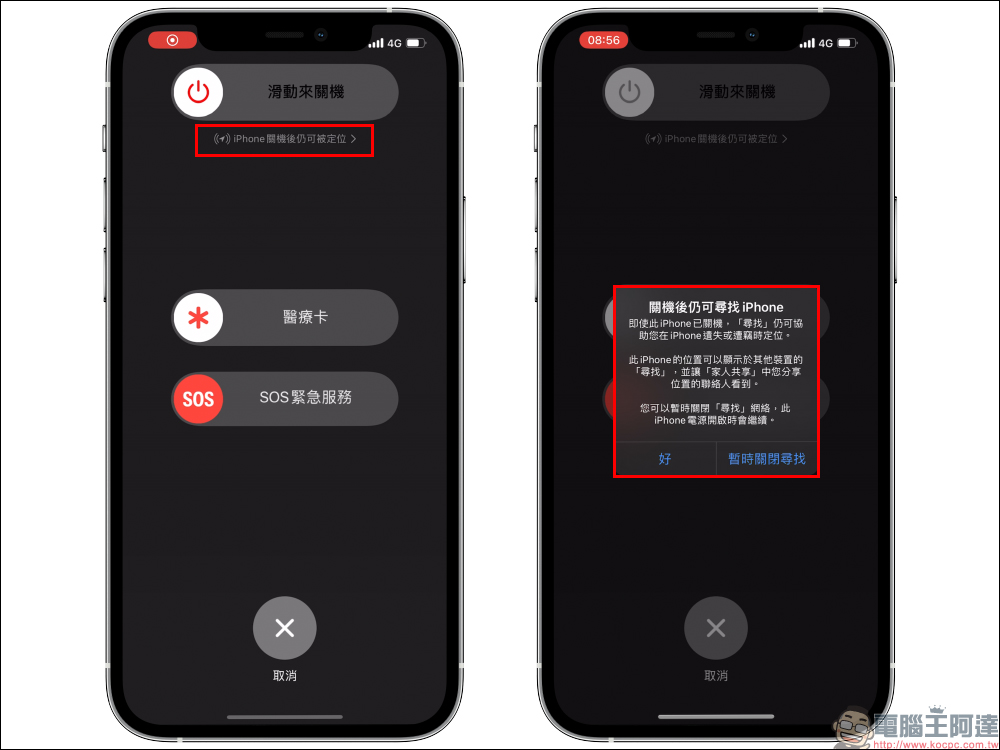
iOS 15 has introduced the Find My function that can be used even when the phone is shut down. After updating to iOS 15, you can see the description of this function in the first shutdown prompt (as shown below). Even if the iPhone is turned off, Find My iPhone can still help users locate it if it is lost or stolen. For more information on this feature, seeReview our previous articles (click here to go)。
9. Apply drag and drop
iOS 15 supports cross-app drag and drop, so users can click on images, links, text, and more and drag them from their original app to another.
Using cross-app drag and drop on iPhone in iOS 15. Finally 🎉 #WWDC21 pic.twitter.com/1RbyPBGfcq
— Federico Viticci (@viticci) June 7, 2021
10. Built-in authentication
You can now save two-factor authentication codes next to your username and password in the Passwords section of the Settings app, so you no longer need a secondary app like Google Authenticator for two-factor authentication.

▲Picture source:MacRumors
Source:MacRumors


Source: KOCPC Chinese