


The data on the mobile phone is getting more and more complex, but the data is priceless. A complete set of mobile phone management and backup tools is indispensable. However, the iTunes that comes with it always feels like it is tied up. It has always been really incompatible with the author. In the end, I can say that it is “difficult to use.” AOMEI MBackupper Pro is a third-party iOS management tool. Whether it is backup, file transfer, or transfer between iOS devices, it can be easily completed. iPhone 13 will be released soon, and new and old iPhones will be seamlessly integrated. Come and try the limited-time free iPhone data conversion tool.

用 Telegram 訂閱【挨踢路人甲】最新文章:https://t.me/itwshare
AOMEI MBackupper can quickly back up iPhone/iPad/iPod photos, videos, music, contacts and messages, and can also easily transfer data between iOS devices and PCs.
[Software name]: AOMEI MBackupper Professional
[Limited Free Event]: Free for a limited time, please click herehere
▼Go to the official event website and see the 29.95 free [Get it Now] button. Just click on it without looking too much.

▼After compressing the downloaded compressed file, you will see the executable file and a file. When you open the file, you will see the authorization serial number. Please note it down.

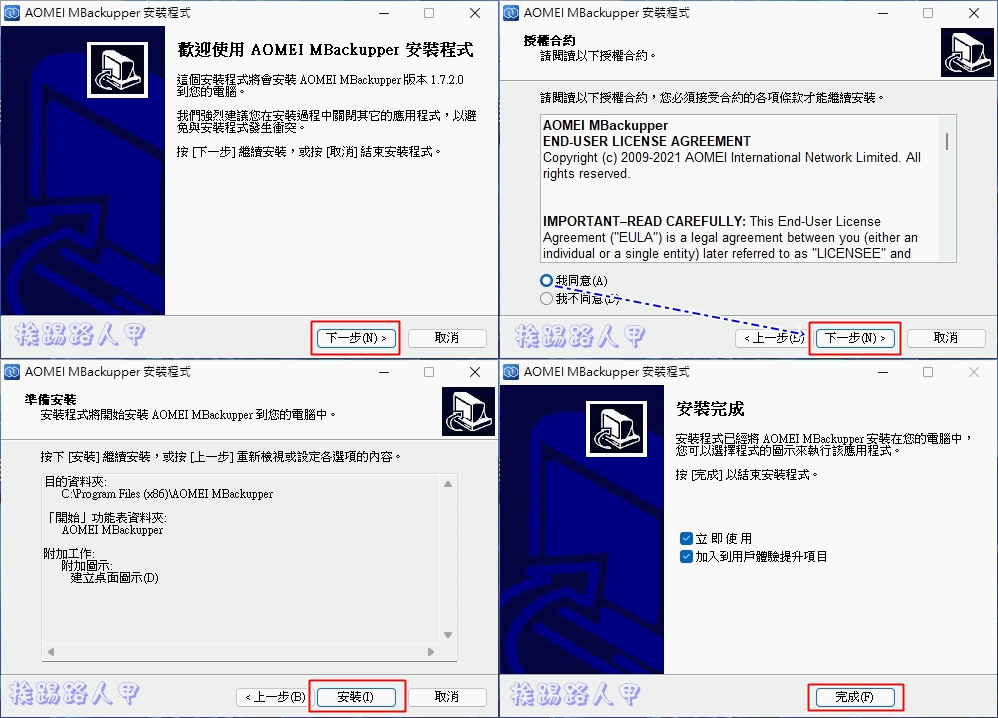
▼Executing the installation file, I am always very happy to see Traditional Chinese.

▼Next, just enter the Windows installation sign [Next] to complete the installation.
▼The registration window will appear before entering the main screen for the first time. Fill in the serial number you wrote down before and click [Register].

▼After successful registration, the word “Professional” will appear in the upper left corner of the title. In the middle of the window, you can see two large buttons (blue boxes) for iOS device backup. The yellow box below is the transfer tool, which can be transferred to other iOS devices or to a computer. It also includes a HEIC converter and clean erase function.

▼Connect the iPhone’s USB transmission cable to the computer and select Trust. You can directly back up pictures or customize the backup. There are categories to choose from, such as pictures, videos, music contacts, and messages.

▼Of course, you can also enter detailed file selections, which is a good tool for backing up iOS devices.

▼iPhone 13 is about to be released. Those who want to buy it can use one-click to seamlessly transfer data between old and new iPhones. It is super convenient and practical.

▼Whether it is transferring from computer to iOS device, or iOS device to computer, you can transfer easily.

▼In addition to image and custom backup, AOMEI MBackupper also supports full machine backup.

Further reading:
Source: KOCPC Chinese