


Although YouTube is the most convenient video streaming service, there are more and more similar video platforms. With the ever-expanding network and the increasing bandwidth, whether you are watching videos or listening to music, any online audio and video platform is not a problem. But sometimes you want to keep the video downloads or watch them again when you have time without disturbing ads. Let’s take a look at the CocoCut video download extension kit. With just a browser, you can easily download videos or music seen on the web. It supports HLS / M3U8 Videos are automatically explored as soon as you enter the webpage and can be downloaded by clicking on them.

用 Telegram 訂閱【挨踢路人甲】最新文章:https://t.me/itwshare
HTTP-based streaming media network transmission protocol HTTP Live Streaming (HLS), the entire traffic can be divided into small data streams, commonly seen in M3U and M3U8 files. CoCoCut can detect the files in M3U8 files of web pages, segment the videos and merge them into MP4 format. No installation is required. Just install the CoCoCut extension on the browser (Chrome or Edge) and download streaming videos easily and happily. However, due to Google App Store regulations, CoCoCut does not support YouTube video downloads!
[Software name]: CocoCut
【Official website】:https://cococut.net/
[Download and install]:Chrome store , Edge plug-in
▼CoCoCut supports Chrome and Edge. Taking Chrome as an example, just presshereTo install the extension, press the blue button “+Add to Chrome” as shown below.

▼The same installation confirmation window will appear for Google chrome extensions. Select the [Add Extension] action.

▼After successful installation, the CocoCut icon and installation success message will appear above the Google Chrome browser.

▼After installation, it is hidden by default, so you need to cancel the hiding, as shown below to pin the right side of the browsing bar.

▼When watching streaming platforms, sometimes I want to download and convert it into an MP4/MP3 file, or even play it on a mobile phone or computer, but I often give up when I think of the trouble of conversion. Now that there is an expansion kit, it is not a problem. First, find the audio and video platform you want to download, as shown belowMoMoVODFor example, on the website, enter the playback video page.

▼As long as you enter the playback webpage, the expanded CocoCut suite will explore the format. On the way down, you will see a 1 on the icon, indicating that a stream that can be downloaded has been detected. Click on the icon and then click on the download icon.

▼Then jump to the new tab and start downloading the video. In addition to seeing the download progress, you can also pause/resume.

▼Click Save after the download is complete.

▼When you see the window to save a new file, you can modify the save file name and path.

▼What should I do if I encounter a video that cannot be downloaded? Don’t worry, CocoCut suite has a built-in recording mode that also allows you to save videos.

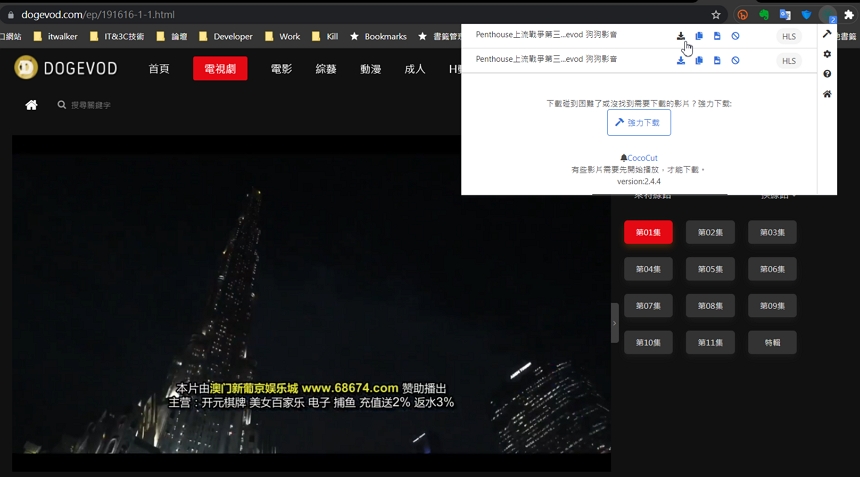
▼Try again Dogevod Online audio and video websites are also automatically captured.
Further reading:
Source: KOCPC Chinese