


I remember when I was a kid, I saw many people typing Chinese on PCs. At that time, I saw “Yitian Chinese” appearing at the bottom. It was so exciting and enviable. Nowadays, most systems have built-in multiple languages and input methods. The success of Windows 7 is not only stable, but also supports Chinese input. However, Chinese input after Windows 8/10 has caused many users to complain, especially the new interface which is not smooth. If you use Zhuyin input, then try the free New Natural Input Method V12 Zhuyin version, which can easily meet your needs.

用 Telegram 訂閱【挨踢路人甲】最新文章:https://t.me/itwshare
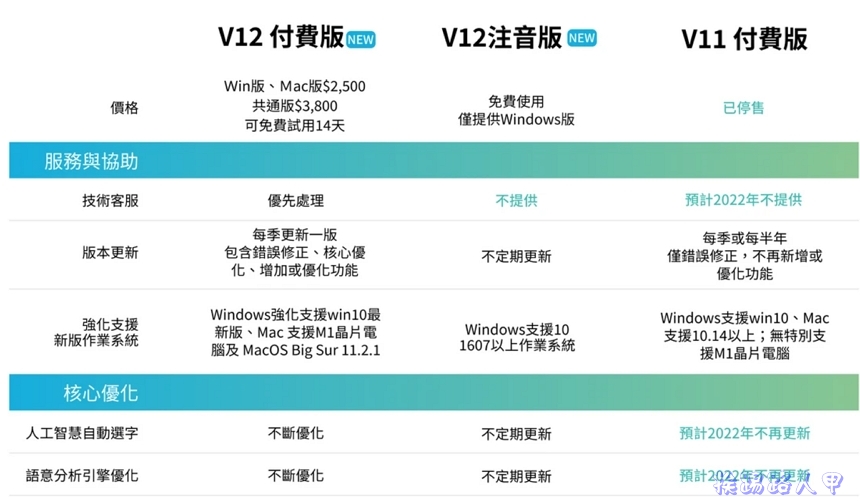
natural input methodIt is not a built-in input method in the system. It is a commercial software that requires a paid license to be used. It supports Windows and Mac versions. If you use Zhuyin input, there is a free Zhuyin input version, which can basically meet your basic needs. Of course, there are still differences between the paid and free versions. For example, they support Mac, Chinese Pinyin, Tongyong Pinyin, Cangjie, Simplified and other input methods. The difference can be seen inVersion comparison web pageCheck it out.
[Software name]: New natural input method
[Software version]: V 12
[Software language]: Traditional Chinese
[Software nature]: Provide free version and paid professional version
[System Support]: Windows 7 / 8 /10, MAC
【Official website】:http://www.goingpro.me/

Subscription platform to register
Remember that the free natural input method V11 phonetic board can be downloaded directly from the official website. After the V12 version, you need to register on the IQ Technology subscription platform before you can download it, so please go herehereto register an account (if you have already registered, you can log in directly).


After the account is successfully created, verification is required. The verification link will be mailed to your registered email address.

Open the Natural Input Method membership verification letter in your mailbox and click the verification link in the red box.

You can see that the verification is successful.

New Natural Input Method Installation and Instructions
After you have an account, log in to the subscription platform and you will see the download buttons for Windows, Mac and the free phonetic version.

After downloading and installing, in a Windows 8/10 environment, a window for using this account will appear during execution. This is because a security warning window of “User Account Control” will appear due to security issues. Mainly when users perform some actions that will affect the system, a confirmation screen will often appear, so click [Yes] to continue (if you want to remove this warning, please refer to “Talking about User Account Control (UAC) in Windows 8/10″article)

After downloading and executing the installation, you will see the Welcome to New Natural Input Method Phonetic Version installation wizard. Although you are happy, you still have to go to the Windows installation sign [Next].

It’s unlikely that anyone will actually read the description of the licensing contract! Please click “I accept…” and click [Next].

Do you want to change the default value of the installation directory? If you want to change, please select [Browse] to select the folder you want to install. Generally, it is based on the default value, so click [Next] to continue.

Finally, when you come to the screen to start the installation, of course, press [Install] to start the installation!

Since the installation of the new natural input method requires Microsoft .Net Framework version 3.x, if your system does not have it installed, it will automatically guide the installation. After the installation is complete, a login screen will appear. Log in with the email and password registered on the subscription platform before. Then you will see the subscription plan – Natural Input Method Phonetic Free Edition.

Returning to the installation screen, I saw the initial setting window. The default button for switching between Chinese and English is “CapsLock”, but I am used to the “Shift” switching of Windows 8/10, so I adjusted it. If I am really not used to it, I can still adjust it afterwards.

When you see the picture below, the installation is complete and the product is enabled.

The input method on the right side of the taskbar is natural input V12.

After switching to the new natural input method, a floating input method toolbar will appear, with switching buttons for settings, full-width/half-width, traditional and simplified, symbols, words, phonetic/English, etc. During the operation, artificial intelligence automatically selects homophones with a very high accuracy, and the cursor display is greatly followed, which feels very comfortable.

Further reading:
Source: KOCPC Chinese