


Apple previews this year’s developer conferenceRelated features for many AirPods range products, including dialogue enhancement, automatic reading and other functions. This also includes “upgrading” the function of finding AirPods to support offline Find My Network search. Recently, with the release of the iOS 15 beta version, some foreign media have unearthed more relevant details. The most concerning thing among them is probably the models supported by AirPods, and how to unbind them? After all… AirPods Pro don’t seem to have “physical” buttons? Continue reading How to unbind AirPods “off-phone version” Find My network support? The internal code reveals relevant details in the report text.
▲Image source: Apple
How to unbind AirPods “off-phone version” Find My network support? Internal code reveals relevant details
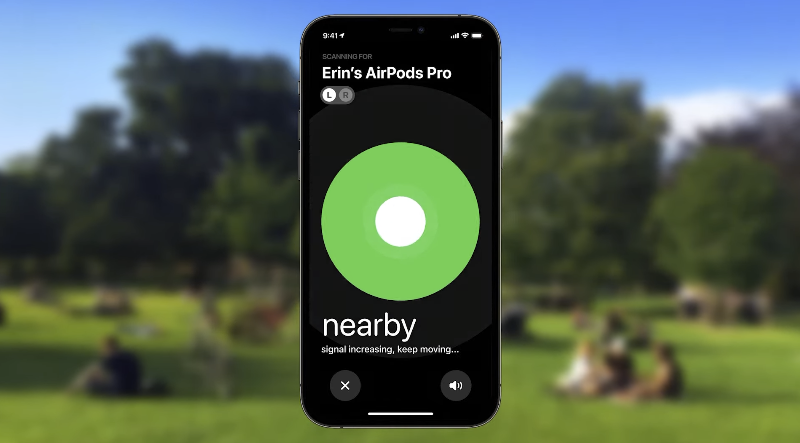
As the public beta version of iOS 15 comes to Beta 5, which should be very close to the official version release. Foreign media 9to5Mac recently unearthed many details about AirPods confirmed to be upgraded at this year’s WWDC. One of them is about the upgrade of Find My Network support.
First of all, it is not surprising that in supporting “Everyone for one, one for everyone”, the object-finding function can be used to locate objects through the Bluetooth connection signal shared by other Apple device users even when the device is offline. After the AirPods update the corresponding firmware, you can get an upgraded search experience – it cannot be said to be a complete version, because the small AirTag can also provide a short-range “direction” search function through the U1 chip; this currently seems to only support distance sensing (within the Bluetooth connection range) on the upgraded AirPods; it can also perform an auxiliary search function for external sound.
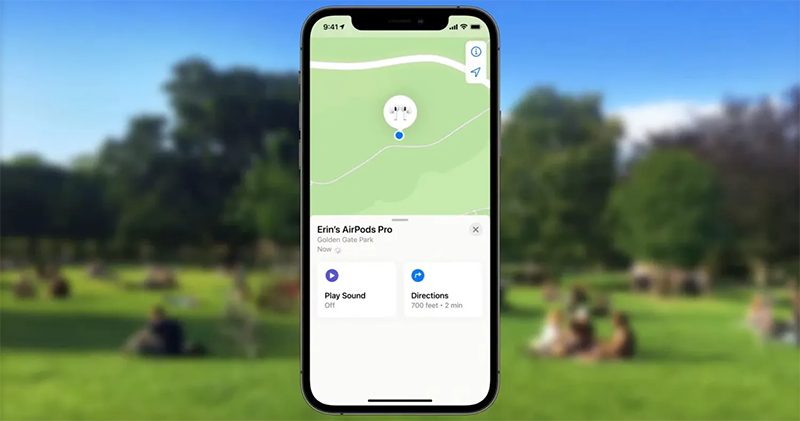
At this stage, according to foreign media information, to provide Find My Network support, AirPods will need to be bound to an Apple ID. But you can still pair the headphones with other devices – because location signals will still be transmitted, so please consider the possibility of being tracked if someone else lends you AirPods (eh). Currently, the only supported models are AirPods Pro and AirPods Max.

▲Image source: 9to5Mac
As for the hardware reset function provided by all devices that support the search function (according to previous experience, you still need to unbind the Apple ID in the cloud before you can use the device), the internal animation dug out this time is also displayed.
First of all, AirPods Max, which has two physical buttons (the knobs can be pressed), actually only need to press the two buttons at the same time for 12 seconds to complete the reset; AirPods Pro is a bit interesting, because the reset action not only requires you to press the sensor on the headphone stem, but also requires the user to cover the two black openings on the inside and outside of the earphones with their fingers at the same time, and press the sensor on the ear stem multiple times. I’m really curious how busy it will be to operate XD.
Further reading:

Source: KOCPC Chinese