


Use the system’s “print screen” button to capture the screen of the Windows system. Of course, you can also usePicPickSimilar screenshot software, in fact, the author also wants to record the process of playing. Whether it is teaching or showing off to others, I always hope to perfectly present the picture of the process. At this time, screenshot software is not useful, and I don’t want to install a large set of image editing software for recording. Let me tell you that you don’t have to spend a lot of time to find a video recording program. “AnyMP4 Screen Recorder” allows you to easily record the screen. It is currently free for a limited time, so hurry up and download it.

用 Telegram 訂閱【挨踢路人甲】最新文章:https://t.me/itwshare
Each set of software has its advantages and disadvantages. Perfect software is hard to find. Personally, I think “AnyMP4 Screen Recorder” is a very practical screen recording tool that can help you record computer desktop screen operations. In addition to the screen, it can also capture different audio sources from system sound, microphone sound, or both at the same time. It is suitable for Windows and Mac systems.
▼Go to the AnyMP4 Screen Recorder event page and see the words “Get IT FREE”. The software worth $19.95 is free for a limited time! (There is an event website at the end of the article).

▼Scroll down to see the link point of “GIVEAWAY PAGE” in Step 1. Click to enter the page.

▼At this time, enter the name and email account and press [Senden]. When you see the Email Sent Successfult message screen, it means that the serial number has been sent. .

▼Go to the email inbox you entered and click to open it when you see the incoming email. You will see the startup serial number (in the red box) in the email. Please note it down.

▼Go back to the event webpage and scroll down. Scroll down to Step 3. When you see the download point of the program, please click to download.

▼The installation interface supports Chinese, and all actions can be completed with just one click of the mouse.

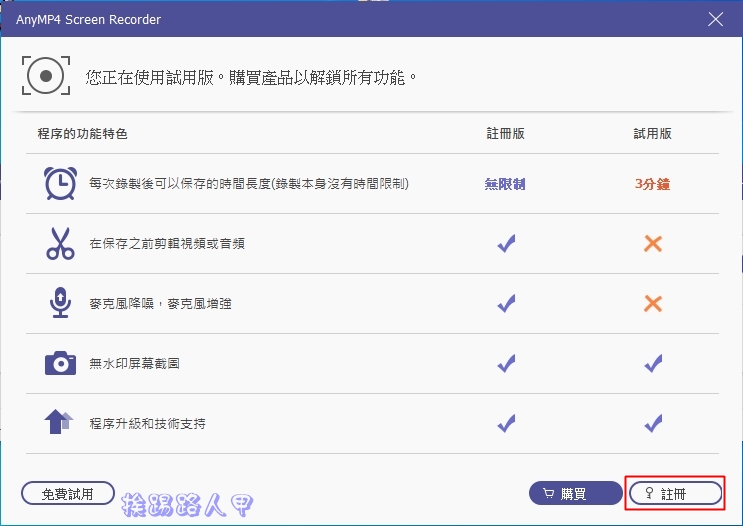
▼Before entering the main screen, there will be a difference between registration and trial version. The trial version has a recording limit of 3 minutes, so click [Register] to register quickly!
▼Enter the email account entered on the event webpage and the authorization serial number in the email, and press [Activate] to complete.

▼In addition to the main screen recording, sound recording, game recording and screenshots, it also supports recording with WebCam camera lenses and mobile phones.

▼Click “Screen Recording” and you will see the picture below. You can use the dotted box to adjust the screen area to be recorded. Of course, you can also record in full screen, window, etc. Webcam, sound and microphone are also supported.

▼Clicking the [REC] icon will enter a 3-second countdown preparation time.

▼When recording, there will be a small long operation toolbar, which can be easily paused or stopped and reduced to the toolbar.

▼After stopping recording, a preview window will appear. In addition to letting you see the recording results first, you can also do simple cropping and editing. When you are satisfied, press [Save] to save the video.

▼Go to the settings window, where there are settings related to recording, output, sound, mouse and shortcut keys.

[Software name]: AnyMP4 Screen Recorder
[Limited free event website]: Please clickhere
Further reading:
Source: KOCPC Chinese