


I believe that many people are used to sending messages and sharing photos of life with friends through LINE every day. However, in the past, when the LINE App sent multiple pictures, they were integrated into the same message to avoid being washed in the chat room. However, if you want to access multiple pictures at once, you have to manually click and save them step by step. It is inevitably inconvenient to access a large number of pictures. However, LINE’s recent updates to LINE iOS version 11.9.0 and Android version 11.9.1 have finally improved this feature! Now, as long as you click on any picture and press Save, you can select “Save All Pictures”, which greatly saves the time of saving chat room pictures.

LINE App 11.9.0/11.9.1 update: Chat room adds one-click downloading of multiple pictures function
In addition to sending text messages, free voice calls, and free video calls, LINE is very convenient. Of course, it also has the function of sending pictures! Many LINE users will directly use LINE to share a large number of photos of food and other life records. However, sending multiple pictures at one time is a bit troublesome for others who want to save them to the photo album. However, in the LINE iOS 11.9.0 and LINE Android 11.9.1 updates, in addition to improving the interface for sharing chat messages and files, it also allows users to download multiple photos in the chat room at the same time.

Just update the LINE App to the latest version. If you want to save all the pictures at once when you see multiple picture messages in the chat room, just click on any picture to enter the preview page, click the “Download” button to select “Save All Pictures”. The button will also mark the total number of pictures in the picture message. After clicking Save All Pictures, you can directly save all the pictures to the mobile phone album!

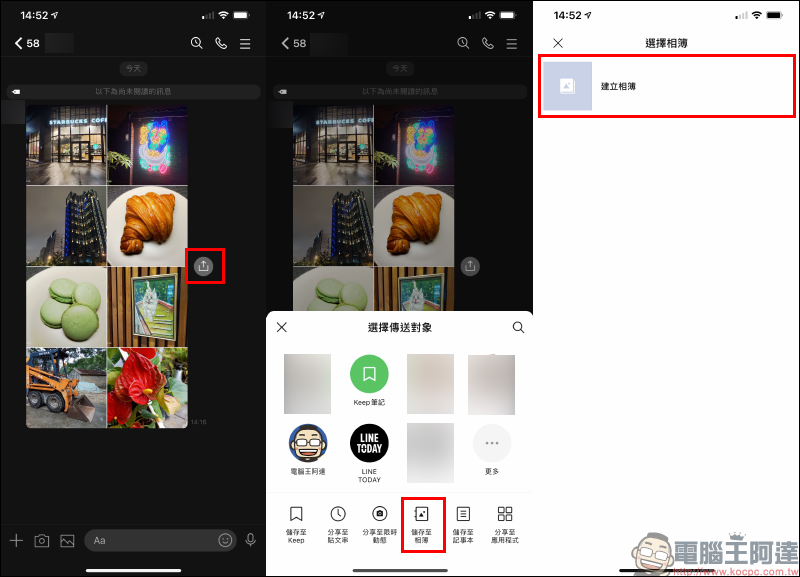
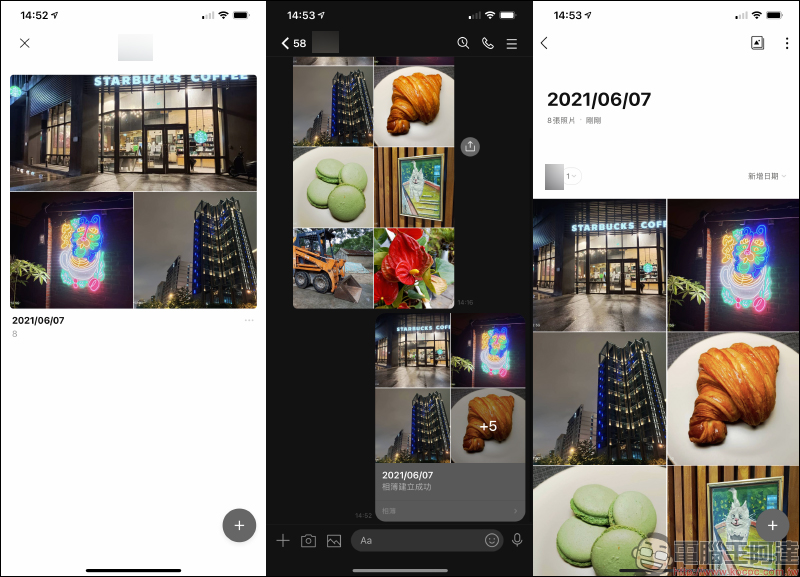
Of course, users can also save multiple pictures at once to the chat room album with this friend. Just click the share button next to the picture message, and the recipient will choose “Save to Album” to select the recipient and create a new album.
After the saving is completed, members in the same LINE chat room can click on the chat room album to view the pictures at any time.
Further reading:
Google gadgets on iOS home screen launch new theme styles: abstract art, travel, Google Earth, solid color and other options (setting tutorial)


Source: KOCPC Chinese