


2026 can be said to be a year of intensive updates for Google Pixel. Android 17 has finally been officially launched, and more features are lined up to be launched later. However, beyond the fanfare of these version updates, what really surprised me this year was a small change that was barely discussed and quietly solved a long-standing problem I have had with Pixel for many years.
Android “Auto-adjust connection” setting makes the Pixel phone network switching method more suitable for you
This problem comes from “auto-adjusting connections”. I’ve had a love-hate relationship with this feature since it came out, tying a very useful power-saving tool with an automatic network switching behavior that I’ve never liked. As a result, every time I buffered a video on YouTube or scrolled through TikTok while lying on the couch, I had to stare at the status bar, waiting to see if my phone would suddenly jump back to mobile data.
Pixel’s battery management has always emphasized “knowing which switches to turn on and which to turn off.” For most people, auto-adjusting wiring is one of the important switches. It will monitor your network status and switch or disable some functions when necessary to balance performance and power consumption. For example, in areas with weak signals, it will reduce overly aggressive 5G searches to avoid unnecessary power consumption. But what really bothers me is its automatic switching logic: as long as the Wi-Fi signal is weak enough to maintain a stable connection, it will immediately jump to mobile data. The problem is, I choose to connect to Wi-Fi, and I choose to use mobile data. I don’t want my phone to overturn my decision just because the signal drops by one or two bars.
There are no issues with my Wi-Fi itself, I just have multiple devices in my home using it at the same time, which occasionally causes brief lags. I’d rather wait a few seconds than waste data I didn’t intend to use. This behavior of “my phone makes decisions for me” completely goes against the “set it and forget it” convenience that I was attracted to in the first place. I always thought this was an unsolvable reality: the advantages and disadvantages of automatic adjustment wiring are tied together and cannot be disassembled. What’s more, most people actually prefer automatic switching because it ensures an uninterrupted connection. It wasn’t until the QPR3 update of Android 16 that I saw for the first time a change that truly took into account the needs of all users.
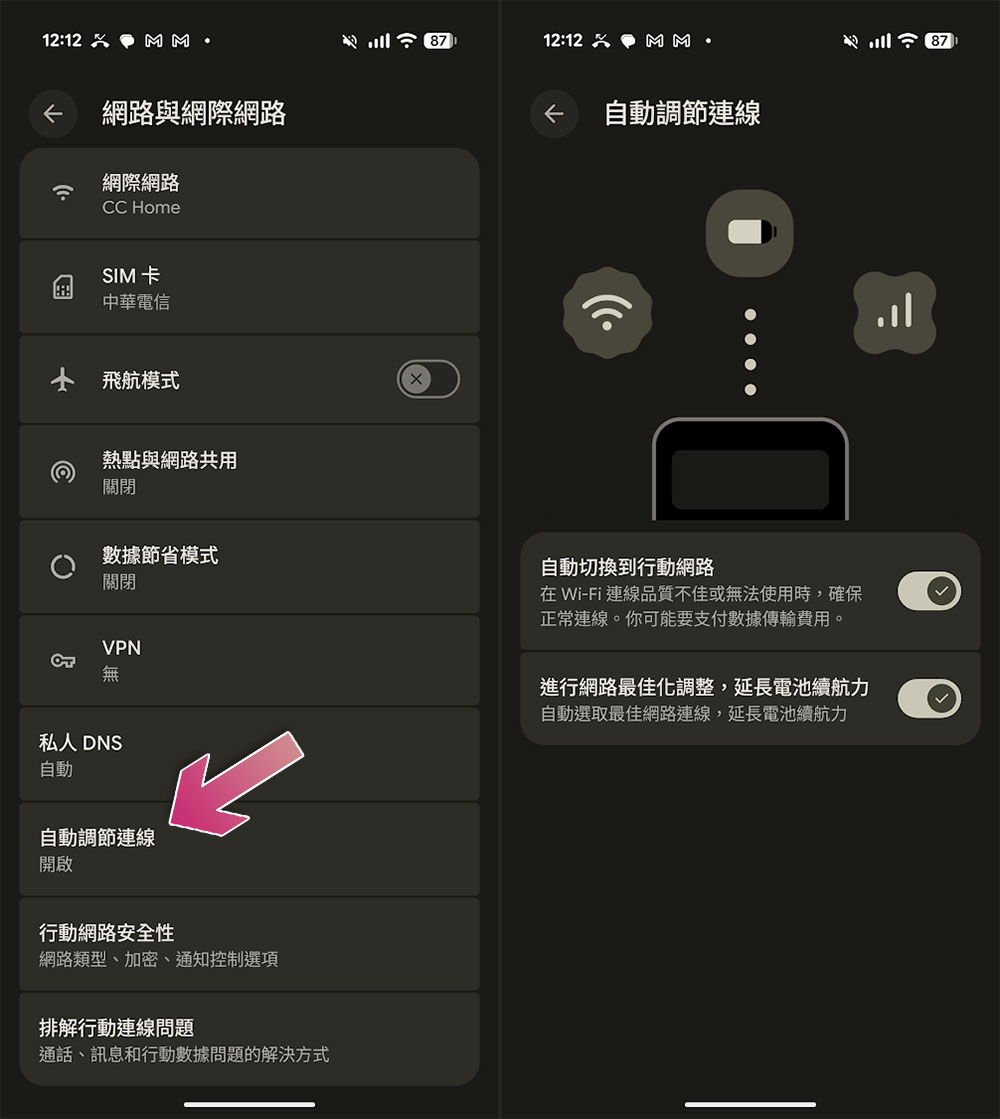
This change first appeared in the beta version in February and was officially rolled out to all users in early March. Google has added two independent switches to the adaptive connection settings page: one is “Optimize the network and extend battery life” and the other is “Automatically switch to the mobile network.” The original single switch was finally split into two, something that should have been done a long time ago. More importantly, the automatic switching option now clearly states “Data traffic charges may incur” below the automatic switching option. This warning was not present at all in the past. For users who have just joined a capped network plan, this tip can avoid a lot of unnecessary data consumption.
I’ve never had a problem with the “optimization” part of the auto-switching connection, which is really responsible for extending battery life. It will downgrade your connection from 5G to 4G when you don’t need high-speed internet, because a high-speed radio will only consume more power when reading or on standby, with no real benefit. Now that the function is unpacked, I can finally retain the power saving effect without being tied up by automatic switching.
When you first open the settings, both switches are preset to on, which is reasonable for the average user. I turned off automatic switching, kept battery optimization, and observed it for a few days. The results were exactly as expected: even if the Wi-Fi signal occasionally weakened, the phone would no longer jump to mobile data without permission, and the battery life remained good. If you also want to adjust, you can go to “Settings >> Network & Internet >> Automatically adjust connections” to find these two options.
For most people, the original bundled design is really convenient, but for the few users like me who don’t need automatic switching at all, now they finally don’t have to choose between “fully on” and “fully off”. I value control more than power saving. This change shows me that Google is willing to break down the functions into more details so that users can have more control within a reasonable range. I am very happy to see this direction.
Source: KOCPC Chinese