


Since the launch of the iPhone 12 series, I believe many users have been considering whether to buy an Apple MagSafe charger. In addition to the “MagSafe dual charger” that can charge Apple Watch at the same time, more people will probably give priority to the relatively cheap MagSafe charger designed for magnetic adsorption wireless charging of the iPhone 12 series. However, in order for the MagSafe charger to maintain a stable and fast charging speed, it is critical to find ways to solve the heat source generated during charging.
Recently, some Chinese netizens have used a simple combination of accessories and built-in automated operations in iOS to easily DIY and bring practical upgrades to the MagSafe charger.
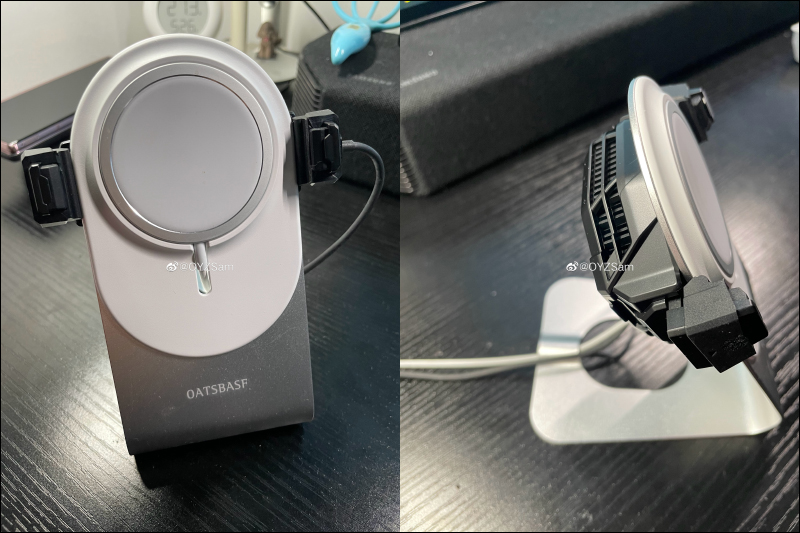
▲Picture source:OYZSam (Weibo)
Apple MagSafe charging stand upgraded with heat dissipation and cooling to increase charging speed? Netizens can easily complete it through simple DIY combination and simple settings
Before sharing the recent DIY “upgraded” MagSafe charging stand made by Chinese netizens, let’s quickly review and clarify a misunderstanding that many people have about MagSafe chargers. When the Apple MagSafe charger was first launched last year, there was an articleAccording to actual measurements by foreign media, only Apple’s original 20W transformer can promote full-speed charging of the MagSafe charger.,The YouTube channel’s conclusion at the time was actually completely wrong.。
First of all, whether it is Apple’s original 20W or above or a third-party charger with a MagSafe charger, in order to achieve the highest charging peak, the current remaining power of the iPhone 12 itself is the primary condition for triggering, and the phone must be in a low power state. In addition, the iPhone 12 series phones must be kept at low temperatures, especially ensuring that the internal components of the iPhone 12 are kept at low temperatures. Like other fast charges, the charging output power will be intelligently adjusted according to the charging status during the charging process, and will not be at the highest charging power at all times. There is also a guide on “How to use MagSafe charger with iPhone 12 models” on Apple’s official websiteComplete instructions (click me to go to Apple’s official website)。
According to the actual measurement results of the iPhone 12 paired with Apple’s 20W, 30W, 61W, and 96W chargers at the time, the charging power can reach 18W. Third-party chargers, most of which have PPS, can also provide 18W charging power. Of course, these test results were achieved by ensuring that the battery of the iPhone 12 was less than 20% and that it was equipped with an ice-coated cooling back clip to dissipate heat from the phone.
Taking the picture below as an example, the Charging Head Network actually measured using a Baseus 20W PD charger with MagSafe to charge the iPhone 12, and the measured voltage was 9.03V, the current was 2.02A, and the power was 18.32W. (Click here to read: Complete test article of Charging Head Network)
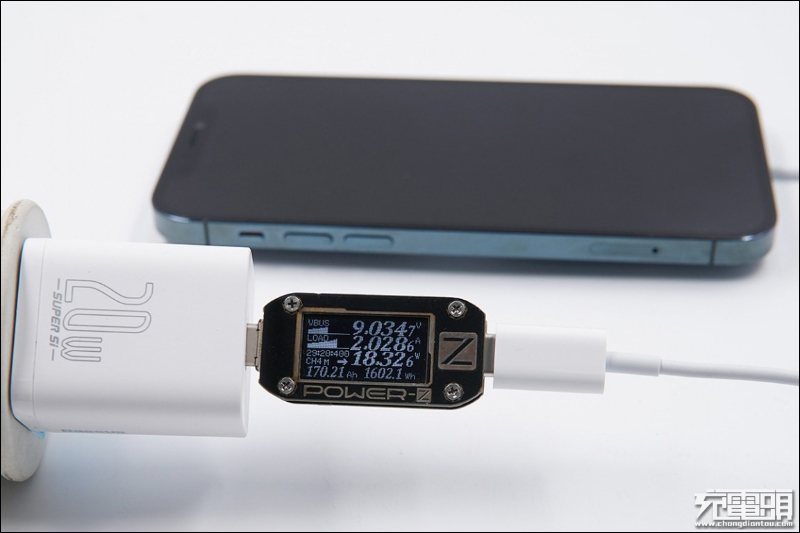
▲Picture source:Charging head network
After clarifying everyone’s myths about MagSafe, let’s get to the point and see how Chinese netizens cleverly and simply “solve” the heat generated by MagSafe on iPhone 12 when charging! Recently, OYZSam first stated that the MagSafe generates too much heat when charging, especially when charging with the belkin 2-in-1 charging base when the screen is awake. The phone and charger heat up even more seriously, and the power consumption is even faster than charging. Later, he also shared his approach and attached the “cooling upgraded version” of the MagSafe charging stand (as shown in the first picture of this article).
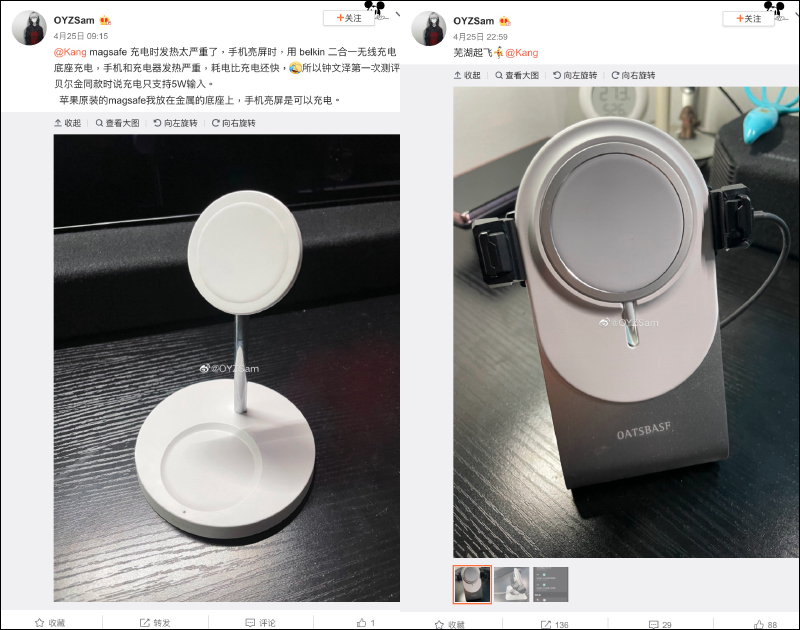
▲Picture source:OYZSam (Weibo)
Let’s briefly analyze what he used to make up this “heat dissipation upgraded version” MagSafe charging stand. The first thing he needs is an Apple MagSafe charger, then a bracket that can fix the MagSafe charger, and finally a mobile phone cooling back clip is completed.
MagSafe brackets are sold by many sellers on Shopee or Taobao. As for the cooling back clip, he uses the “Black Shark Ice Cooling Back Clip 2 Pro”. The recommended price in China is RMB 199 (approximately NT$863). Of course, you can also find this cooling back clip on Shopee or Taobao.
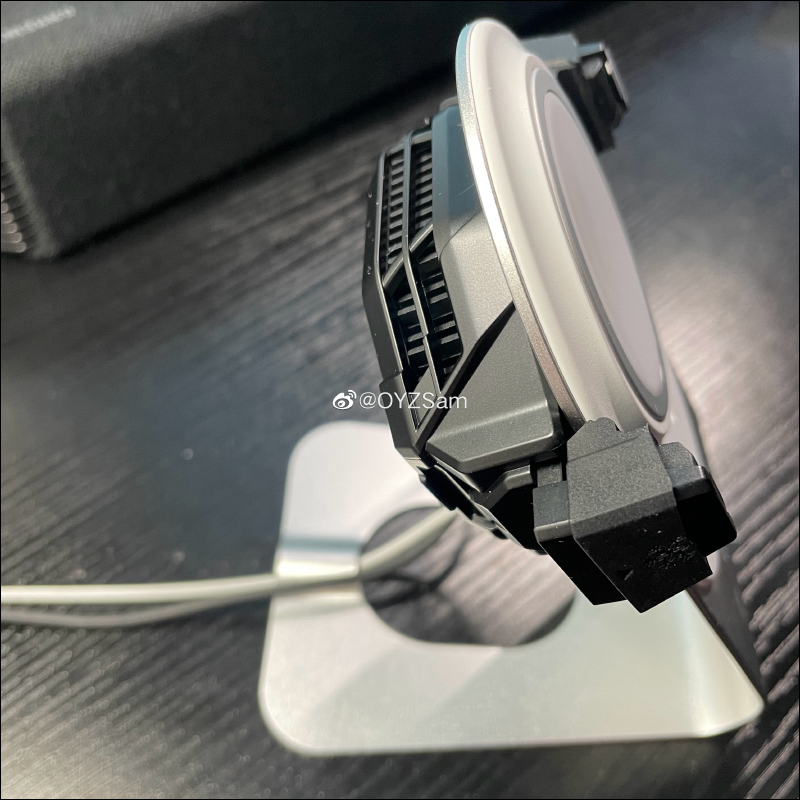
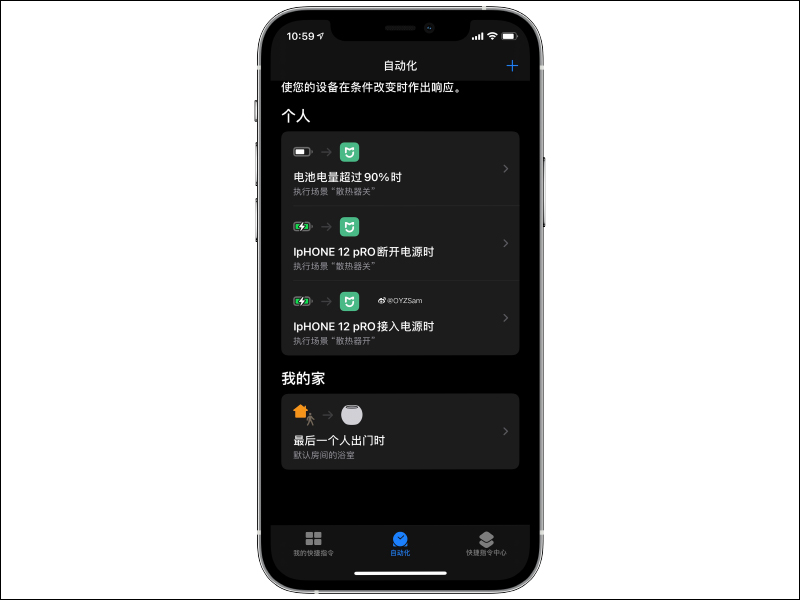
After fixing the hardware part of the MagSafe charging stand itself, we can’t just let the cooling clip keep running there without thinking and consuming power, right? So OYZSam used a smart and simple method, which is the “automated” operation in iOS shortcuts. At this time, smart people may start to wonder about a question. It is clear that the “Black Shark Ice Cooling Backpack 2 Pro” is not a Mijia smart device, so how to control its switch when charging the iPhone 12?
Because OYZSam connected the power supply of the Black Shark Ice Cooling Back Clip 2 Pro to a WiFi smart socket to control power outages, it can set up a scene to turn on the cooling back clip when the iPhone 12 is connected to the power source and starts charging. If iPhone 12 is charged more than 90% or iPhone 12 is disconnected from charging, another scene will be executed to close the heat dissipation clip.
▲Picture source:OYZSam (Weibo)
After reading this, I have to admire the smart little minds of netizens! In addition to being easy to install, simple to set up, and not expensive in total, it can directly improve the charging efficiency of MagSafe chargers that are originally limited by temperature rise. The most important thing is that if you want to play mobile games and install a cooling back clip on your phone, you can remove it from the MagSafe charger at any time.
If you are considering buying a MagSafe charger, or if you have already bought a MagSafe charger but are unable to accept the heating problem when charging, you might as well give this method a try!
Further reading:
The ASUS ZenFone 8 series will be launched online at 01:00 on May 13, and the small-sized flagship will be launched soon!

Source: KOCPC Chinese