


Whether it is daily work with clients or private conversations with relatives, friends, or significant other, LINE has become a must-have communication app for people to connect socially with others over the years. In order to get closer to people’s lives, we often use social media editors to promote posts on Facebook to simulate LINE chat conversations to make people feel more relevant. If you want to create ultra-realistic LINE chat simulation conversations, you can try MSL PRO, a LINE chat conversation simulation APP designed specifically for users!
MSL PRO can not only easily create chat conversations that are usually impossible to achieve through a simple and intuitive setting process, but the layout design and real LINE chat room conversations are almost indistinguishable from the realism. Whether it is the editor’s promotional use at work, white lies to decline social interactions, or fun prank conversations, it can be easily simulated.
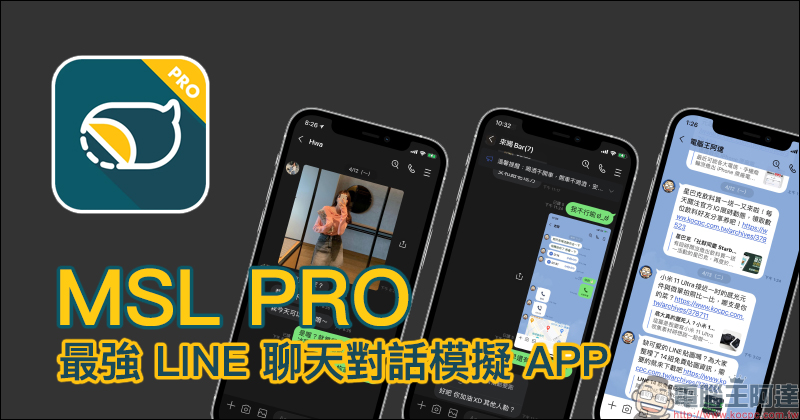
MSL PRO|The most powerful LINE chat conversation simulation APP! Various LINE chat room function screens, ultra-complete simulation restoration!
I believe that many readers of Computer King Ada have seen the “Fake Details“Is this an online conversation production tool that can be used for LINE chat? However, if you are heavy users of LINE who come into contact with LINE every day, work in design-related industries, or are community editors, you will definitely understand that the similarity between this type of generator tool in simulating LINE chat conversations and the real interface and functions is limited. People with sharp eyes can easily tell that the difference is actually quite large.
So, what should you do if you want to create a LINE chat conversation record that is so realistic that it is difficult to distinguish? Except for those who have certain graphic design expertise, they can use Photoshop to synthesize similar results, or use drawing software such as Illustrator to imitate similar results. However, these methods not only require a certain professional threshold and are not accessible to the general public, but also are very time-consuming to actually create and modify the content in the future.
If you want to easily and quickly complete various LINE chat conversation simulations, you don’t need any design expertise now. You can just use the MSL PRO LINE chat conversation simulation APP shared this time.
Next, I will take you to learn more about how to use MSL PRO? At the same time, the author will also share several situations in which various life needs can be solved as long as the MSL PRO App is properly used.
MSL PRO APP download:Click here to go to (App Store)
How to create a LINE chat conversation simulation with MSL PRO?
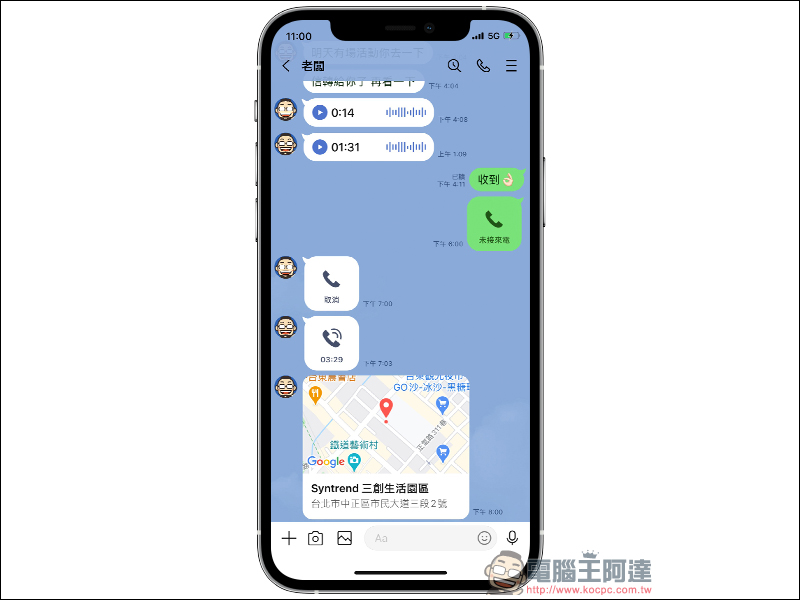
Before starting to share how to make the MSL PRO app, you might as well take a look at the two LINE chat room screenshots below. In addition to the iPhone body frame, guess which conversation is a LINE chat conversation simulated with MSL PRO?

In fact, the above two LINE chat room screenshots were all made using the MSL PRO APP, including the chat partners, photo posts, message content, message time, mobile phone battery, and signal. I believe that after seeing how realistic it is, you will be more curious about how to set it up and what kind of dialogue simulations it can make during LINE chat, right?
Chat room background interface settings
First, open the MSL PRO APP and enter the main screen. Select “New Conversation” to create the background interface of the LINE chat room. MSL PRO has built-in light and dark LINE background themes. Looking back at the end of 2020, the LINE 10.21.0 version was updated to a new, simpler interface. MSL PRO now also provides a new version of the chat room background interface for users to choose, making the screenshots of LINE chat room conversations look more realistic.
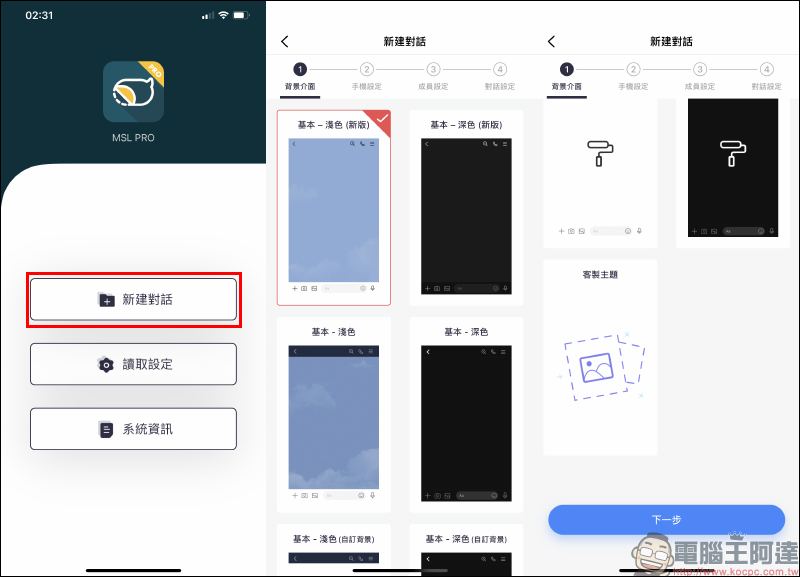
In addition to the basic light and dark background interface, users can also apply pictures in the photo album as the chat room background for LINE conversation simulation.
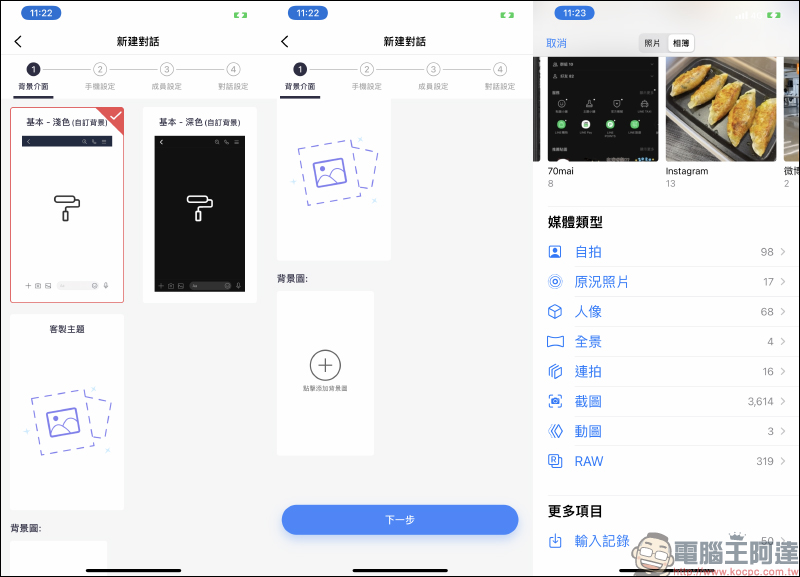
If you want to customize a more unique theme, MSL PRO “Customized Theme” can set the background image, the image style at the top/bottom of the chat room screen, and the color of the chat dialog box between both parties, which can be customized and matched:
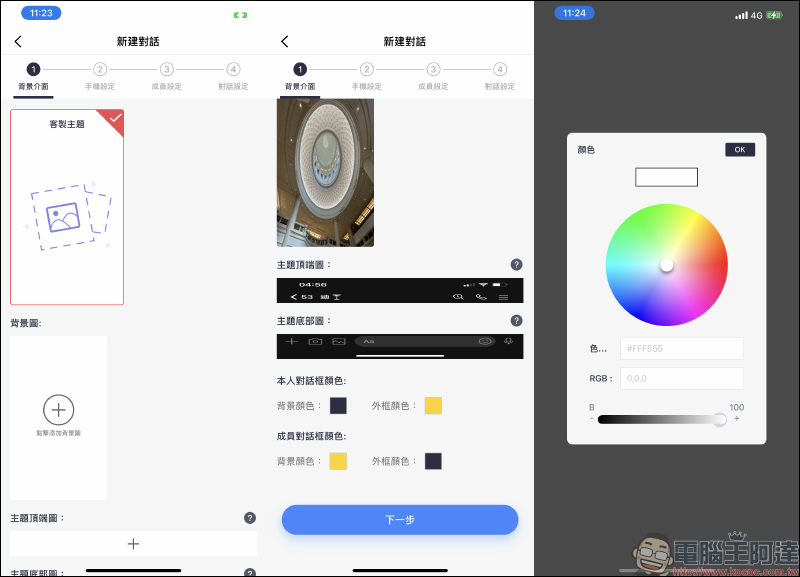
- Basic light/dark background theme (new version)
- Customized background screen theme (light/dark)
- Fully customized theme (optional customization of upper and lower frames, background and dialog box colors)
Phone settings
In order to create more realistic screenshots of LINE chat room conversations, MSL PRO allows users to customize the time, signal, battery and other settings at the top of the phone screen. In terms of models, MSL PRO currently offers two models to choose from: iPhone without bangs (eg iPhone 8 Plus) or iPhone with bangs (eg iPhone 12 Pro Max).
Users can also customize the time, signal, network signal, power, power mode and location services of the mobile phone system, all of which can be modified and adjusted at any time through this simple process:
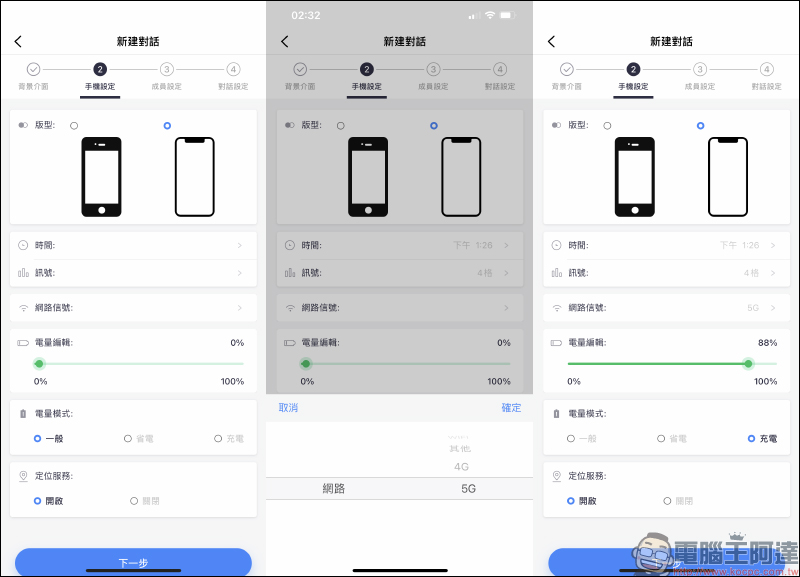
- Two iPhone models are configurable: iPhone without bangs/iPhone with bangs screen
- time adjustment
- Number of signal grids (1~4 grids and flight mode)
- Additional telecommunications service providers are available for the 5.5-inch iPhone version.
- Network signal: Wi-Fi, 4G, 5G and customization options
- Mobile phone battery: 0~100%
- Three power modes: normal (not charging), power saving mode, charging
- Location service symbol
Chat room member settings
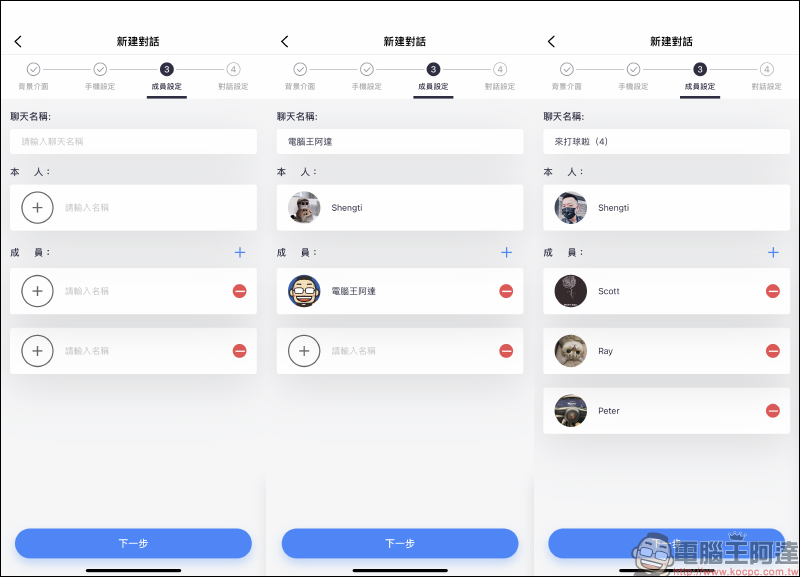
In the “Member Settings” of the chat room, first set the chat room name. MSL PRO can simulate one-to-one or multi-person LINE chat conversations. You only need to set the nicknames and avatars of yourself and the members and click Next.
Chat room conversation settings
Most of the general LINE chat conversation simulation tools can only simulate one-to-one text conversations. MSL PRO can simulate functions such as text messages, pictures, albums, links, videos, calls, designated party reply messages, files, contact information, location sharing, voice messages, activities and voting, which LINE users use in daily chats.
In addition, extremely minute details of various LINE chat room interface designs, such as the date and time of message sending, unread messages, and read message display (you can also set the number of people who have read it), can be simulated in MSL PRO. Even the completed screenshots can be saved and the actual iPhone resolution images can be accessed.
To put it simply: as long as you design it carefully, MSL PRO APP can achieve almost the same effect as a real LINE chat conversation.
1. General text:
In LINE chat, which is the most basic text message, users can edit which member of the chat room sends the message, including message content, message sending time, and read display (the number of people who have read it can be set). All can be added and edited according to needs:
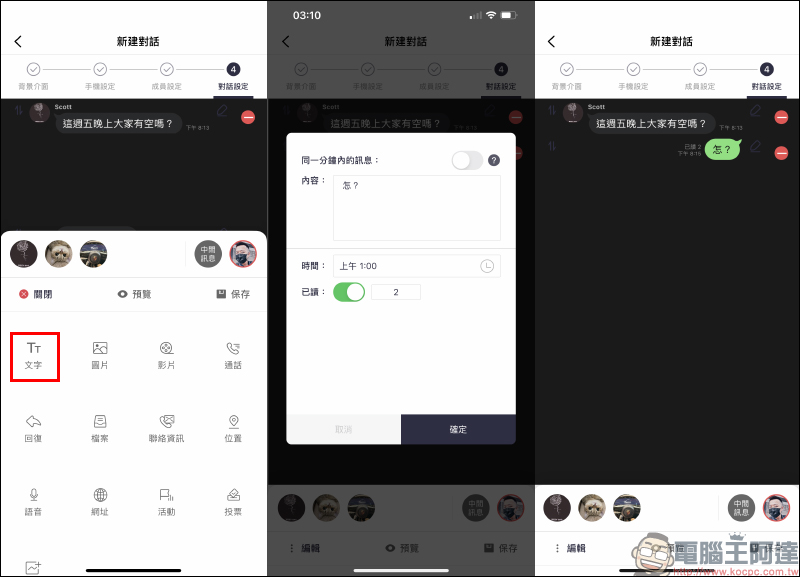
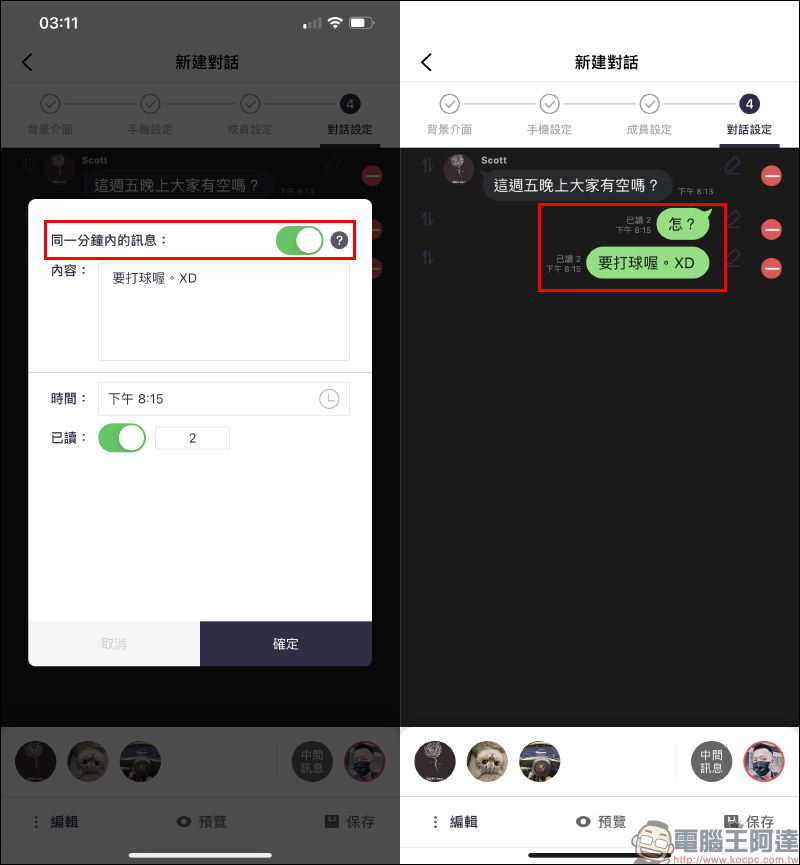
If there are messages from the same member within the same minute, it is recommended to enable the “Messages within the same minute” function from the second message onwards. In this way, the message box will have the same interface settings as the actual LINE chat room conversation.
If you want to reply to a message from a specific person, you can click “Reply” and select the member, fill in text, time and other related content to generate a message box that responds to the specific message. Although this function may seem inconspicuous, it can simulate the different chat habits of each member of a multi-person chat room, making the entire chat conversation look like ordinary people’s gossip.
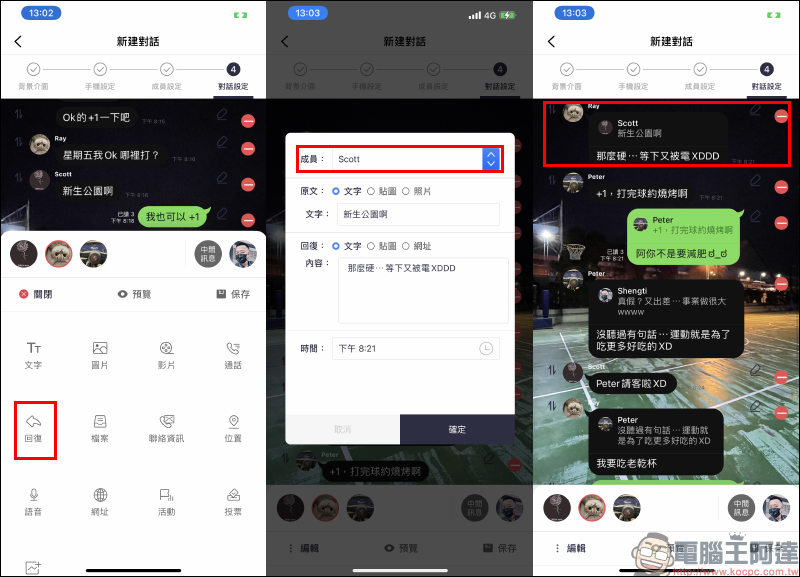
As long as you design the chat “script” a little bit, you can simulate a conversation like a group of golfers chatting on LINE:
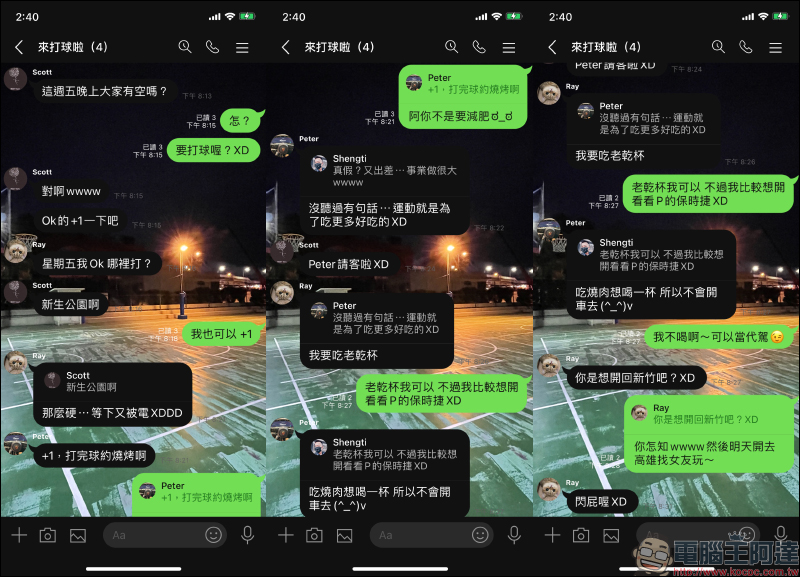
To save the created LINE simulated chat conversation as a screenshot, just click “Preview” on the editing page and click “Save Screenshot”:
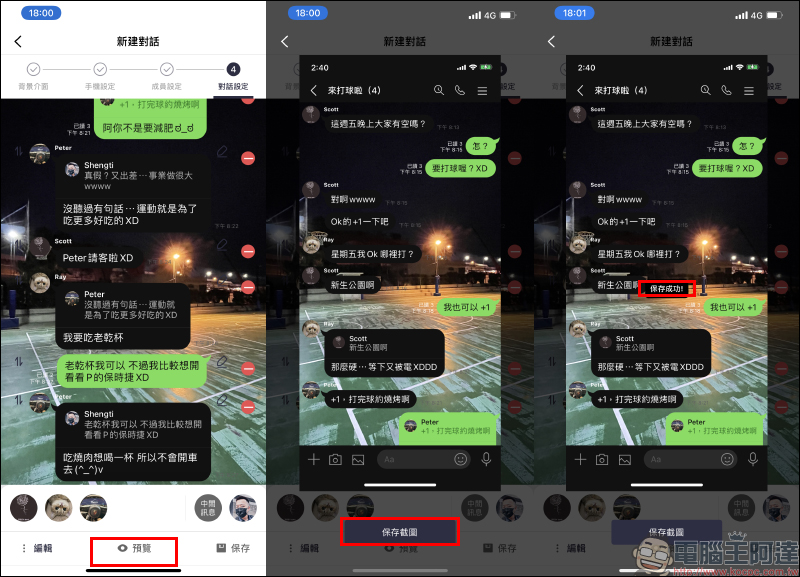
picture:
People often send pictures to each other when chatting on LINE. Whether sending a single picture or multiple pictures at a time, the MSL PRO APP can also simulate the presentation effect of the LINE chat room interface. For example, if you send multiple pictures at one time, the pictures will be automatically integrated into a single message (as shown below):
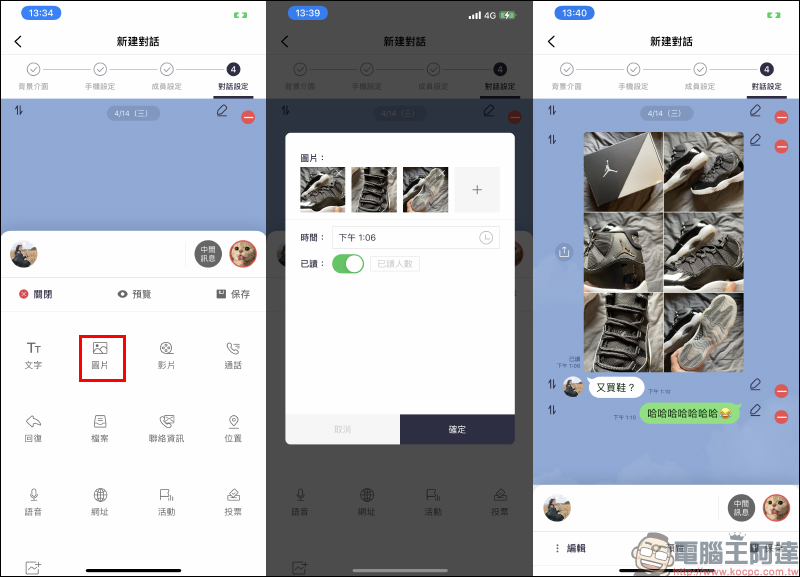
If the user’s picture message is a single picture, a full picture preview will be displayed, which is exactly the same as the LINE chat room design.

The actual simulation effect is as follows:

Album:
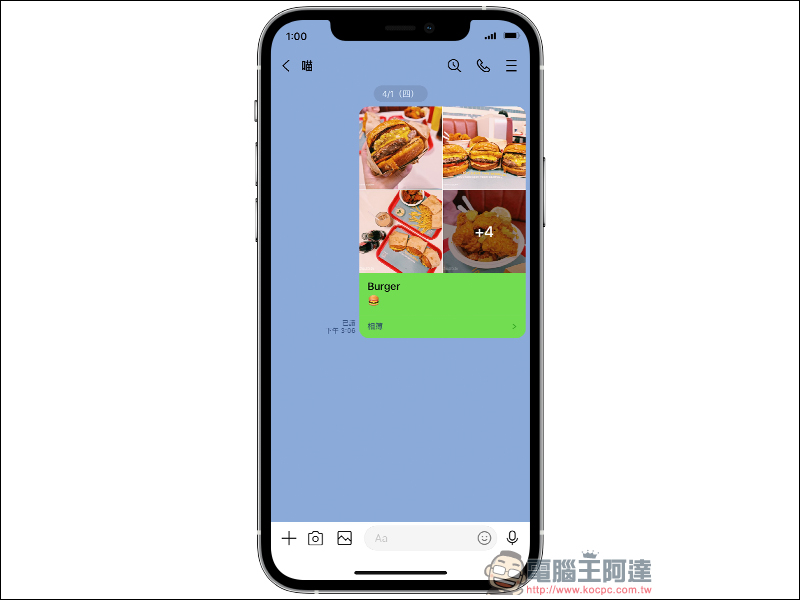
In addition to single or multiple pictures, the MSL PRO APP can also simulate the photo album function in the LINE chat room. The user only needs to select four preview pictures and enter the title and description of the album and the number of remaining pictures in the preview to generate a simulated conversation of the LINE photo album:
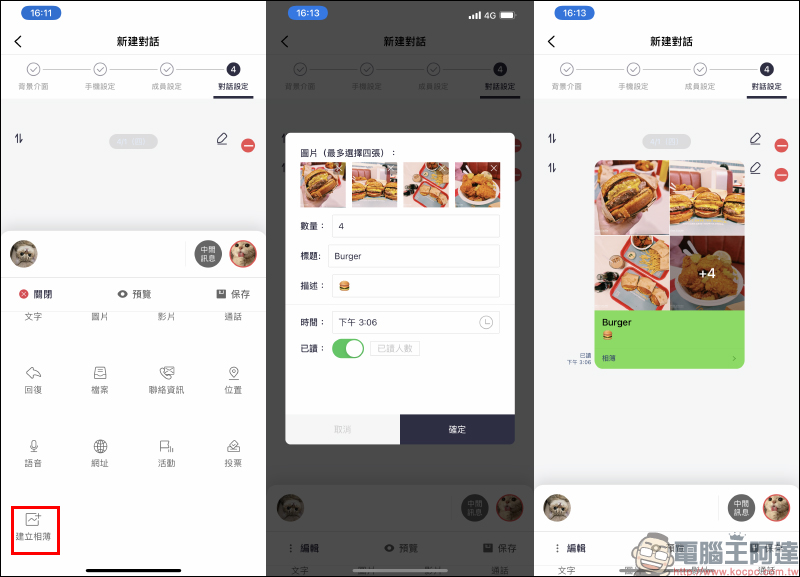
The actual simulation effect is shown as follows:
video:
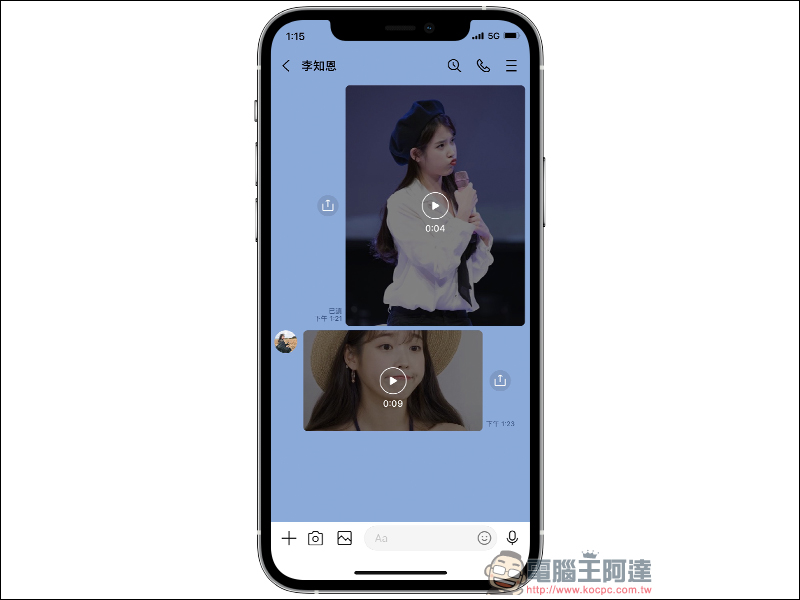
When you are chatting with friends on LINE, you have also directly sent a video to each other, right? MSL PRO APP can even simulate “video” messages in chat rooms. Users do not need to select a video file, they only need to select the picture in the album that they want to use as a video preview, and then fill in the length of the video and whether it is a horizontally shot video.
When setting the video message to simulate filling in the video length, remember to manually pay attention to the time format of the video! For example, if a 9-second video is filled with “0:09”, it will have the same format as the actual LINE chat room.
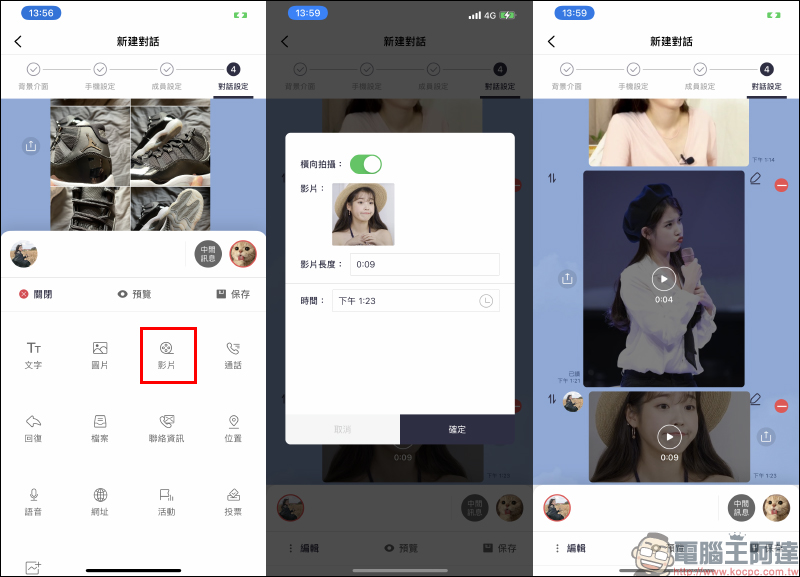
The actual simulation effect is as follows:
Voice message:
Sometimes they just want to send a short message, but they are a little busy and it is not convenient to send text. At this time, many LINE users will choose to send the message to the other party through “voice message”. MSL PRO APP can also simulate voice messages. Just enter the number of seconds of the voice to simulate the display effect of the usual LINE chat room:
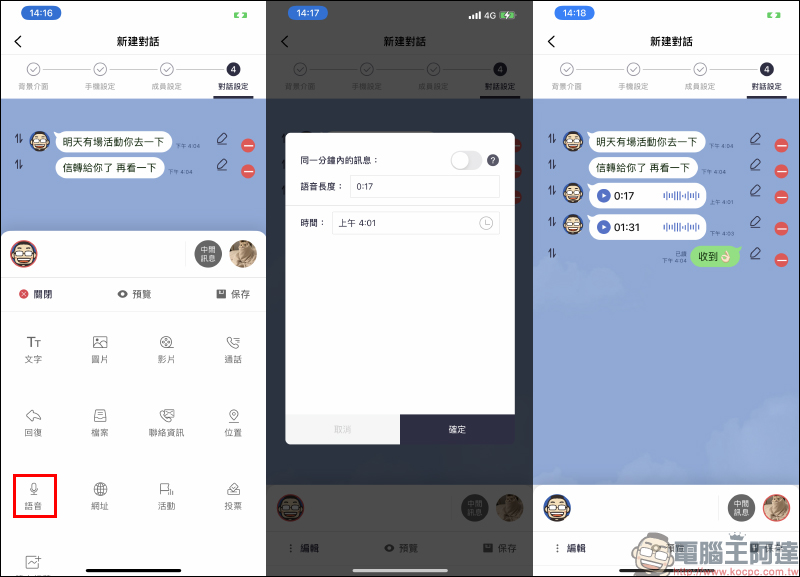
The actual simulation effect is as follows:

Voice call:
For many phone calls with friends, family, and even work, a high proportion of people now use LINE’s free voice calls to communicate. MSL PRO can even simulate voice call messages in LINE chat rooms! You can also choose to connect, cancel, no response or missed calls according to the status of the voice call, completely restoring various voice call records.
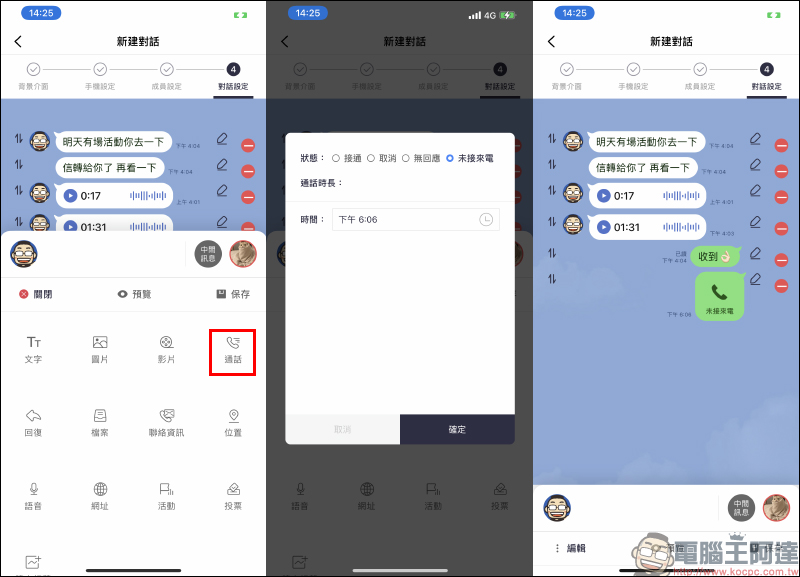
In addition to canceling calls, no response, or missed calls, which are voice calls that are not successfully completed, if you want to simulate a successfully connected voice call, you can also customize the call duration to make the entire LINE chat string look quite real.
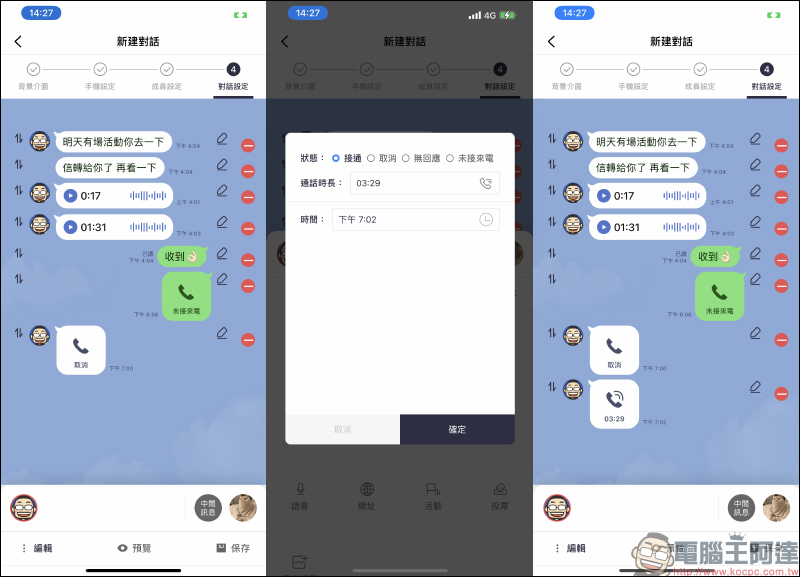
The actual simulation effect is as follows:

Location:
Sometimes we want to share our location or an address on LINE. It is very convenient and fast to share location information directly in the LINE chat room. MSL PRO can simulate the location information shared by LINE users. Just enter the preview title and address of the location (no need to enter the zip code), and the Google Maps preview map can be simulated in the LINE chat conversation:
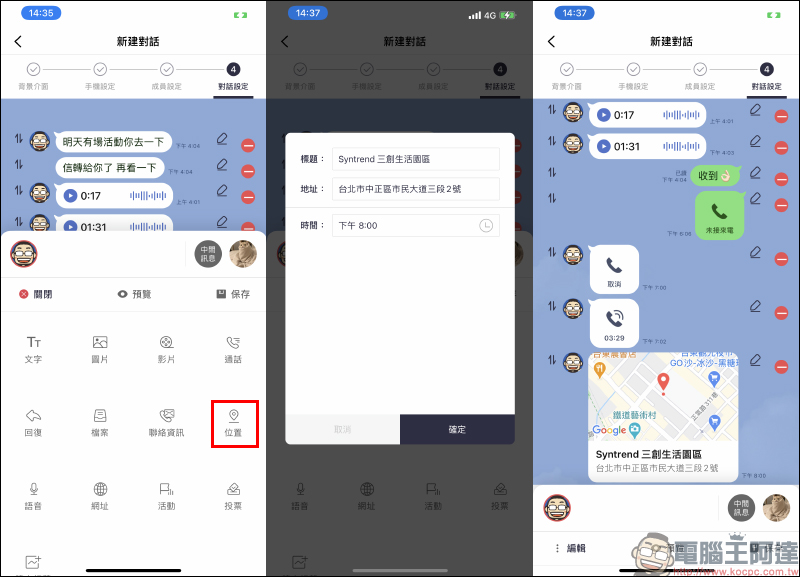
The actual simulation effect is as follows:
file:
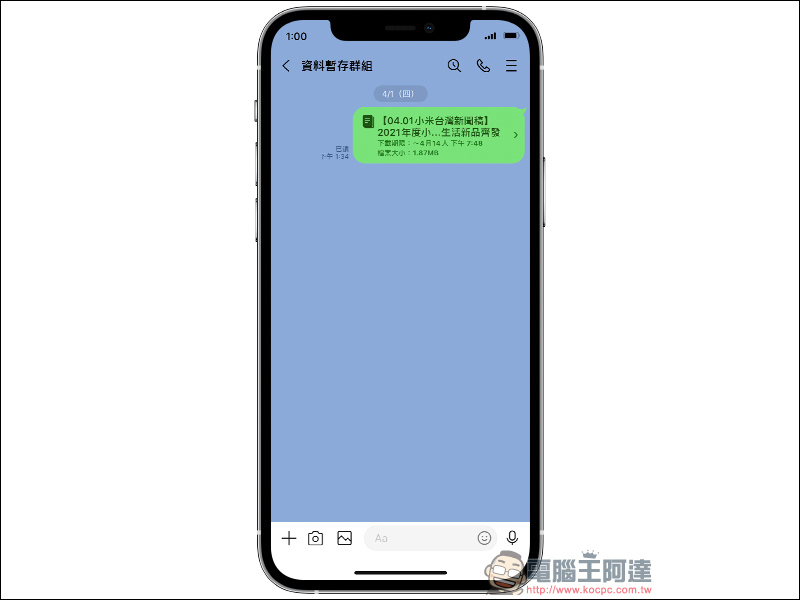
It is very convenient to send files on LINE, and many people like to use LINE to send files to each other. MSL PRO can simulate a user’s LINE chat conversation to send file messages. Users can customize the file name, download period and file size to make the sent message look like the real thing:
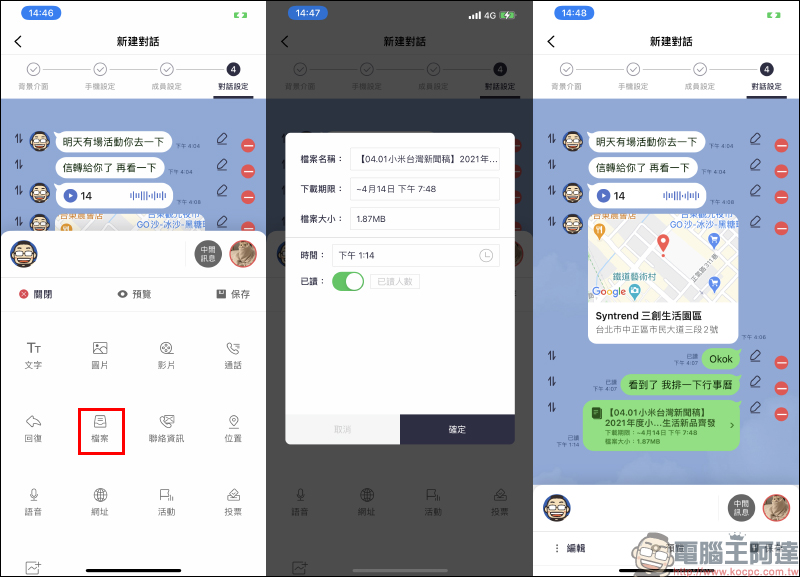
The actual simulation effect is as follows:
Contact information:
Although sharing contacts is rarely used in LINE, MSL PRO still supports the message function of “Contact Information” sharing. Users only need to select an avatar and name to generate a message screen similar to a LINE chat room for sharing contacts.
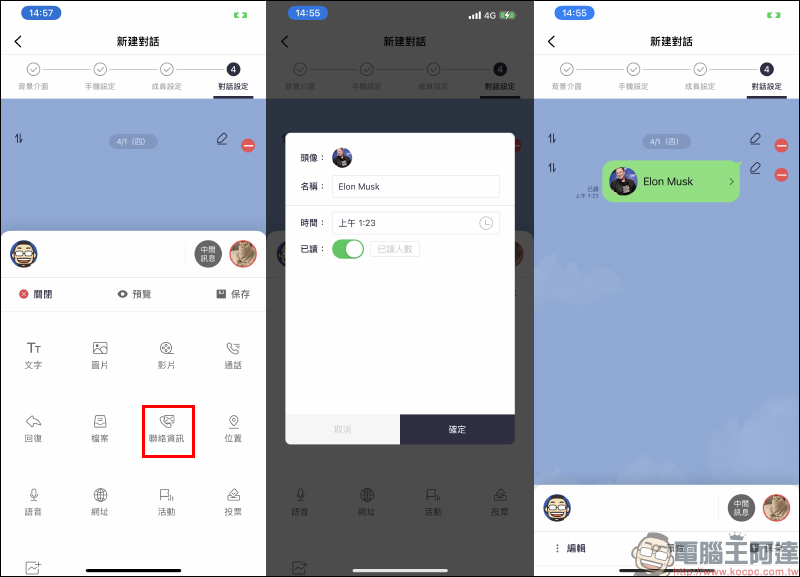
The actual simulation effect is as follows:
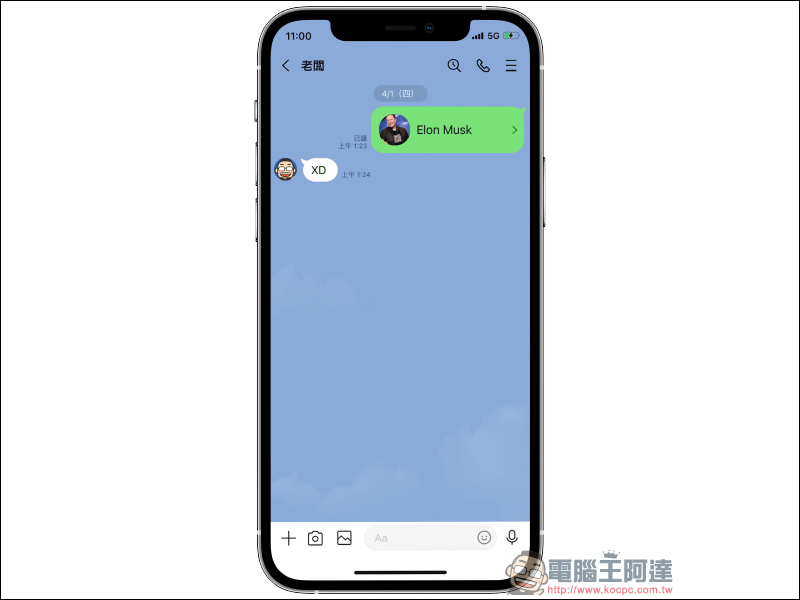
URL:
Whether it is LINE official accounts or general LINE users, URL information is often shared directly. MSL PRO can also simulate the URL message of a LINE chat conversation. As long as there is a link, the preview effect will be displayed:
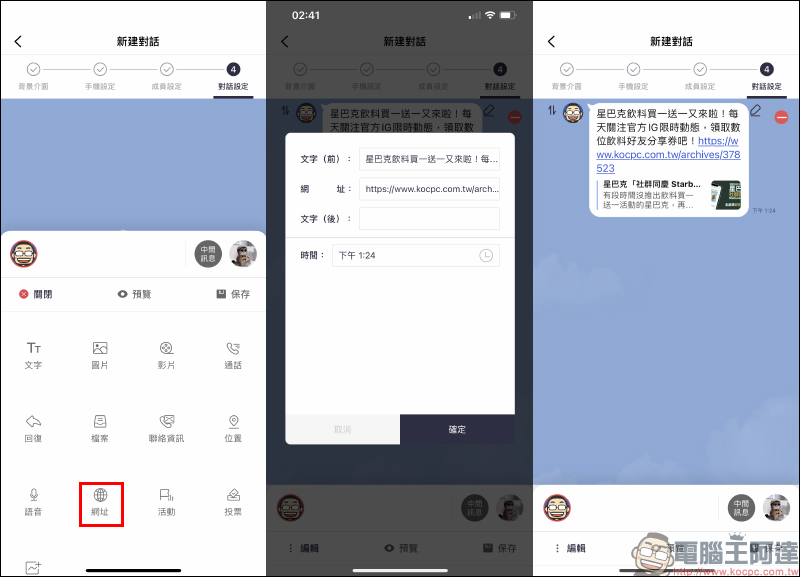
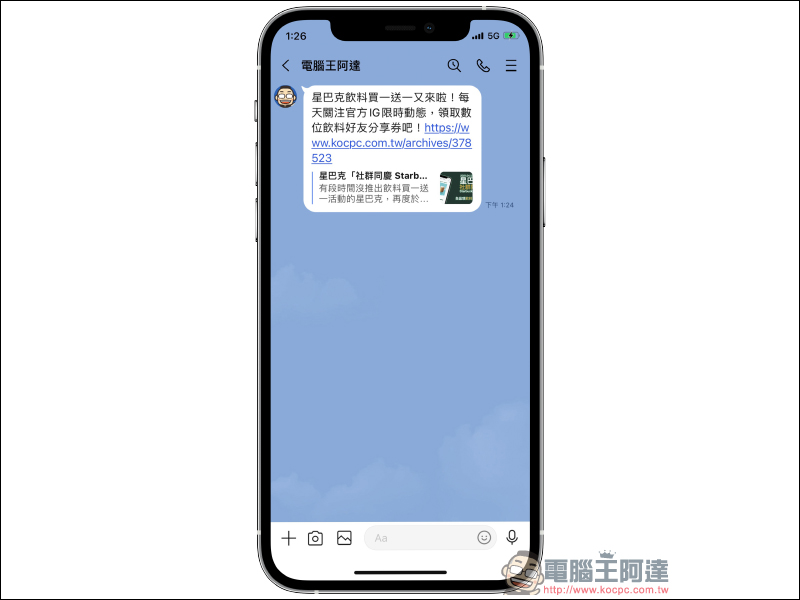
The actual simulation effect is as follows:
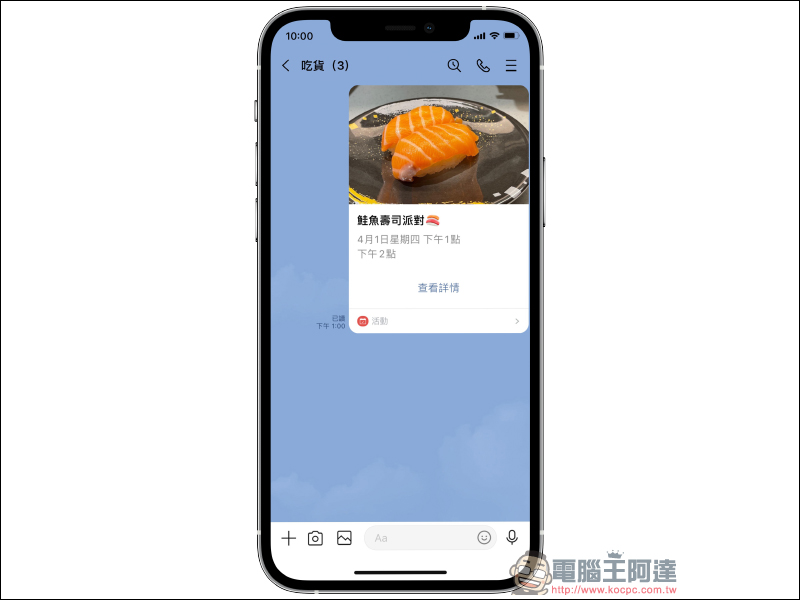
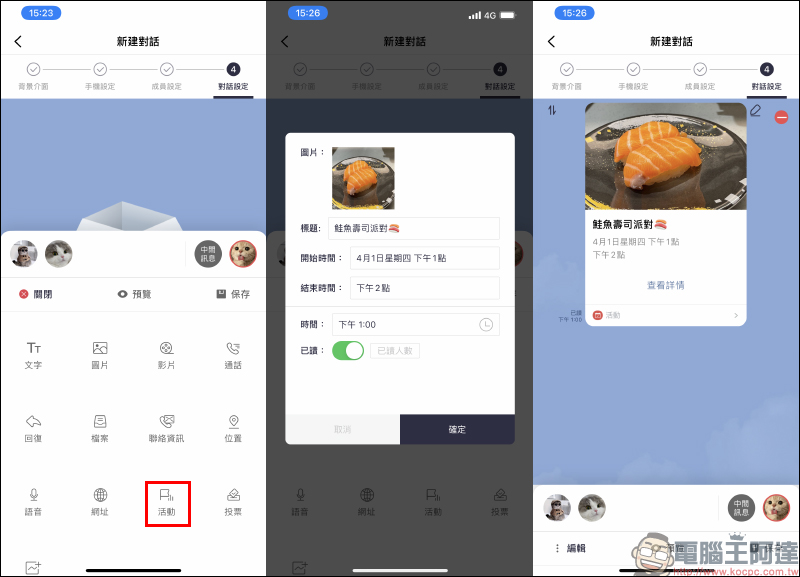
Activity:
LINE chat room users can create “activities”, and MSL PRO can also simulate activity messages for LINE chat conversations.
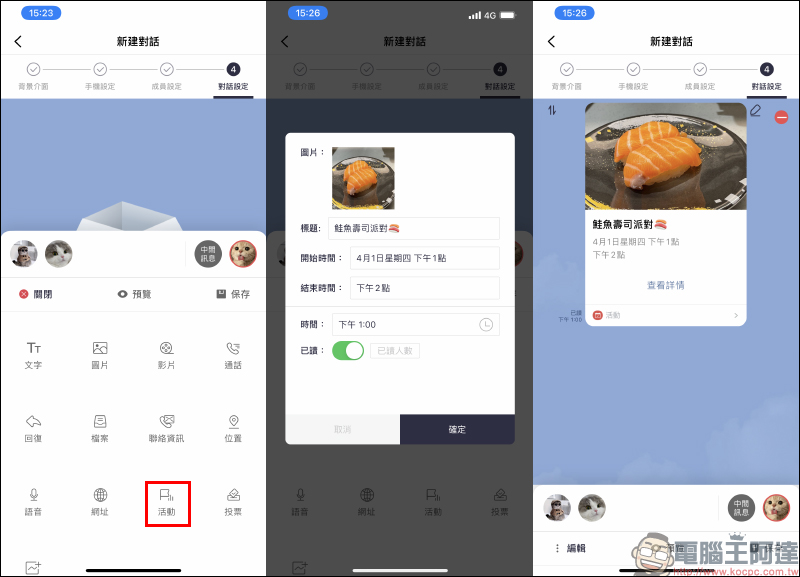
The actual simulation effect is as follows:
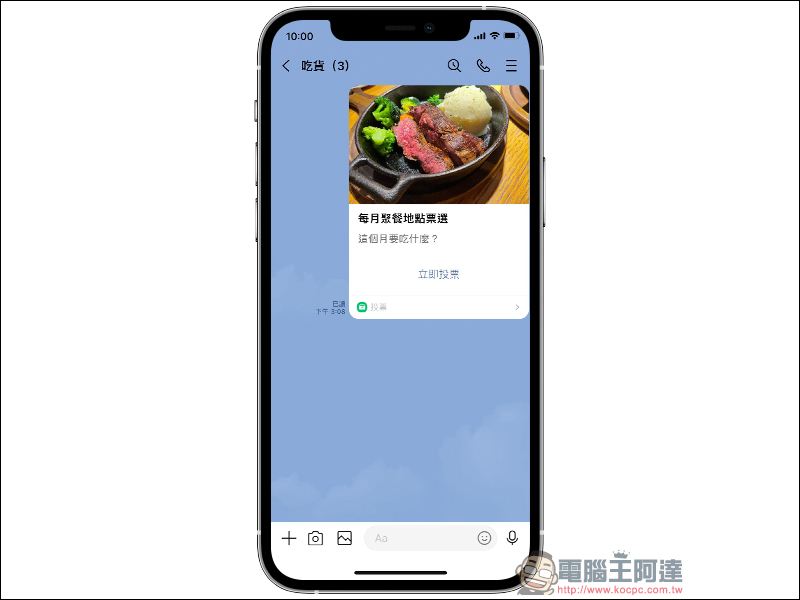
vote:
In LINE chat rooms, users can create voting functions in the chat rooms by themselves. MSL PRO APP can also simulate screenshots of LINE voting messages:
The actual simulation effect is as follows:
In what situations can LINE chat conversation simulation be applied?
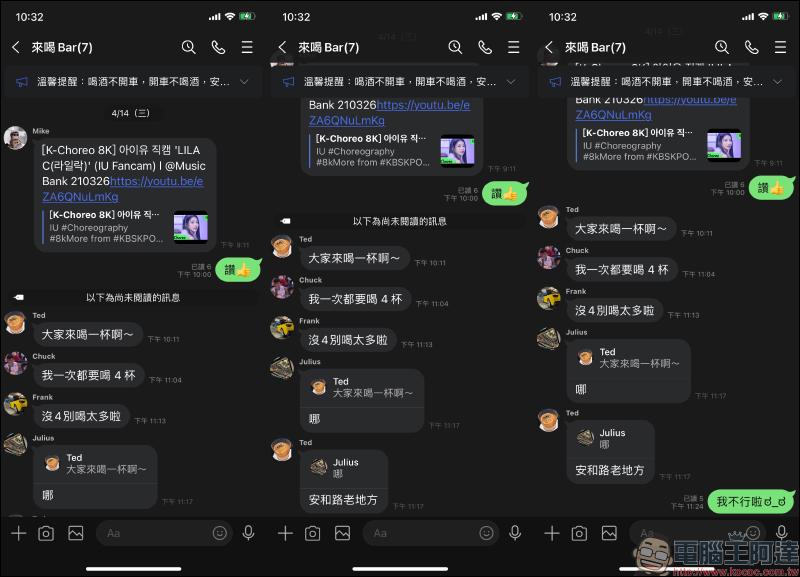
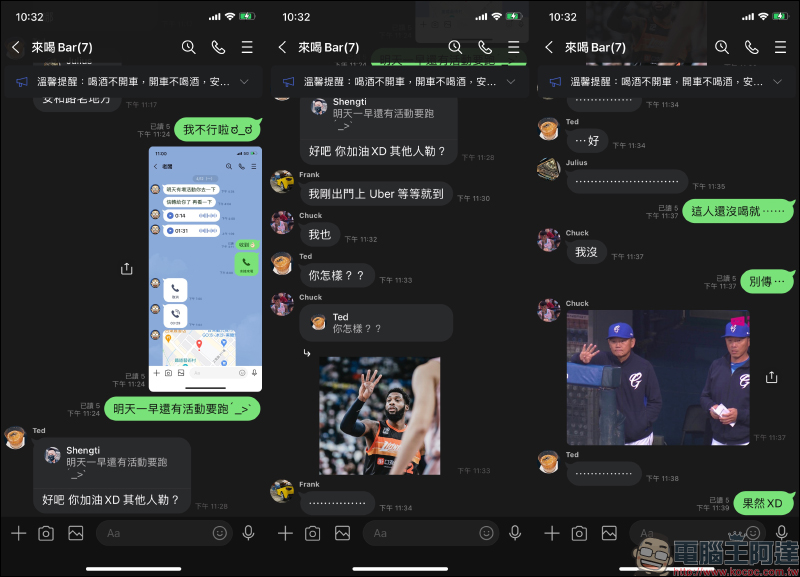
White lies to politely decline a friend’s social invitation:
When a group of friends get together to chat, it is inevitable that they will receive social invitations from time to time but do not know how to decline them politely. However, as long as you have the MSL PRO APP, all kinds of LINE chat conversations can be constructed at any time according to the current needs. If you want to cancel the event in the least sentimental way, you can just make a few screenshots of the conversation with your boss and put them in the group, and you no longer have to worry about ruining the atmosphere ~
Internet memes:
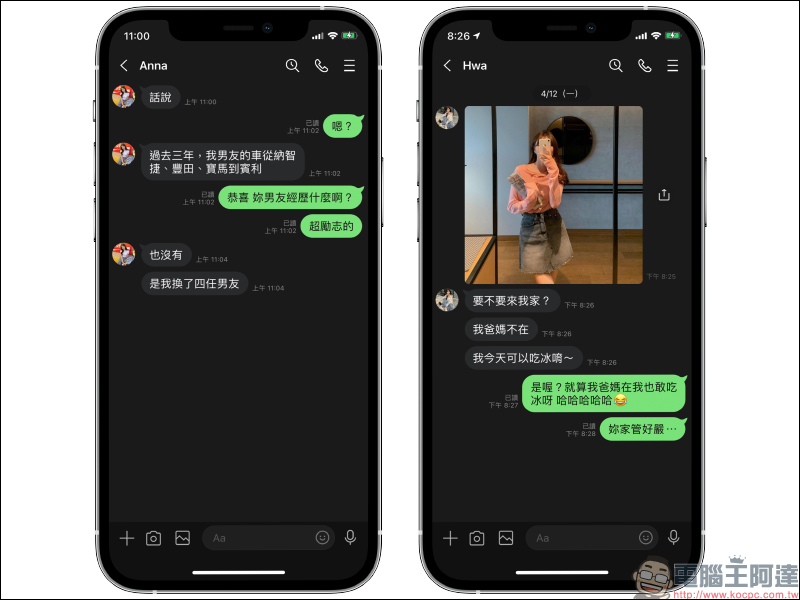
There are many funny Internet memes that use messaging software to circulate frequently on Instagram or Facebook. If you are used to making funny meme content, you can also use this MSL PRO APP to simulate super-realistic LINE chat conversations:
Conclusion
In this social era, LINE has become one of the communication software that we use every day for a long time, and it is also an essential tool for many people to socialize with others. Many connections with friends, family, lovers, or work associates depend on it.
However, there are still some things in daily life that we could not control in the past, such as friends’ social invitations. However, if we can use an app like MSL PRO at the right time, which simulates LINE chat conversations, we can use ultra-realistic screenshots of LINE chat conversations as white lies to decline parties we don’t want to go to. This is a very practical social skill.
In addition, many social media editors may be worried about how to come up with interesting and lively topics to attract fans to like and share when posting every day. MSL PRO APP can be used to simulate various functions used in LINE chat rooms. As a “production tool” for social media editors, it is also super easy to use!
Even though this MSL PRO APP is not free, since it has the most powerful and complete LINE chat conversation simulation application, it is still highly recommended for those in need to purchase it!
MSL PRO APP download:Click here to go to (App Store)
Source: KOCPC Chinese