


Windows 10 is now Microsoft’s computer operating system with the largest market share, but I believe some people will find that their computers display a prompt that “Windows 10 version will terminate updates soon.” Aren’t they all Windows 10? This time I will explain to you why there is this notice. Of course, this time I will only talk about Windows 10 Home Edition and Professional Edition. The enterprise version has its own life cycle.
Why does my Windows 10 say “End of Service Soon”?
Microsoft releases version updates for Windows 10 twice a year. If you are unwilling to download the update to the most recent version, you are likely to see a notification that the Windows 10 version is about to end its service. The author will explain the causes and solutions so that you can use it with more peace of mind.
Under what circumstances will a service termination message appear?
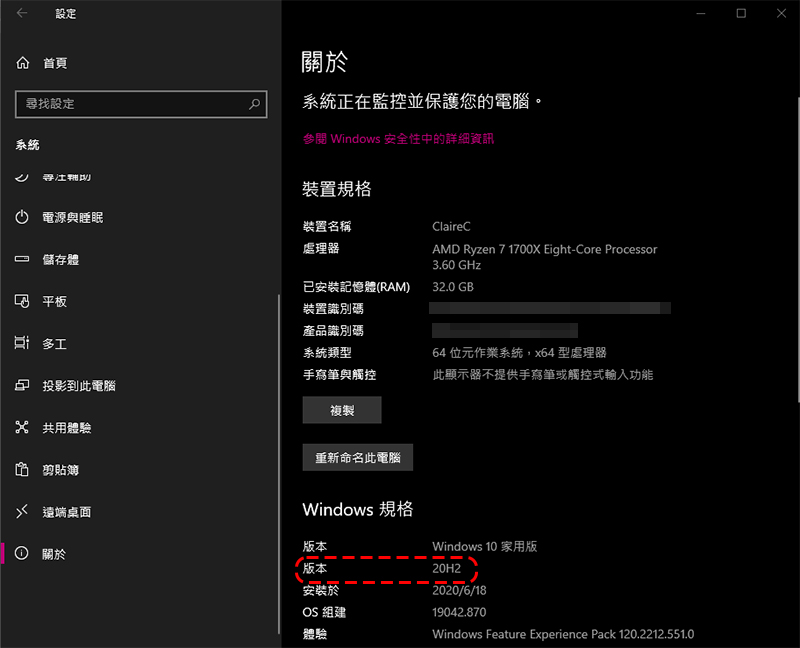
Before getting into the solution, the author will first explain to you why you received this prompt, which will help you understand your computer and how the entire Windows 10 operates. If you are currently running Windows 10 version 1909 (also known as the November 2019 Update) or an older version, you are likely to see a termination message, which means that Microsoft will not update the operating system currently on your computer. Although your computer can still be used, there will be some security and functionality risks. The author does not recommend that you ignore the update reminder. Where can I see my operating system version? You only need to go to the “Windows Version” unit in the “Settings >> System >> About” page to see it (as shown in the picture below).
Every year, Microsoft launches major Windows 10 updates in the spring and autumn respectively. Therefore, Microsoft has a support end schedule for each version. The author has organized it below. You can compare it with your current system version:
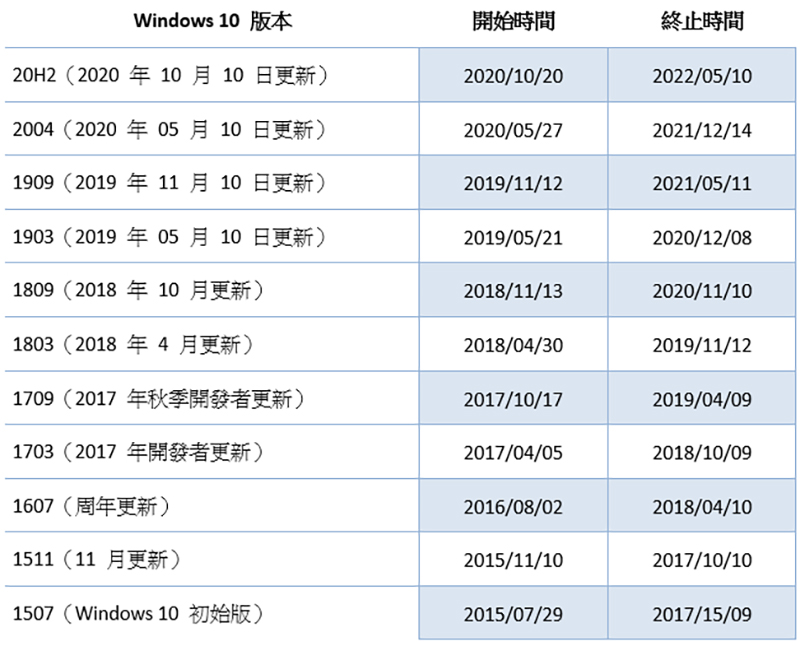
Microsoft no longer supports Windows 10 version 1903 and older, which means that these older versions of Windows 10 no longer receive security fixes. If you use these older versions of Windows, you will expose your computer to the risk of viruses and other attacks. This is why Windows 10 will display a notification to let you know when it is updated.
How to fix end of service notification?
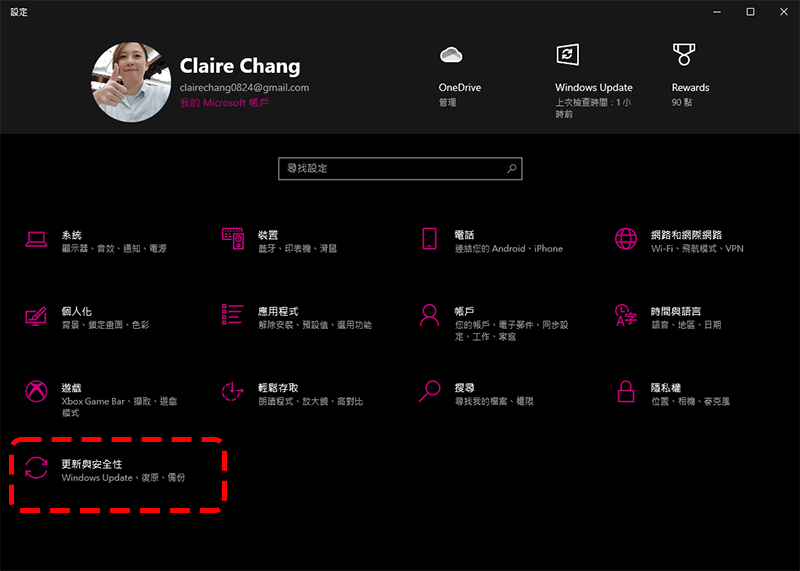
To fix or delete this message, you should update the Windows 10 operating system on your computer as soon as possible. The easiest way is to check for updates directly from “Settings >> Update & Security” to automatically download the Windows 10 system. During the download, you can continue to use your computer. When you are ready, you will get a notification to restart your computer to install the update. System updates are completely free. If you have an older version of Windows 10, it may take a little longer. However, you can get new features from the new version of Windows updates, and there will also be many fixes to the operating system. Basically, as long as the update is completed, you will no longer see the end of service notification.
If it still doesn’t work after you update, you can go to MicrosoftDownload Windows 10 Update Assistant from the official website, just select “Upgrade this computer now” after downloading and executing.
Source: KOCPC Chinese