


PC AutoTimer is a computer automatic timer tool used on Windows systems. Users can automate tasks by editing events. It is very powerful. Set tasks are diverse, including shutdown, standby, power on, hibernate, wake up, lock, turn off the screen, restart, hotkey set, keyboard and mouse, etc. You can also specify a time to start the program, and even display a reminder message. It is worth $24.99 and is currently free for a limited time. Act quickly.

用 Telegram 訂閱【挨踢路人甲】最新文章:https://t.me/itwshare
Go to the event webpage to see that the $24.99 PC AutoTimer is free for a limited time (the event webpage URL is at the end of the article).

Scroll down to see the HERE download link for Step 1. Please click to download the program.

Please note down the free serial number you see when you expand Spoiler.

After downloading and decompressing, execute the installation. The installation wizard screen will appear first. Just press [Next] to complete the installation.

When the following picture appears, you can test the automatic startup 3 minutes after shutting down. I pressed [Cancel] to skip it.

Don’t worry if you see that the main program screen is in English, it supports Traditional Chinese!

There is a menu to change the system on the [Options] page, just select Traditional Chinese.

The normal trial period is only 30 days, so go to the “Help” → “About” window to register for authorization, customize the registration name, fill in the serial number obtained previously for the authorization registration code, and finally click [Verify Registration Code] to successfully become the official version.

PC AutoTimer is a simple-to-use but effective timer that allows your PC to resume scheduled tasks from hibernation, and can customize hotkeys to start these repeated operations. For example, you can wake up to the sound of your favorite music every morning, automatically start the computer before going to the office, etc.
PC AutoTimer is a bit like a scheduling tool. You need to add a task and specify a certain time to schedule a certain event, so click [Add] first in the picture below.

When adding a task, enter the task list title for easy identification. The activation of the event is set in the blue box. You can specify a periodic period or a hotkey to start. The green box is to determine the time to execute the task. Finally, check the task to be executed. In addition to starting up, restarting, shutting down, locking the system, standby, hibernating, logging off and closing the display, it also supports the execution and closing of applications, keyboard attributes, opening URLs and prompt messages, etc.
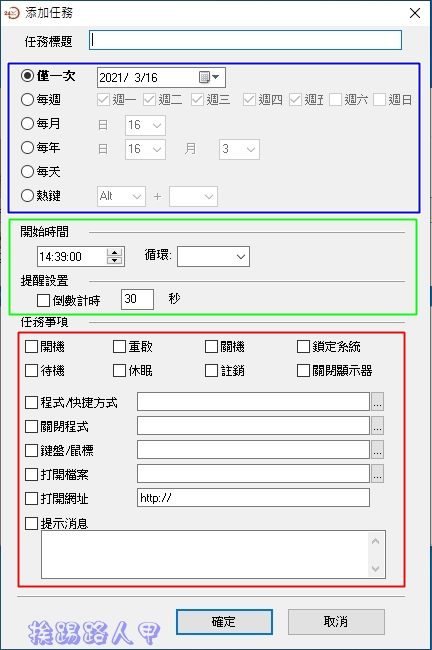
The author tried to create two tasks. One goes to sleep at a certain time and automatically turns on after a period of time. Sure enough, it automatically goes to sleep at the specified time and turns on at the specified time.

PC AutoTimer has a reminder function, which is very practical. You can specify a certain time to remind important events.

A reminder window will appear, which is quite intuitive and difficult to miss.

It also supports shortcut keys to quickly perform tasks such as restarting, shutting down, logging out, turning off the screen, and entering hibernation.

[Software name]: PC AutoTimer
[Supported Languages]: English/Chinese
[Operating system]: Windows 7 / 8 / 10 (32-bit and 64-bit)
[Activity web page]: Clickhere
Further reading:
- For a limited time, get a lifetime license for the Perfect PDF 9 Editor editing tool for free
- Limited time free AnyMP4 MP4 Converter audio and video conversion tool
- UnHackMe removes backdoor tools and software, leaving Rootkits nowhere to hide
Source: KOCPC Chinese