


In February, LINE officially opened LINE’s community building function to all users, allowing people with similar topics to create exclusive communities to discuss topics of interest. Then half a month ago, LINE communityA chat room emoticon function that can give instant feedback has also been added, allowing community members to express their emotional responses to specific messages in the community. Now, the LINE community has officially opened the “Chat Room Search” function! Allow members to easily enter keywords to search for relevant information or members in the community.

The “Search in Chat” function of LINE community is officially open, making it easier to search for messages and members in the community!
Earlier today (2nd), LINE officially announced that the LINE community has officially opened a new “chat room search” function. Although this function has long been available in the computer version of LINE, in the past, if LINE users wanted to search for relevant content in a LINE community with thousands of members, they only had to click the “Search” button in the upper right corner of the community chat room and enter the specified keywords to query the community’s recent relevant information that matches the search results.

However, most people probably use the mobile version of LINE as their main platform, so from now on, whether they are iOS or Android users, as long as they update the LINE App to the corresponding version (or directly to the latest version), they will be able to see the “Search” button in the social chat room! The search function in LINE social chat rooms added in this update requires the LINE application to be updated to LINE iOS 11.2.0 (inclusive) or above, LINE Android 11.2.0 (inclusive) or above, or LINE PC version 6.0 (inclusive) or above.
The operation method of the search function in LINE social chat rooms is very simple as in general one-on-one chats and groups. Just click the search button with the “magnifying glass” icon in the “upper right corner” of the social chat room, and then enter the search keywords to search for “messages” and “members” in the social chat room!
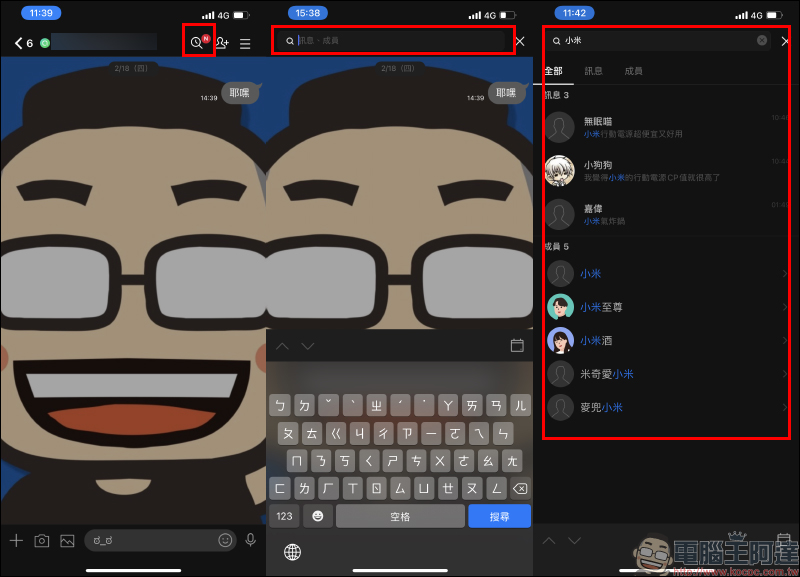
Users can filter the search results to display “Messages” or “Members”. If they want to directly view messages matching the keywords, just click on the message, and the screen will jump directly to the message screen. Of course, if the keywords you enter happen to have members in this LINE community that match the search results, you can also find them through this method.
For example, if you have just joined a new community, or if you want to find specific content that you have talked about before (for example: food in a certain region), you can quickly find the corresponding results in this way, and you no longer have to worry about being disliked by other members because you, as a newbie, asked some topics that have been discussed for a long time!
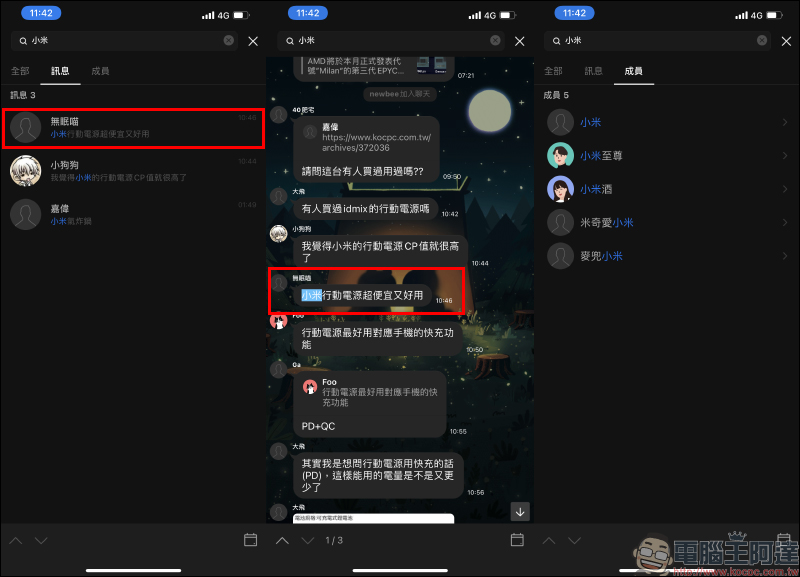
Source:LINE Taiwan Official BLOG
Further reading:
LINE community has fully released the “create community” function, announcing that the new emoticon function in the chat room will be launched soon.


Source: KOCPC Chinese