


Since June 2020 “LINE community“After its launch, many users are looking forward to and wanting to establish their own LINE community. LINE announced earlier today (8th) that the “Create Community” function of “LINE Community” has been fully released, allowing every LINE user to create their own community, become a moderator, and manage chat rooms. At the same time, in response to the release of LINE community-related functions, a dedicated entrance to the community has been officially added to the “Homepage” in LINE, allowing users to quickly go to the community homepage. In addition, the official also announced that a new feature “chat room emoticons” will be launched in the near future, which can like and various emoticons for specific conversations.

LINE community has fully released the “create community” function, announcing that the new emoticon function in the chat room will be launched soon.
After the LINE community function was launched in June last year, it was gradually opened to some users to create their own LINE community public online chat rooms. However, there are still some users who have not received the “create community” permission before. However, starting from the 8th, all users can create communities! LINE communities and “groups” have different functional positionings. LINE communities support up to 5,000 people in group chats at the same time, can add custom nicknames to chats to maintain privacy, and are equipped with administrator functions. They are more suitable for a group of people with similar topics to participate in sharing and discussion.
Computer King Ada also has a LINE community! Scan the QR Code or click the link to join the community now!
“Computer King Ada Technology Chat Group” LINE community (click me to join the community)
Build a community
With the full release of the community creation function of LINE, LINE users can now see the conspicuous “Community” button under the homepage service items. Click to go to the community homepage to join or create their own exclusive community. (*The “Create Community” function and “Community Homepage” are only available in the mobile version.)
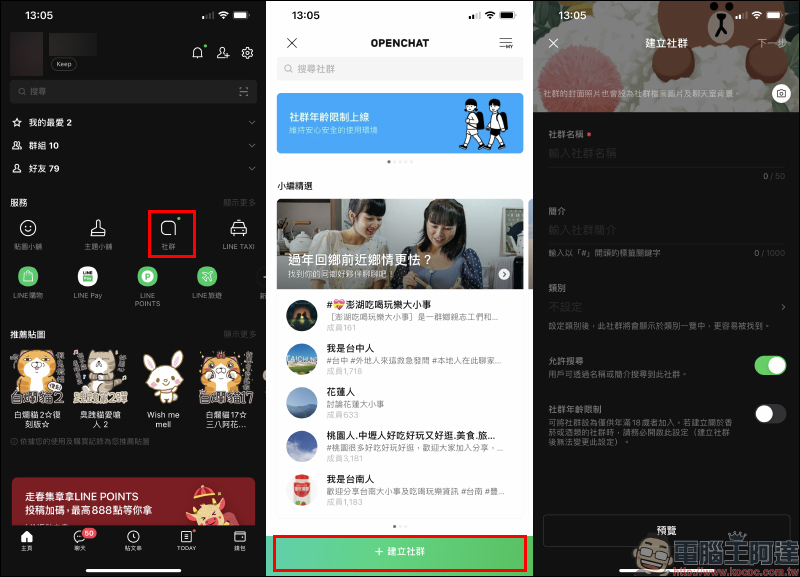
Community age limit
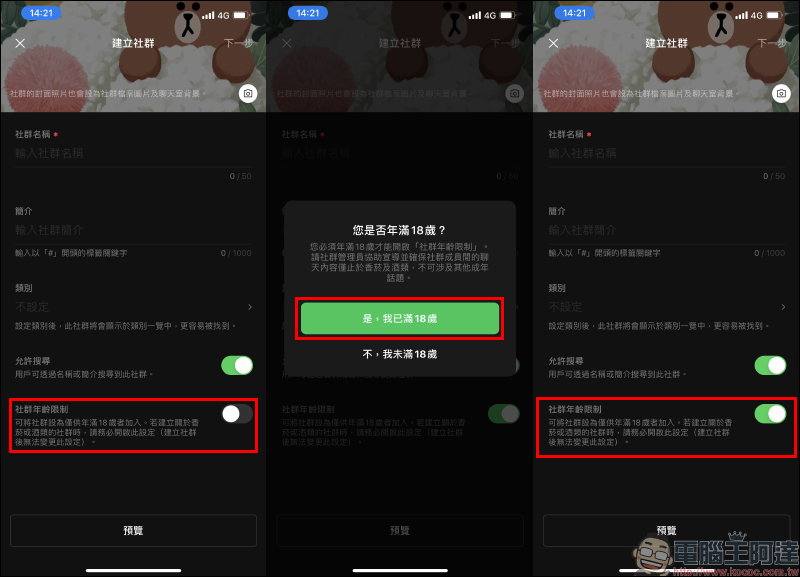
Now when creating a community, you can choose whether to enable “Community Age Restriction”. For example, if the discussion topic is related to legal tobacco and alcohol, be sure to enable this setting. In addition, it is important to note that this setting cannot be changed after the community is created. For communities established before January 4, 2021, the system defaults to no age limit. Therefore, if you want to enable this setting, you need to create a new community and abide by the relevant community regulations.
For joining members, if the administrator has enabled “Community Age Restriction”, you must be over 18 years old and click “Yes, I am over 18 years old” to join. This setting can increase the openness of discussion content, but please note that discussions related to tobacco and alcohol should still comply with the law and must not violate LINE community prohibitions.
Chat room emoticons (new feature preview)
The LINE community team has announced that it will launch a new feature called “chat room emoticons” in the community in the near future. Users only need to long press a message in the social chat room to like the message. There are six emoticons to choose from, including like, heart, cry, etc.
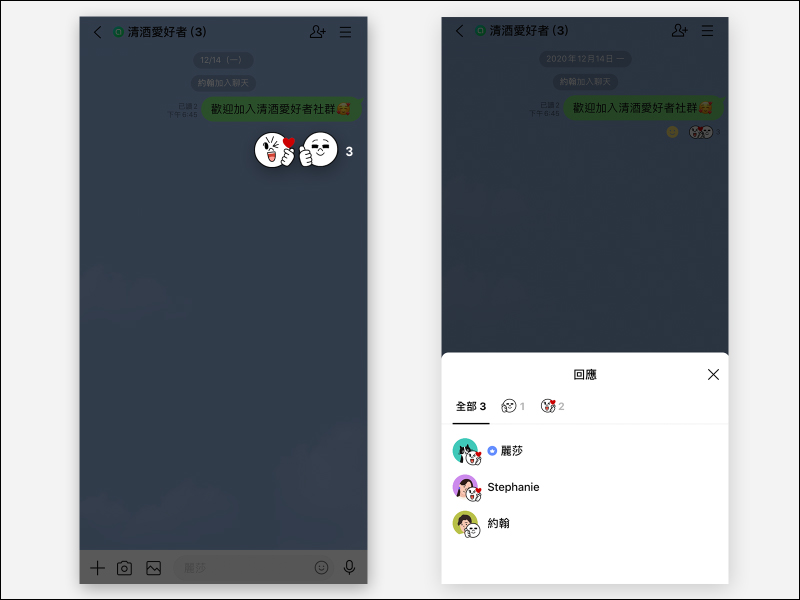
▲Image source: LINE
Source: LINE
Computer King Ada also has a LINE community! Scan the QR Code or click the link to join the community now!
“Computer King Ada Technology Chat Group” LINE community (click me to join the community)
Further reading:
Apple Watch invoice vehicle barcode setting tutorial, one-click to quickly wake up the vehicle barcode is super convenient!

LINE application tips: 10 practical tips for organizing your LINE account

Source: KOCPC Chinese