


We have shared many methods and tools before to check whether your LINE account has been blocked by friends, and also answered the questionThe chat room found that the object has become “no members”The meaning represented. However, when most LINE users want to delete their friends, most of them think that they must first block the person before they can delete the friend. But what should they do if they want to delete their friends but do not want the other party to find out? Today I’m going to share a little trick to delete LINE friends with one click. If you learn it, you won’t be afraid of being discovered by deleting friends and hurting your feelings!
Tips for deleting LINE friends with one click. Learn this trick to delete LINE friends without blocking them first.
For LINE users, if they want to delete someone from their friend list, many people will directly press the “Block” button on the friend list or the function menu of the chat room. However, after a friend is blocked, you will no longer receive any messages from this friend. If the other party wants to check whether he or she is blocked, just try to send a LINE sticker. When the LINE screen displays “The other party already owns this sticker”, you will find that you have been blocked.
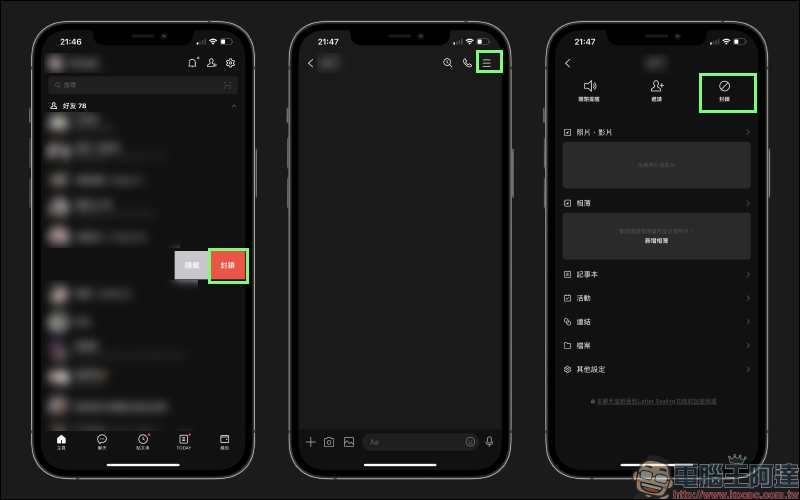
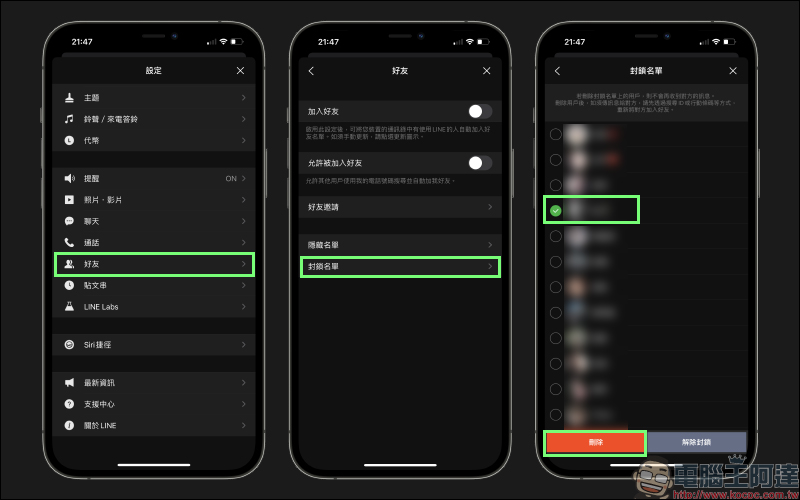
As for how to delete friends? Because most users may not know how to delete friends, they often only know that they can delete friends by checking the objects in the blocked list:
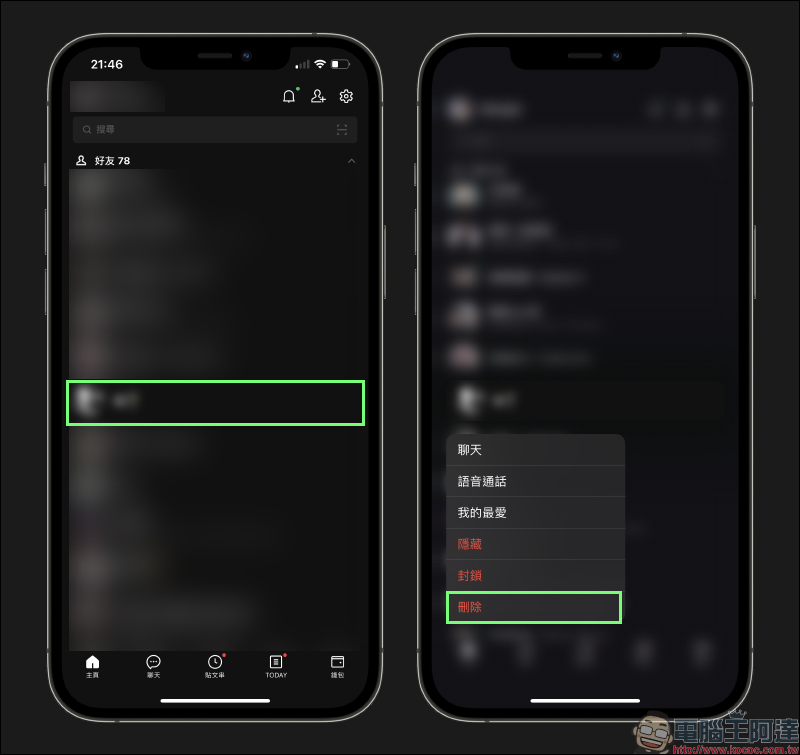
In fact, now you only need to long-press the person you want to delete in the friend list on the LINE homepage to expand the floating window, and then click “Delete” to directly delete the friend without going through the blocking step first.
As for what will be the impact if the friend is deleted directly without going through the blocked process? When this deleted friend sends a message, he will still receive it, but it will show that this friend is not a friend. Of course, if you turn on “Block messages from non-friends” in LINE’s privacy settings, you will not receive any messages from non-friends.
Since this method directly deletes friends instead of blocking them, the other party will not be able to check whether they are blocked like using “LINE Gift Stickers” in the past. Even if non-friend messages are blocked, it will not be easy to find.
For setting tips on LINE privacy settings, you can refer to our previous articles: (Extended reading:LINE application tips: Friends & privacy settings tutorial)
Further reading:
LINE personal account URL generation techniques, in addition to QR Code and LINE ID, it is more convenient to share account links
Source: KOCPC Chinese