


Although Windows 10 (hereinafter referred to as Win 10) is still released occasionally, it is a leap forward compared to previous generations of Windows operating systems such as Win 7 and Win 8, not to mention compared to Win XP. If you are already used to the customization and flexibility that Win 10 brings to you, I believe you must have the same feeling.
Regarding Win 10, I have some methods that I personally find very convenient to share with you.
Move the start toolbar to the top of the screen
After the Start menu was changed to dynamic bricks on Win 8 system and was criticized, Win 10 has returned to the familiar menu. Even though the start menu is arranged in alphabetical order, in fact, I think the Start menu after Win 10 is not important at all.Custom dynamic bricksLet’s explain again, let’s go back to why the start toolbar is moved to the top of the screen? My reasons are as follows:
-
Clear separation of instruction blocks and work blocks
-
Continue operating habits on mobile devices
-
In line with Mac OS visual distribution
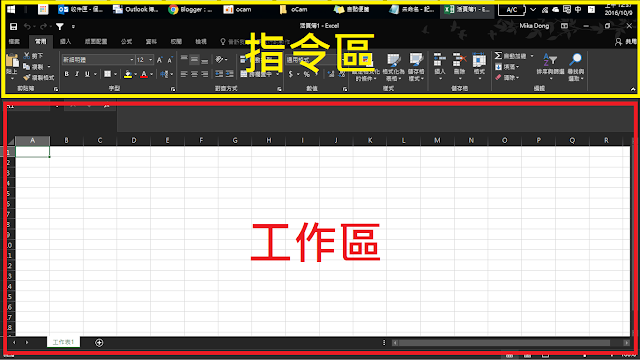
●Clearly separate instruction blocks and work blocks
“McKinsey Note-taking: Reflections of a Top Consultant.” Writing skills》There is a similar concept in the book. The note page is divided into sections such as title, current situation, questions, actions, etc., which can quickly and clearly divide the page presentation and improve the efficiency and effectiveness of notes.In the Win 10 interface, you can also move the toolbar to the topMake a definite separation between the command area and the work area, reduce distractions in the work area. The gaze can be steadily placed on the work area. When you need to use any other function, just move the gaze upward to the command area, which improves concentration and work efficiency. It can also reduce the interference of dynamic prompts from other windows, such as LINE’s instant messages.
●Continue the habit of using mobile devices
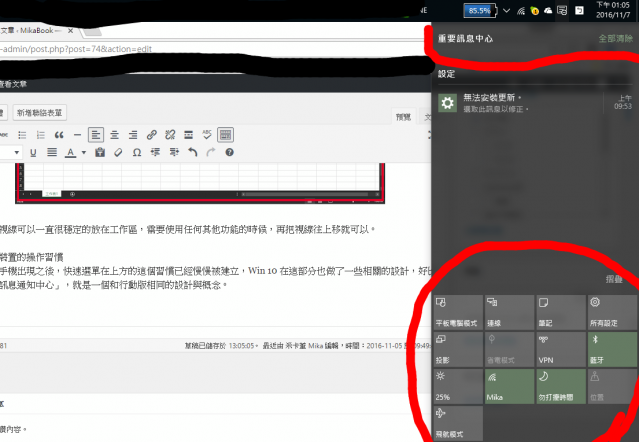
I don’t know if anyone still remembers that Microsoft was preparing to use Win 10 as an OS across PCs, mobile phones, and tablets. Therefore, some related designs have also been made in this part, such as “Important message center”, which is a function similar to the notification menu design in mobile phones. Not only do the menus look similar, but the quick function switches are also the same as those on the mobile system. Many items no longer need to be adjusted on the console and can be quickly completed here. By moving the start toolbar to the top of the screen, operating habits can become more intuitive.
●Interface compatible with Mac OS
This is not necessary for everyone, but if you use both systems, or if you return to Win 10 from Mac OS, you will have a sense of familiarity after moving the start toolbar to the top of the screen. From Mac OS Of course, if you are a Windows system user from beginning to end, this difference will not be felt.
●Conclusion
Win 10 is the “last Windows version” announced by Microsoft. Through continuous updates and optimizations, it should be obvious to all that it is easy to use for ordinary users. Through some customization flexibility, you can make the operating system more suitable for your own usage habits. I will continue to share it with you later.
For more experiences, tips, and gossip, please read“Mikabook”
Source: KOCPC Chinese