


Google recently officially announced its latest video generation model Gemini Omni Flash(gemini-omni-flash-preview) is now officially available to developers. This model specializes in high-quality, low-cost video generation and “conversational editing,” and developers can start using it directly through the Gemini API and Google AI Studio.
What is Gemini Omni Flash?
Gemini Omni Flash is the first derivative model in Google’s Gemini Omni series, making its debut at the Google I/O 2026 developer conference on May 19. It combines Gemini’s multimodal reasoning capabilities with Google’s generative media models, specifically optimized for two key tasks:Video generationandConversational Video Editing。
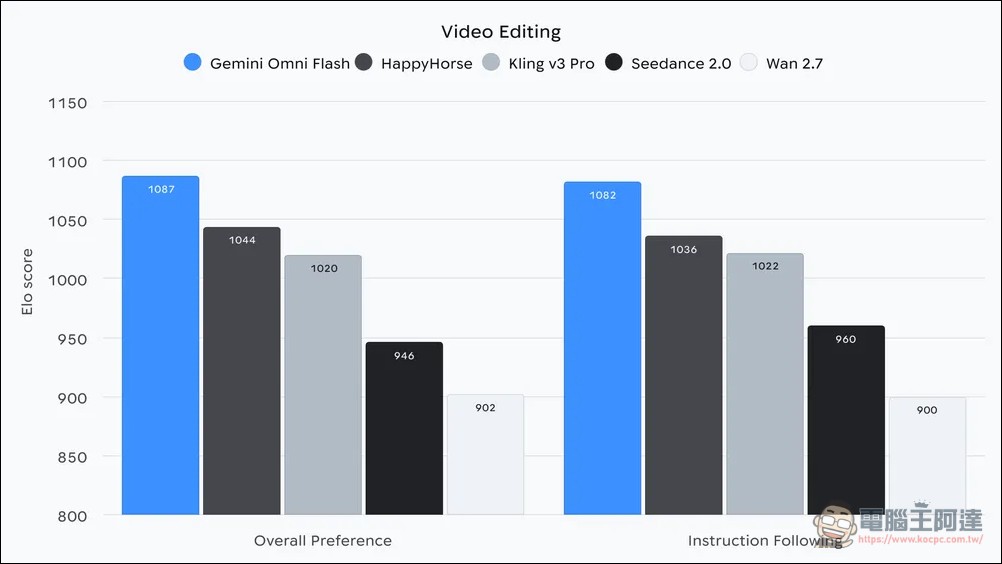
The “Omni” in the model name represents broad multimodal capabilities, enabling unified processing across text, images, audio, and video; “Flash” continues the naming convention established with Gemini 1.5 Flash, emphasizing speed and cost efficiency, with a certain advantage over other AI video tools in terms of pricing.
Core selling point: conversational video editing
Most existing AI video tools use a “generate then export” workflow: you write a prompt, the model generates a video, and if you need to make changes, you have to start from scratch with a new prompt or export to other editing software. Gemini Omni Flash breaks this workflow.
Through conversational editing, users can treat videos as “living materials” and continuously interact with the model using natural language. For example, after generating an initial video, you can follow up by saying:
- Slow down the second half of the video
- Apply cinematic look
- Remove the background and replace it with a clean studio style
- Add a slow push-in effect to the last three seconds.
The model interprets these natural language instructions and applies the modifications directly—no need to export frames, open other editors, or start from scratch.
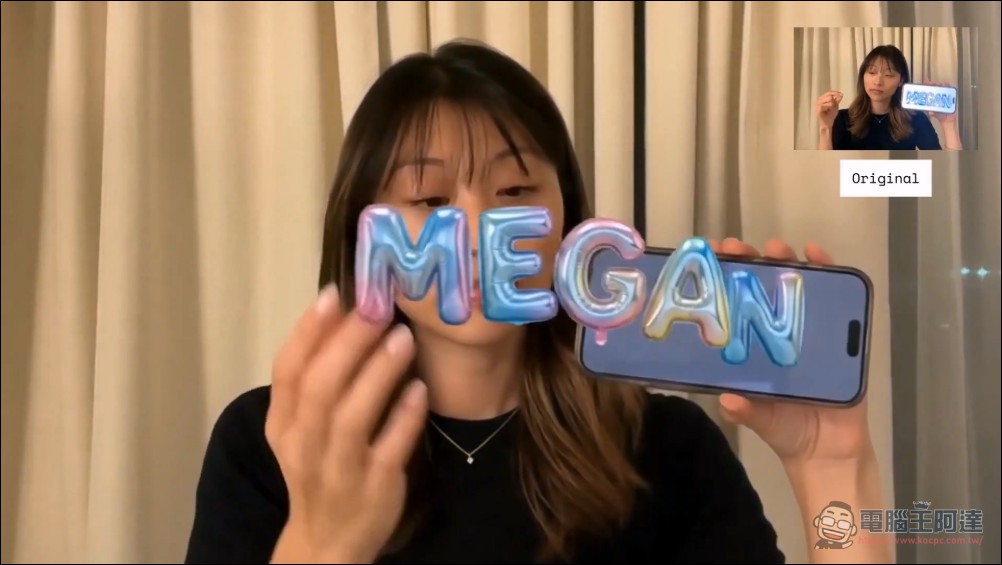
This feature through Interactions API Achieve, can maintain conversation session history and context, allowing users to stack up to three sequential edits consecutively. Google demonstrated multiple application scenarios in their official blog: after users take a selfie with their phone, Omni Flash can transform the photo into a short video with magical effects like “pulling 3D balloon text out of the screen” or “pouring water from the screen into a glass.”
Pricing and How to Obtain
The pricing for Gemini Omni Flash is $0.10 per second of video output(approximately NT$3.2), the same price as Veo 3.1 Fast. Developers can use it through the following two methods:
- Google AI StudioProvides a no-code playground for testing video generation and conversational editing directly in the interface
- Gemini APIFor production environments, the API call method is the same as other Gemini models – just replace the model name with “gemini-omni-flash-preview”
Additionally, Google AI Plus, Pro, and Ultra subscribers can also use it in the Gemini app.
Pairing with Nano Banana 2 Lite
At the same time, Google also launched Nano Banana 2 Lite(gemini-3.1-flash-lite-image) is the fastest and most cost-effective image generation model in the Nano Banana series. Google’s recommended workflow is to first use Nano Banana 2 Lite to quickly generate images, then input those images as references into Gemini Omni Flash to animate them into high-quality videos.
Nano Banana 2 Lite is simultaneously rolling out to consumer-facing products including Google Search’s AI Mode, Gemini app, NotebookLM, Google Photos, Stitch, Google Flow, and Google Ads.
Known limitation: Real person content filtering
On launch day, many developers encountered an obvious limitation during testing:Requests involving real people’s names or likenesses will be blocked by the content safety filter.The returned message reads: “Input blocked: Sorry, we can’t create videos with real people’s names or likenesses”
This aligns with Google’s longstanding responsible AI principles, and while it limits certain creative uses (such as generating scenes with historical figures), it also reduces the risk of large-scale deepfake misuse. Other known limitations include:
- The upper limits for video length and resolution have not been fully disclosed yet.
- Complex multi-step conversational editing may produce inconsistent results in edge cases
- Availability on the Google AI Pro consumer plan has not been confirmed.