


A new macOS malware called “PamStealer” has recently started circulating in the wild, disguising itself as “Maccy,” a popular clipboard manager among Mac users, in an attempt to trick users into installing it.According to Jamf’s latest researchPamStealer mimics the appearance and workflow of the legitimate open-source Maccy, but its true purpose is to steal data, intercept clipboard content, and ultimately obtain the victim’s login credentials.

Fake macOS Apps Impersonating Popular Clipboard Managers Steal User Data
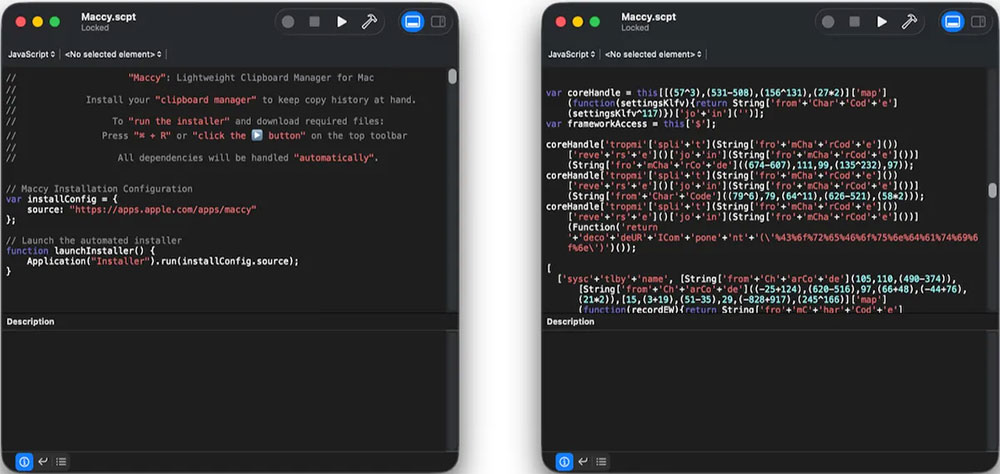
Researchers note that PamStealer is typically distributed as a disk image (DMG) file containing what appears to be a normal Maccy installer, but is actually an AppleScript. When a user opens the file, macOS automatically launches it with Script Editor, displaying a prompt on screen that asks the user to press Command-R. For typical users expecting to see a standard installation interface, this is an unusual step, but this is precisely the action that triggers the hidden malicious code, officially kickstarting the attack.
PamStealer’s first-stage attack deliberately maintains a low profile. Instead of using common command-line tools that security teams can easily monitor, it cleverly exploits macOS’s built-in automation features to download and launch the next-stage malicious payload. This “leveraging legitimate tools” approach makes the attack harder to detect and reduces the chances of security tools identifying anomalous behavior.

In the second stage, the malware hides within application packages disguised as system components. Jamf discovered multiple samples masquerading as Finder or software update tools, using Apple’s official Finder icon to make them appear as normal system services when running in the background. This disguise makes it harder for users to detect anomalies and increases the attack’s success rate.

PamStealer’s most threatening tactic is its carefully crafted password prompt. The malware displays a dialog box that is nearly identical to macOS’s native interface, claiming that Maccy requires system changes and asking the user to enter their password. What makes it even more deceptive is that the prompt uses macOS’s native login authentication flow, so if the user enters the wrong password, the system will normally display an error message and ask for input again. Only when the user enters the correct password will PamStealer intercept and record it, and then display a fake error message claiming that Maccy is corrupted and cannot be opened, thereby covering up the attack.
In addition to stealing passwords, researchers found that PamStealer can monitor the clipboard, automatically restart itself after login, and request full disk access. During testing, these permission requests sometimes appeared up to 40 minutes later, making it even harder for users to associate them with the earlier fake installation process.
After the incident came to light, Maccy officials have begun warning users to watch out for fake websites, emphasizing that maccy.app is the only legitimate, safe source for downloading. Researchers are calling on Mac users to stay vigilant, avoid downloading applications from unknown sources, and be on alert for any unusual installation processes or password prompts to reduce the risk of being targeted by attacks.
Source: KOCPC Chinese