


a few days ago,We just reported that the YouTube app is launching 5 super convenient new features, because according to the past, new features will be pushed out one after another according to each country/region, so when YouTube officially announced the news, only a few features were available to Taiwanese users. Unexpectedly, after only a few days, YouTube officially started to push these functions late today. If you were not familiar with how to operate it last time, this hands-on sharing should give you a better idea!
YouTube App’s 5 new features are officially launched (hands-on tips and tricks)
In order to improve users’ experience of watching YouTube videos, YouTube officially announced that it will launch 5 new features. Although some are still optimized for the application interface, new features such as video chapter lists with thumbnails, gesture switching to full-screen mode, and bedtime reminders have also been launched. YouTube’s many new features this time do not require additional app updates. According to the author’s actual testing, these features have been fully rolled out earlier, and users in Taiwan, regardless of whether they are iOS or Android systems, should be able to receive them one after another.
Function 1. New video chapter interface, making it easier to select the video chapter you want to watch.
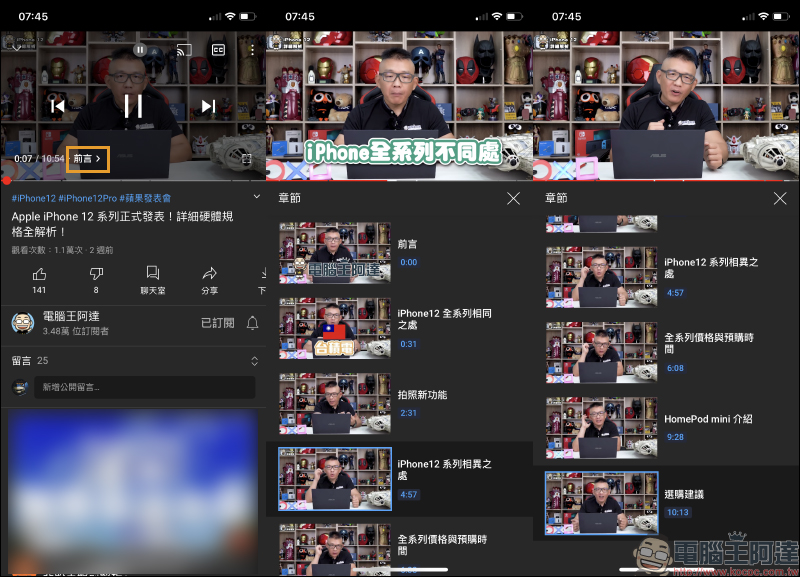
Since YouTube started to support adding chapters to the video progress bar, YouTube channel owners can add chapters to uploaded videos. Chapters will divide the video into multiple paragraphs, each paragraph has its own preview thumbnail. However, the preview thumbnails were only displayed briefly before. Now the new video chapter interface is changed to a list display with thumbnails. Just click on the chapter title next to the timeline to expand the list. This makes it easier for the audience to select the video section they want to watch within the chapter.
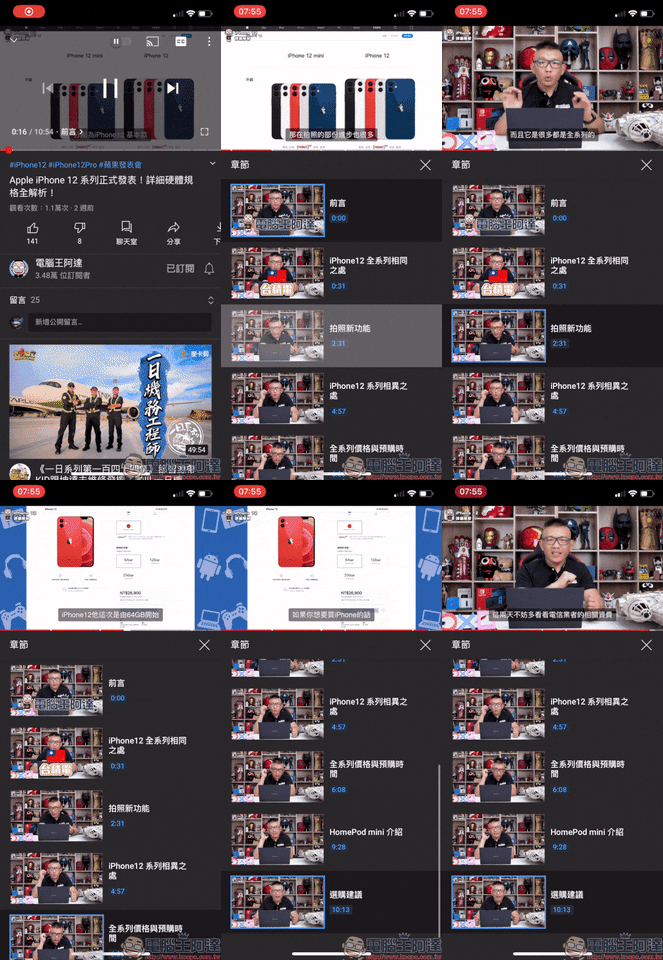
From the animation operation demonstration below, you can see that as long as you select any chapter, the video can directly jump to that paragraph and start playing the video:
Function 2. A more simplified player page
For those who are heavy YouTube users for a long time, sometimes they just get used to letting videos play randomly, so they choose to turn on the “autoplay” function. However, the previous autoplay button was designed near the current location of the small bell, and there are also some function buttons in the upper right corner of the video player. Unless they are very familiar users, many users don’t even know how to turn it on or off, right?
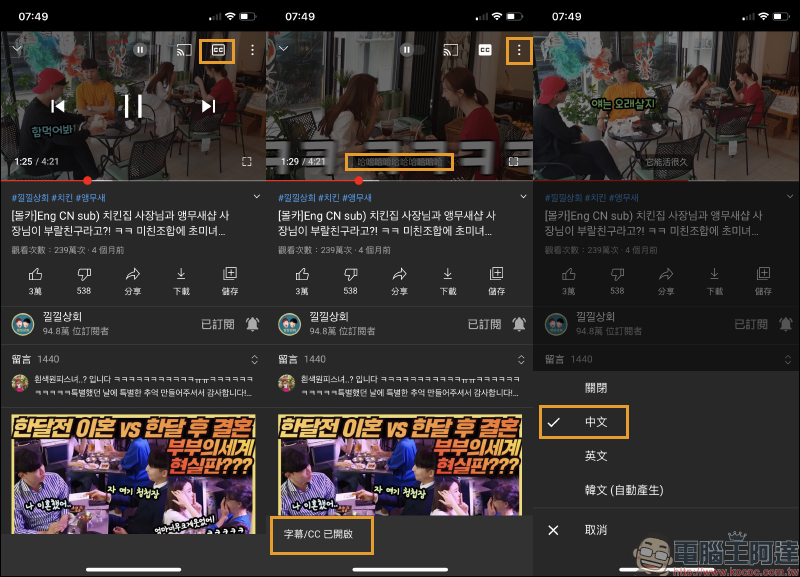
From now on, YouTube will integrate “Autoplay”, “Placement”, “CC Subtitles” and “Function Menu” in the upper right corner of the screen. The rearrangement of these buttons allows users to operate various functions faster.
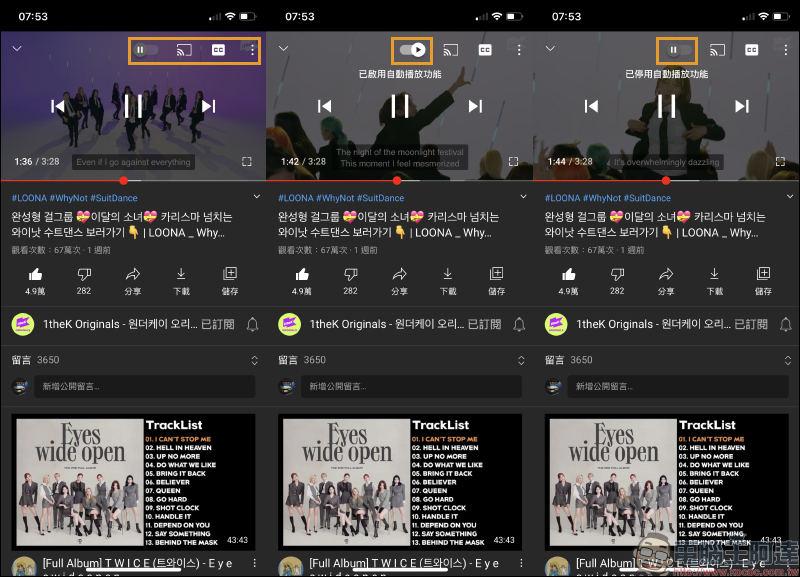
Take CC subtitles as an example. In the past, when you wanted to turn on CC subtitles, you first had to expand the function menu to enable it. But now you can quickly turn on/off CC subtitles directly in the player with one click, which is really convenient! However, the “CC subtitle button” in the player only supports the “on/off” function. If the video provides subtitle selections in multiple languages, the user still has to open the menu to select different subtitles through the previous method:
Function 3. More convenient gesture operation, easy to switch to full-screen playback
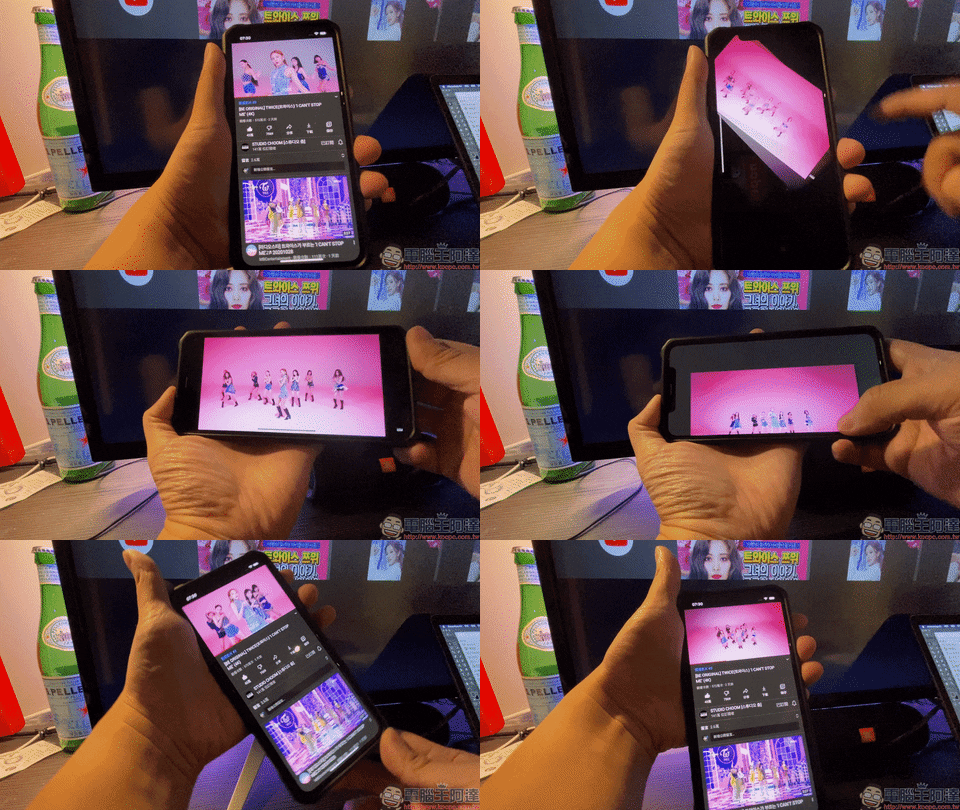
In the past, if you wanted to play a video in full screen mode on YouTube, you had to rotate your phone or click the full screen button of the player. From now on, users can directly enter full-screen display by swiping up the screen, and then swipe down the screen in full-screen mode to exit full-screen mode.
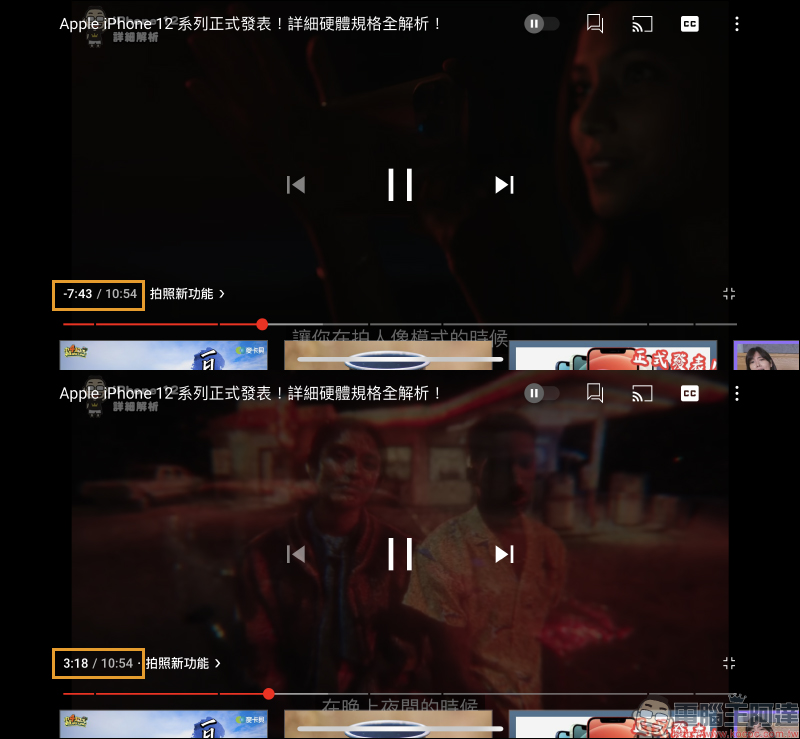
In addition, many users will pay attention to the minutes and seconds of video playback. From now on, just click on the time position to switch the display time of the timeline. There are two options to display “remaining time” or “playing time”:
Function 4. Suggested operations such as rotating the phone to improve viewing experience
As the number of users using mobile devices such as smartphones to watch YouTube videos has increased significantly, “direct-shot” videos have also emerged in recent years. The vertical screen format is more suitable for mobile users’ usage habits. YouTube has also begun to launch recommended operation tips.
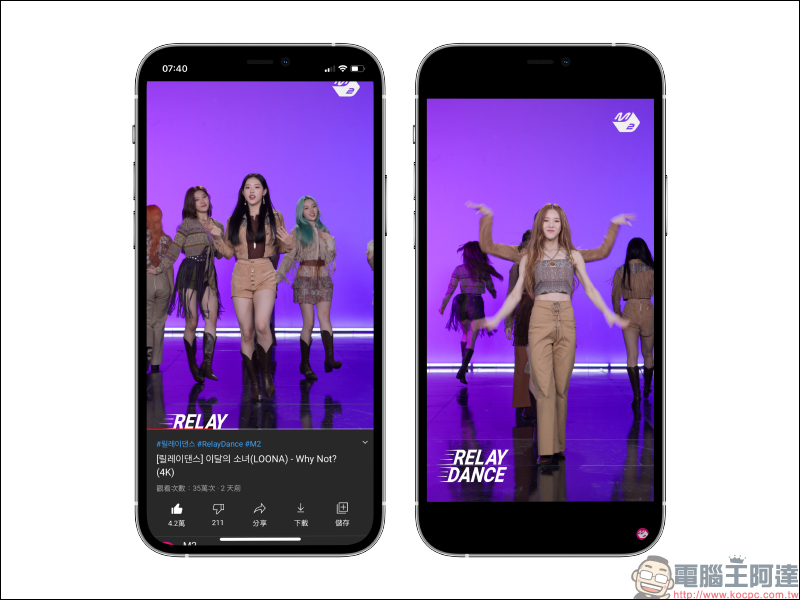
For example, if you turn the screen to landscape orientation when playing a live video, a “rotate” reminder window will appear in the center of the screen. At this time, users can click to directly rotate the screen and directly switch to full-screen playback, allowing users to have a better experience when watching videos.
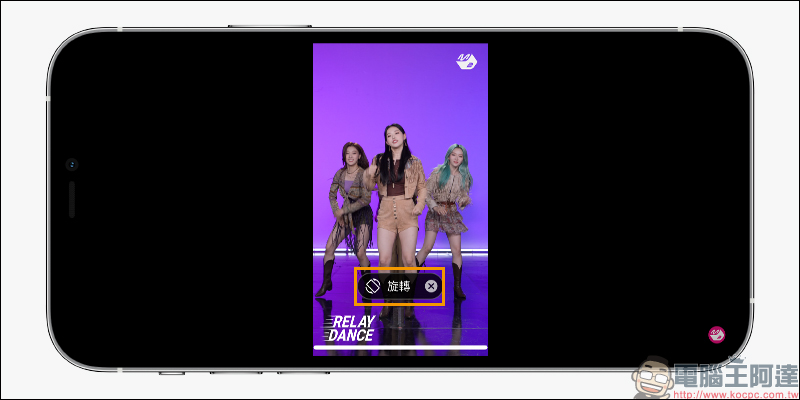
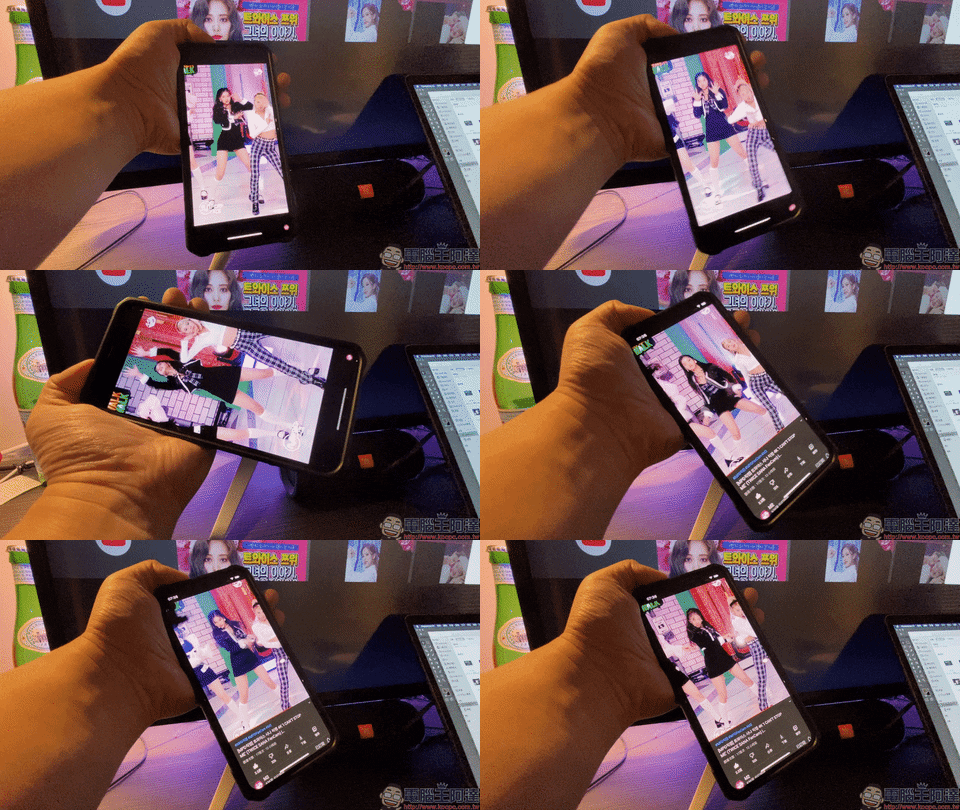
If you don’t want to click the rotate button to enter full-screen mode, here I also share a tip for full-screen playback. Take the playback of this type of “direct shot” video as an example. In addition to sliding the screen with gestures to enter full-screen mode to play the video, you can also make good use of this rotation reminder function to enter full-screen mode directly by rotating the phone screen.
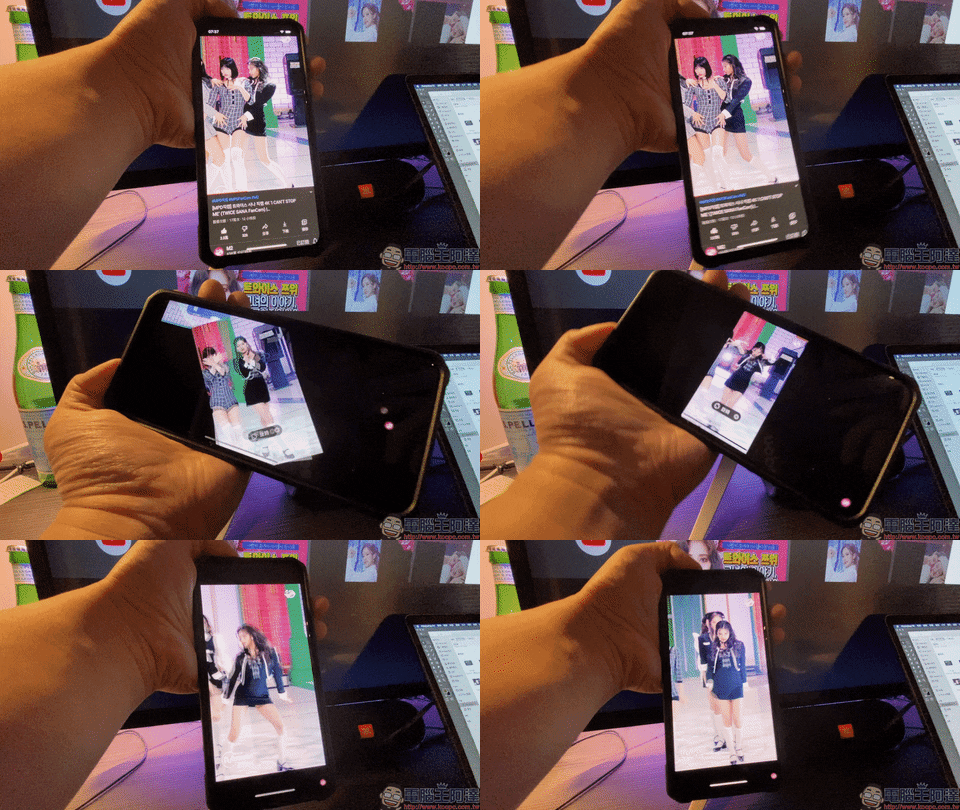
If you want to exit full-screen mode, just rotate the screen again.
Function 5. Bedtime reminder function
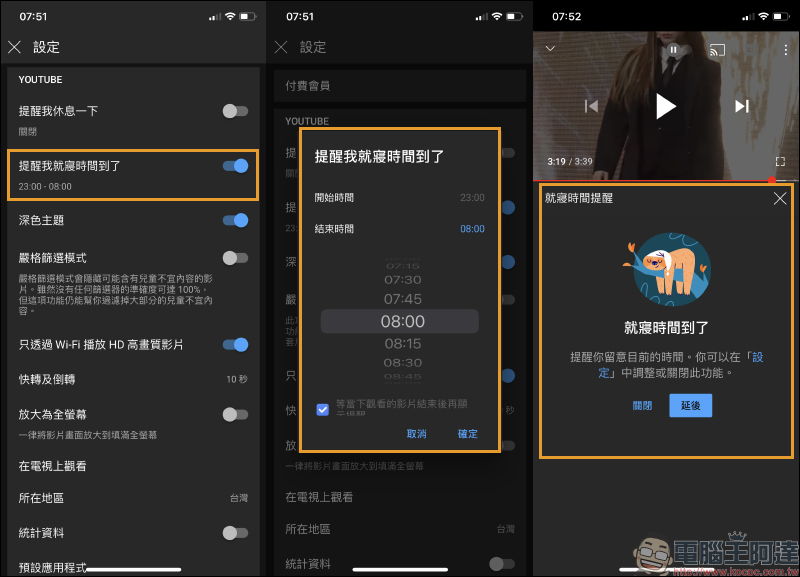
YouTube has previously had a “reminder to take a break” function, which allows users to set a fixed time (for example: 1 hour), and uses a reminder frequency to remind users to take a break when the reminder set time is reached. The “Bedtime Reminder Function” launched by YouTube this time is different from the above-mentioned functions. It is set by a specific time interval (for example: starting from 23:00 and ending at 08:00) to remind users to pay attention to the current time and avoid forgetting to sleep because of watching videos when it is time to sleep.
Further reading:
Xiaomi Driving Recorder 2 will go on sale in Taiwan at 10:00 on 11/6: 2K high image quality, 140-degree ultra-wide angle, supports 3D noise reduction night vision and smart voice control functions, priced at 1,795 yuan
Official repair prices for iPhone 12 and iPhone 12 Pro screens and batteries released
Source: KOCPC Chinese