• About Us
King of Computer Media
  • Home
  • Tech News
  • AI News
  • Apps & Tutorials
  • Mobile & Telecom
  • Lifestyle
  • About Us
No Result
View All Result
  • Home
  • Tech News
  • AI News
  • Apps & Tutorials
  • Mobile & Telecom
  • Lifestyle
  • About Us
No Result
View All Result
King of Computer Media
No Result
View All Result

Home - iPhone/iPad usage tutorial - How to temporarily solve the confusing teaching of Zhuyin input method on iOS Facebook Messenger

How to temporarily solve the confusing teaching of Zhuyin input method on iOS Facebook Messenger

kocpc by kocpc
September 5, 2020 - Updated on August 4, 2026
in iPhone/iPad usage tutorial, Latest Technology News

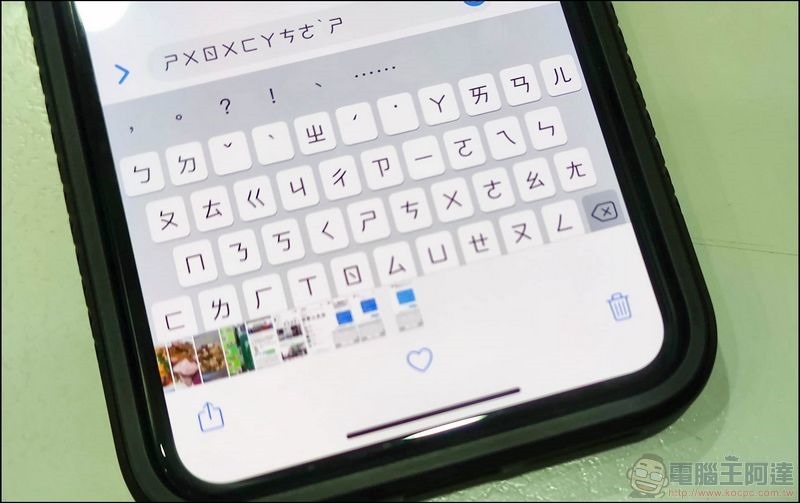
Friends who use iPhone must have found that the Zhuyin input method is weird when replying to Messenger messages with friends in the past few days. It often ends after typing half a word, and complete sentences cannot be sent normally. Ada tested it himself and found several temporary solutions. If you need friends, you can try it, which should solve the input method problem.
118858565_3110101842431923_1955041193509049653_n (1)

How to temporarily solve the confusing teaching of Zhuyin input method on iOS Facebook Messenger

Kill Messenger Dafa

Now when typing on the Zhuyin keyboard, it turns out to be like this, and it becomes a real “Zhuyin”. Some people suspect that it is because the new version of iOS does not allow Messenger to record the keyboard for security reasons. The solution I have found so far is to directly remove it to the “Messenger” App:

01

Then go back to FB and click Messenger in the upper right corner of the screen. The Messenger chat room list and content will also be displayed (there are also tips for installing the App below):

0203

The phonetic keyboard is normal here, which is a temporary solution. However, this also has several big disadvantages. If there is a message, it will not be notified, and then you cannot answer the voice call, so there is a second method:

0405


Install third-party input method

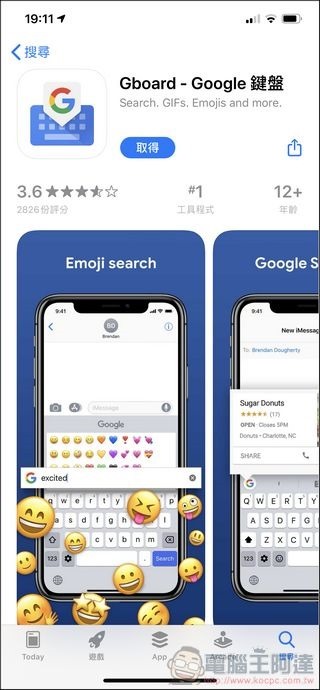
The second step is to install other third-party input methods. There are many choices in this part, but many of them are Chinese apps. I personally recommend Gboard (Google input method). After installation, it will teach you how to set it up. If you use this, it will be normal:
0607


Other methods

If you don’t even want to install a third party, you can also use the voice input method or handwriting input method. Just use it temporarily before FB launches an update.

Source: KOCPC Chinese

Recent Posts

  • The Xiaomi Pad 8S Pro has passed network access certification and will debut with the self-developed XRING O3 chip.
  • The entire Google Pixel 11 lineup has been leaked! Official promotional renders of the Pixel 11 Pro XL have also surfaced
  • Are Chinese phone battery capacities falsely labeled? A brief look at the “capacity locking” phenomenon in Chinese silicon-carbon batteries.
  • NCC is leaderless, recklessly sending out national-level alert messages!?
  • What does “QR” in QR Code mean?

Recent Comments

No comments to show.
  • About Us

We welcome partnership inquiries and product review opportunities from smartphone manufacturers, iPhone accessory brands, and app developers.koc kocpc.com.tw|Privacy Policy |Hosting & Maintenance: Fast Line Taiwan, A-Chang Digital Technology

No Result
View All Result
  • Home
  • Tech News
  • AI News
  • Apps & Tutorials
  • Mobile & Telecom
  • Lifestyle
  • About Us

We welcome partnership inquiries and product review opportunities from smartphone manufacturers, iPhone accessory brands, and app developers.koc kocpc.com.tw|Privacy Policy |Hosting & Maintenance: Fast Line Taiwan, A-Chang Digital Technology