


Although most people should now be used to adding Google Calendar events on their mobile phones, even so, the official is actually still very active in updating the web interface – it is really getting more and more beautiful, which will make people more willing to use it. Recently, Google has brought another wave of feature updates to the web version of its calendar service. Continue reading to make it more user-friendly. The interface of Google Calendar web version has been updated to make you fall in love with the new event report content.
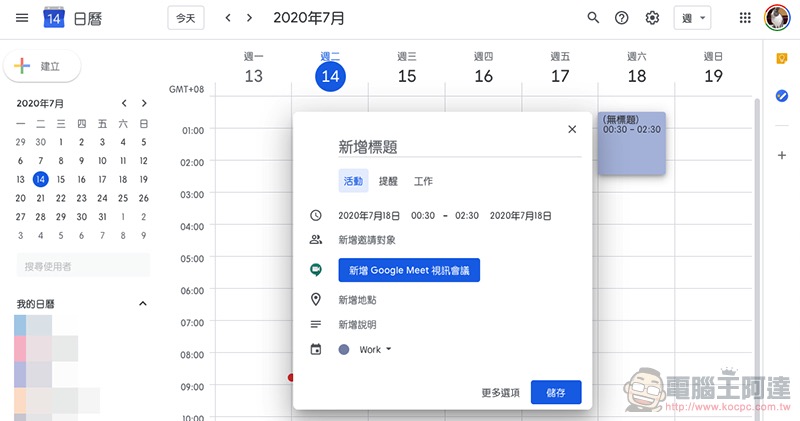
More user-friendly, the Google Calendar web interface has been updated to make you fall in love with the new events
I don’t know if everyone is the same as the editor. Even if it is the same service, if the App or web interface is well designed, you will even deliberately choose which device to use. Regarding the Google Calendar service, the editor has actually not felt that the web version would be my first choice for a long time – unless there are specific settings that must be selected through this interface. However, in recent years, the improvements made by the Google development team to the web version of the Calendar calendar service have really made people more willing to use it – if you don’t believe it, you can use a desktop computerOpen it and see for yourselfIs it completely different from your impression?
▲Image source: Google
Recently, Google has improved the pop-up window for quickly adding activities. Not only is the interface more concise and beautiful, you can also see various advanced options such as Google Meet appearing in it. In addition, the official also explained various improvements this time on the G Suite Updates page, including making it easier to activate and manage guest permissions, adding additional information files, etc. It is also easier to select the color of the event (just right-click on the event), customize notifications, select busy/available, and change whether the event is public or not. Options, etc., are all placed in the pop-up window of the new event.
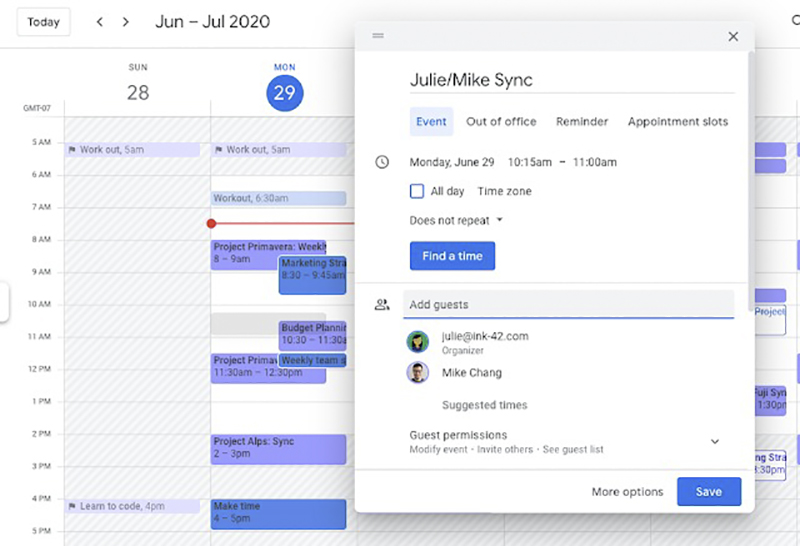
▲Image source: Google
Google Calendar also provides a quick launch button for the “Check the other party’s availability” function in the quick addition window. In fact, the main direction of this update is to bring the commonly used functions in more options to the outer layer, thereby reducing the chance of clicking on advanced options. Let the time management master save more valuable time。
Pictures/sources cited in this article
Further reading:
Pixel 4a briefly appeared on the official website, is it a warm-up before launch?
Before trying the watchOS 7 Public Beta, please note that there is no retreat for this update!
Source: KOCPC Chinese