


With the official launch of the LINE community, LINE users can also use the social function to chat in the PC version of LINE. Recently, LINE has once again released version 6.1 update for the PC version. In addition to directly expanding the free group call limit from 200 to 500 people, this update also brings four hidden update highlights, namely group video call optimization, browsing window integration, format copy and paste function optimization, and LINE Four updates including not displaying unread messages in the community.

LINE PC version 6.1 version update: Free calls expanded to 500 people! Four hidden version updates highlighted
I believe users of LINE PC version for Windows/Mac have noticed that LINE has recently released version 6.1 update for LINE PC version, which brings the following update highlights:
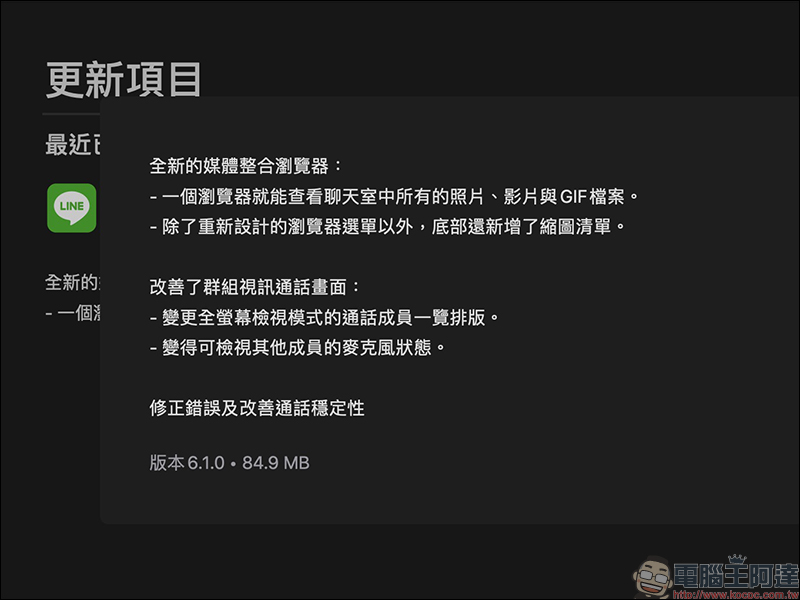
1. Optimization of group video calls: the upper limit of group calls has been expanded to 500 people
The maximum number of people in a LINE group is 500, but in the past it could only support free calls to a maximum of 200 people. However, in the 6.1 update of the PC version of LINE, the upper limit of free calls has finally been increased to 500 people (the same as the upper limit of group members). The upper limit of 500 people includes both voice calls and video calls.

In addition, the LINE free calling interface has also been optimized. All menu interfaces are integrated at the bottom of the screen, and the menus are automatically hidden at ordinary times. The machine mouse cursor must be moved to the bottom for the button menu to be displayed:

The thumbnails of the call recipients have been adjusted to the top of the screen, and icons of the mute person and the speaker have been added to ease the problem of not knowing who is speaking during a multi-person group call, and to quickly identify which member is speaking:

You can share your computer screen during a video call. This update also optimizes the screen sharing interface. When the screen being shared is displayed with a green border, a “Sharing screen” prompt is also added above the face shield:

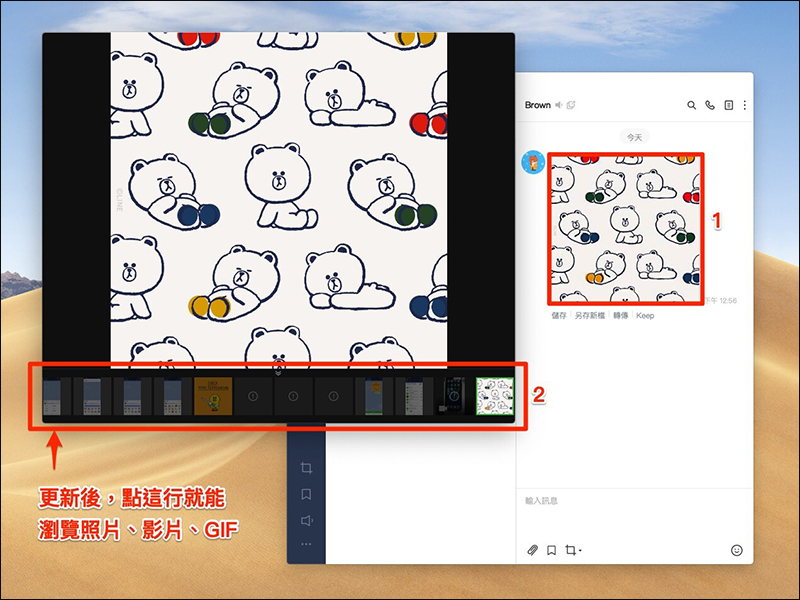
2. Browsing window integration: Click once to browse photos, videos, and GIFs
In the past, the PC version of LINE needed to open photos and videos separately, but after this update, photos, videos, and GIFs are integrated into a media browser. Therefore, users only need to click on any one to browse the photos, videos, and GIFs sent in the entire chat room at once:
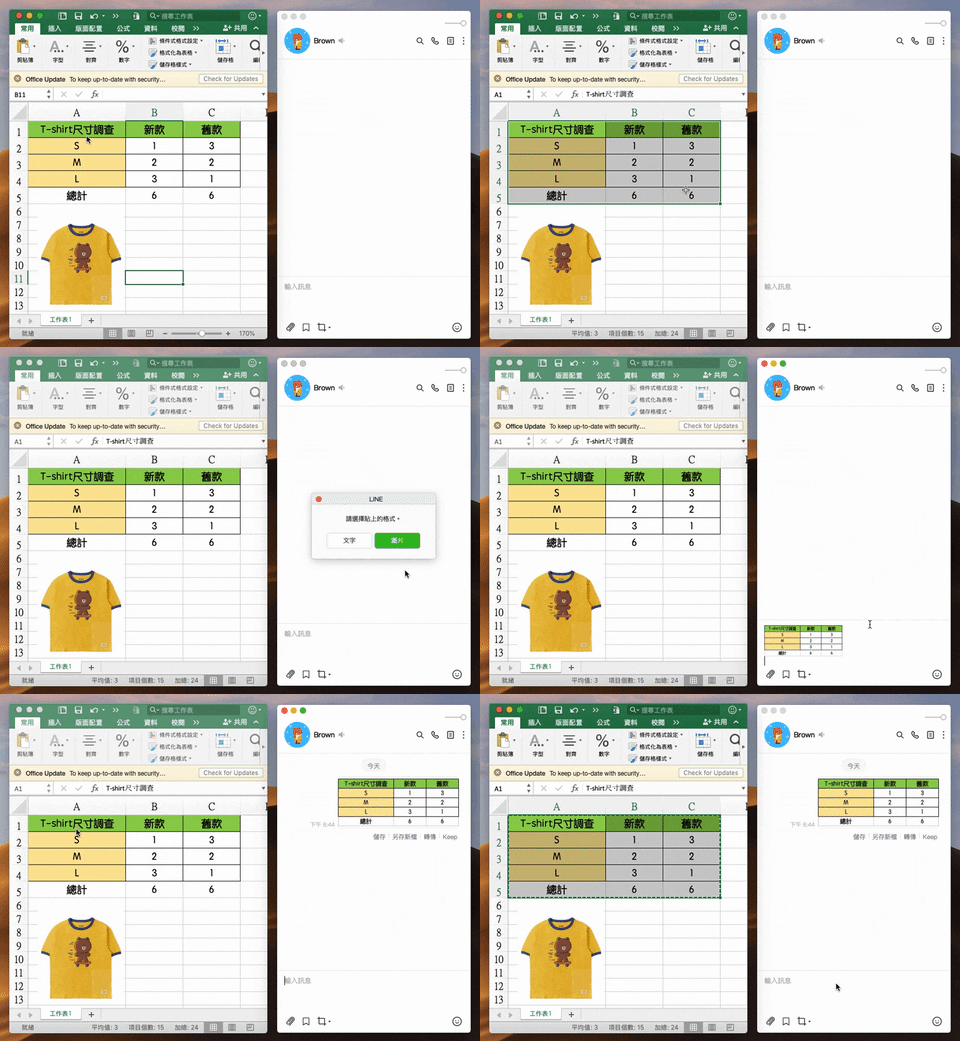
3. Format copy and paste function optimization: you can copy the selected block from Excel and paste it directly to LINE
For many users who use the PC version of LINE to communicate at work, sometimes they need to paste the Excel format in the LINE chat room. However, in the past, users had no way to directly copy and paste operations. This time, after the LINE PC version 6.1 update, it supports two copy and paste content formats: “plain text” and “picture”. You can directly copy the selected block in Excel and paste it directly in the LINE chat room. When pasting, you can choose to convert it directly into a picture:
4. LINE community: You can set not to display the number of unread messages, replace it with “N”
some time ago LINE communityOfficially launched, many readers are joining in one after another“Computer King Ada Technology Chat Group” LINE communityChat and discuss various information together. However, taking Computer King Ada’s community as an example, it has accumulated more than 2,800 members, and quite a few members send messages every day.In addition to teaching you last time how to set “not display the number of unread messages” on your smartphone, now the PC version of LINE can also cancel the display of message number through settings and replace it with “N”!
In the PC version of LINE, if there is no other setting, the default group message will display the number of unread messages normally. Therefore, if you do not want to accumulate hundreds of unread messages, it is recommended to turn this setting on. First, open the settings in the LINE desktop app:

Then turn on the “Hide the number of unread messages” function in the community item of the “Reminder” tab:
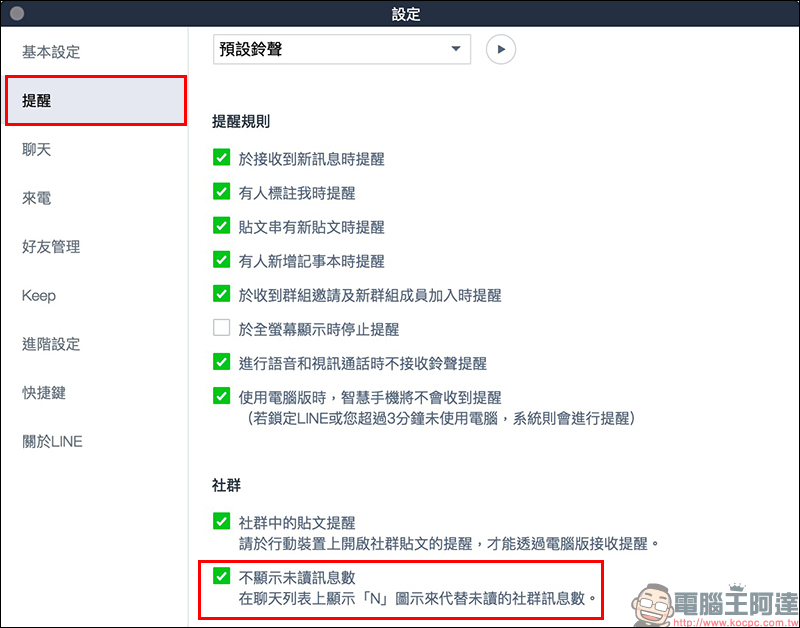
After turning it on, the number of unread messages from “Community” will be changed to “N”, and the number of unread messages in the chat button will be deducted from messages from the community:

Picture/Source:LINE Taiwan official BLOG
Brain King Ada also has a LINE community! Scan the QR Code or click the link to join the community now!
“Computer King Ada Technology Chat Group” LINE community (click me to join the community)

Further reading:
LINE application tips: LINE received a message but not notified? Check out these settings!


Source: KOCPC Chinese