


There will always be times when people accidentally delete important files or damage USB flash drive or memory card files. At this time, if the damage happens to be an important or targeted collection or work file, it will make people cry. Microsoft quietly launched a file repair application “Windows File Recovery” to help you find a way to recover files for free.

Microsoft launches new help data recovery tool “Windows File Recovery” for advanced users
The new recovery application “Windows File Recovery” launched by Microsoft is essentially a command tool application that can be downloaded from the Microsoft Store. This application may come in handy if you accidentally delete important documents, files on a disk, pen drive or memory card, and the temptation is that the file is damaged. It provides a comprehensive range of file recovery options, supporting various photo, document and video types, as well as different file systems including NTF, FAT, exFAT, ReFs, etc. Since it requires inputting commands, its main customer base is advanced users and users with system management experience and technology.
【Microsoft Store download, click here】
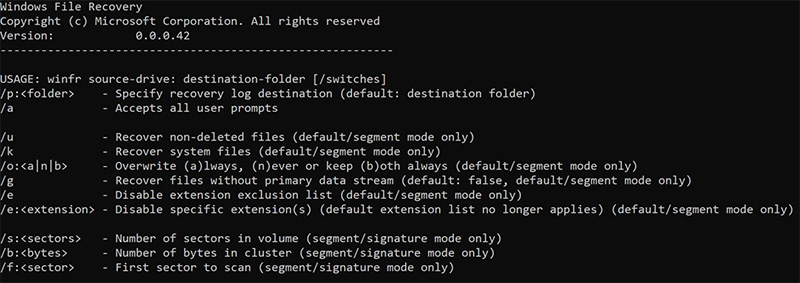
You can restore using three modes: Default, Segment and Signature. These three modes mainly target different parts:
1. Default mode
Microsoft recommends using this mode if the file you are looking for has been recently deleted or is in the NTFS file system (HDD/SSD on Windows PC, external hard drive, and pen drive larger than 4GB).
2. Split mode
If the file has been deleted for a while, or is running on a formatted hard drive or a hard drive with bad tracks/damage, you should try using split mode first.
3. Signature format
Signature mode is recommended for file formats supported on FAT, exFAT and ReFS file systems (SD cards, flash drives smaller than 4GB).
【For more related command syntax, click here】
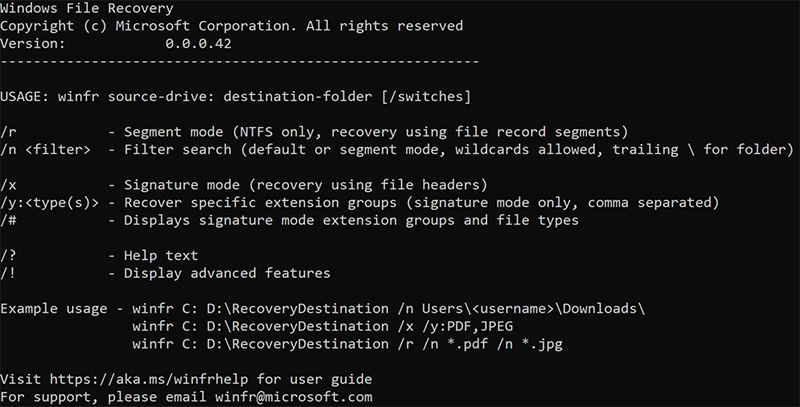
Windows File Recovery requires the computer operating system to be Windows 10 build 19041 or above. It can be downloaded for free from the Microsoft Store. Please note that this application does not support the recovery of cloud drives and network file shares. I would also like to remind everyone that the Windows system treats the extra space after deleting files as available space, allowing the computer to be widely used to write more new files, and these files may overwrite the extra space after deleting files. If you want to increase the success rate of file recovery, please minimize or not use the computer at all after accidentally deleting files until the recovery operation is performed.
Source: KOCPC Chinese