


Seeshed next doorAll support Apple Pay, and GoShare has not fallen behind by officially introducing such a mobile payment option. The point is, I always know how to do it thing Gogoro, the organizer of the event, also followed up the event of giving away AirPods Pro. In addition to drawing 1 set every day for 30 consecutive days – a total of 30 sets, everyone should be happy. The key point is that you only need to complete 2 valid rides with payment (that is, the bill amount must be greater than zero before you can pay it XD) to be eligible for the lottery. This is indeed an activity that you don’t have to worry about to get a lot of money. Continue reading GoShare supports Apple Pay. For how to set it up, see the content of the report here.

▲Image source: GoShare
GoShare now supports Apple Pay, how to set it up here
The weather is hot and I want to encourage everyone to make more use of sharing services. This time GoShare is also working hard to make this mobile sharing service that focuses on ultra-fast 3-minute review more popular. In addition to the above-mentioned activities of using Apple Pay to draw AirPods Pro (one set will be drawn every day until 7/17), there is also an activity that rewards 10 yuan in riding credits for each trip paid with Apple Pay.

▲Picture: This is the official trailer of GoShare… everyone is invited to eat Apple like this (Source: GoShare)
During this event, if you happen to be using a Taishin credit card, you can also enjoy a 50% down payment rebate for the first time you bind your Taishin card to pay for GoShare rides with Apple Pay (please note that this offer starts on 7/1); friends who have already signed up for Apple Pay, don’t feel bad, because Taishin is also offering a 20% rebate on each trip from now until 7/17. (For details, please see the event page information)

▲Image source: GoShare
OK… Now I regret not setting up Apple Pay first when riding GoShare yesterday (crying), but this event will actually last until 7/17. Next, we will also teach you how to set up this mobile payment option.
Click here to download the GoShare app(Link to register to enjoy a discount of NT$100 on the total price)
First of all, if you haven’t registered yet, you can refer toOur registered teaching. After the registration is completed, open the GoShare app updated to version 2.4.2 or above, and click on the leftmost mugshot of the three circles at the bottom:
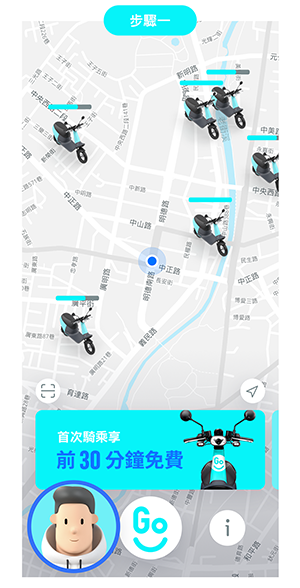
Select “Payment Settings” in the pop-up menu:
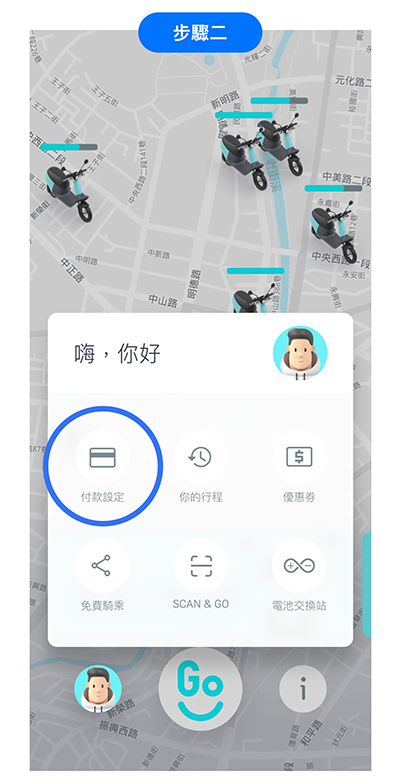
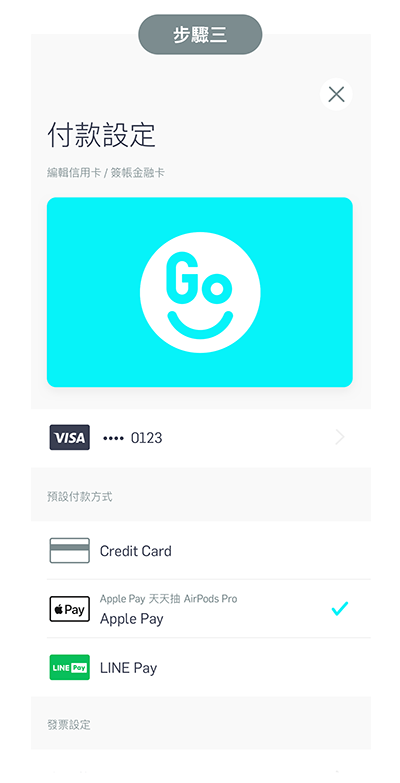
Here you can change your payment settings from other settings to Apple Pay. After the setting is completed, the Apple Pay payment page will pop up at the end of each ride. Compared with the default credit card payment, there is one more payment step when ending the ride, but it is relatively safe:
Further reading:
Taipei Nanmen Market supports Apple Pay mobile payment, so you can buy groceries without using cash.


Source: KOCPC Chinese