


I wonder if you still remember that we previously introduced the “automatic backup chat history” function launched by LINE on the iOS version? Now it’s finally supported on Android too! In addition to this convenient function, this LINE 10.10.0 version update also takes the lead in optimizing the sticker interface for the Android version. Keep can also save directly to special albums, comprehensively improving the user experience.

LINE Android 10.10.0 version update: Android adds automatic backup of chat history, multiple optimizations of sticker interface, Keep saves directly to special albums
In the near future, LINE will release version 10.10.0 update for LINE Android version. First of all, it will finally follow the iOS version to add a convenient automatic backup chat history function. This feature was first introduced in LINE first appeared on iOS version 10.3.0, now it can finally be enjoyed by Android users! Starting from LINE Android version 10.10.0, in addition to manual backup at any time, Android users can also automatically save chat history backup to the Google Drive configured by the user according to the set period as long as the automatic backup function is turned on. At present, LINE’s backup is mainly for text messages. Others include photos and videos. It is recommended to save them to the photo album, notepad or Keep as soon as they are received in the chat room.
How to automatically back up chat history in LINE?
First, click on the upper right corner of the LINE homepage to go to the “Settings” page, then select “Chat” > “Backup and Restore Chat History”: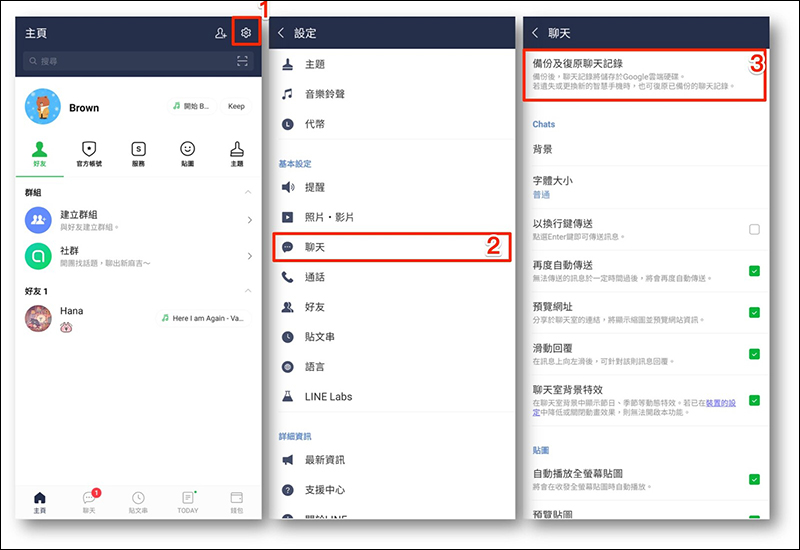
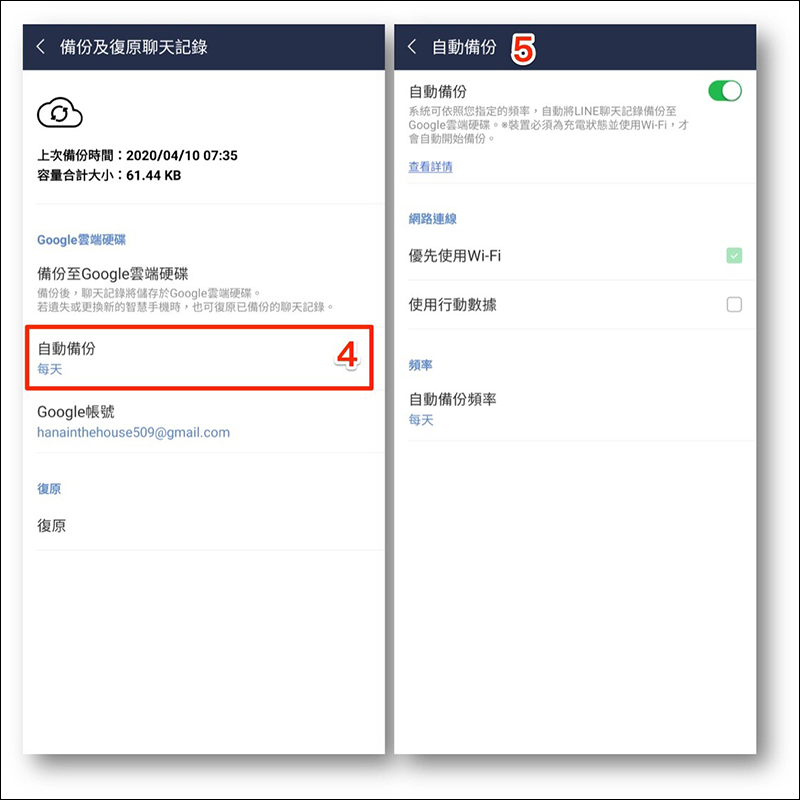
Starting from LINE Android version 10.0.0, you will see an additional “Auto Backup” option on this page. After entering and turning on the automatic backup function, you can also set the frequency of automatic backup. (Note: This feature is currently available on LINE iOS version). LINE’s automatic backup frequencies include “once a day”, “once every 3 days”, “once a week” and “once a month”.
Chat room page sticker menu optimization
In addition, after this update, the sticker menu on the chat room page has been adjusted to the top (on the left side of the picture below), which also reduces the chance of users accidentally touching it: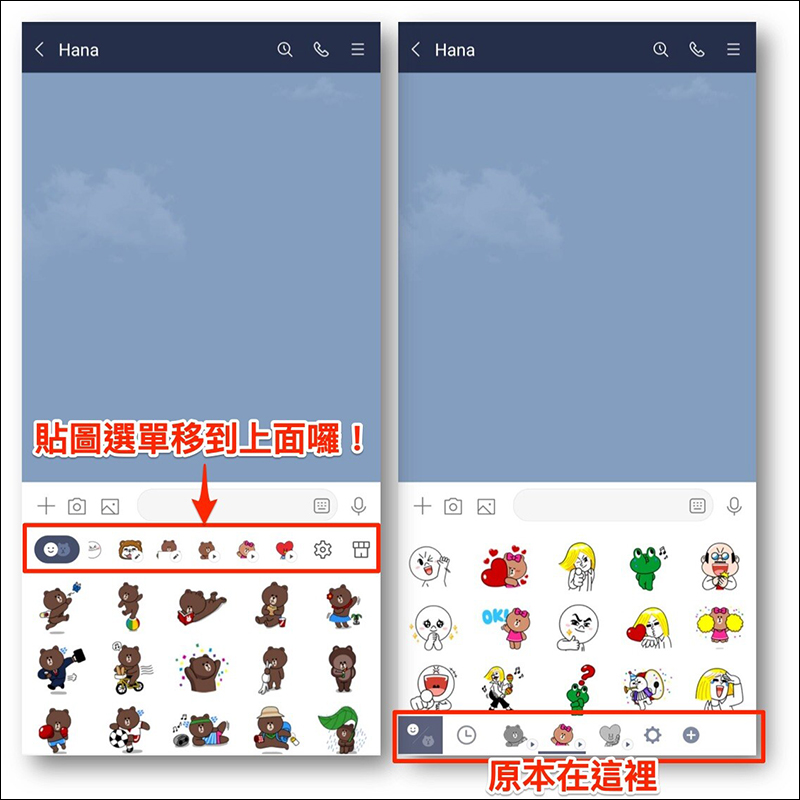
Added sticker keyboard category
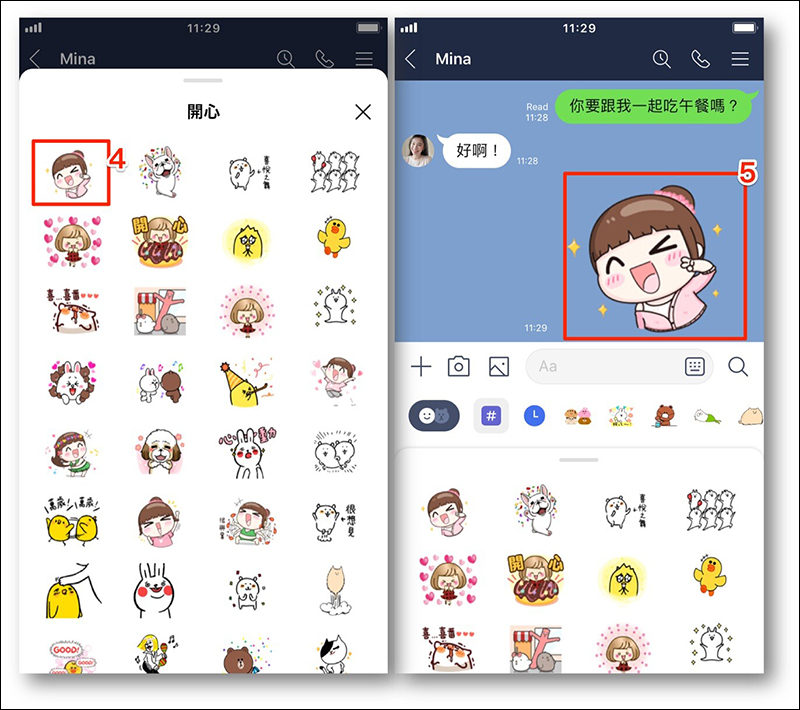
As LINE users download more and more stickers, a new “Sticket Keyboard Category” (shown with a “#” icon) has been added after the update. Just click on the classification button that fits the current situation, and it will help the user find the corresponding sticker! Category items can be selected from OK, Thank you, Happy, Please, etc. The number of categories visible to each user will vary depending on the stickers they have. Taiwanese users can currently display up to 12 categories:
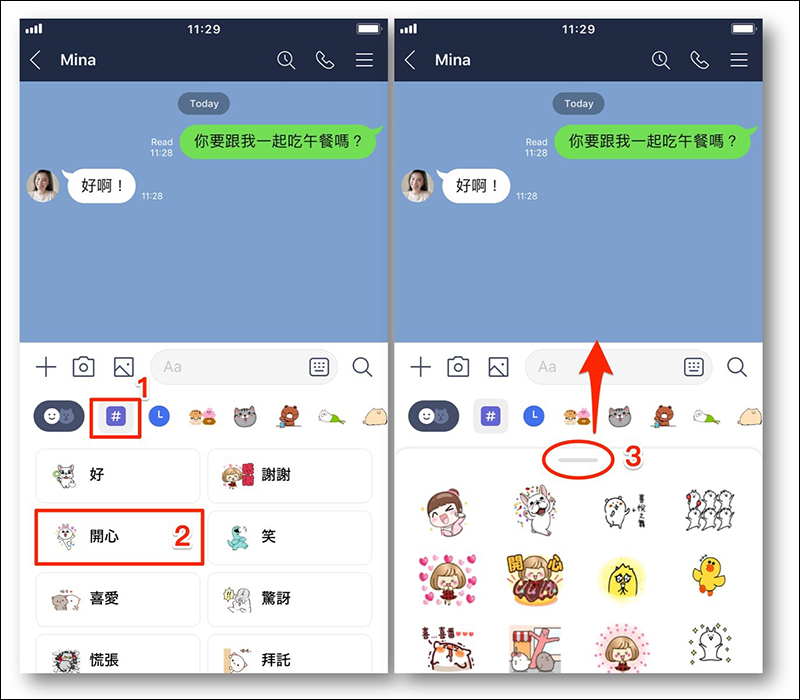
For example, if you want to reply to a friend’s happy sticker, this method can save a lot of time in selecting stickers, and it will also make your friend less likely to think that you can’t reply! (laugh)
Added message sticker application shortcut
The biggest highlight of the new “Message Stickers” that is different from previous stickers is that they can be edited and saved individually, and up to 100 words can be entered for each sticker. Users can express their creativity and customize stickers without text for different situations. In this LINE 10.10.0 version update, a shortcut for applying message stickers has also been added to the mobile version.
As long as you update to LINE version 10.10.0 (inclusive) or above and have “Message Stickers”, you only need to enter text first, then click the sticker icon next to the input box, and you will see a pencil icon added to the screen. This is the shortcut for applying message stickers! Just click on it and it will help you find all the message stickers you have, and the entered words will be automatically applied, allowing users to immediately select the most suitable message sticker to use: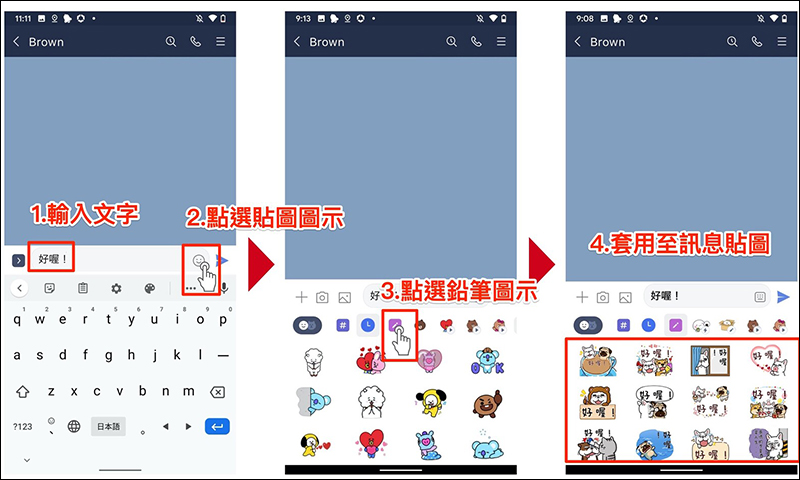
Automatically delete expired stickers and display reminders for soon-to-expiry stickers
The Computer King Ada team will organize many free LINE activity stickers for everyone from time to time. However, in the past, once the validity period of the stickers expired, you had to manually delete them yourself.
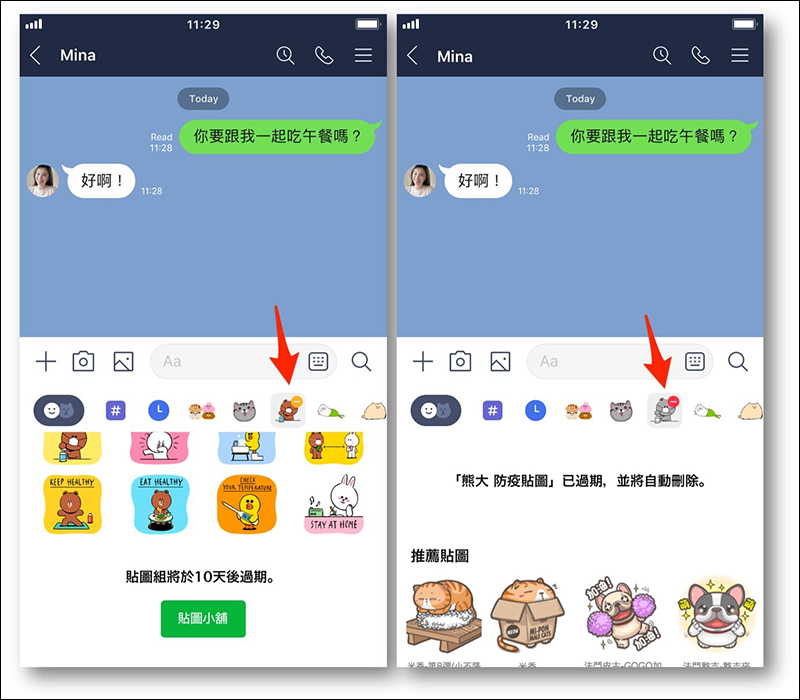
After this update, when there are only 10 days left for the sticker to expire, it will be marked with a “yellow” dot on the sliding menu; if this set of stickers has expired, it will be marked with a “red” dot on the sliding menu; if the sticker has expired for more than 20 days, the system will automatically delete it for you, and users no longer need to delete it manually.
Added recommendations for creators’ works and shortcuts to the sticker shop
I believe everyone has a favorite sticker creator, right? After the update, users only need to open the sticker menu in the chat room and slide to the bottom to click the “^” icon to expand to see other stickers from the same creator!
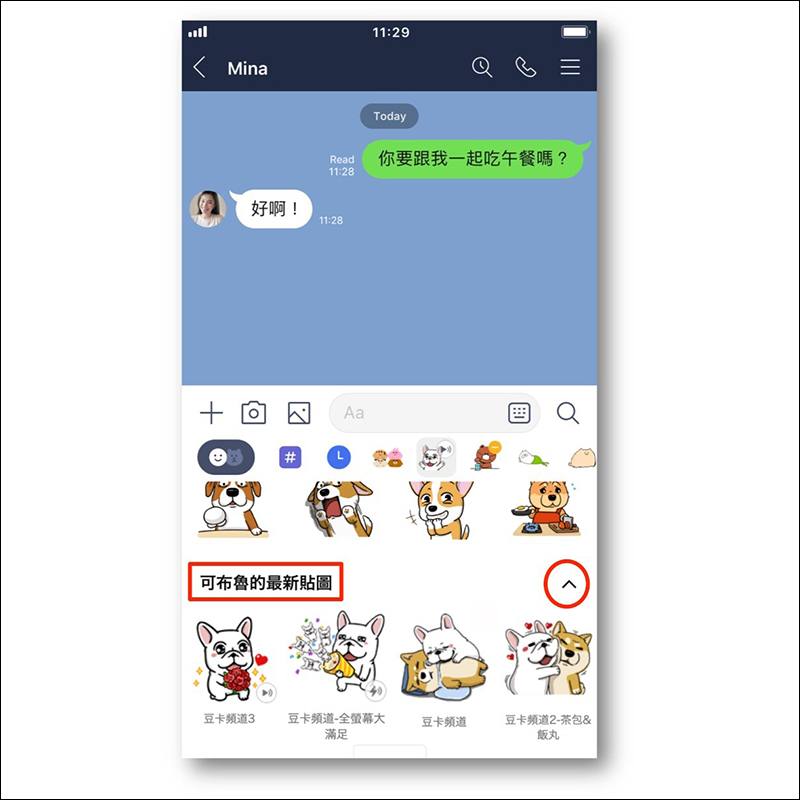
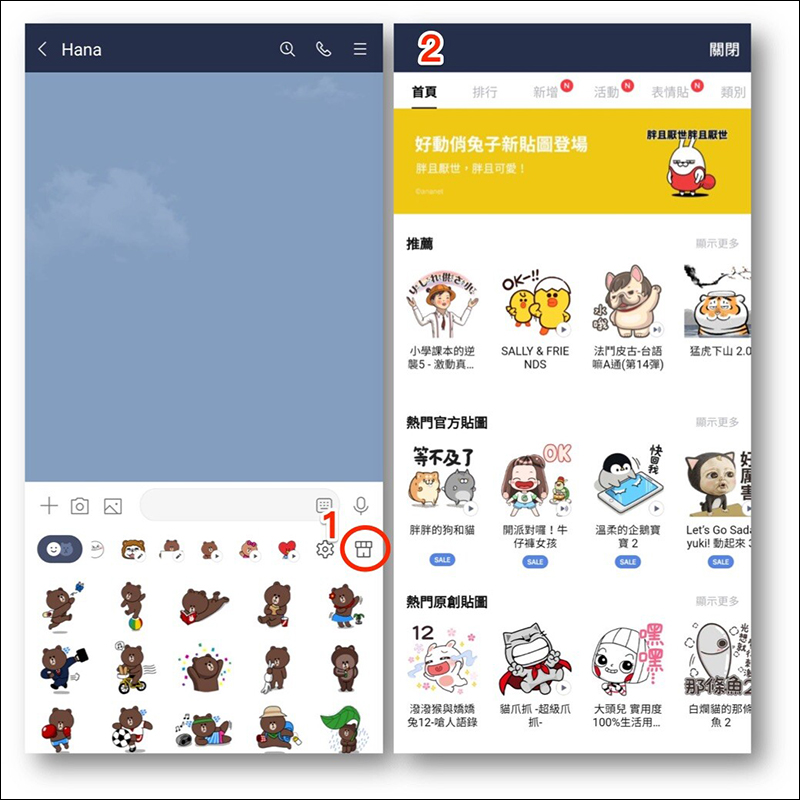
In addition, you don’t need to leave the chat room page after the update. You can directly click on the store icon to go directly to the sticker shop:
Keep: You can save directly from the chat room to the designated special episode
If you are worried that the text, photos, videos, files and other content sent by friends in the chat room will expire, you will not have to worry about expiration if you save it to Keep!
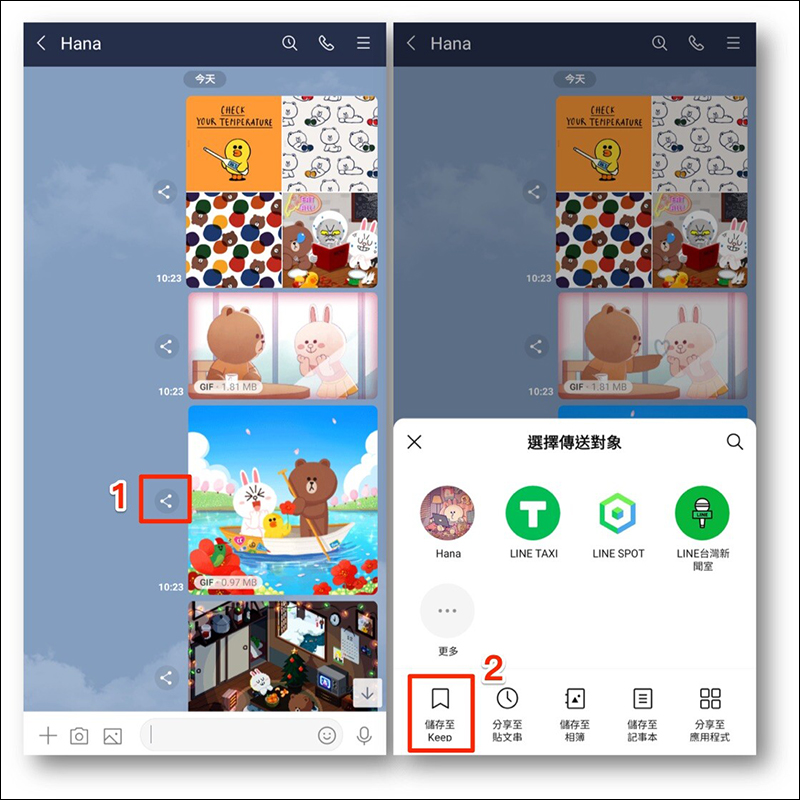
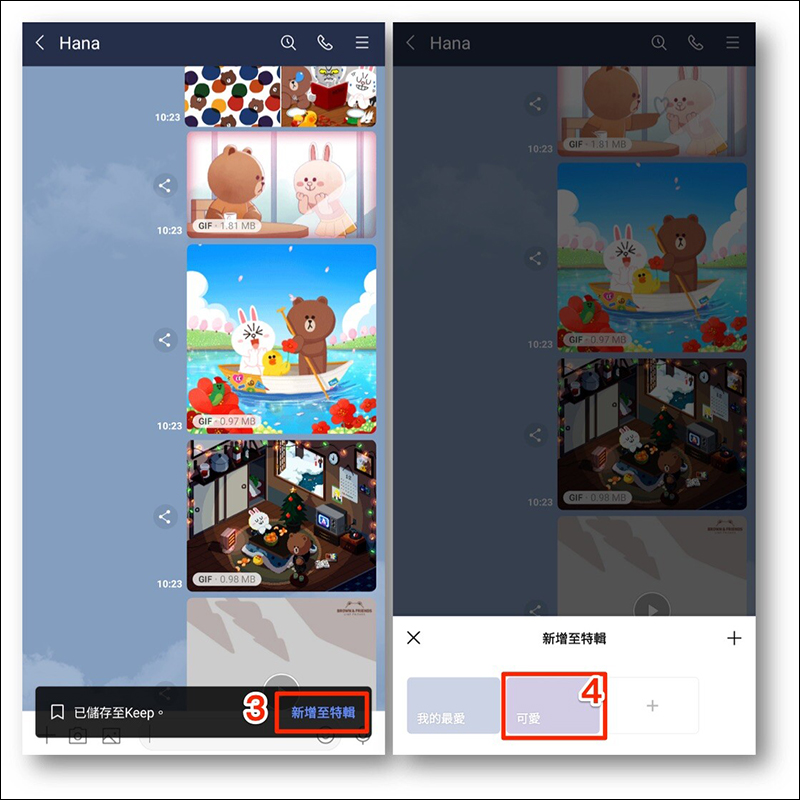
After this version update, when users want to save content to Keep, whether they “long press” a message to save it to Keep, or click the “Share” icon next to the photo/video and choose to save it to Keep, they can directly choose whether they want to put a special episode directly into it, without having to go to Keep to find it and archive it later!
The above updates are all for the dual platforms of Android and iOS. However, in addition to the automatic backup chat history function that has been supported in the iOS version, other functions will be launched first in the Android version starting today (16th), and the iOS version will be launched in the near future.
Picture/Source:LINE Taiwan Official BLOG
Further reading:
LINE Bubble 2
Source: KOCPC Chinese