


Traditional web crawling technology is about to undergo a major revolution, with traditional crawlers facing issues such as being easily blocked, silently losing information, and ignoring image-based tables and formula content. Researchers at UC Berkeley have introduced “PixelRAG,” a RAG (Retrieval-Augmented Generation) system that uses “pixels” rather than “text” as the foundation for retrieval. Instead of parsing HTML, this system takes screenshots of web pages and lets vision models read them directly, outperforming traditional text-based RAG by 18.1% across multiple benchmarks. The paper has been published on arXiv, and the open-source code has been released under the Apache 2.0 license for anyone to use freely.
PixelRAG: Enabling AI to Read Web Pages Visually, Outperforming Text-Only RAG by 18%
Traditional RAG’s blind spot: HTML parsing loses information
Current mainstream RAG systems work by: parsing web page HTML into plain text, splitting it into text chunks, creating a vector index using an embedding model, and then retrieving the most relevant text chunks for the language model to read based on queries. The problem is that the HTML parsing process loses a large amount of visual structure information—tables, charts, formulas, and layout formatting often become unrecognizable when converted to plain text. In fact, simply switching to a different HTML parser can cause RAG accuracy to fluctuate by approximately 10%.
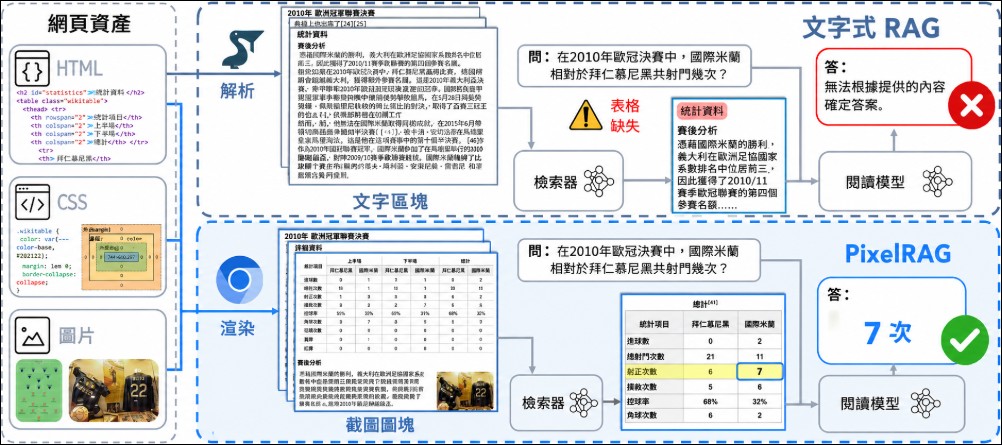
PixelRAG takes a completely different approach: it renders web pages as screenshots, divides the screenshots into image tiles, creates vector indices using a visual embedding model, retrieves the most relevant screenshot tiles directly in pixel space during querying, and then feeds the screenshots to a Vision Language Model (VLM) to read. The entire process skips the HTML parsing step, preserving all the visual information that users actually see on screen.
Technical Architecture: Qwen3-VL-Embedding + FAISS Index
PixelRAG’s core technical workflow consists of four steps: First, use the built-in pixelshot command to render web pages into screenshots and split them into image blocks via Playwright; second, use the Qwen3-VL-Embedding model (fine-tuned with LoRA, trained on web page screenshots) to convert image blocks into vector embeddings; third, store the vectors in a FAISS index; finally, during queries, perform vector retrieval in the FAISS index to find the most relevant screenshot blocks, which are then handed to the VLM for answering. Throughout the entire process, text never appears—information is always conveyed in pixel form from input to output.
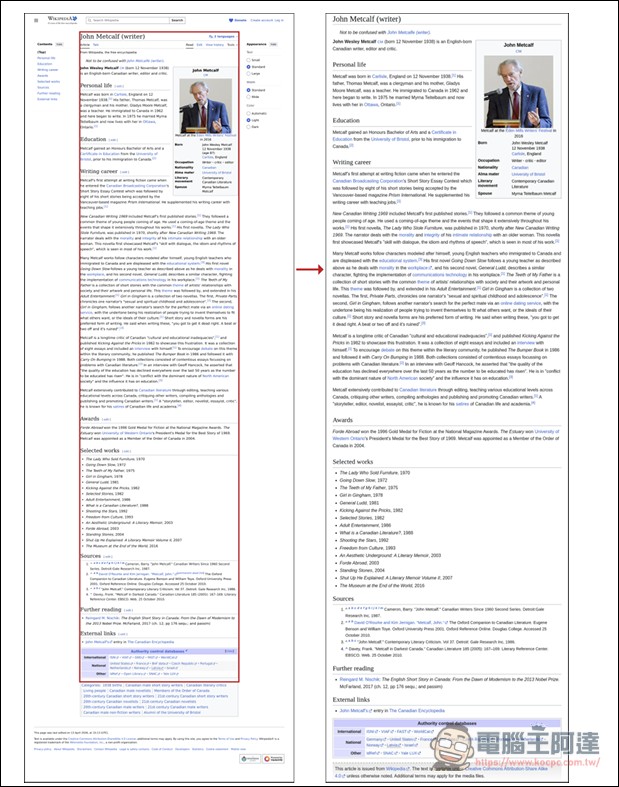
A key design decision is that the index stores pixel images instead of parsed text. This means when upgrading to better visual models in the future, there’s no need to rebuild the index—only the model that reads the screenshots needs to be replaced. This “decoupled index and model” design gives the system long-term viability. The Berkeley team has built a pre-built index containing 30 million Wikipedia screenshots, available for download through Hugging Face.
Benchmark: Outperforms text-based RAG on pure text tasks
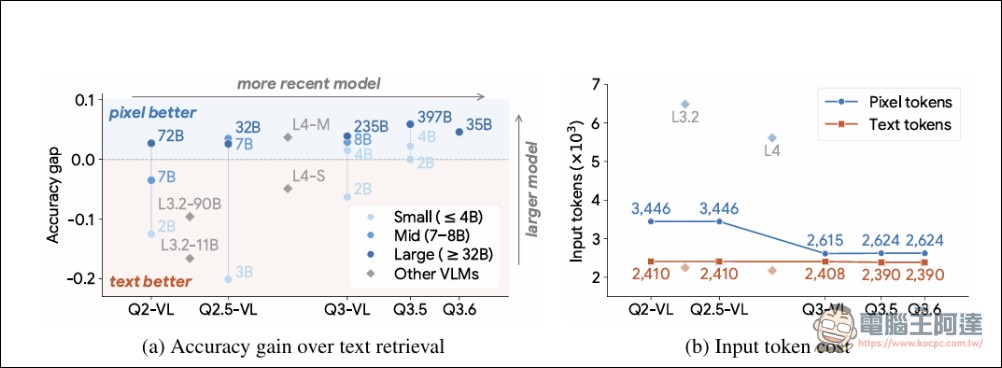
The benchmark results reported in the paper are quite compelling. On pure text QA tasks such as NQ (Natural Questions) and SimpleQA, PixelRAG outperforms text-based RAG baselines, with an improvement of 18.1%. It also demonstrates clear advantages in multimodal open-domain question answering (MMSearch), noisy news corpus (LiveVQA), and agent benchmarks (MoNaCo).
Beating text-based RAG on pure text tasks is inherently meaningful, as it indicates that existing RAG systems lose more information during HTML parsing than previously anticipated. Even when the task only requires answering text-based questions, screenshot-based retrieval still outperforms text-based retrieval.
What may be even more practically significant is that PixelRAG achieves up to 3x token cost reduction through image compression while maintaining accuracy at lower resolutions. This means users can significantly reduce computational costs per query without sacrificing accuracy. For enterprises deploying RAG systems at scale, this represents a direct and measurable cost advantage.
Claude Code Extension: Showing AI What Webpages Look Like
PixelRAG comes with a Claude Code plugin called pixelbrowse that gives Claude “visual browsing” capabilities. Once installed, Claude can take screenshots of any webpage, PDF, arXiv paper, or local application, then read information directly from the screenshots instead of scraping text via the DOM. Users simply give commands like “screenshot https://news.ycombinator.com and summarize the headline news,” and Claude automatically takes a screenshot and reads it.
This feature solves a common pain point: when web pages contain complex tables, charts, or dynamic layouts, traditional text extraction methods often fail to fully restore the content. By using screenshots, what the AI sees is exactly what humans see — whether it’s data in tables, curves in charts, or hierarchical relationships in layouts, nothing is lost during the conversion process.
Install and Use
PixelRAG is released as a Python package and can be installed via pip. The base installation only includes screenshot rendering functionality (pixelshot command); visual embeddings and index construction require additional modules to be installed separately. The system supports Linux (CUDA) and macOS (Apple Silicon / MPS), and can also run on CPU-only machines without a GPU, though it will be slower. Users can also build indexes for specific documents or websites on their own; on Apple M-series chips, it takes about 3 minutes to build an index for a single PDF.
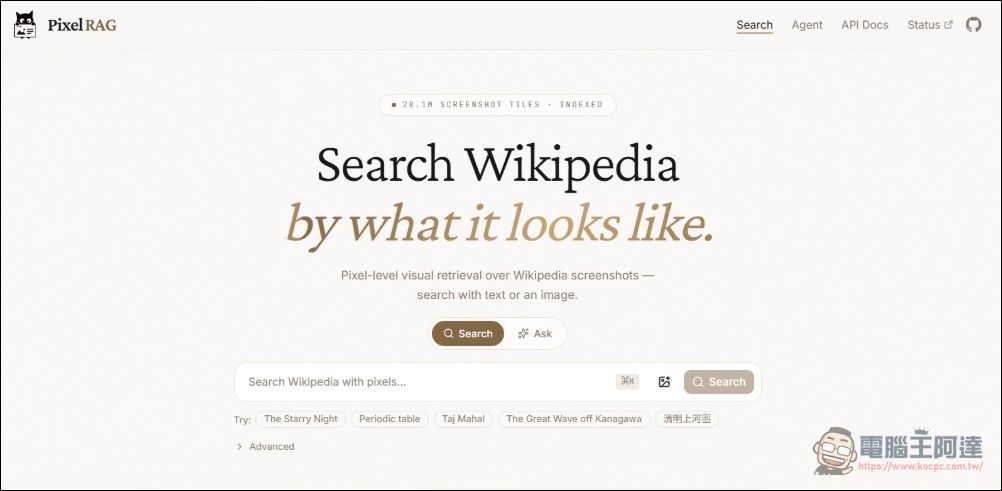
The Berkeley team also provided aOnline API endpointIt features a built-in pre-built index of 8.28 million Wikipedia pages, allowing direct queries without local deployment, and supports visual search that accepts images as query input. This significantly lowers the barrier to entry for developers who want to quickly experience PixelRAG.
The significance to the RAG field
The conclusion of the PixelRAG paper challenges a fundamental assumption in the RAG field: whether textual representations are truly necessary for web retrieval. Experimental results show that screenshot-based retrieval outperforms text-based retrieval on textual question-answering tasks, suggesting that the amount of information lost during HTML parsing in traditional RAG systems may be greater than previously anticipated.
This research comes from Berkeley SkyLab, BAIR, and Berkeley NLP, and the paper has been uploaded to arXivThe code is GitHub It is open source under the Apache 2.0 license, freely available for anyone to use and modify. For developers building RAG systems, PixelRAG offers a new approach worth trying: letting the model see the original appearance of webpages is more effective than spending time optimizing HTML parsers.
Source: KOCPC Chinese