• About Us
King of Computer Media
  • Home
  • Tech News
  • AI News
  • Apps & Tutorials
  • Mobile & Telecom
  • Lifestyle
  • About Us
No Result
View All Result
  • Home
  • Tech News
  • AI News
  • Apps & Tutorials
  • Mobile & Telecom
  • Lifestyle
  • About Us
No Result
View All Result
King of Computer Media
No Result
View All Result

Home - Cross-platform App - More organized, Chrome will support group paging and naming

More organized, Chrome will support group paging and naming

ROSS by ROSS
May 14, 2020 - Updated on August 4, 2026
in Cross-platform App

I always like to arrange all the applications around me and on my computer/mobile phone in an orderly manner – although it may not necessarily increase the efficiency by many %, but it looks great? It seems that you will be more and more fond of using the Chrome browser in the future, because they have announced that they will add an awesome feature of grouping and naming tabs for people who always open a lot of tabs (like me). Continue reading Be more organized, Chrome will support group paging and naming functions Be more organized, Chrome will support group paging and naming functions Report content.
Chrome 將支援群組分頁與命名功能
▲Image source: Google

More organized, Chrome will support group paging and naming

Often when I look up information, the Chrome browser’s tabs are full and it looks like a complete mess – just finding the tabs is dizzying, so how can I talk about work efficiency? Fortunately, Google has finally thought of a good way to bring the concept of label classification, which is often used in folders in real life, into the paging function of the Chrome browser. The key point is that not only can labels be added to name categories, but also colors can be used to distinguish various blocks.

▲Image source: Google

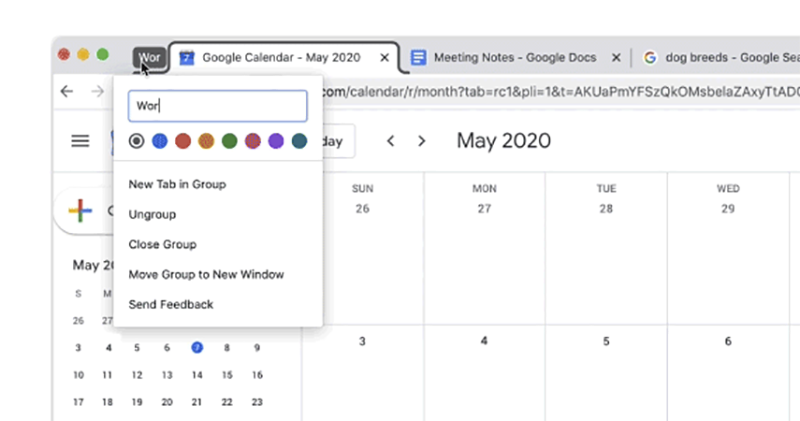
According to information announced by Google on its official blog today, this tab grouping feature, which will be “slowly” brought to more Chrome users through updates, is actually easier to use than imagined. Just right-click on the open paging tab and you will see the option to add a new group. After clicking, a group box will be added in front of the paging (it looks a bit like a fixed paging symbol).

▲Image source: Google

Click on this grouping label to see more options for grouping functions, including naming (you can use emoticons <3), quick setting of group color, and you can also choose to add a new page to this group, cancel the group, close the group, or directly pull all the pages in the group into a new window (this is very practical!).

Pictures/sources cited in this article

Further reading:
Facebook iPad version finally adds split window multitasking function, this article teaches you how to use it

Write a new page in history! Hongjiateng enters the electric vehicle sales rankings over the years, aiming for third place in Gwangyang

Source: KOCPC Chinese

Tags: BrowserChromeClassificationGooglegroupPagination

Recent Posts

  • The Xiaomi Pad 8S Pro has passed network access certification and will debut with the self-developed XRING O3 chip.
  • The entire Google Pixel 11 lineup has been leaked! Official promotional renders of the Pixel 11 Pro XL have also surfaced
  • Are Chinese phone battery capacities falsely labeled? A brief look at the “capacity locking” phenomenon in Chinese silicon-carbon batteries.
  • NCC is leaderless, recklessly sending out national-level alert messages!?
  • What does “QR” in QR Code mean?

Recent Comments

No comments to show.
  • About Us

We welcome partnership inquiries and product review opportunities from smartphone manufacturers, iPhone accessory brands, and app developers.koc kocpc.com.tw|Privacy Policy |Hosting & Maintenance: Fast Line Taiwan, A-Chang Digital Technology

No Result
View All Result
  • Home
  • Tech News
  • AI News
  • Apps & Tutorials
  • Mobile & Telecom
  • Lifestyle
  • About Us

We welcome partnership inquiries and product review opportunities from smartphone manufacturers, iPhone accessory brands, and app developers.koc kocpc.com.tw|Privacy Policy |Hosting & Maintenance: Fast Line Taiwan, A-Chang Digital Technology