


This “Daily Accounting” free app can be said to be the most complete option among free iOS accounting apps, without any restrictions and with few ads. In addition to basic accounting functions, it can also create multiple accounts. For example, you can create accounts dedicated to yourself, travel, or children.
What I think is best is that it also provides a pie analysis chart, which allows you to understand the distribution of expenditures this month at a glance. You can also set fixed income and expenses, fixed transfers, and budget preparation. Basically, it has almost everything you need.
If you are looking for an accounting app, I highly recommend giving it a try.

Introduction to Tiantian Accounting Free App
Tiantian Accounting App does not have a too fancy interface design, and mainly uses simple color schemes. However, since there are a lot of functions, it will take some time to get familiar with it at first.
It also provides in-app purchases, but only to remove ads. The free version can use full functions.
Create multiple ledgers
The app has a built-in default ledger, but you can add others. For example, in addition to the most basic personal ledger, if you plan to travel, you can create a special ledger to record, such as a Japanese travel ledger, so you don’t have to worry about it being mixed with your original consumption expenditures, making it difficult to view or analyze the travel expenses.
There is no limit to the number of ledgers, you can have as many as you want.

Create multiple accounts
Like other accounting apps, this one can also create multiple accounts, one for cash, bank, and credit card is preset, and the initial value and name can be changed:
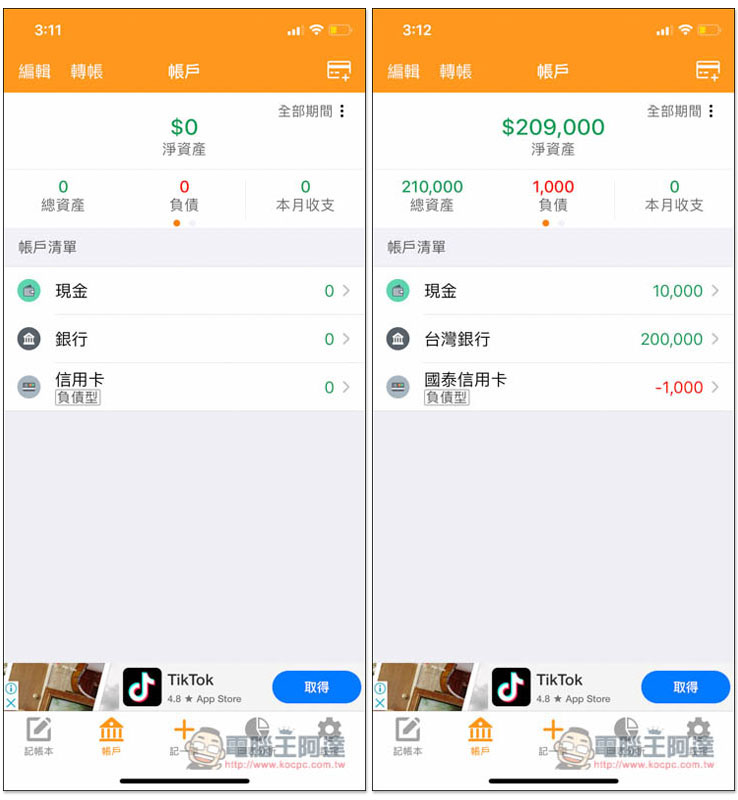
There are also many account types available, including electronic currency, investment and financial management, lending, and borrowing. Even if you can’t find any suitable ones, you can create them yourself (others):

Provide transfer function
The transfer function is also the most basic and important in accounting apps, and this one is certainly not lacking. All accounts can be transferred to each other, and handling fees can be set. This amount will also be automatically included in your expenses:

Record expenses
There is a + function below the app, click on it to start setting up spend. Just fill in the amount and select the project and account. There are not too many complicated options, which is good. If you have receipts or invoices, you can also take photos and record them together:

It also provides member functions, which can specify who spends this money:

The project section has several commonly used categories built in, and you can also create your own:

View Spend Analysis Pie Chart
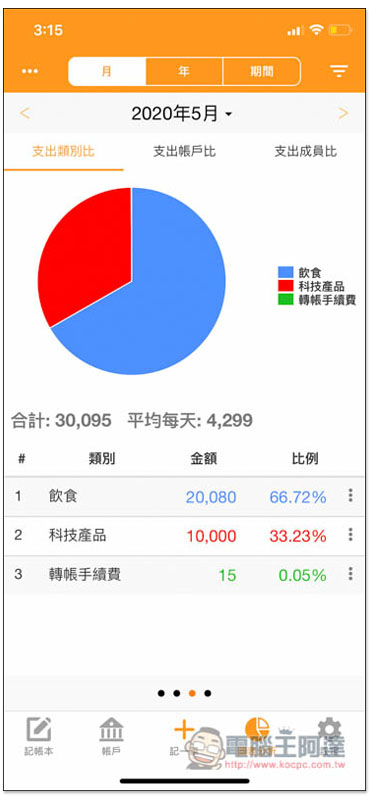
Record analysis can be said to be the most indispensable part of accounting. It allows us to quickly check the recent expenditure status at any time. Is there any consumption that is too high and needs to be reduced?
The analysis pie chart of this app is very good. Each category has a unique color and the percentage is automatically calculated. At a glance, you can quickly know which categories are particularly expensive this month, this year, or during a specified period, and then find the problem:
Set fixed income and expenses, transfer funds, or prepare a budget
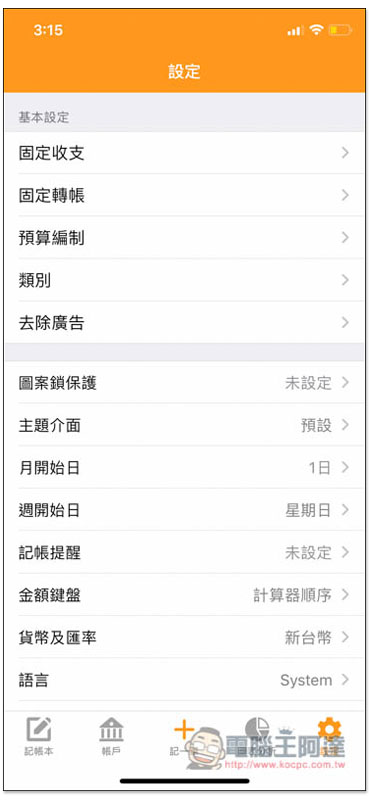
For those who have a fixed salary every month, or who have certain expenses that require fixed transfers every month (such as student loans, rent, credit, etc.), these can be added directly in the settings, so that they no longer need to enter manually in the future, making accounting simpler and easier:
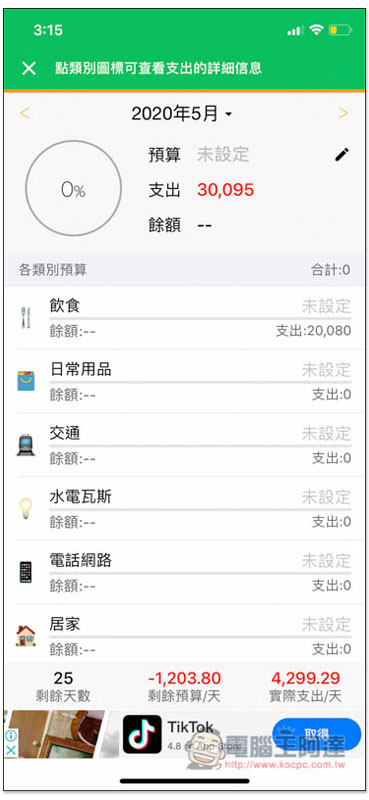
For those who want to manage monthly expenses more disciplinedly, it is highly recommended to prepare a budget. It will quickly help you calculate how much you have left to spend. This function is also very useful when traveling and can effectively avoid spending more than the budget:
Currently, this app is only available for iOS. If we find other good Android accounting apps, we will also see you soon.
Supplementary information
- App name: Accounting every day
- App Store download page:Click here to go
- Supported system: iOS
微軟知名賽車遊戲 Forza Street 正式登陸 iOS 和 Android,限時免費解鎖 2017 Ford GT
Source: KOCPC Chinese