


As a magic tool for modern people to protect their account security, Google Authenticator / Google Identity Verifier is a good tool for two-stage authentication. Although it is quite responsible, it basically does all the functions it should do – in fact, displaying the authentication code (XD). Obviously, it does not have high requirements for other functions. However, there has always been a troublesome problem, that is, as more and more services support two-stage authentication, it is very inconvenient to change phones every time. However, it is said that in the latest update, this problem has been solved (spread). Continue reading Finally! Google Authenticator will support mobile phone use by scanning QR codes. Report content.

▲Image source: Google
finally! Google Authenticator will support mobile phone use by scanning QR codes
After all, it is a tool for two-stage authentication as the second line of login defense for personal information security. Google Authenticator, basically one of the important steps that many people absolutely need to prioritize when changing their mobile phones. However, compared to Android and iOS, the migration operation of the entire system is becoming easier and easier to use. In the past, Google Authenticator still had to open a service, scan the code and enter the authentication code before it could be added to a new phone, which was really not convenient.
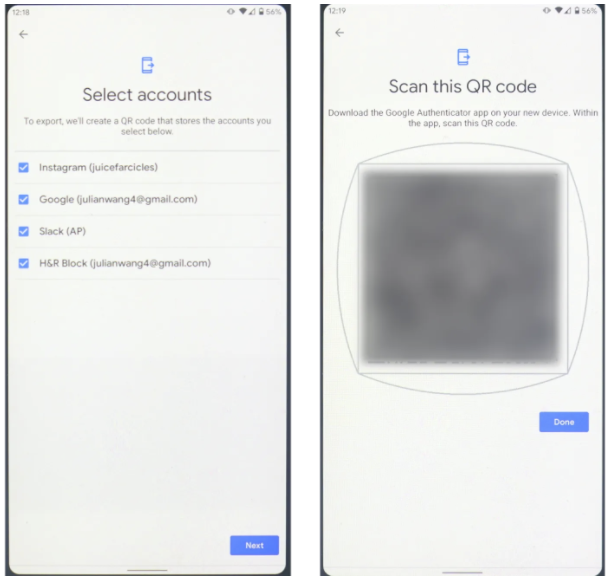
▲Image source: Android Police
I have to say that if you only have one or two accounts that use two-stage authentication, it’s fine, but if it includes services such as Dropbox, Gmail, Facebook / Instagram, etc., it will really add a little doubt to your life. Fortunately, it is reported that in the latest v5.1 version, Google will begin to introduce the output/import function of quick device swap in the Android version. The best thing is that this export function only requires a simple check of the account, and it can be directly transferred to another mobile phone through QR Code, which is extremely convenient!
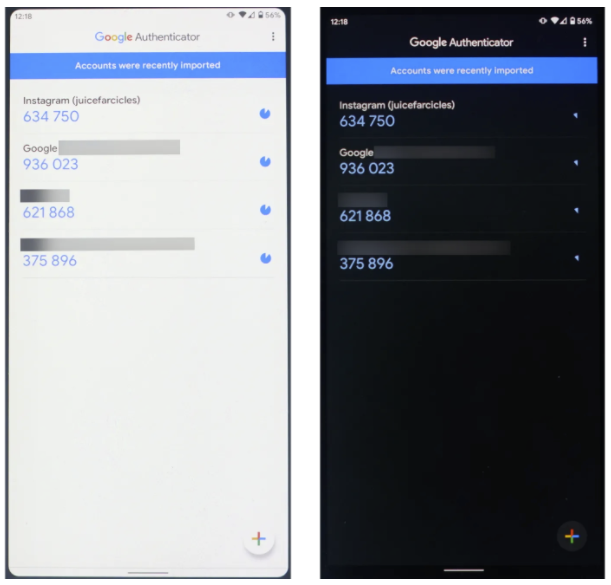
▲Image source: Android Police
In addition, although it was mentioned at the beginning of this article that it did not pay much attention to other functions, Google took the opportunity to improve the appearance. While importing Material Design 2.0, it also provided a dark mode theme. This update is said to be slowly being released in batches (Android Police provides APK files, you can refer to it). Unfortunately, there is no relevant news about the iOS version yet (but it should be updated).
Pictures/sources cited in this article
Further reading:
NFC Learn new skills: wireless charging (correct)
Source: KOCPC Chinese