


When you see that familiar blue Windows 11 update screen on your display with the message “This may take a few minutes, please don’t turn off your PC,” you know the system is installing the latest update. For long-time Windows users, updates have long been a part of daily life. Especially given the rapidly evolving threat landscape and the use of artificial intelligence to exploit software vulnerabilities, updates are more important than ever. Software must deploy patches more frequently, and Microsoft has recently published a brief guide that clearly distinguishes between the different types of updates in Windows 11.
Microsoft tells you the types of Windows updates
The most core update type is the monthly “Patch Tuesday,” released on the second Tuesday of each month. The KB5094126 pushed to Windows 11 users on June 9 is an example. Patch Tuesday includes both security and non-security updates and uses a cumulative design—meaning installing the latest version brings all patches from previous versions. For IT administrators, these updates can be deployed across organizations using tools like Autopatch, Intune, and Windows Server Update Services (WSUS). If only a quick security fix is needed, hot patching can be used to complete it without restarting the device. Patch Tuesday versions are sometimes called “B” versions, quality updates, security updates, monthly cumulative updates, or latest cumulative updates (LCU).

In addition to the regular monthly updates, Microsoft also provides “Optional non-security preview updates.” These updates are typically released in the fourth week of each month and serve as a “dress rehearsal” for the next Patch Tuesday. They allow IT administrators to test upcoming releases in advance, ensuring validation is complete before wider deployment the following month. Regular users who want to install them manually can find them under Settings >> Windows Update >> Advanced options >> Optional updates. In the past, these types of updates were commonly referred to as “C” or “D” releases, but Microsoft now prefers the term “Optional non-security preview updates.”
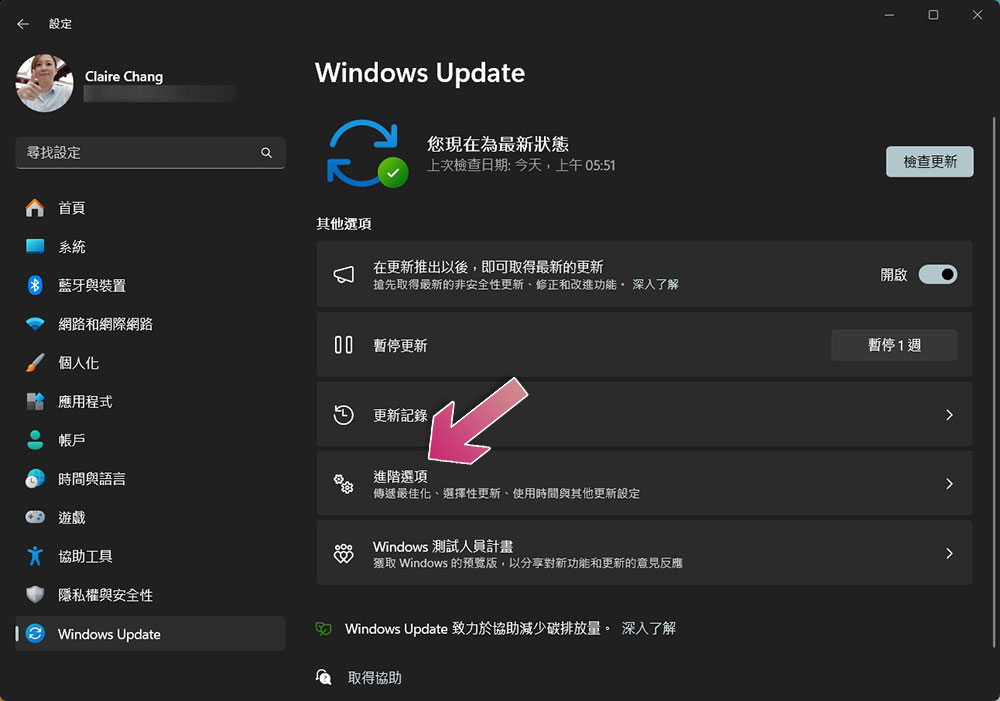
The third type is “Out-of-band” (OOB) updates. These updates have no fixed schedule and are typically released when urgent fixes are needed for major issues or security risks. OOB updates are also cumulative, with some being strongly recommended patches and others being optional. Enterprise customers can still use their existing update management tools to deploy these updates.

Beyond these three main update types, Microsoft also delivers new Windows 11 features through annual updates, monthly updates, and the Microsoft Store. These features are rolled out in phases using Controlled Feature Rollout (CFR), ensuring updates are gradually enabled across different devices. For enterprise customers, features managed through CFR are typically disabled by default, giving IT departments more precise control over when features are enabled.
No matter the type of update, Microsoft’s core message remains consistent: keeping systems updated is key to maintaining security. The company encourages IT administrators to ensure devices within their organizations stay current, and encourages general users to join the Windows Insider Program (WIP) to experience the latest Windows 11 features early. For modern Windows users, updates are no longer just routine—they’re an integral part of overall security strategy.
Source: KOCPC Chinese