


Late today, Apple quietly pushed software version updates including iOS 13.4, iPadOS 13.4 and watchOS 6.2. Let’s take a look at what updates are included! In addition to adding iCloud Drive file sharing to iOS and iPadOS, in response to the recent launch of iPad Pro, the new cursor function in iPadOS has also been officially launched, allowing users to operate the cursor on iPad through a Bluetooth mouse or smart trackpad (trackpad).
iOS 13.4, iPadOS 13.4, watchOS 6.2 software updates officially released
iOS 13.4
iOS 13.4 introduces new Memoji stickers and “iCloud Drive” folder sharing in the “Files” app. This update project also contains bugfixes and improvements.
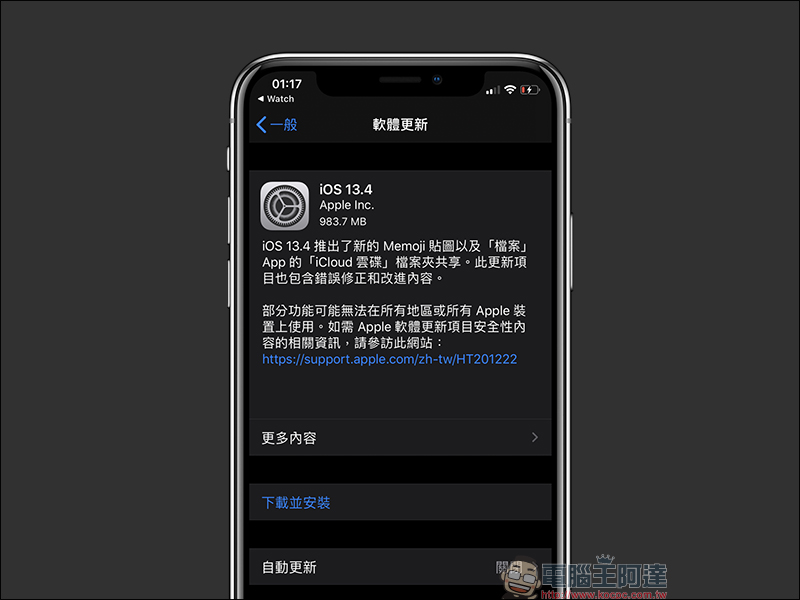
The complete update content of iOS 13.4 is as follows:
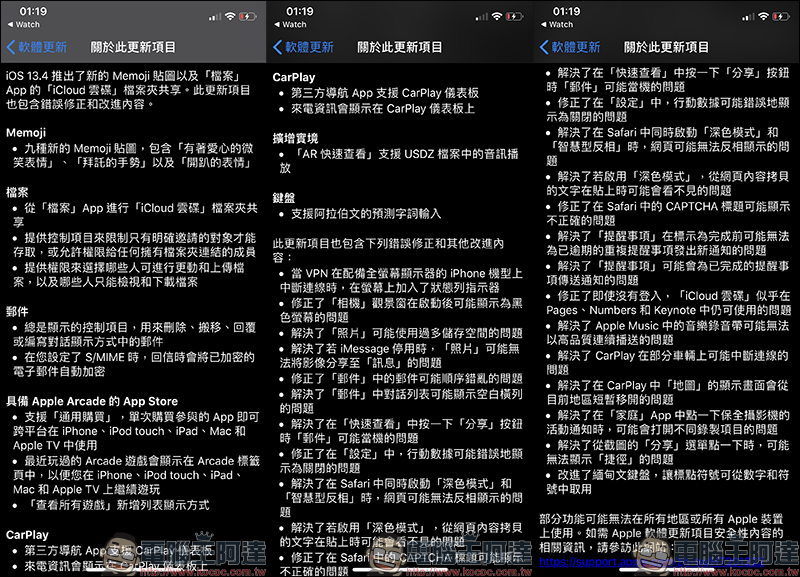
Memoji
iOS 13.4 adds 9 new Memoji stickers, including new emoticons such as “Smiling Emoticon with Love”, “Please Gesture” and “Party Emoticon”: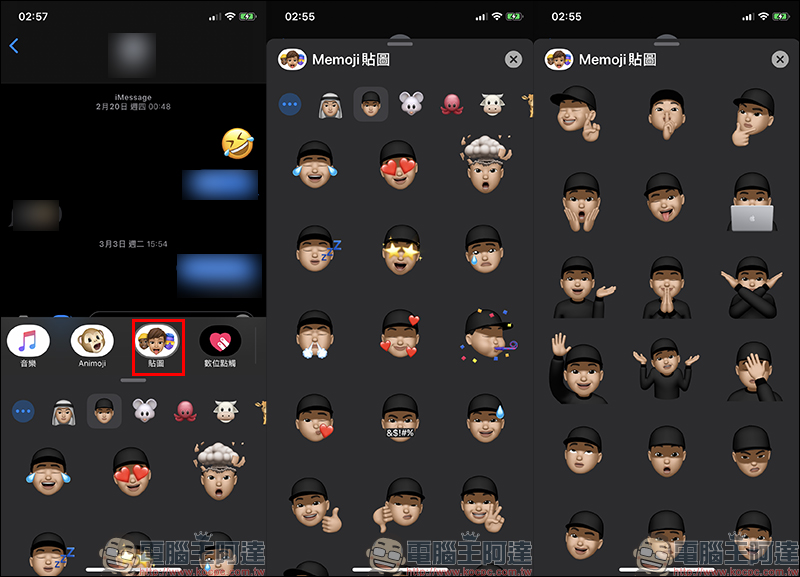
file
Supports “iCloud Drive” folder sharing from the “Files” App. Users can choose the folders or files they want to share with others.
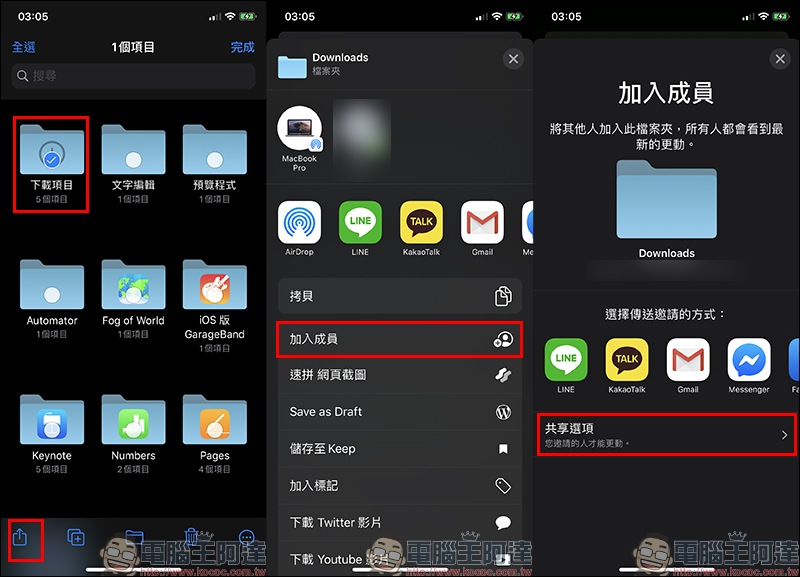
Additionally, controls are provided to restrict access to only those explicitly invited, or to allow access to any member with a link to the folder. You can configure your own permissions to choose who can make changes and upload files, and who can only view and download files.
If you stop sharing, others will lose access to the folder or its items, and the folder will be removed from iCloud Drive on all their devices.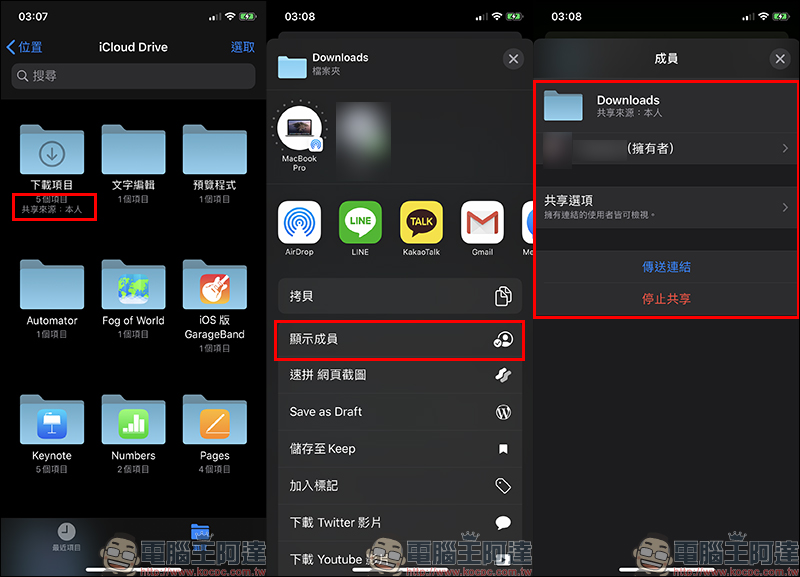
- Always displayed controls for deleting, moving, replying to, or composing messages in conversation display mode
- When you set up S/MIME, encrypted emails are automatically encrypted when you reply
App Store with Apple Arcade
- Supports “Universal Purchase”, a single purchase of participating apps can be used across platforms on iPhone, iPod touch, iPad, Mac and Apple TV
- Recently played Arcade games appear in the Arcade tab so you can continue playing on iPhone, iPod touch, iPad, Mac and Apple TV
- “View all games” adds a list display method
CarPlay
- Third-party navigation apps support CarPlay dashboard
- Incoming call information is displayed on the CarPlay dashboard
augmented reality
- “AR Quick View” supports audio playback in USDZ files
keyboard
- Supports Arabic predictive word input
This update also contains the following bugfixes and other improvements:
- Added a status bar indicator to the screen when the VPN disconnects on iPhone models with full-screen displays
- Fixed an issue where the “Camera” viewport may display as a black screen after startup
- Resolved an issue where Photos might use too much storage space
- Addresses an issue where Photos may not be able to share images to Messages if iMessage is disabled
- Fixed an issue where emails in Mail may be out of order
- Fixed an issue where the conversation list in Mail might display blank columns
- Addresses an issue where Mail could crash when clicking the Share button in Quick View
- Fixed an issue where mobile data could incorrectly appear to be off in Settings
- Solved the problem that when “Dark Mode” and “Smart Invert” are enabled at the same time in Safari, web pages may not be displayed in reverse.
- Resolved an issue where text copied from web content may not be visible when pasted if “Dark Mode” is enabled
- Fixed an issue where CAPTCHA titles might display incorrectly in Safari
- Addresses an issue where Reminders might not be able to send new notifications for overdue recurring reminders until they are marked complete
- Addresses an issue where Reminders might send notifications for completed reminders
- Fixed an issue where iCloud Drive seemed to be available in Pages, Numbers and Keynote even when not logged in
- Addresses an issue where music tapes in Apple Music may not play continuously at high quality
- Resolved an issue where CarPlay could disconnect on some vehicles
- Fixed an issue where the “Map” display screen in CarPlay would briefly move away from the current area.
- Fixed an issue where different recording projects might be opened when clicking on the security camera activity notification in the Home app
- Fixed an issue where the “Shortcut” may not be displayed when clicking from the “Share” menu in a screenshot
- Improved Burmese keyboard so punctuation can be taken from numbers and symbols
iPadOS 13.4
iPadOS 13.4 introduces mouse and trackpad support for iPad, providing better accuracy and the ability to use “multi-touch” gestures to navigate the system, and adds “iCloud Drive” folder sharing in the Files app and new Memoji stickers. This update project also contains bugfixes and improvements.
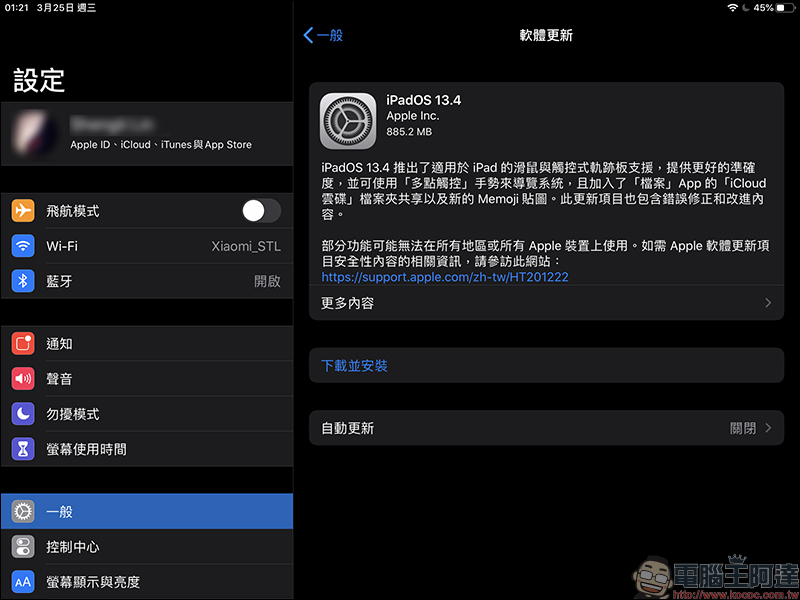
The complete update content of iPadOS 13.4 is as follows:
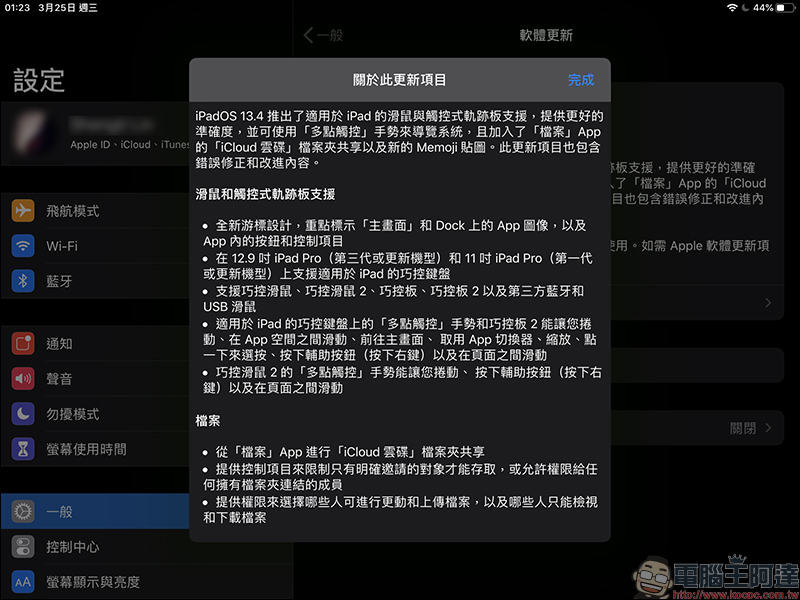
*Tips: Since many updates in iPadOS 13.4 are the same as iOS 13.4, updates unique to iPadOS have been added to facilitate readers’ browsing.blue identification。
Mouse and trackpad support
A new cursor design that highlights app images on the Home screen and Dock, as well as buttons and controls within the app:
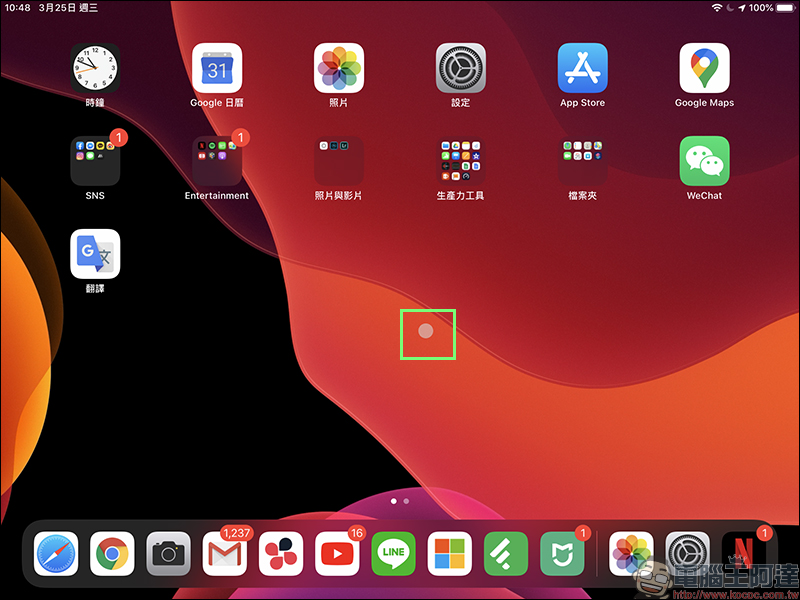
- Smart Keyboard for iPad supported on 12.9-inch iPad Pro (3rd generation or later) and 11-inch iPad Pro (1st generation or later)
- Supports Smart Mouse, Smart Mouse 2, Smart Control Pad, Smart Control Pad 2 and third-party Bluetooth and USB mice
- Multi-touch gestures on Smart Keyboard and Smart Trackpad 2 for iPad let you scroll, swipe between app spaces, go to the Home screen, and access app switching
- browser, zoom, click to select, press the secondary button (right-click), and swipe between pages
- Control Mouse 2’s Multi-Touch gestures let you scroll, press the secondary button (right-click), and swipe between pages
file
- “iCloud Drive” folder sharing from the “Files” app
- Provide controls to restrict access to only those explicitly invited, or allow access to anyone with a link to the folder
- Provide permissions to choose who can make changes and upload files, and who can only view and download files
Memoji
- Nine new Memoji stickers, including “Smiling with Love”, “Please Gesture” and “Party Emoji”
- Always show controls in the mail conversation list for deleting, moving, flagging, or replying to mail
- When you set up S/MIME, encrypted emails are automatically encrypted when you reply
App Store with Apple Arcade
- Supports “Universal Purchase”, a single purchase of participating apps can be used across platforms on iPhone, iPod touch, iPad, Mac and Apple TV
- Recently played Arcade games appear in the Arcade tab so you can continue playing on iPhone, iPod touch, iPad, Mac and Apple TV
- “View all games” adds a list display method
augmented reality
- “AR Quick View” supports audio playback in USDZ files
keyboard
- Auto Character Selection for Zhuyin automatically converts Zhuyin into the correct characters, eliminating the need to press the space bar to convert text or select candidate characters.
- AutoSelect for Japanese automatically converts Hiragana to the correct characters, eliminating the need to press the space bar to convert text or select candidates.
- Swiss German keyboard layout support for 12.9-inch iPad Pro
- The 12.9-inch iPad Pro’s on-screen keyboard layout now matches the Smart Keyboard
- Supports Arabic predictive word input
This update also contains the following bugfixes and other improvements:
- Fixed an issue where the “Camera” viewport may display as a black screen after startup
- Resolved an issue where Photos could use too much storage space
- Addresses an issue where Photos may not be able to share images to Messages if iMessage is disabled
- Fixed an issue where emails in Mail may be out of order
- Fixed an issue where the conversation list in Mail might display blank columns
- Addresses an issue where Mail could crash when clicking the Share button in Quick View
- Fixed an issue where mobile data could incorrectly appear to be off in Settings
- Solved the problem that when “Dark Mode” and “Smart Invert” are enabled at the same time in Safari, web pages may not be displayed in reverse.
- Solved the problem that if “Dark Mode” is enabled, text copied from web content in third-party apps may not be visible when pasted.
- Fixed an issue where CAPTCHA titles might display incorrectly in Safari
- Addresses an issue where Reminders might not be able to send new notifications for overdue recurring reminders until they are marked complete
- Addresses an issue where Reminders might send notifications for completed reminders
- Fixed an issue where iCloud Drive seemed to be available in Pages, Numbers and Keynote even when not logged in
- Addresses an issue where music tapes in Apple Music may not play continuously at high quality
- Fixed an issue where different recording projects might be opened when clicking on the security camera activity notification in the Home app
- Fixed an issue where the “Shortcut” may not be displayed when clicking from the “Share” menu in a screenshot
- Improved Burmese keyboard so punctuation can be taken from numbers and symbols
watchOS 6.2
Compared with iOS 13.4 and iPadOS 13.4, the updates in watchOS 6.2 are relatively small. This time only a small number of new features, improvements and bug fixes have been launched. To perform a watchOS software update, you must first make sure that the Apple Watch to be updated is connected to the charger and within the communication range of an iPhone connected to Wi-Fi.
Then open the Watch App from iPhone and select “General” > “Software Update”. If iOS has not been updated to iOS 13.4, you must complete the iOS 13.4 software update before performing the watchOS 6.2 software update.
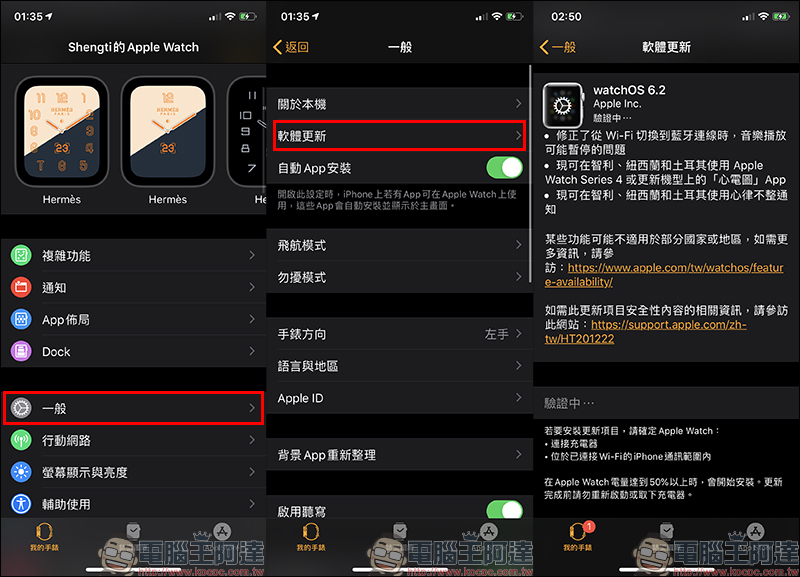
The complete update content of watchOS 6.2 is as follows:
Added in-app purchases for Apple Watch App
Many apps offer in-app purchases, such as subscriptions, in-game currency, or full functionality. In-App Purchases are additional content or subscriptions that users can purchase within an app on iPhone, iPad, iPod touch, or Mac. After the watchOS 6.2 software update, it can also be executed on Apple Watch.
However, not all apps offer in-app purchases. If an app offers in-app purchases, the words “In-App Purchases Available” or “In-App Purchases Available” will appear in the App Store near the Price, Buy, or Get buttons on the App page.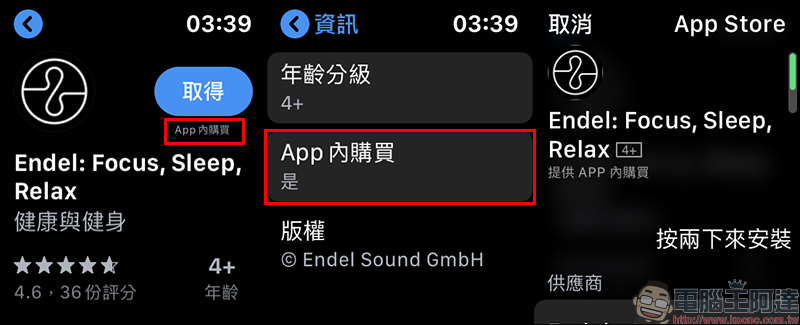
- Fixed an issue where music playback may pause when switching from Wi-Fi to Bluetooth connection
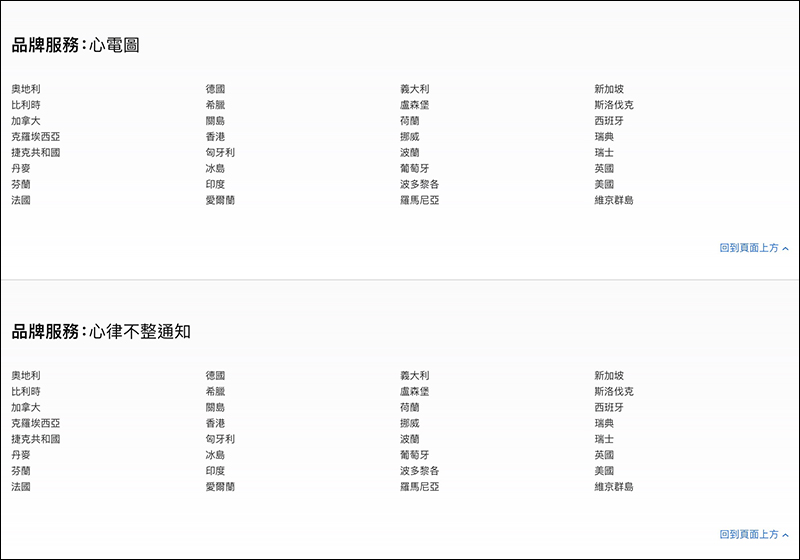
- EKG App, supports more countries:Chile, New Zealand, and Türkiye (*with Apple Watch Series 4 or later)
- Arrhythmia notification function supports more countries:Chile, New Zealand and Türkiye
*Tips: Some features may not be available in some countries or regions. For details, please refer to Apple’s official website.
https://www.apple.com/tw/watchos/feature-availability/
Further reading:
iOS application tips: Safari paging automatically closes schedule setting tutorial
Source: KOCPC Chinese