


Anyone who has used Time Machine backup should know that if a lot of files are added or modified that week, the backup speed will definitely become very slow, let alone the first backup. A file of several hundred GB will never run out in five or six hours. The good news is that some foreign users have discovered that Apple actually limits the performance of Time Machine by default to balance the overall system speed, thereby improving the user experience and extending battery life (if you are using a MacBook). As long as you enter the specified command in Terminal, you can lift this restriction and speed up the backup speed of Time Machine.

How to speed up Time Machine backup on Mac
This acceleration method was discovered by a foreign Reddit user (villiansv). He mentioned that due to the nature of the Mac system, Time Machine backup will run at the lowest priority level to avoid interfering with the user’s normal use.
In order to solve this limitation, enter a specific command in the Terminal to allow Time Machine to obtain more CPU usage rights. In addition, there is no need to restart the computer after this command is enabled, it will take effect immediately.
- Speed up Time Machine backup command: sudo sysctl debug.lowpri_throttle_enabled=0
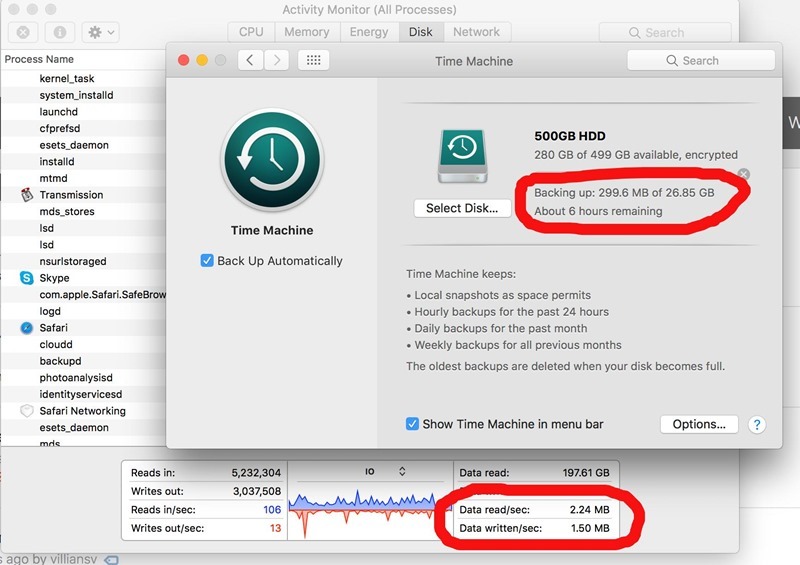
The picture below is a screenshot of him without enabling the acceleration command. It takes nearly 6 hours to read 26.85GB, reading 2.24MB/s, and writing only 1.5MB/s:
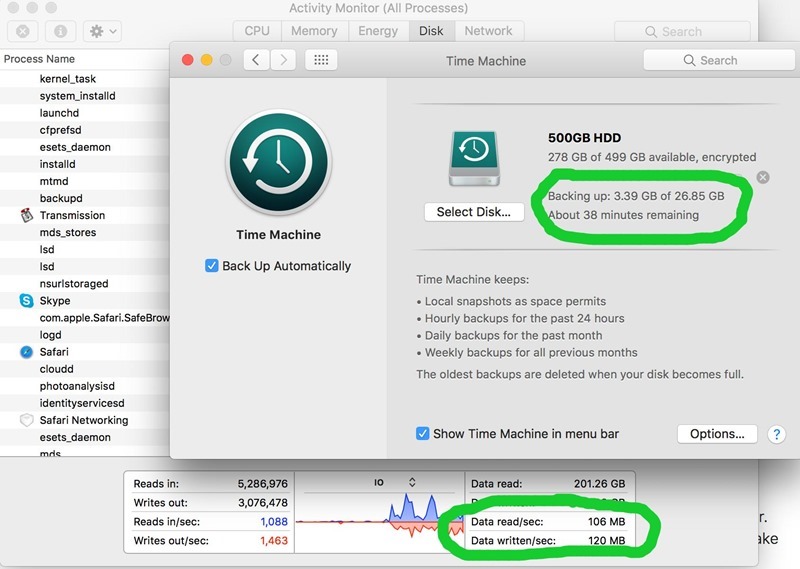
There are a lot of improvements after enabling it, and it can be completed within 1 hour. You can also see below that the speed per second has increased a lot, reading has increased to 106MB/s, and writing has also increased to 120MB/s:
However, please note that after the backup is completed, remember to restore this setting, otherwise your Mac may be slowed down in the future.
Restore Time Machine backup command: sudo sysctl debug.lowpri_throttle_enabled=1
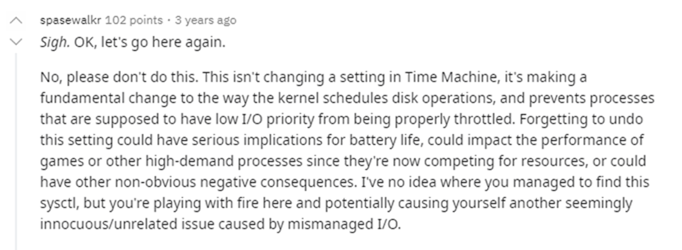
This Reddit thread, also mentioned by a spasewalkr
This command will change the processor’s scheduling of hard disk operations, blocking the original low I/O priority process limit, so if you forget to restore this setting, it is likely to seriously affect battery life, games or other applications that are competing for resources.
Therefore, this command is best used when you plan to enable Time Machine backup and will not perform other operations, that is, leave the Mac there and let it run by itself.
If you plan to do other work, it is recommended to keep the default.
Source: KOCPC Chinese